
Payspan Login: Payment Portal, Free EFT and Card Fees
By George Ruan • October 9, 2026
For Payspan provider login, open the official Payspan payment login and sign in with your authorized Payspan username and password. Last updated: October 9, 2026. For a missing code or forgotten account details, use our login and registration-code help.
Sections
- Direct links: Payspan login, registration and recovery
- TL;DR: use your own login, and give your biller their own
- Who needs their own Payspan login
- Before you create access
- What is Payspan today?
- Payspan fees: free EFT, virtual cards and optional services
- Account setup steps
- Existing Payspan account: add the payer and choose EFT
- Add your biller/delegate
- Login errors & lockouts
- If virtual-card or service fees were already taken
- Verified payer routes as of October 9, 2026
- Payers that should not be treated as current Payspan enrollment guides
- Keep the handoff specific
- Frequently Asked Questions
Direct links: Payspan login, registration and recovery
Provider Support: 877-331-7154 / providersupport@payspanhealth.com. Official help
The Payspan sign-in page asks for your username first. Existing users choose Next; new users choose Register.
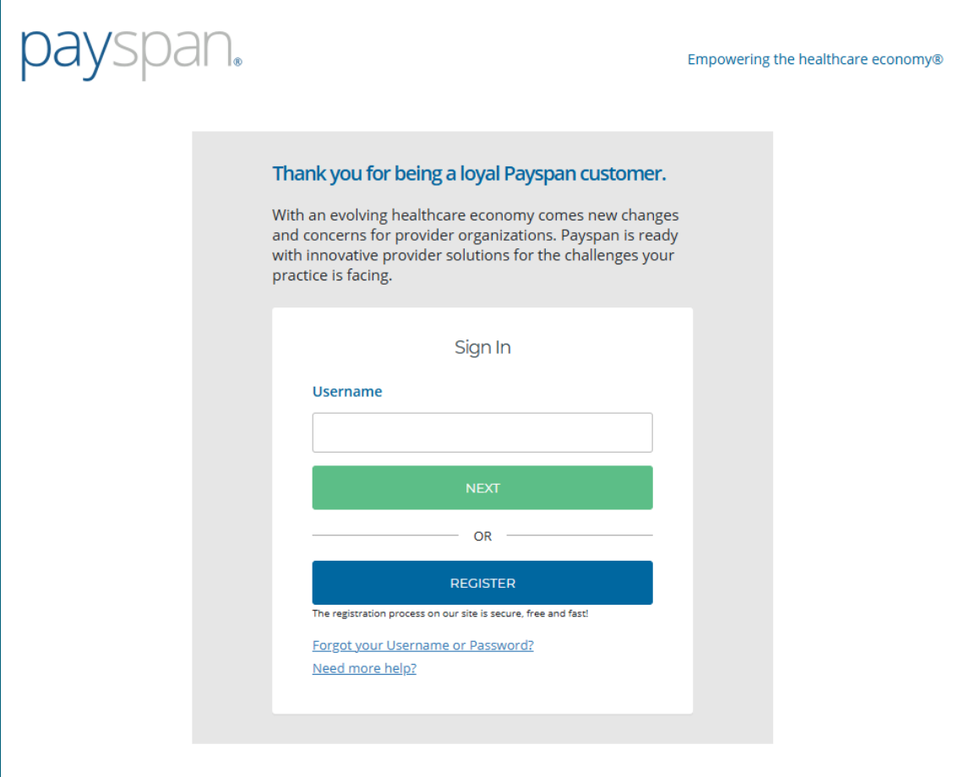
Screenshot source: Making Sense of NC Medicaid Plans, Services and Waivers (January 6, 2026), PDF page 53 (slide 54).
TL;DR: use your own login, and give your biller their own
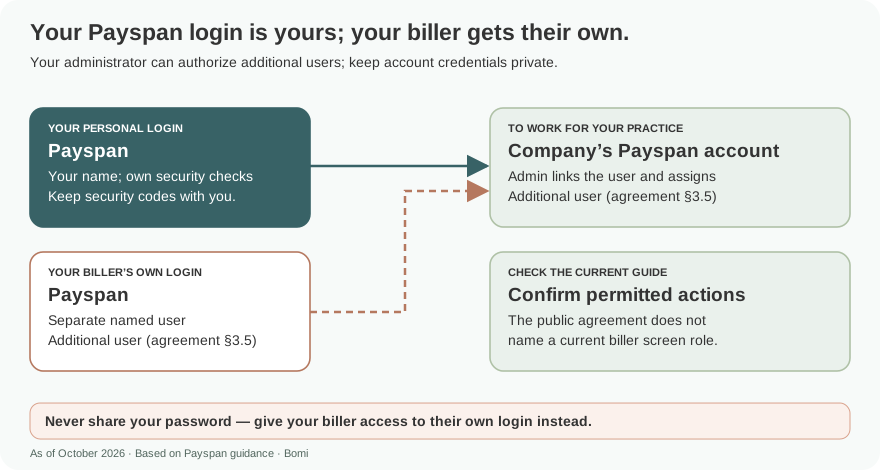
Use your own Payspan login. Your administrator can authorize your biller as an additional user with their own login; keep passwords and security codes private. Registering a payer relationship and choosing EFT are separate from signing in, and other Zelis payment portals have separate routes. Payspan agreement, section 3.5.
Who needs their own Payspan login
Have each biller or staff member use their own authorized user. The company can authorize additional users after establishing account administration and must protect its administrative credentials. Payspan agreement, section 3.5.
Recommended access practice: each account belongs to a named person. Keep your own password, recovery details and any MFA codes with you. The public agreement calls billers and staff additional users; it does not establish a current biller-role label or multi-organization linking. Never share your password — give your biller access to their own login instead. Account administration rights.
Before you create access
Check the payer/product, existing account and administrator first. The code form requests practice identifiers, contact information, affected payer and billing address. Keep those details consistent with payer records. Official registration-code form.
What is Payspan today?
Payspan is a provider-payment and remittance service. Zelis acquired Payspan in 2022. Zelis still lists a separate Payspan Payments Portal in its official login directory; a Zelis-branded invitation does not tell you which portal a particular payer uses. Zelis acquisition announcement
Use the official login directory to distinguish the Payspan portal from the other provider payment portal. Zelis official login directory
Payspan fees: free EFT, virtual cards and optional services
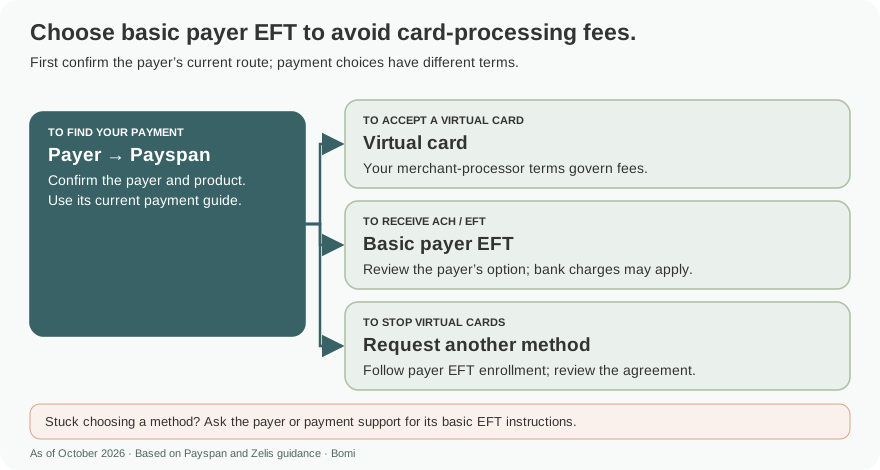
The live Payspan service agreement, last modified August 27, 2021, says Payspan charges no fee for basic payment documentation or receipt of funds. It also says financial institutions may charge for ACH transactions and optional enhanced services have separate terms and fees. Check the payer-specific route and your bank agreement before calling every ACH option free. Payspan service agreement
Zelis virtual cards are a different payment method. Its terms say providers may request another method and that card processing can carry interchange or other third-party fees governed by the merchant-processor agreement. There is no universal percentage in these terms. Zelis Payments terms
Zelis describes ACH+ as a fee-based service. Read the proposed agreement and ask for the payer’s basic no-cost EFT option where its instructions offer one. Do not assume an optional premium service is required just because it is presented alongside EFT. Zelis payment FAQ
Account setup steps
Identify the payer and product on the payment notice. Open that payer’s official payment instructions, using the guides below as a starting point.
If those instructions still use Payspan, request the appropriate registration code through its official form. Keep the payer relationship attached to the code.
Open the official Payspan registration page. The public flow lists payment preference as a stage. Follow the payer’s EFT instructions and review the selected agreement before completing financial steps.
Have the authorized practice representative supply financial information and complete any required bank verification directly. Existing users should follow the payer’s instructions for adding a relationship.
Before closing the task, reconcile the first deposit with its remittance and confirm that the biller can retrieve the payment record.
Official code request · Official Payspan registration
Existing Payspan account: add the payer and choose EFT
The screens below illustrate the Payspan interface in a January 2026 guide published by Arizona Complete Health. Your payer’s current product and payment instructions determine which options are available; this example does not replace them. Read the public Payspan tip sheet.
For an existing account adding a payer relationship, open Your Payments and Manage Reg. Codes, then Add New Reg. Code. Enter the registration code, PIN and TIN supplied for that payer relationship. Tip sheet, pages 1–2.
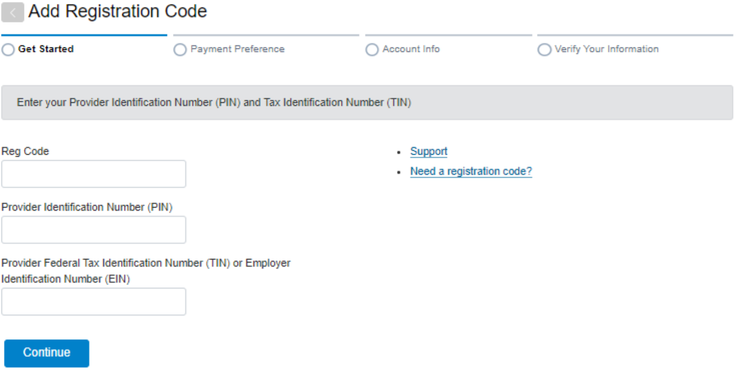
Screenshot source: Zelis (Payspan) Tip Sheet 26-005 (January 13, 2026), page 2.
When Payment Preference offers ACH for the payer, select that option and review its terms before continuing. The guide says payment options depend on payer preferences; ask for the payer’s basic no-cost EFT route rather than assuming every ACH-branded offer has the same terms. Payment Preference example, page 2.
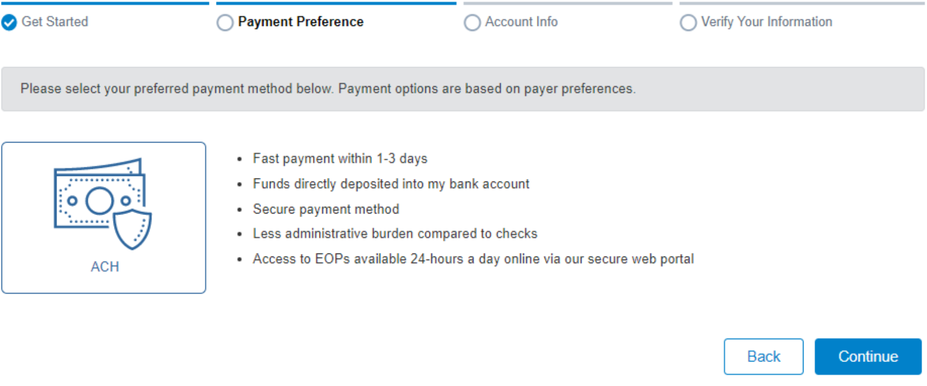
Screenshot source: Zelis (Payspan) Tip Sheet 26-005 (January 13, 2026), page 2.
Have the authorized practice representative choose the intended Receiving Account, or use Create New Receiving Account when appropriate. That person should verify bank details and any agreement directly. Receiving Account example, page 3.
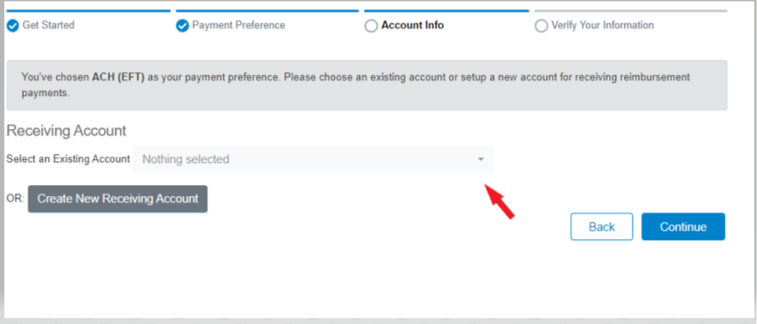
Screenshot source: Zelis (Payspan) Tip Sheet 26-005 (January 13, 2026), page 3.
Add your biller/delegate
The practice administrator authorizes the biller’s separate login as an additional user, using the company’s administrative rights described in section 3.5. Ask official support to confirm the current permission controls; do not substitute a shared owner password. Payspan account agreement.
Ask the practice administrator to authorize the biller’s own user. The public agreement supports additional users but does not supply a current permission-screen walkthrough. Keep financial changes and agreement acceptance with the authorized representative. Account administration rights.
Login errors & lockouts
Use the official recovery page for forgotten credentials. Payspan’s public login says locked accounts require an administrator; its help page supplies Provider Support for administrator username problems. A new registration code will not replace a forgotten password. Recovery; Login; Official help.
If virtual-card or service fees were already taken
Keep the remittance, payment reference, merchant statement and applicable service agreement. Ask the party that assessed the charge to identify it and review any suspected error. Separately request the desired payment method for future payments and obtain confirmation. A prospective change is not confirmation of a retrospective refund.
For a Zelis virtual card, its terms direct specific fee questions to the merchant processor or financial institution. Ask about the actual transaction rather than assuming every deduction is a Payspan fee. Zelis Payments terms
Verified payer routes as of October 9, 2026
These guides cover the payer/product routes verified for this packet. The Payspan code form’s payer selector is a discovery list, not evidence every listed name still pays through Payspan. Recheck the linked payer instructions, especially where a transition is announced. Payspan registration-code request / payer selector
Payers that should not be treated as current Payspan enrollment guides
Carelon has announced a move to Zelis; use the existing Carelon payment-transition guide for that payer’s instructions.
Devoted’s official page announces its September 2026 move from Payspan to ePayment Center. Do not rely on its continued appearance in a Payspan selector. Devoted ePayment Center migration
CCA’s June 2026 SCO/One Care manual names ECHO for provider payments. Older CCA Payspan references do not establish the current route for those products. CCA June 2026 manual
Keep the handoff specific
Give the biller the payer/product, selected payment method, activation status and remittance destination through the practice’s approved workflow. Keep passwords, MFA codes, full bank details and verification amounts out of ordinary email. If a payment is missing, first establish which payer and processor issued it.
Frequently Asked Questions
What is the Payspan Zelis login?
Zelis’s directory lists the Payspan Payments Portal separately from its other provider payment portal. Match the portal to your payer/product’s current instructions.
How do I reset my Payspan password?
Use the official Payspan username/password recovery page. The public login says an administrator must unlock a locked account.
Is Payspan the same as Zelis?
Zelis acquired Payspan, but its login directory still separates the Payspan Payments Portal from its other provider payment portal. Use the payer-specific instructions.
Does Payspan charge a fee for every EFT?
The live Payspan agreement says basic payment documentation and receipt of funds carry no Payspan fee. Bank charges and optional services are separate. Check the specific payer option and agreement.
How do I get a Payspan registration code?
Use the official Payspan code-request form for the relevant payer, then follow its enrollment instructions. A code request alone does not complete EFT enrollment.
Want Bomi to handle insurance billing?
Bomi helps therapy practices with benefit checks, claims, denials, balances, CAQH, attestations, and revenue management.
Book a call
About Bomi
Founded by George Ruan, Dax Earl, and Andrey Goder, Bomi helps independent therapists and group practices with insurance billing, credentialing, and payer follow-up. Bomi grew out of Dax’s experience helping his mother with her therapy practice, with a clear purpose: reduce the administrative burden of insurance while keeping practice owners in control.
Meet our founders