
BCBS Massachusetts Payspan EFT and Bank Verification
By George Ruan • October 9, 2026
Last updated: October 9, 2026.
Sections
Start with BCBS Massachusetts instructions
As of October 9, 2026, BCBS Massachusetts directs medical providers to enroll in EFT through Payspan. Its public page links the registration-code and PIN request and identifies the tax ID and bank information needed for enrollment. Use that page to start, not a payment link from an unverified message. BCBS Massachusetts Payspan page
Pending enrollment needs bank confirmation
The payer describes a small deposit into the designated bank account. An authorized representative must return to Payspan, enter the exact amount and confirm it before the account becomes active. Have the person authorized to view that bank account handle verification directly; do not send deposit amounts to the biller by ordinary email. BCBS Massachusetts Payspan page
Save the right payment advisories
BCBS Massachusetts says paper and electronic Provider Payment Advisories and Provider Detail Advisories overlap for 90 days before electronic-only delivery. Plan who will retrieve and retain both advisory types. The payer’s page is the source for current timing and support. BCBS Massachusetts Payspan page
A login is only one part of the handoff
Before closing the enrollment task, have the practice confirm activation and ask the biller to reconcile a real payment with its advisory. Keep a record of which payee was enrolled and who owns future bank changes. If a deposit does not arrive, start with enrollment status and the payer’s payment record. If an advisory is missing, identify the document and date rather than opening another account.
Existing Payspan account: add the payer and choose EFT
The screens below illustrate the Payspan interface in a January 2026 guide published by Arizona Complete Health. Your payer’s current product and payment instructions determine which options are available; this example does not replace them. Read the public Payspan tip sheet.
For an existing account adding a payer relationship, open Your Payments and Manage Reg. Codes, then Add New Reg. Code. Enter the registration code, PIN and TIN supplied for that payer relationship. Tip sheet, pages 1–2.
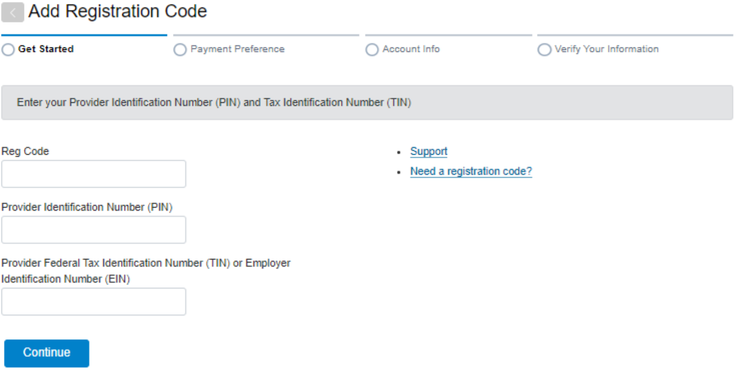
Screenshot source: Zelis (Payspan) Tip Sheet 26-005 (January 13, 2026), page 2.
When Payment Preference offers ACH for the payer, select that option and review its terms before continuing. The guide says payment options depend on payer preferences; ask for the payer’s basic no-cost EFT route rather than assuming every ACH-branded offer has the same terms. Payment Preference example, page 2.
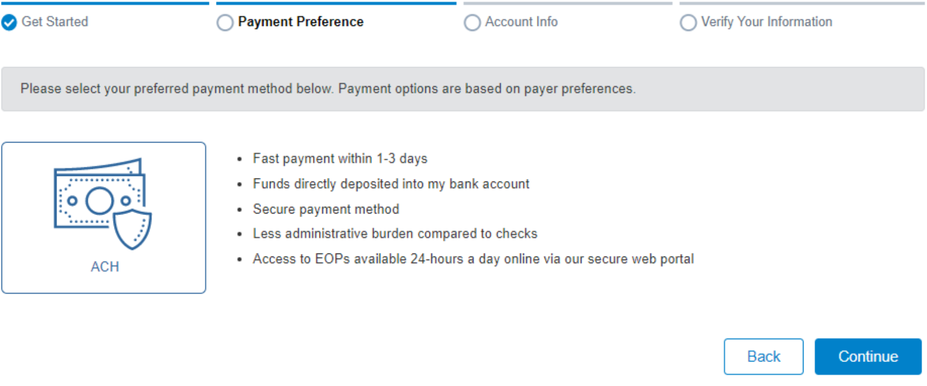
Screenshot source: Zelis (Payspan) Tip Sheet 26-005 (January 13, 2026), page 2.
Payspan login, code help and fee questions
Payspan login, forgotten username/password and registration-code help
Payspan payment options, card fees and what to do about prior charges
Frequently Asked Questions
Why is my BCBS Massachusetts Payspan enrollment pending?
The payer describes a small bank deposit that must be confirmed in Payspan. Have the authorized bank-account representative check the official enrollment instructions and complete that step.
Want Bomi to handle insurance billing?
Bomi helps therapy practices with benefit checks, claims, denials, balances, CAQH, attestations, and revenue management.
Book a call
About Bomi
Founded by George Ruan, Dax Earl, and Andrey Goder, Bomi helps independent therapists and group practices with insurance billing, credentialing, and payer follow-up. Bomi grew out of Dax’s experience helping his mother with her therapy practice, with a clear purpose: reduce the administrative burden of insurance while keeping practice owners in control.
Meet our founders