
Payspan Login: Registration Code, Password and Biller Help
By George Ruan • August 26, 2026
For Payspan provider login, open the official Payspan payment portal and sign in with your own authorized Payspan username and password. Last updated: October 9, 2026.
Sections
- Direct links: Payspan login, registration code and password help
- TL;DR: use your own login, and give your biller their own
- Who needs their own Payspan login
- Before you create access
- Account setup steps
- Add a payer code to an existing account
- Add your biller/delegate
- Login errors & lockouts
- Related Payspan payment guides
- Frequently Asked Questions
Direct links: Payspan login, registration code and password help
Provider Support: 877-331-7154 or providersupport@payspanhealth.com. Official Payspan help
The Payspan sign-in page asks for your username first. Existing users choose Next; new users choose Register.
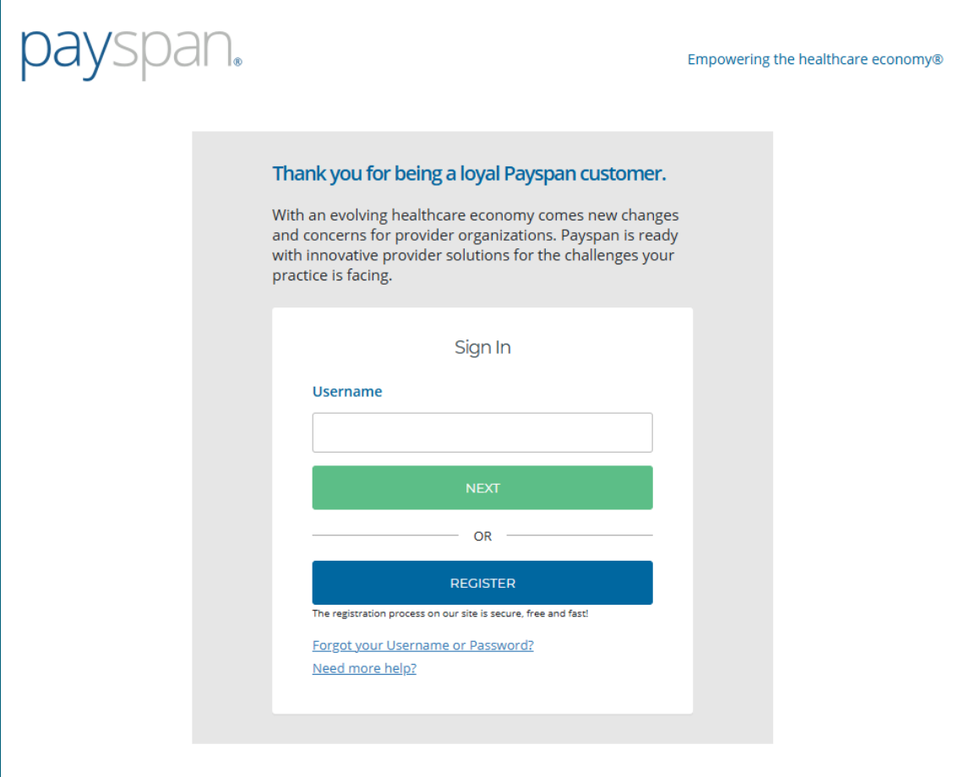
Screenshot source: Making Sense of NC Medicaid Plans, Services and Waivers (January 6, 2026), PDF page 53 (slide 54).
TL;DR: use your own login, and give your biller their own
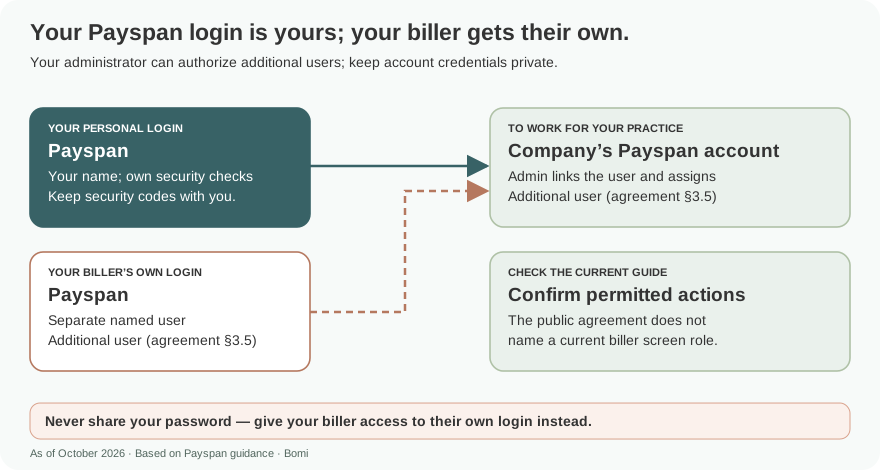
Use your own Payspan login. Your administrator can authorize your biller as an additional user with their own login; keep passwords and security codes private. Registering a payer relationship and choosing EFT are separate from signing in, and other Zelis payment portals have separate routes. Payspan agreement, section 3.5.
Who needs their own Payspan login
Use a separate authorized user for each person who needs access. The live Payspan agreement, last modified August 27, 2021, lets the company authorize additional users after establishing administrative access and makes it responsible for protecting its administrative account. Do not share an owner’s password or security codes with a biller. Payspan account-access agreement, section 3.5.
Recommended access practice: each account belongs to a named person. Keep your own password, recovery details and any MFA codes with you. The public agreement calls billers and staff additional users; it does not establish a current biller-role label or multi-organization linking. Never share your password — give your biller access to their own login instead. Account administration rights.
Before you create access
Identify the affected payer and the existing account administrator first. Have the practice identifiers and contact information matching the payer’s enrollment record. The public code-request form asks for the tax ID, NPI, provider/practice name, contact details, billing address and affected payer; it also has third-party company/contact fields. Official code-request form.
A payer’s appearance in the request selector is not evidence that it still uses Payspan. Confirm its current payment instructions before choosing a route. See the linked payer guides for verified products and announced transitions.
Account setup steps
Existing account: use the login or recovery link above. A registration code is not a substitute for the existing password. Official account recovery.
New payer relationship: request the appropriate registration code using current payer/practice information. Have an authorized practice representative review the request. Registration-code request.
After receiving the code, open official registration and follow the payer’s enrollment instructions. The public flow includes payment preference, account setup and information verification. Financial details and agreement acceptance belong with the authorized practice representative. Provider registration; Payspan agreement.
Add a payer code to an existing account
The January 2026 Payspan tip sheet shows existing users opening Your Payments, Manage Reg. Codes and Add New Reg. Code. Enter the code, PIN and TIN for the intended payer relationship. This is a payer-registration task, not password recovery. Payspan tip sheet, pages 1–2.
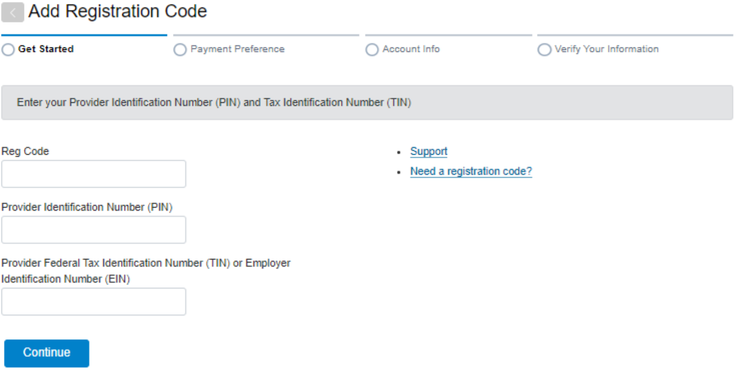
Screenshot source: Zelis (Payspan) Tip Sheet 26-005 (January 13, 2026), page 2.
The inherited form example below uses example-only information and was not submitted. Use the live official form for current fields. Current code-request form.
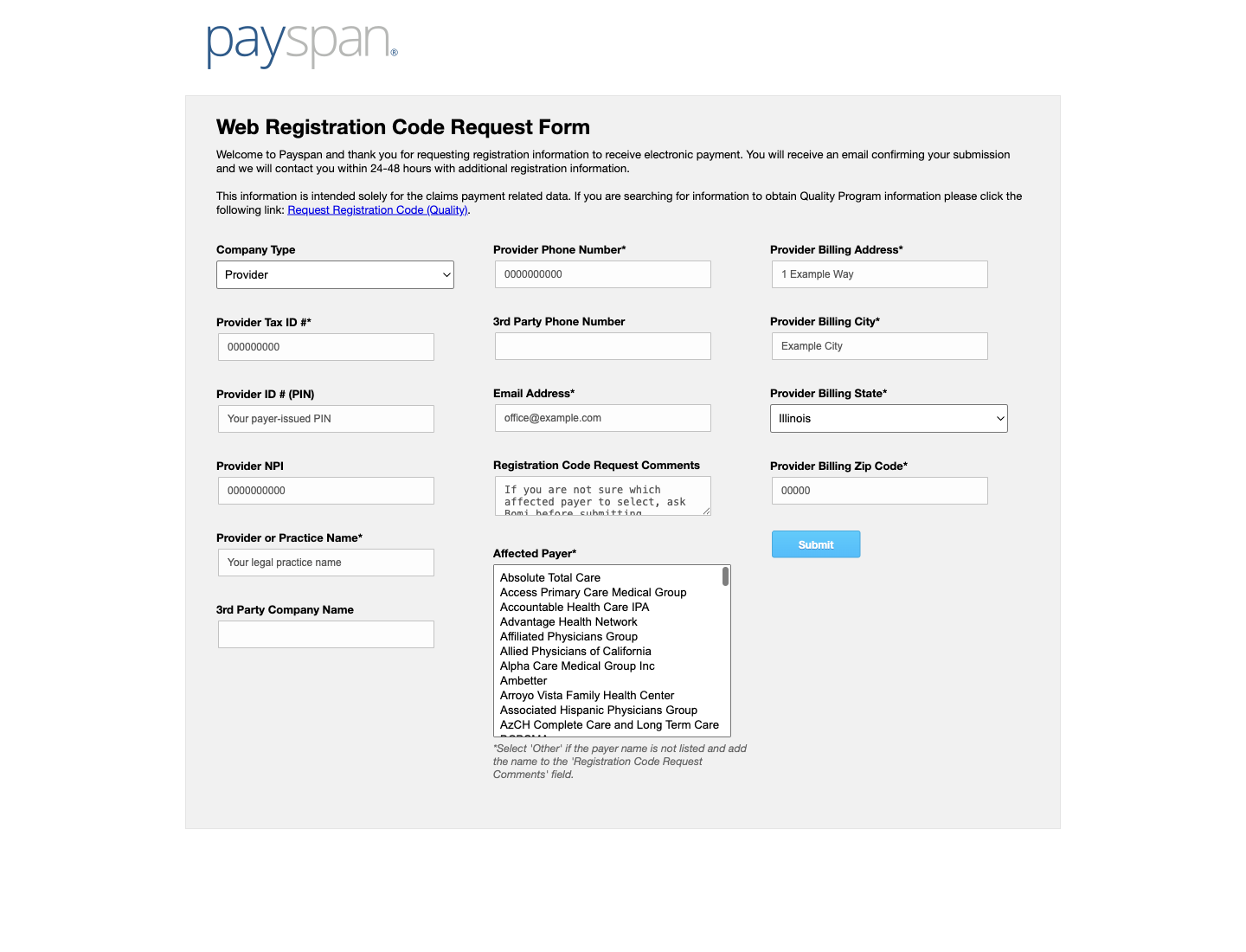
Screenshot source: Payspan public registration-code request form — inherited example.
Add your biller/delegate
The practice administrator authorizes the biller’s separate login as an additional user, using the company’s administrative rights described in section 3.5. Ask official support to confirm the current permission controls; do not substitute a shared owner password. Payspan account agreement.
The company’s administrator may authorize additional users under the Payspan agreement. Ask that administrator to arrange the biller’s own authorized access for the agreed work. The cited public pages do not establish a current click-by-click user-permission screen, so use official support rather than guessing its buttons. Account administration rights; Provider Support.
For Bomi enrollment help, send only the registration code and payer name through Bomi’s approved secure channel. Keep passwords, MFA codes, bank details and verification amounts out of ordinary email or text. Have the authorized practice representative complete financial verification directly.
Login errors & lockouts
The official recovery page has “I know my username” and “I don’t know my username” paths with username/email fields. Use that page for forgotten account details. Payspan help directs users who cannot recall their username to their administrator; administrators can contact Provider Support at 877-331-7154 or providersupport@payspanhealth.com. Username/password recovery; Official login help.
The public login’s locked-account message says only an administrator can unlock the account. Contact the practice administrator for that situation; do not request a new enrollment code as a password workaround. Payspan login and lockout message.
Related Payspan payment guides
Payspan EFT, virtual-card fees and payer-specific guides
Frequently Asked Questions
What is the Payspan provider login?
Use the official Payspan payment portal at www.payspanhealth.com/nps with your authorized username and password. A registration code is used for enrollment, not as a login password.
What is the Payspan Zelis login?
Zelis’s official directory lists the Payspan Payments Portal separately from its other provider payment portal. Follow your payer’s current instructions and choose the matching directory entry.
How do I reset my Payspan password?
Use the official Forgot your Username or Password page. It has paths for known and unknown usernames. For a locked account, the public login directs you to the administrator.
Where do I request a PaySpan registration code?
Use Payspan’s official Request Registration Code form for the affected payer. Verify current payer routing before requesting a code.
Should I share my Payspan password or bank details with Bomi?
No. Use Bomi’s approved secure channel for only the registration code and payer name. Keep passwords, MFA codes and financial verification with the authorized practice representative.
Want Bomi to handle insurance billing?
Bomi helps therapy practices with benefit checks, claims, denials, balances, CAQH, attestations, and revenue management.
Book a call
About Bomi
Founded by George Ruan, Dax Earl, and Andrey Goder, Bomi helps independent therapists and group practices with insurance billing, credentialing, and payer follow-up. Bomi grew out of Dax’s experience helping his mother with her therapy practice, with a clear purpose: reduce the administrative burden of insurance while keeping practice owners in control.
Meet our founders