
Optum Pay Basic vs Premium: Fees, ACH and Virtual Cards
By George Ruan • October 9, 2026
As of October 9, 2026. Getting an insurance deposit and paying for portal features are different decisions. Start with Optum’s enrollment page and choose the payment route your payer offers. Then check whether you need Basic or Premium access.
Sections
- Optum Pay Basic vs Premium fees
- ACH deposits and virtual cards are different payment rails
- Enroll in ACH/EFT without accidentally choosing virtual cards
- Already enrolled? Change the payment preference
- Cancel Premium and check the remaining invoice
- What if fees were already taken?
- Which payers use Optum Pay?
- Frequently Asked Questions
Optum Pay Basic vs Premium fees
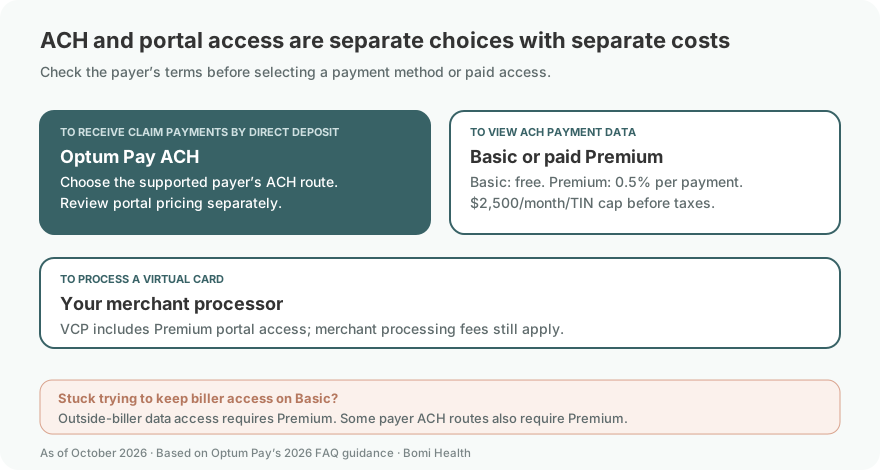
Basic portal access is free. For paid Premium portal access, Optum lists 0.5% of each claim payment, capped at $2,500 per month per TIN before applicable taxes. Optum’s 2026 FAQ, pages 5–8 gives these terms; older PDFs may show a different cap.
At 0.5%, $1,000 in payments produces $5 in Premium fees; $10,000 produces $50, before tax and the cap. Treat that as a subscription decision in your billing budget, separate from the amount the payer approved.
ACH deposits and virtual cards are different payment rails
UnitedHealthcare says its ACH deposits are issued for the full claim-payment amount at no charge. Its virtual-card processing costs depend on your merchant agreement. See UHC’s payment options. Do not apply a generic 3% rate to every practice or mistake the 0.5% Premium fee for a merchant-card fee.
Optum’s 2026 FAQ warns that some payers offer ACH only with Premium. It also requires Premium for third-party biller data access. Confirm the payer and access needs before choosing Basic; neither “all ACH is free” nor “everyone needs Premium” describes the whole network.
Optum’s 2026 FAQ also offers Premium access at no additional portal charge with VCP enrollment. That does not remove the merchant processor’s card charges. Compare the total cost rather than choosing a card to get portal features.
Enroll in ACH/EFT without accidentally choosing virtual cards
Open the official enrollment selector and select Healthcare Organization for a practice enrollment. A billing company has its own enrollment classification.
Choose direct deposit (ACH) when that is your intended route. Use the Optum ACH enrollment guide alongside the live application.
Prepare the legal organization name, mailing address, tax identification number (TIN), contacts, W-9, bank details and a voided check or bank letter. These are listed on How to Enroll.
Review the payer selection and subscription terms before accepting. Keep a copy of the confirmation; do not send banking documents to an unverified email address.
Match the next deposit to the electronic remittance advice (ERA). Check both the bank credit and any separate portal invoice before calling the result fee-free.
Select the practice enrollment classification
For an Optum Pay practice enrollment, select “I am enrolling as a Healthcare Organization.” A third-party billing service uses the other classification. This crop comes from the direct-deposit guide currently linked on Optum’s enrollment page, revised June 2022; follow the live application if its layout changes. Optum enrollment screen guide.
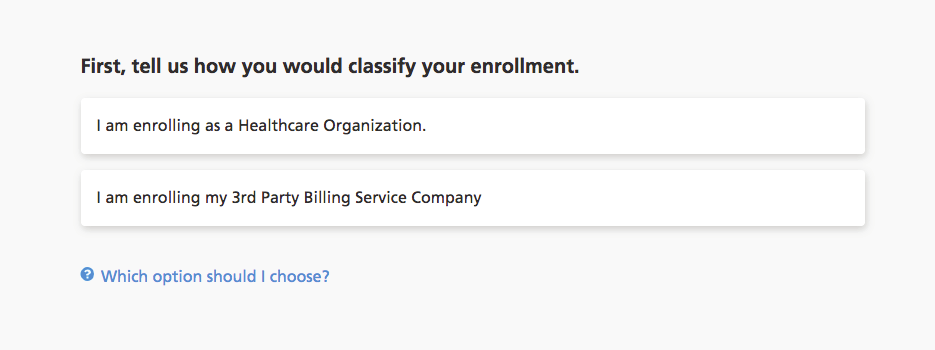
Screenshot source: Optum Pay direct deposit enrollment guide (June 2022), page 2.
Select direct deposit for the ACH enrollment
For ACH, select “I would like to enroll in direct deposit (ACH) only.” This payment choice is separate from portal access pricing. Check the current payer eligibility and Premium terms before completing enrollment; the guide’s older feature list does not establish today’s Basic or biller-access benefits. ACH selection guide; 2026 fee and access FAQ.
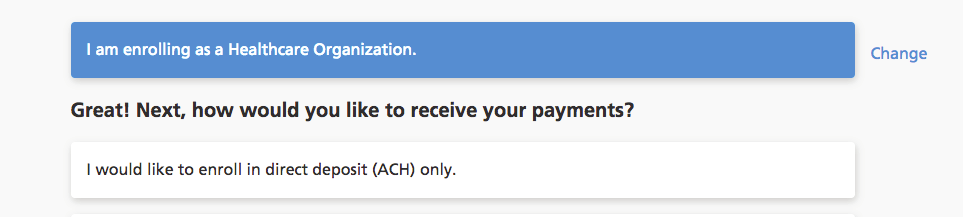
Screenshot source: Optum Pay direct deposit enrollment guide (June 2022), page 2.
Already enrolled? Change the payment preference
A Super Admin can use Maintain Enrollment → Edit → payers to change ACH/card preferences, according to Optum’s FAQ, page 12. Confirm the correct TIN and payer before saving. A future preference change does not settle the handling of a card already issued.
Cancel Premium and check the remaining invoice
The 2026 cancellation terms, page 9 say online cancellation through Solutions ends Premium at month-end; Basic begins the following month. Accrued fees still bill afterward. Do not promise a same-day fee stop or automatic refund.
What if fees were already taken?
First identify the charge: a merchant fee on a redeemed card, an Optum Pay Premium invoice, or another vendor’s payment service. Save the remittance, bank transaction, invoice and processor statement. Ask the charging company to explain the rate and any refund policy. Changing future enrollment is a separate task.
Which payers use Optum Pay?
These guides use payer payment instructions, rather than a generic clearinghouse or eligibility directory, to establish the route. Check the exact product and administrator on your payment notice:
UMR already has a separate Optum Pay-to-Zelis warning. Do not infer today’s UMR payment vendor from an old deposit. For outside billers, use Optum Pay billing-service access; PES user access is a different tool.
Frequently Asked Questions
Is Optum Pay Basic free?
Yes, Basic portal access is free. Confirm that the payer offers your intended ACH route with Basic and that you do not need paid third-party biller access.
Is the Premium fee a virtual-card fee?
No. Premium portal fees and merchant fees for redeeming cards are separate charges. Check the portal invoice and your processor agreement.
How do I avoid an unexpected Optum Pay fee?
Choose the intended payer payment method and portal subscription deliberately, review any biller-access requirement, and reconcile the deposit and invoice. Changing a subscription does not automatically refund past charges.
Want Bomi to handle insurance billing?
Bomi helps therapy practices with benefit checks, claims, denials, balances, CAQH, attestations, and revenue management.
Book a call
About Bomi
Founded by George Ruan, Dax Earl, and Andrey Goder, Bomi helps independent therapists and group practices with insurance billing, credentialing, and payer follow-up. Bomi grew out of Dax’s experience helping his mother with her therapy practice, with a clear purpose: reduce the administrative burden of insurance while keeping practice owners in control.
Meet our founders