
Optum Pay Login: Provider and Biller Access
By George Ruan • October 9, 2026
For Optum Pay provider login, open the official Optum Pay sign-in page and select Sign In to use your own One Healthcare ID.
As of October 9, 2026. A third-party biller needs its own billing-service account and an approved association with the practice.
Sections
- Direct links: Optum Pay login, enrollment and identity help
- TL;DR: use your own login, and give your biller their own
- Who needs their own Optum Pay login?
- Before you create access
- Check the Premium requirement before adding your biller
- Account setup: register the billing service separately
- How to add your biller to Optum Pay
- Approval and ongoing access
- Do you need Optum Pay or Payer Enrollment Services?
- Optum Pay login errors, password resets and lockouts
- If the biller cannot see payment data
- Related guides
- Frequently Asked Questions
Direct links: Optum Pay login, enrollment and identity help
Optum Pay provider login — existing provider and billing-service accounts.
Registration and enrollment requirements — review the documents and organization type before applying.
New organization or billing-service enrollment — choose the correct enrollment classification.
Password, user ID and sign-in support — the public page lists One Healthcare ID support at 855-819-5909 and Optum Pay support at 877-620-6194.
Payer Enrollment Services (PES) — the separate EFT/ERA enrollment tool.
Optum Pay uses One Healthcare ID sign-in; enter your own ID or email and select Continue.
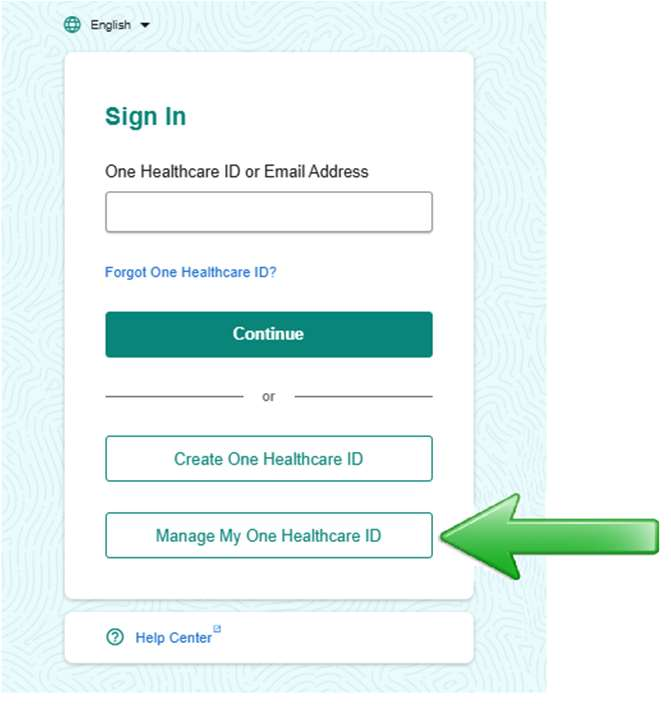
Screenshot source: Optum One Healthcare ID MFA Quick Steps, PDF page 1 (current published guide; no printed revision date).
TL;DR: use your own login, and give your biller their own
Sign in with your own One Healthcare ID. Your biller uses its own registered billing-service account, which the practice administrator approves through Billing Service Information; outside-biller data access requires Premium. EFT enrollment applications and Payer Enrollment Services are separate tasks. 2026 billing-service access FAQ.
Who needs their own Optum Pay login?
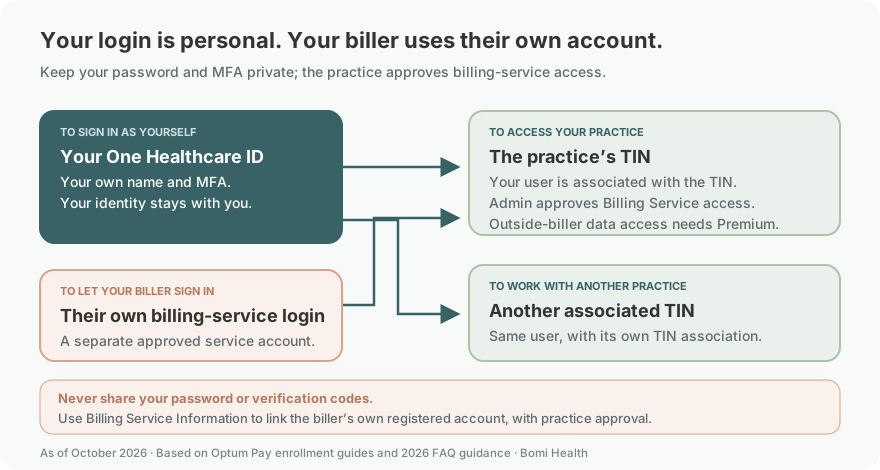
Keep the practice’s credentials private. An outside billing company registers its own organization, rather than using a renamed practice account. Optum directs practices that have added an outside biller as a provider-account user to call support for correction. 2026 FAQ, pages 8 and 19–20.
Use your own name and One Healthcare ID, and keep your password and MFA private. Optum’s ACH guide explains that an existing user can be associated with an additional TIN, after confirming the individual. A biller still signs in with its own billing-service account, which the practice links through Billing Service Information; do not make it a shared provider login. Existing-user and TIN guidance, page 3; Personal identity and MFA guidance; Billing Service association, 2026 FAQ page 19.
Before you create access
Confirm the practice’s TIN and the billing service’s registered organization name.
Have the authorized practice administrator review the intended association and portal cost.
For new enrollment, prepare the organization and contact details and follow the document requirements for your enrollment type. How to Enroll.
Check the Premium requirement before adding your biller
Optum’s 2026 FAQ, page 19 requires Premium for outside-biller data access. Review the fee hub with the owner first. Having a free ACH deposit route does not mean the requested portal access is free.
Account setup: register the billing service separately
Optum’s enrollment page says a third-party service registers separately, identifies the provider TINs it supports and connects them with each provider’s approval. The billing-service guide supports that separate registration process. Use the biller’s own contacts and organization details, not a renamed practice account.
Choose the third-party billing service classification
For a new billing-service account, select “I am enrolling my 3rd Party Billing Service Company.” The practice uses the Healthcare Organization classification instead. This crop is from Optum’s currently linked billing-service enrollment guide, revised June 2022; follow the live application if its layout changes. Billing-service enrollment guide.
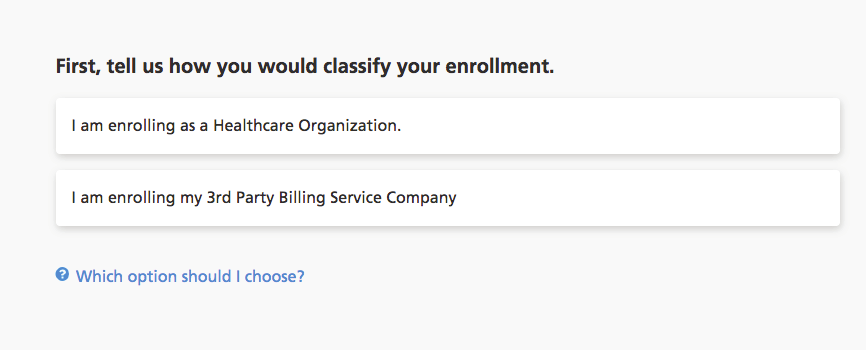
Screenshot source: Optum Pay billing services enrollment guide (June 2022), page 1.
Identify the billing service administrators
At Identify Administrators, enter the billing service’s own administrator contact details and use a unique email address for each person. The guide describes these administrators as able to manage billing-service users and provider associations. This setup form creates billing-service account contacts; it does not replace the practice’s approval of a TIN association or its current Premium requirement. Administrator setup guide; 2026 association and access FAQ.
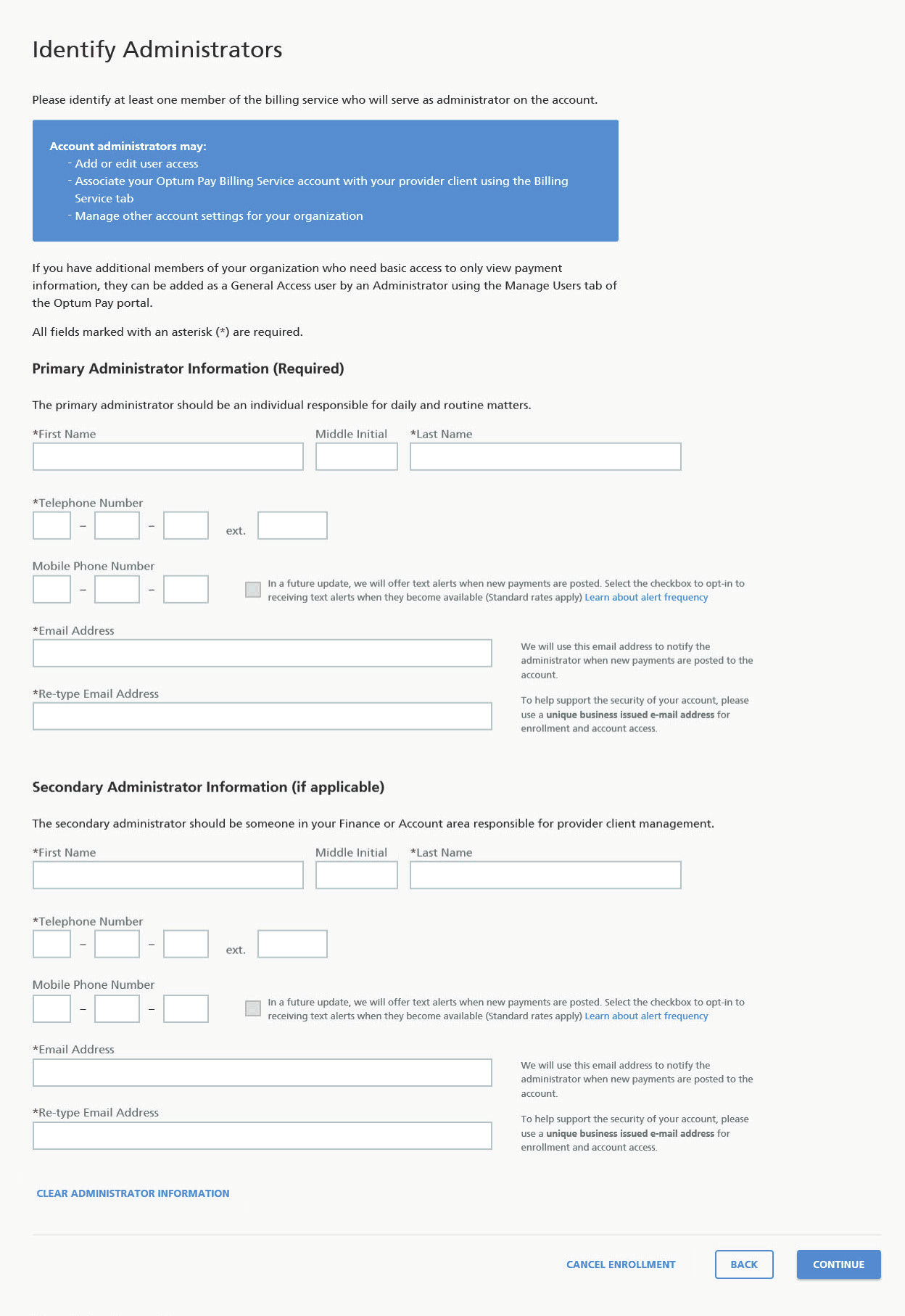
Screenshot source: Optum Pay billing services enrollment guide (June 2022), page 4.
How to add your biller to Optum Pay
Confirm the correct practice/TIN and the biller’s registered name before linking. The biller uses its own login and MFA; never share your password or verification codes.
In Optum Pay, open Billing Service Information → Search/Add Billing Services. Find the biller and enter the effective date; the practice administrator approves the association. These are the steps in the 2026 FAQ, page 19.
If a matching name is ambiguous, verify the service identity with your biller before granting access.
If the biller is not registered, ask it to complete the separate enrollment. Review the recipient before using any portal invitation.
After approval, have the biller verify access to the intended payment data. Preserve the association details with the practice’s access records.
Approval and ongoing access
The 2026 FAQ, pages 19–20 requires annual reapproval and directs practices with a biller incorrectly added as a provider-account user to call 877-620-6194 for correction. Payment-data association does not grant bank-information access. Ask support before altering a working account.
Keep a short record of the service name, practice/TIN, effective date and owner approval. During an access review, check whether the same service still handles billing and whether it can reach only the records it needs.
Do you need Optum Pay or Payer Enrollment Services?
Payer Enrollment Services is the EFT/ERA enrollment tool described in our PES provider/TIN user guide. That guide’s Users tab is a different workflow. Use this article for Optum Pay payment-data association; use the PES guide when the task is PES enrollment access.
Optum Pay login errors, password resets and lockouts
The official Optum Pay sign-in page separates identity support from Optum Pay support. For a password, user ID or sign-in problem, contact One Healthcare ID support at 855-819-5909. For an organization, TIN or billing-service association problem, contact Optum Pay at 877-620-6194. Identify whether sign-in failed or the expected payment record is missing before changing enrollment.
If the biller cannot see payment data
Confirm that it finished its own enrollment and that the practice approved the correct association.
Compare the requested TIN with the payment’s billing entity. Do not broaden access to unrelated records as a workaround.
Review the access tier and any expiry/reapproval notice with the authorized administrator.
Ask the biller to identify the missing payment reference. Distinguish a missing payment from missing portal access before changing banking settings.
Related guides
Frequently Asked Questions
What is the Optum Pay provider login?
Use https://myservices.optumhealthpaymentservices.com/registrationSignIn.do and select Sign In. The public page routes sign-in through One Healthcare ID; organization enrollment and approved access are separate.
How do I reset my Optum Pay password?
For password or user ID assistance, the official Optum Pay login page lists One Healthcare ID support at 855-819-5909. Optum Pay support for organization and payment access is 877-620-6194.
How do I add my biller to Optum Pay?
Optum directs outside billing services to their own billing-service account and an approved association with the practice.
Is Optum Pay the same as Payer Enrollment Services?
No. Optum Pay Billing Service Information and the PES provider/TIN Users tab are different workflows.
Is billing-service access free with Basic ACH?
The current Optum FAQ requires Premium for billing-service data access. Review costs and the intended access with the owner before enabling it.
Want Bomi to handle insurance billing?
Bomi helps therapy practices with benefit checks, claims, denials, balances, CAQH, attestations, and revenue management.
Book a call
About Bomi
Founded by George Ruan, Dax Earl, and Andrey Goder, Bomi helps independent therapists and group practices with insurance billing, credentialing, and payer follow-up. Bomi grew out of Dax’s experience helping his mother with her therapy practice, with a clear purpose: reduce the administrative burden of insurance while keeping practice owners in control.
Meet our founders