
Oxford Health Plans: Optum Pay EFT Enrollment
By George Ruan • October 9, 2026
As of October 9, 2026. Oxford providers can start from the 2026 UnitedHealthcare administrative guide, whose Oxford commercial supplement directs practices to Optum Pay for payment information and enrollment. This guide addresses that commercial route, not every plan with an Oxford network label.
Sections
Where Oxford directs EFT enrollment
The Oxford supplement on printed page 300 of the 2026 guide lists Optum Pay and 877-620-6194 for enrollment help. Use this explicit payment instruction rather than treating an Oxford entry on an ERA or eligibility directory as proof of who deposits the funds.
Before starting a new enrollment
Match the remittance’s payer/product with the Oxford commercial plan you intend to enroll.
Confirm the legal business name, TIN and intended account with the practice administrator.
Check for an existing practice enrollment. A new clinician or location does not automatically justify a new bank record.
Keep claim submission settings separate from payment settings. An EFT change is not a reason to change the claim destination.
Enroll in ACH and review the access cost
Open Optum’s enrollment page from the official payment instructions.
Use the Healthcare Organization / ACH selector for a practice seeking direct deposit.
Complete the live organization, contact and banking-document requirements under the correct legal entity.
Review the Basic/Premium fee guide and payer-specific options before accepting paid access.
After approval, verify a deposit and its remittance, not just the enrollment confirmation.
Select the practice enrollment classification
For an Optum Pay practice enrollment, select “I am enrolling as a Healthcare Organization.” A third-party billing service uses the other classification. This crop comes from the direct-deposit guide currently linked on Optum’s enrollment page, revised June 2022; follow the live application if its layout changes. Optum enrollment screen guide.
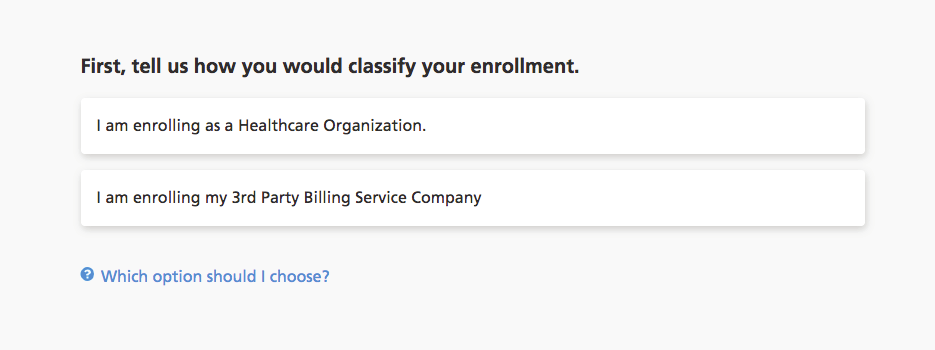
Screenshot source: Optum Pay direct deposit enrollment guide (June 2022), page 2.
Select direct deposit for the ACH enrollment
For ACH, select “I would like to enroll in direct deposit (ACH) only.” This payment choice is separate from portal access pricing. Check the current payer eligibility and Premium terms before completing enrollment; the guide’s older feature list does not establish today’s Basic or biller-access benefits. ACH selection guide; 2026 fee and access FAQ.
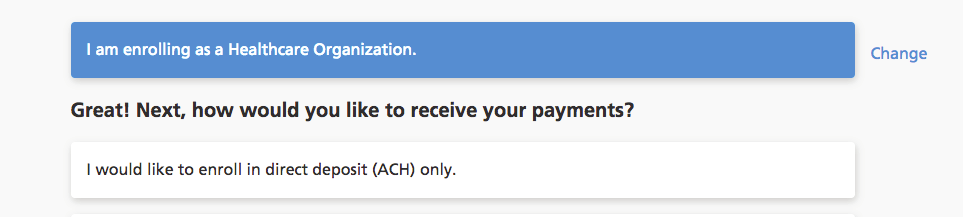
Screenshot source: Optum Pay direct deposit enrollment guide (June 2022), page 2.
Finding a PRA is different from receiving EFT
The 2026 payment section, page 132 notes that affiliated-network PRAs, including Oxford’s, are generally available on their portals without charge. Use the actual PRA needed for posting. Its availability does not show which bank account received the payment.
When a payment is missing, write down the payment reference, issued amount and date first. Compare the PRA with bank activity under the same TIN. If the remittance shows an adjustment, resolve that claim issue separately from the enrollment or deposit trace.
Virtual cards and fees already paid
Read the issuer’s current notice before redeeming a card. Identify the merchant charge or portal invoice before asking for an explanation. Future ACH enrollment does not establish a refund entitlement for a processed card.
Biller access and other routes
Use Optum Pay’s billing-service association for payment data access. If the task is another payer’s EFT/ERA enrollment in PES, follow the separate PES guide instead.
Frequently Asked Questions
Does an Oxford ERA payer-list entry establish the deposit vendor?
No. This guide relies on Oxford’s explicit payment enrollment instructions in the UHC commercial supplement.
Should I change claim submission when enrolling EFT?
Keep the claim destination and payment destination separate. Change claim routing only when the payer’s instructions require it.
Does portal PRA access prove my deposit arrived?
No. Reconcile the PRA to bank activity using the payment reference and correct billing entity.
Want Bomi to handle insurance billing?
Bomi helps therapy practices with benefit checks, claims, denials, balances, CAQH, attestations, and revenue management.
Book a call
About Bomi
Founded by George Ruan, Dax Earl, and Andrey Goder, Bomi helps independent therapists and group practices with insurance billing, credentialing, and payer follow-up. Bomi grew out of Dax’s experience helping his mother with her therapy practice, with a clear purpose: reduce the administrative burden of insurance while keeping practice owners in control.
Meet our founders