
InstaMed Virtual Card Fees: Switch to No-Fee ACH EFT
By George Ruan • October 9, 2026
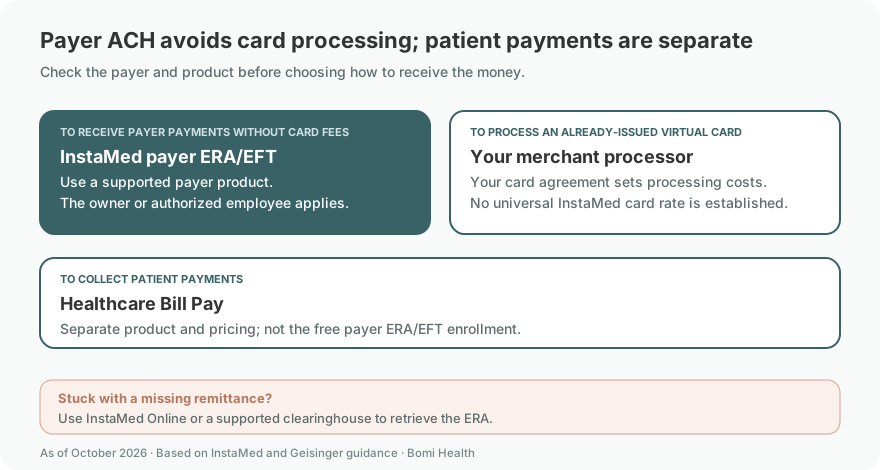
As of October 9, 2026. If an insurance payment arrives as a virtual card, check the cost before running it through your merchant account. InstaMed offers free payer ERA/EFT for its payment network. Start at InstaMed’s provider ERA/EFT page and official payer-payment enrollment.
Sections
- What is the InstaMed virtual card fee?
- Free payer EFT is different from patient-payment processing
- Which payers pay providers through InstaMed?
- How to switch to no-fee ACH through provider ePayment enrollment
- What if you already paid card fees?
- If the payer refuses standard EFT/ERA
- InstaMed login, biller access and enrollment help
- Keep payment vendors separate
- How Bomi helps
- Frequently Asked Questions
- Sources
What is the InstaMed virtual card fee?
There is no single card-processing percentage established by the sources used here. Geisinger’s provider page says claim payment cards are subject to the practice’s existing merchant-processing rates and offers no-fee EFT/ERA instead. The fee you need to check is the rate in your own processing agreement. Geisinger payment options.
A virtual card is processed through card-payment networks. CMS explains that providers typically incur a percentage processing fee when they redeem a claim-payment card. Receiving a card number is different from receiving an ACH deposit. CMS guidance.
Free payer EFT is different from patient-payment processing
InstaMed advertises free Integrated ERA/EFT for payers on its payment-network list. Its registration page separately prices Healthcare Bill Pay, a patient-payment product. Do not use those patient card or eCheck prices as the fee schedule for insurance-claim ACH payments. Payer-payment list; registration product terms.
Which payers pay providers through InstaMed?
Use the Integrated ERA/EFT payer list to check payment connections. A generic eligibility or claims list can describe a different transaction. A payer’s presence on the payment list does not establish that every product uses InstaMed or that every provider starts on virtual cards. These payer guides explain the verified boundaries:
How to switch to no-fee ACH through provider ePayment enrollment
Identify the actual payment. Check the payer, product, billing entity and vendor on the notice. For a card, read your merchant terms before processing it; keep that payment separate from an enrollment for future EFT.
Confirm a free payer-payment route. Use the payer’s own EFT page and InstaMed’s ERA/EFT list. Check exceptions such as Premera and LifeWise individual plans before applying. Payment-network list
Have the owner or an authorized employee apply. Open the official ERA/EFT application. InstaMed prohibits enrollment by a third party. Bomi can help prepare the information; the practice submits it. Application terms
Prepare the practice and bank information. The InstaMed payer-payment form currently linked by CountyCare asks for legal name, TIN, billing NPIs, deposit account and a bank letter or voided check, plus authorization. Use the live application’s requirements rather than assuming all screens match that older form. Linked order form
Keep ERA delivery working. Choose a supported clearinghouse or use the provider portal. Verify the remittance reaches your posting workflow. ERA clearinghouses
Confirm what happens to pending cards. Ask the payer/vendor when the new method applies and how an outstanding payment will be handled. Do not process a card and also collect a replacement for the same payment.
Verify the next deposit. Match its reference and amount to the ERA/EOP and check for unexpected processing deductions. Keep the enrollment confirmation with your payment records.
Enter the practice information
The 2026 Brown & Toland provider manual illustrates InstaMed’s business-information screen: legal business name, address, principal or officer details, and billing provider information. Use the practice’s records and follow the current application prompts. These are shared InstaMed registration illustrations, not this payer’s claim portal. The manual was revised September 2025; screens may change. Enrollment screen guide.
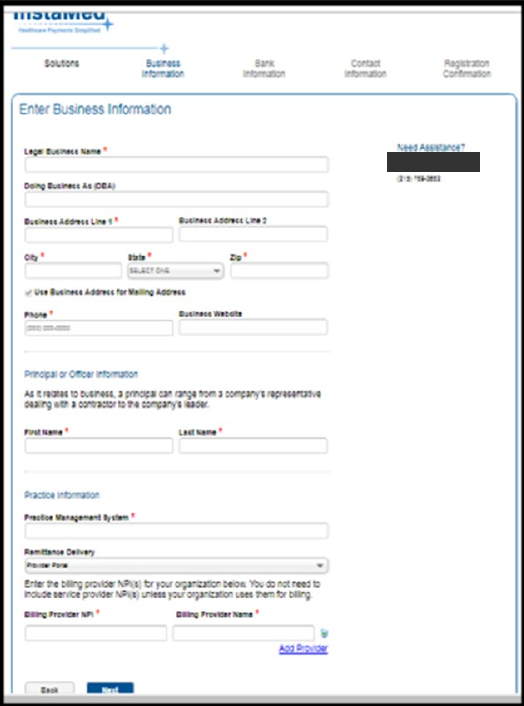
Screenshot source: Brown & Toland Provider Manual 2026 (revised September 2025), page 29.
Enter the bank account for EFT
The next illustrated enrollment screen asks for the bank name, routing number, account number and account-number confirmation. Enter the practice’s intended deposit account and follow the current verification requirements. The example check and contact address in the crop are covered. Bank-information screen guide.
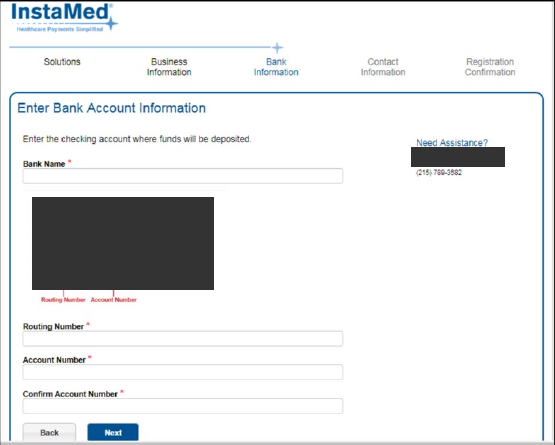
Screenshot source: Brown & Toland Provider Manual 2026 (revised September 2025), page 29.
What if you already paid card fees?
Changing the future payment method does not document a refund of old fees. Save the remittance and processing statement, identify which company charged the fee and ask that company about its refund policy. If the deposit is smaller than the remittance, distinguish a processing deduction from a claim adjustment before asking the payer to correct its payment. These are reconciliation steps, not a guarantee of recovery.
If the payer refuses standard EFT/ERA
CMS’s March 2022 guidance says a covered health plan must comply when a provider requests the adopted standard EFT/ERA transaction, including when the plan uses a payment vendor. That standard-transaction requirement is not proof that every banking or optional service fee is prohibited. Here, the no-fee enrollment offer comes from InstaMed’s and the payer’s published payment information. CMS VCC and EFT guidance.
InstaMed login, biller access and enrollment help
Use InstaMed Online for Providers for an existing account. Account-specific instructions and support are on InstaMed’s provider-support page. Give your biller a separate user using the existing InstaMed access guide; delegated access does not remove the owner/employee enrollment rule.
Keep payment vendors separate
If the notice names a different payment rail, use its guide: Zelis virtual-card fees and EFT, Payspan registration and biller access, or Carelon’s Payspan-to-Zelis transition. A switch for one vendor does not prove another payer’s enrollment changed.
How Bomi helps
Bomi helps practices check payment notices, prepare enrollment details, coordinate delegated account access and reconcile funds with remittances. The owner or an authorized employee submits InstaMed enrollment. See Bomi’s billing service or contact Bomi for help checking your payment routes.
Frequently Asked Questions
Does InstaMed charge 3% on every insurance payment?
The sources used here do not establish a universal rate. Virtual-card costs depend on merchant processing; InstaMed separately advertises free payer ERA/EFT.
Where do providers enroll in InstaMed EFT?
Use the provider ERA/EFT page and its official registration link at register.instamed.com/eraeft. Confirm the payer and product first.
Can Bomi enroll my practice for me?
InstaMed permits only the owner or an authorized employee to complete the application. Bomi can help prepare details and work through separate delegated access.
Will switching to ACH refund fees already paid?
A future payment-method change does not confirm a past-fee refund. Ask the entity that charged the fee about its policy.
Sources
Want Bomi to handle insurance billing?
Bomi helps therapy practices with benefit checks, claims, denials, balances, CAQH, attestations, and revenue management.
Book a call
About Bomi
Founded by George Ruan, Dax Earl, and Andrey Goder, Bomi helps independent therapists and group practices with insurance billing, credentialing, and payer follow-up. Bomi grew out of Dax’s experience helping his mother with her therapy practice, with a clear purpose: reduce the administrative burden of insurance while keeping practice owners in control.
Meet our founders