
Premera Individual Plans: InstaMed EFT and NPI2 Limits
By George Ruan • October 9, 2026
As of October 9, 2026. Premera Washington’s EFT overview directs individual-plan providers to InstaMed. Other supported Premera payment products use Availity’s Transaction Enrollment tool, so identify the product before you register. Official payment instructions.
January 1, 2027 date-of-service cutoff. Premera’s October 1, 2026 notice says InstaMed EFT ends for dates of service on or after January 1, 2027. Payments for earlier dates of service may still arrive through InstaMed after that date. Before planning enrollment, check the service dates and Premera’s transition instructions. Read the dated payment-transition notice.
Open InstaMed provider ERA/EFT enrollment for a new payer-payment account, or InstaMed Online for Providers for an existing account. Confirm the product limits below before applying.
Sections
Which payments use this route?
This guide covers Premera Washington individual-plan EFT. Do not use it as blanket instructions for employer, Medicare Advantage or FEP payments. Premera’s overview describes the Availity route for other supported products and points individual plans to separate resources. Check the payer instructions.
Card fees, checks and no-fee EFT
Premera’s June 5, 2025 registration notice says InstaMed enrollment may be unavailable without a type-2 billing NPI, when TIN/NPI2 combinations are missing or mismatched, or when one NPI is linked to multiple TINs. A solo therapist should check these restrictions before assuming a new account will produce EFT. Review the source before choosing a method.
How to enroll and keep remittances connected
Verify that this is an individual-plan payment. Use Premera’s product-specific EFT instructions. The individual-plan materials identify InstaMed as the claims-payment partner and point new users to instamed.com/eraeft. Official instructions.
Check billing NPI2 and TIN together. Review the registration limitations with Premera before submitting. Its notice says the listed unsupported scenarios continue receiving paper checks. Do not invent a group NPI or alter identifiers to bypass a payment limitation. Official instructions.
Use the current enrollment resources. If your billing entity is eligible, follow the individual-plan online registration link. Premera’s resource also describes a paper-form option. Have the owner or an authorized employee complete the application. Official instructions.
Enter the practice information
The 2026 Brown & Toland provider manual illustrates InstaMed’s business-information screen: legal business name, address, principal or officer details, and billing provider information. Use the practice’s records and follow the current application prompts. These are shared InstaMed registration illustrations, not this payer’s claim portal. The manual was revised September 2025; screens may change. Enrollment screen guide.
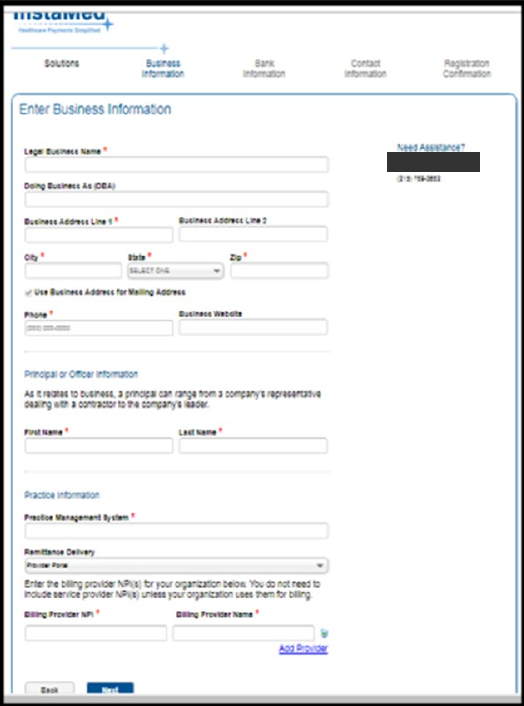
Screenshot source: Brown & Toland Provider Manual 2026 (revised September 2025), page 29.
Enter the bank account for EFT
The next illustrated enrollment screen asks for the bank name, routing number, account number and account-number confirmation. Enter the practice’s intended deposit account and follow the current verification requirements. The example check and contact address in the crop are covered. Bank-information screen guide.
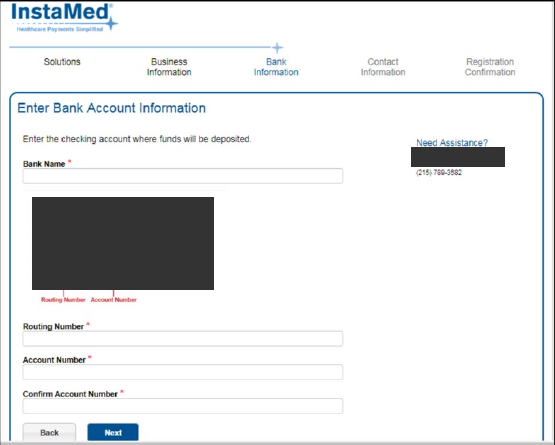
Screenshot source: Brown & Toland Provider Manual 2026 (revised September 2025), page 29.
InstaMed’s application permits only the owner or an authorized employee to complete registration; third-party enrollment is not allowed. Your biller can help prepare records and use separate delegated access after setup. Registration terms.
Verify the first payment
As an operational check, compare the bank deposit with the corresponding ERA or EOP, confirm the billing entity and payment reference, and check that your billing system received the remittance. InstaMed provides portal remittance access and a supported-clearinghouse list. ERA and remittance overview; supported ERA clearinghouses.
If enrollment or a payment is still missing
Recommended next check: A successful login does not prove that Premera can send EFT for your NPI/TIN combination. If the published restrictions apply, confirm the paper-check mailing address with Premera and use its provider-information update route. Do not promise that changing one portal field fixes a payer data mismatch. Payer payment guidance; InstaMed provider support.
What if a fee was already taken?
Keep the remittance, merchant settlement or vendor statement, and enrollment confirmation. Ask the entity that actually charged the fee about its refund policy and ask the payer/vendor to confirm the method for future payments. Do not assume that a new enrollment reverses an earlier fee, or that a smaller settlement means the payer owes another full payment. For the general card-versus-ACH distinction, read the InstaMed virtual-card fee guide.
Get help with payment setup
Bomi can help your practice review payment notices, prepare enrollment details and check remittance delivery. The practice remains responsible for the owner/authorized-employee application. See Bomi billing support and the separate InstaMed user-access guide.
Related payer payment guides
InstaMed fee and ACH enrollment hub · LifeWise Individual Plans: InstaMed EFT and Paper Checks
Frequently Asked Questions
Does all Premera EFT use InstaMed?
No. Premera Washington distinguishes individual-plan InstaMed enrollment from the Availity route for other supported products.
Can a solo provider without a type-2 NPI enroll?
Premera’s June 2025 notice lists absence of a type-2 NPI among the scenarios preventing individual-plan InstaMed EFT registration.
Why am I still receiving paper checks?
Premera identifies missing or mismatched TIN/NPI2 combinations and single NPIs linked to multiple TINs as possible barriers. Confirm the current issue with the payer.
Sources
Want Bomi to handle insurance billing?
Bomi helps therapy practices with benefit checks, claims, denials, balances, CAQH, attestations, and revenue management.
Book a call
About Bomi
Founded by George Ruan, Dax Earl, and Andrey Goder, Bomi helps independent therapists and group practices with insurance billing, credentialing, and payer follow-up. Bomi grew out of Dax’s experience helping his mother with her therapy practice, with a clear purpose: reduce the administrative burden of insurance while keeping practice owners in control.
Meet our founders