
Verify MassHealth Eligibility with EVS, POSC or NEHEN
By George Ruan • October 9, 2026
As of October 9, 2026. Use the official POSC login below to check MassHealth’s Eligibility Verification System (EVS). If your practice uses NEHEN, its current EDI service includes MassHealth and supports eligibility transactions. Choose the workflow your organization has authorized. MassHealth POSC entrypoint MHDC NEHEN EDI services
Sections
- Check coverage for the actual service date
- How to verify eligibility through POSC EVS
- How NEHEN fits into MassHealth eligibility
- What about NEHENNet searches
- Recommended response-review checklist
- If you cannot run the inquiry
- Related MassHealth guides
- Get help with MassHealth billing setup
- Frequently Asked Questions
- Sources
Check coverage for the actual service date
A MassHealth card is not proof of current eligibility. The PCC handbook recommends checking at scheduling and again on the appointment date because enrollment can change. Review coverage type, restrictions, managed-care information and other insurance rather than stopping after an eligible result. PCC Provider Handbook eligibility section
How to verify eligibility through POSC EVS
Open the eligibility task. Choose Manage Members > Eligibility > Verify Member Eligibility. Select the correct provider from the dropdown. MassHealth eligibility verification instructions
Enter the member search and dates. Use the 12-digit member ID or another search method listed in the official instructions. Enter the From and To dates of service and Submit. MassHealth eligibility verification instructions
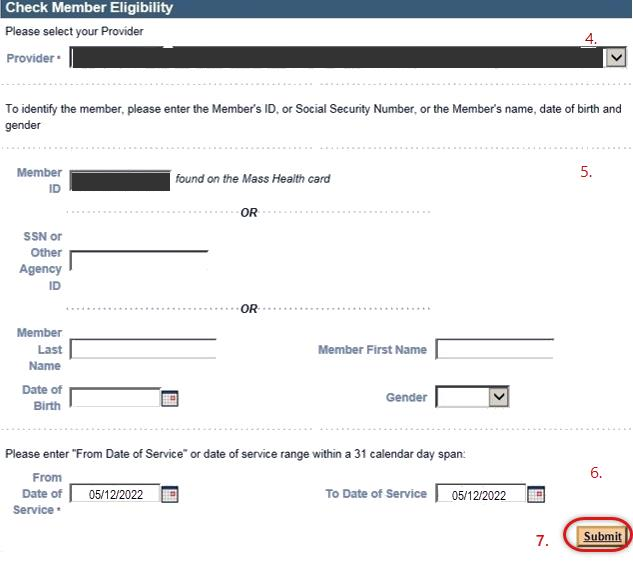
Screenshot source: MassHealth Verify Member Eligibility job aid, page 2 (November 2022; currently linked by MassHealth).
Read both information and eligibility. Confirm the Member Information tab, open Eligibility and use Verify Eligibility Status on the Dates of Eligibility panel. Save the verification as the state instructions describe. MassHealth eligibility verification instructions
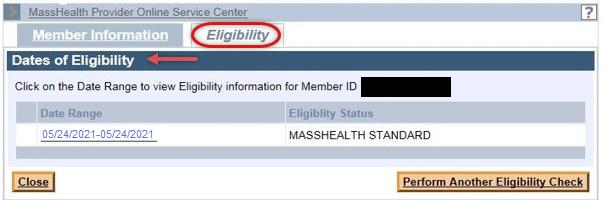
Screenshot source: MassHealth Verify Member Eligibility job aid, page 3 (November 2022; currently linked by MassHealth).
How NEHEN fits into MassHealth eligibility
The Massachusetts Health Data Consortium’s current NEHEN EDI page lists MassHealth in its payer network and supports X12 270/271 eligibility queries. It describes integrated, batch and online access. Confirm your organization’s connection, user permissions and MassHealth configuration with its NEHEN administrator or vendor. MHDC NEHEN EDI services
The state’s currently linked 270/271 companion guide, dated November 2023, defines the eligibility transaction requirements and system-to-system implementation checklist. A POSC subordinate account alone should not be treated as proof that a vendor’s EDI connection is configured. Follow the current companion guide for that setup. MassHealth 270/271 companion guide
What about NEHENNet searches
If your office calls its workflow NEHENNet, ask the administrator which current NEHEN service and account it uses. This guide links the operator’s current EDI page and the state instructions; it does not prescribe undocumented NEHEN screen labels or require a second portal signup.
Recommended response-review checklist
Match the person and the dates of service before interpreting the result.
Record the coverage type, plan enrollment, other-insurance details and restrictions shown in the response. Ask the administrator about an unclear message.
Confirm the service, provider contract and any authorization separately. An eligibility response should not be treated as a completed claims review.
If a response conflicts with a prior check, rerun the intended date and resolve the difference before copying the old claim route.
If you cannot run the inquiry
For a missing task or provider selection, have the Primary User review account permissions. The official eligibility instructions list MassHealth provider support at 800-841-2900. Recommended: tell support which service date and response message need clarification using the practice’s approved secure channel. POSC frequently asked questions MassHealth eligibility verification instructions
Related MassHealth guides
Get help with MassHealth billing setup
Bomi can help your therapy practice organize payer enrollment, portal permissions, eligibility checks and claims follow-up. The practice’s authorized administrator handles account permissions and approvals. See Bomi billing support.
Frequently Asked Questions
Is a MassHealth card enough to verify eligibility?
No. The PCC handbook says card possession does not guarantee eligibility; check the coverage and service-date enrollment.
Where is EVS in POSC?
Manage Members > Eligibility > Verify Member Eligibility, according to the official state instructions.
Does NEHEN support MassHealth eligibility?
The current NEHEN EDI operator page includes MassHealth and X12 270/271 eligibility transactions. Confirm your organization’s setup with its administrator.
Sources
Want Bomi to handle insurance billing?
Bomi helps therapy practices with benefit checks, claims, denials, balances, CAQH, attestations, and revenue management.
Book a call
About Bomi
Founded by George Ruan, Dax Earl, and Andrey Goder, Bomi helps independent therapists and group practices with insurance billing, credentialing, and payer follow-up. Bomi grew out of Dax’s experience helping his mother with her therapy practice, with a clear purpose: reduce the administrative burden of insurance while keeping practice owners in control.
Meet our founders