
MassHealth POSC Login: Provider Account Setup
By George Ruan • October 9, 2026
For MassHealth POSC provider login, open the official MassHealth POSC login and sign in with your own business account. As of October 9, 2026, MassHealth lists this entrypoint for its Provider Online Service Center. Official MMIS and POSC information
Sections
- Direct links: POSC login, new access and help
- TL;DR: use your own login, and give your biller their own
- Who needs their own MassHealth POSC login
- Before you create access
- How to register the primary user
- Set up your own business sign-in
- Add your biller as a subordinate user
- Fix a missing menu or login problem
- Recommended setup check
- Related MassHealth guides
- Get help with MassHealth billing setup
- Frequently Asked Questions
- Sources
Direct links: POSC login, new access and help
For business-account login help, call Virtual Gateway at 800-421-0938. For MassHealth provider registration, call 800-841-2900. Business Log In provider guide POSC frequently asked questions
The MyMassGov business sign-in page looks like this. Existing users enter their own email and password; first-time users choose CREATE AN ACCOUNT after following their Virtual Gateway invitation.
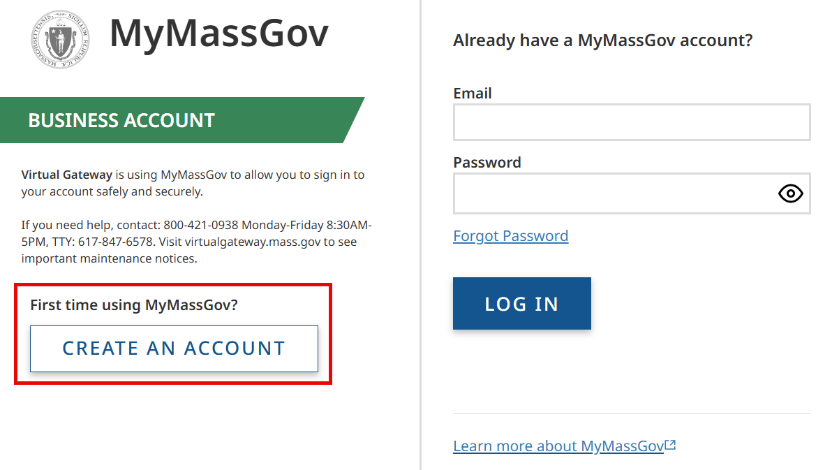
Screenshot source: Business Log In for Provider User Reference Guide, page 3 (Last Updated: May 17, 2026).
TL;DR: use your own login, and give your biller their own
Use your own business login. Your biller uses their own login as a subordinate user; the Primary User grants access to the practice and the services the biller needs. Provider enrollment and health-plan contracts are separate. POSC Primary User policy Create subordinate accounts
Who needs their own MassHealth POSC login
Each person signs in under their own name and uses their own multifactor authentication (MFA). Never share your password. A Primary User can link an existing subordinate account to authorized Provider IDs/Service Locations (PID/SLs); the current business guide also documents selecting an organization when the person has access to more than one. Business Log In provider guide POSC Primary User policy Link subordinate accounts
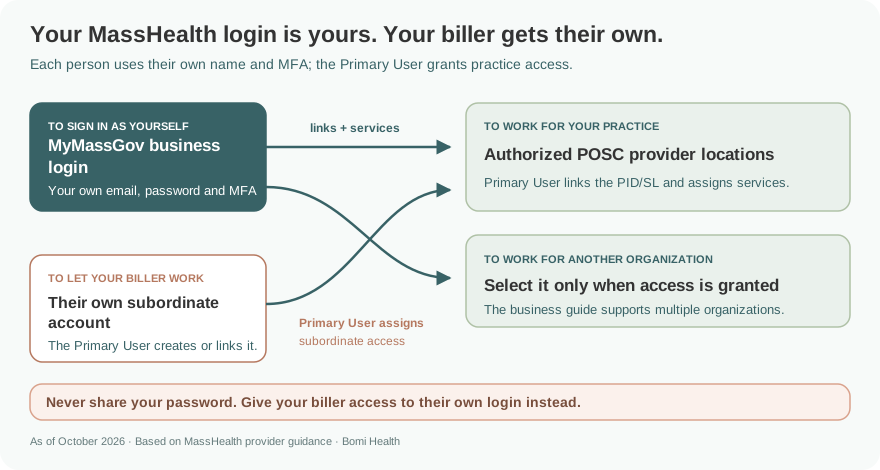
Access map based on MassHealth’s Primary User policy, current business sign-in guide and subordinate linking job aid. Primary User policy Business sign-in guide Link subordinate accounts
Before you create access
The organization designates a Primary User and must maintain a backup Primary User. Confirm the intended PID/SL and the tasks each person is authorized to perform before granting access. A POSC account does not replace provider enrollment or a managed-care agreement. POSC Primary User policy Register for MassHealth POSC
How to register the primary user
Use the official registration page. Complete the Provider Enrollment Data Collection Form and Registration Instructions (POSC-DC-PE) to identify your organization’s primary administrator. Register for MassHealth POSC
Submit through the published channel. The page lists fax 617-988-8974 and a mail option. It publishes a seven-business-day processing timeline; allow for missing-information requests rather than promising a start date. Register for MassHealth POSC
Follow the Virtual Gateway email. Complete the account setup instructions sent after processing. Then have the Primary User assign staff and billing-partner access. Register for MassHealth POSC
Set up your own business sign-in
Follow the Virtual Gateway invitation and current Business Log In provider guide. At Virtual Gateway, choose Log In, then Business Log In for my job or my business, and Proceed through the security warning. A first-time user chooses CREATE AN ACCOUNT, verifies their email, enters their own name, sets a password and sets up MFA. An existing user enters their own email and password and completes verification. Accept the terms and select the authorized organization if prompted. Business Log In provider guide
Add your biller as a subordinate user
For a new person, the Primary User chooses Administer Account > Manage Subordinate Accounts, selects the intended PID/SL and chooses New Subordinate. Enter that person’s information and unique business email, assign needed services and Submit. The February 2026 job aid describes the generated username and the Virtual Gateway email for business-account MFA setup. Your biller completes their own sign-in setup; never give them your password. Create subordinate accounts job aid
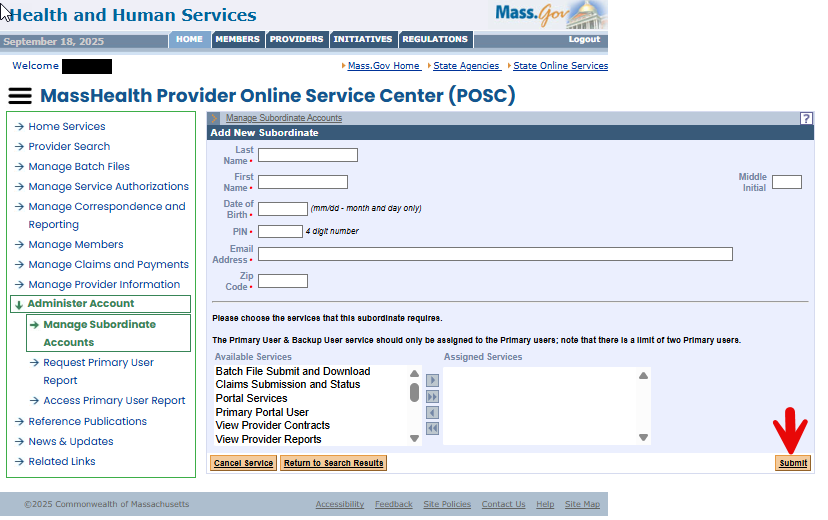
Screenshot source: MassHealth Create Subordinate Accounts job aid, page 4 (February 2026).
If the biller already has a POSC/Virtual Gateway username, use Link Subordinate for the intended PID/SL, enter that existing username, assign services and Submit. Confirm the username with the biller: the linking field requests the existing Virtual Gateway username, while current MyMassGov business sign-in uses email and password. Do not create a duplicate account or share your sign-in. Link subordinate accounts job aid Business Log In provider guide
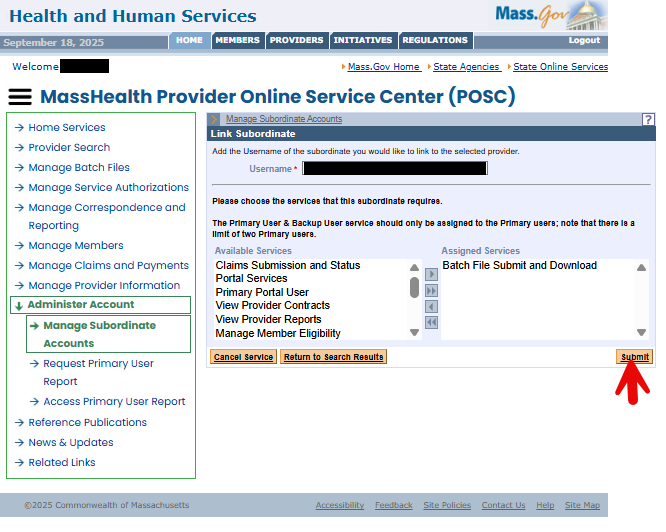
Screenshot source: MassHealth Link Subordinate Accounts job aid, page 4 (January 2026).
Fix a missing menu or login problem
Forgot your business-account password? In the current business sign-in flow, choose Forgot Password, verify your email with the emailed code and set a new password. For MFA or account help, use Virtual Gateway Customer Service at 800-421-0938; do not reset or borrow a coworker’s account. Business Log In provider guide
A staff user cannot see claims or eligibility. Ask the Primary User to review assigned services and PID/SL links; do not borrow the administrator’s login. POSC Primary User policy
The previous Primary User left. Submit the Existing Provider Modification Data Collection Form (POSC-DC-PM) and remove the departed user’s access. Register for MassHealth POSC
You need credential help. The FAQ lists Virtual Gateway Help Desk 800-421-0938; questions about MassHealth registration go to 800-841-2900. POSC frequently asked questions
Recommended setup check
Before handing off billing, ask each person to sign in with their own account and confirm that the intended service location appears. Record who holds the primary and backup roles and where your team will report access problems. Keep account setup and member-level claim work in separate task lists.
Related MassHealth guides
Get help with MassHealth billing setup
Bomi can help your therapy practice organize payer enrollment, portal permissions, eligibility checks and claims follow-up. The practice’s authorized administrator handles account permissions and approvals. See Bomi billing support.
Frequently Asked Questions
Where is the official MassHealth provider login?
Use the POSC link above, published on MassHealth’s MMIS and POSC information page.
Can my biller use my POSC username?
No. The Primary User assigns separate authorized access; MassHealth’s policy prohibits sharing user IDs.
How do I reset my MassHealth POSC business password?
Open Virtual Gateway, choose Log In and Business Log In, then Forgot Password on MyMassGov. Verify your own email and set a new password using the current provider guide.
Does a MyMassGov account automatically enroll me in MassHealth?
No. Business sign-in, POSC permissions, provider enrollment and health-plan agreements are separate.
What if our primary user has left?
Use the Existing Provider Modification Data Collection Form to assign a replacement and remove former access, following the official registration page.
Sources
Planning a private practice?
Use Bomi's free Build resources to plan the business, provider identity, payer setup, and billing workflow before you see clients.
Use Build resources
About Bomi
Founded by George Ruan, Dax Earl, and Andrey Goder, Bomi helps independent therapists and group practices with insurance billing, credentialing, and payer follow-up. Bomi grew out of Dax’s experience helping his mother with her therapy practice, with a clear purpose: reduce the administrative burden of insurance while keeping practice owners in control.
Meet our founders