
Add Your Biller to MassHealth POSC as a Subordinate User
By George Ruan • October 9, 2026
As of October 9, 2026. Start at the official POSC login below. Your practice’s Primary User manages subordinate accounts and authorized billing-entity links. Give the biller their own account and the services they need for the correct Provider ID/Service Location (PID/SL). MassHealth POSC entrypoint POSC Primary User policy
Sections
- Create a new user or link an existing one
- How the Primary User creates a subordinate account
- How to link a biller who already has an account
- Give access to the right locations and tasks
- Billing agency access is a separate choice
- Recommended handoff checklist
- Related MassHealth guides
- Get help with MassHealth billing setup
- Frequently Asked Questions
- Sources
Create a new user or link an existing one
MassHealth permits one user ID per person. Its Create Accounts job aid distinguishes new staff accounts from access for existing users or other billing entities through linking. Ask whether the biller already has a user ID before creating one; use the Link Accounts job aid for existing access. Create subordinate accounts job aid, February 2026 POSC job aids
How the Primary User creates a subordinate account
Open subordinate management. Choose Administer Account > Manage Subordinate Accounts. Select the correct PID/SL from the Provider dropdown, then New Subordinate. Create subordinate accounts job aid, February 2026
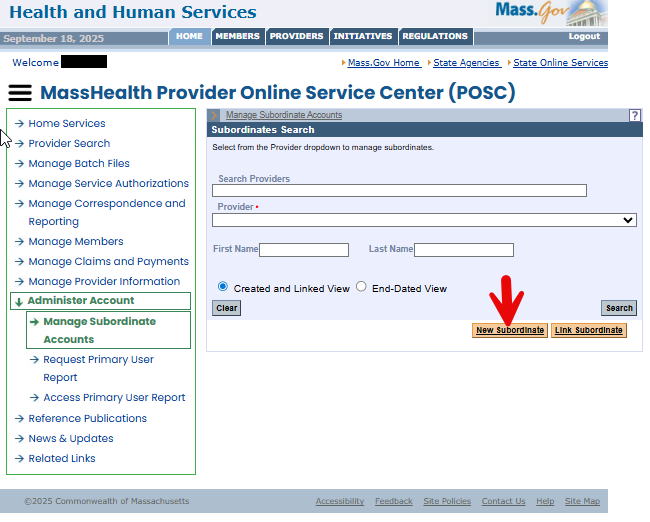
Screenshot source: MassHealth Create Subordinate Accounts job aid, page 3 (February 2026).
Enter the person’s information. The job aid requests name, birth month/day without the year, a user-chosen four-digit PIN, unique business email and ZIP code. Create subordinate accounts job aid, February 2026
Assign services and submit. Move needed services from Available Services to Assigned Services. Submit and note the generated username; the person receives Virtual Gateway business-account MFA instructions by email. Create subordinate accounts job aid, February 2026
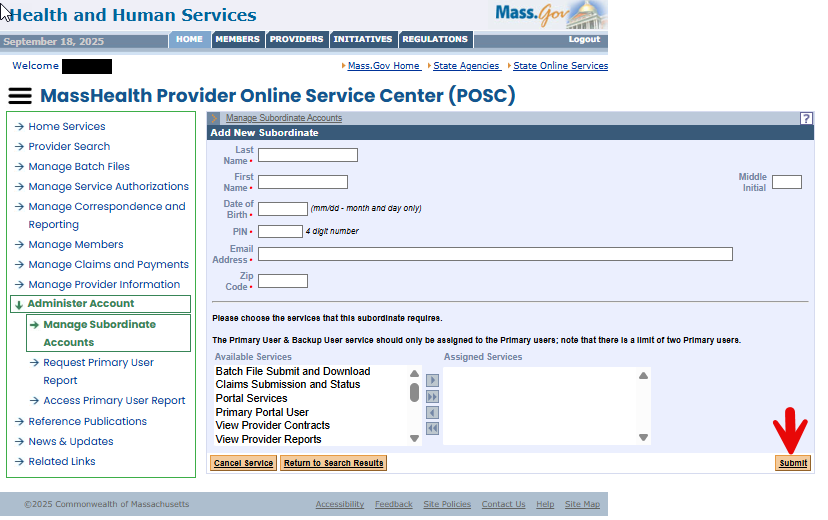
Screenshot source: MassHealth Create Subordinate Accounts job aid, page 4 (February 2026).
How to link a biller who already has an account
The January 2026 Link Accounts job aid uses Administer Account > Manage Subordinate Accounts. Choose the intended PID/SL and Link Subordinate, enter the existing Virtual Gateway username, assign the authorized services and Submit. Confirm which ID to link with the biller; do not create a duplicate account. Link subordinate accounts job aid
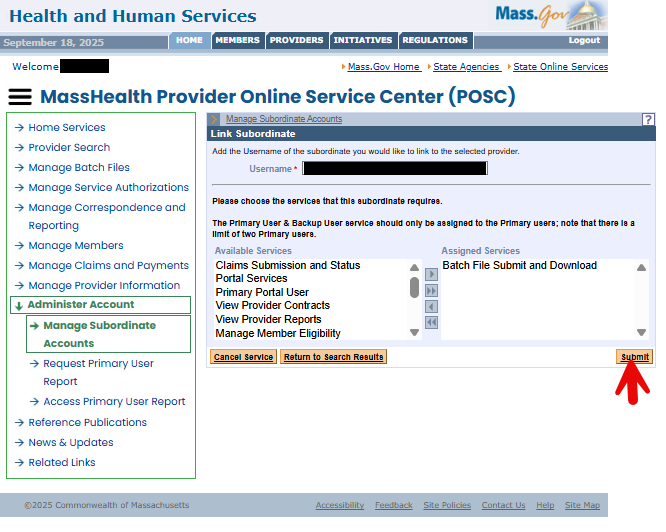
Screenshot source: MassHealth Link Subordinate Accounts job aid, page 4 (January 2026).
The biller uses their own business sign-in and MFA. Never share the Primary User’s password. The current business guide signs in with email; the Link Subordinate field above requests the existing Virtual Gateway username. Business Log In provider guide Link subordinate accounts job aid
Give access to the right locations and tasks
Primary Users must limit each person’s services and PID/SL assignments to authorized work. Existing users can be linked to multiple locations when appropriate. The policy requires prompt updates when duties change and prompt deactivation or delinking when staff or affiliate relationships end. POSC Primary User policy
Billing agency access is a separate choice
MassHealth’s FAQ describes enrolled POSC business partners such as billing intermediaries and clearinghouses. The Primary User can authorize another entity to perform work on the provider’s behalf. Recommended: ask your billing agency which registered entity and existing user need access, then use the current linking job aid. POSC frequently asked questions POSC job aids
Recommended handoff checklist
Have the biller confirm access to the intended PID/SL and the actual eligibility, claims or remittance task before assigning a work queue.
Keep a record of the authorized tasks and who will review access. Do not grant administrator duties simply because the person submits claims.
When the engagement ends, confirm access removal with the Primary User and check any separate MBHP or plan portal permissions too.
Maintain a backup Primary User and review access quarterly, semiannually or annually as MassHealth’s policy requires. A POSC account change does not itself change a provider’s enrollment or managed-care agreement. POSC Primary User policy
Related MassHealth guides
Get help with MassHealth billing setup
Bomi can help your therapy practice organize payer enrollment, portal permissions, eligibility checks and claims follow-up. The practice’s authorized administrator handles account permissions and approvals. See Bomi billing support.
Frequently Asked Questions
Who can create a MassHealth POSC subordinate?
The organization’s Primary User creates subordinate accounts and assigns services.
Should I create a second ID for a biller who already uses POSC?
MassHealth allows one ID per person. Use the official linking workflow for authorized additional provider or location access.
Does POSC access also give my biller MBHP access?
Arrange MBHP or plan portal permissions separately. The POSC account is the state MMIS access workflow.
Sources
Want Bomi to handle insurance billing?
Bomi helps therapy practices with benefit checks, claims, denials, balances, CAQH, attestations, and revenue management.
Book a call
About Bomi
Founded by George Ruan, Dax Earl, and Andrey Goder, Bomi helps independent therapists and group practices with insurance billing, credentialing, and payer follow-up. Bomi grew out of Dax’s experience helping his mother with her therapy practice, with a clear purpose: reduce the administrative burden of insurance while keeping practice owners in control.
Meet our founders