
ECHO Provider Portal Login: ACH and Biller Access
By George Ruan • October 9, 2026
For ECHO provider login, open ProviderPayments.com and sign in with your registered username and password. As of October 9, 2026, ECHO links this payment-document portal from its official provider page. Portal access and your payer’s EFT election are separate tasks.
Sections
- Direct links: ECHO login, registration and EFT enrollment
- TL;DR: use your own login, and give your biller their own
- Who needs their own ECHO login?
- Before you create access: identify the TIN and payer
- What the ECHO provider portal is for
- ECHO account setup: register or use your existing login
- How to enroll in ACH without choosing the wrong fee option
- Confirm the ACH deposit and payment result
- Add your biller: confirm access with ECHO
- ECHO login errors, password help and missing payments
- Which payers use ECHO, and which guide applies?
- Frequently Asked Questions
Direct links: ECHO login, registration and EFT enrollment
ECHO provider login — sign in to look up payment documents.
New account registration — use the registration link on the login page, as documented in the ECHO portal guide.
Account/password help: 888-834-3511 — contact ECHO support if you cannot sign in; no separate reset URL is verified in the cited sources.
EFT/ERA enrollment form — confirm the payer and terms before enrolling.
Aetna Better Health dedicated EFT enrollment — a payer-specific example linked by Aetna Better Health Florida; not a universal enrollment route for other payers.
The ECHO login page looks like this. Existing users choose Log In; first-time users choose the registration link below the sign-in area.
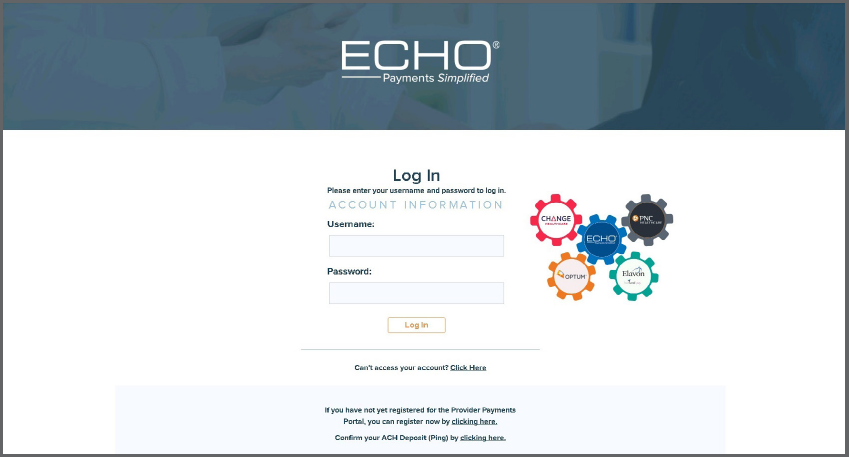
Screenshot source: ECHO Provider Payments Portal Quick Reference Guide, page 3.
TL;DR: use your own login, and give your biller their own
Use your own ECHO login to review payments. Give your biller their own account, and ask ECHO how to link it to the practice: the public guide does not name a biller role your administrator can grant. Choosing bank deposits instead of cards is a separate payer enrollment task.
Who needs their own ECHO login?
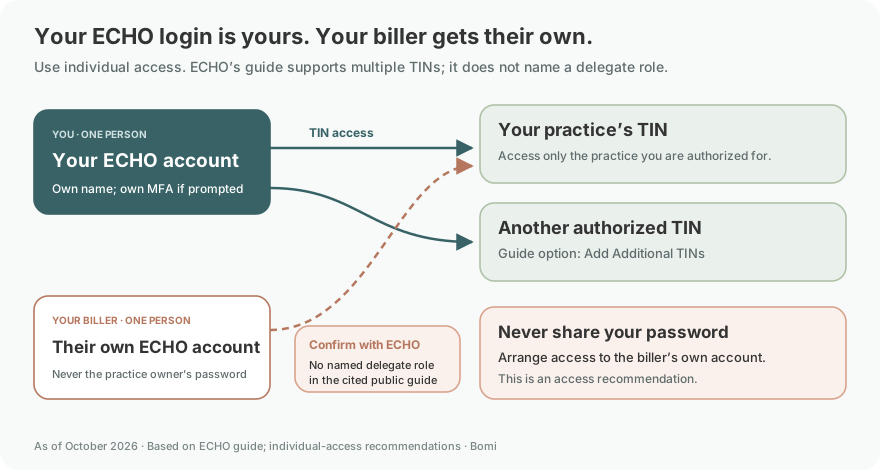
Treat each ECHO login as one person’s account: use your own name and contact information, and complete any multi-factor authentication (MFA) prompt yourself. We recommend individual access for every authorized person who looks up payments. Never share your password. The cited guide does not specify a current MFA method or a named biller/delegate role. ECHO’s enrollment form includes provider-agent contacts, but does not establish a portal administrator/delegate permission model. Ask ECHO support how to provision each biller’s access.
Before you create access: identify the TIN and payer
Confirm the billing entity’s tax identification number (TIN) and the payer whose payments you need to find. For EFT enrollment, gather the provider and agent contacts, matching draft number and amount, banking details and clearinghouse information requested by the current ECHO form. Portal registration, a payment election and any required bank verification need separate confirmation.
What the ECHO provider portal is for
ECHO’s portal quick reference guide describes an Inquiry page with payment documents, an EPP link for printable remittances, an 835 link for electronic remittance advice, and Settlement links for payment status. An ERA is the payment explanation used for posting; EFT is the bank transfer. Check both when reconciling a deposit.
ECHO account setup: register or use your existing login
Open ProviderPayments.com through the official ECHO link above. Existing users can sign in; first-time users use the registration link below the login area.
Complete the Create a New Account form using the instructions displayed beside its fields. Follow the current password and identity checks rather than an old screenshot.
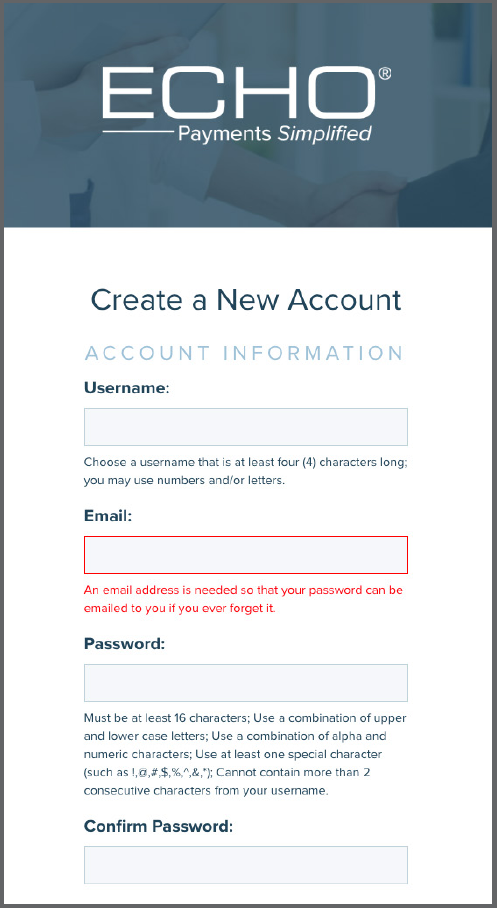
Screenshot source: ECHO Provider Payments Portal Quick Reference Guide, page 6.
After account creation, verify that the practice and payment records you expect are available. ECHO’s guide also documents Add New TIN for users working across tax IDs. A tax identification number (TIN) identifies the billing entity.
Those account steps are documented in the ECHO-authored portal guide. Keep portal registration and bank verification as separate completion items.
How to enroll in ACH without choosing the wrong fee option
Automated Clearing House (ACH) is the bank-transfer rail used for EFT. Start with your payer’s official EFT page. For example, Aetna Better Health Florida explicitly distinguishes its dedicated no-fee enrollment from ECHO’s fee-based ACH All Payer program. A generic ECHO enrollment button is not enough evidence of the price you selected.
Gather the payer name, legal practice name, TIN, national provider identifier (NPI), matching ECHO draft number and amount, bank details, and clearinghouse contact.
Choose EFT, ERA, or both according to the payer’s instructions. ECHO’s standard form names one payer per form and handles enrollment at the tax-ID level.
Have an authorized signer review the banking information and terms. The form provides provider-agent contact fields for an authorized biller.
Use the submission channel on the current instructions. ECHO’s form offers its secure portal or postal mail; do not send banking documents to an unverified address.
This preparation list follows ECHO’s 2026 EFT/ERA form. Ask the payer to identify its direct no-fee option in writing before accepting broader services.
Confirm the ACH deposit and payment result
When your enrollment requires a small verification deposit, ECHO’s guide calls it an ACH deposit or ping. The documented portal link accepts the TIN and deposited amount. Follow your enrollment confirmation for when to complete it. See the ping instructions.
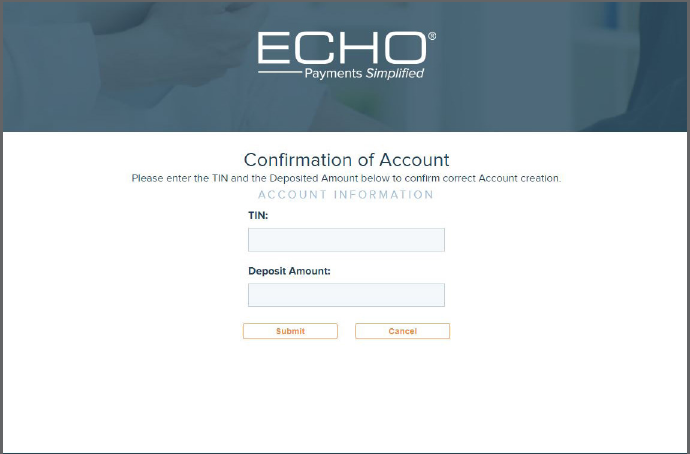
Screenshot source: ECHO Provider Payments Portal Quick Reference Guide, page 4.
For your own acceptance check, record the selected payer and method, the enrollment acknowledgment, and the first deposit with its remittance. Match the payment reference and amount before marking the setup complete. A submitted form or a working password is only part of that evidence.
Add your biller: confirm access with ECHO
Use the provider-agent fields on the enrollment form for an authorized biller assisting with EFT/ERA enrollment. For portal access, ask ECHO support: 888-834-3511 to confirm access to the biller’s own account for the practice’s TIN. The practice administrator should coordinate that authorization, rather than hand over a shared password. The guide documents Add Additional TINs for users working across tax IDs, but it does not name an administrator-assigned biller/delegate role; ask ECHO for the exact access arrangement. Keep the biller’s name and any MFA verification their own. Do not infer delegated banking permissions from the enrollment contact fields.
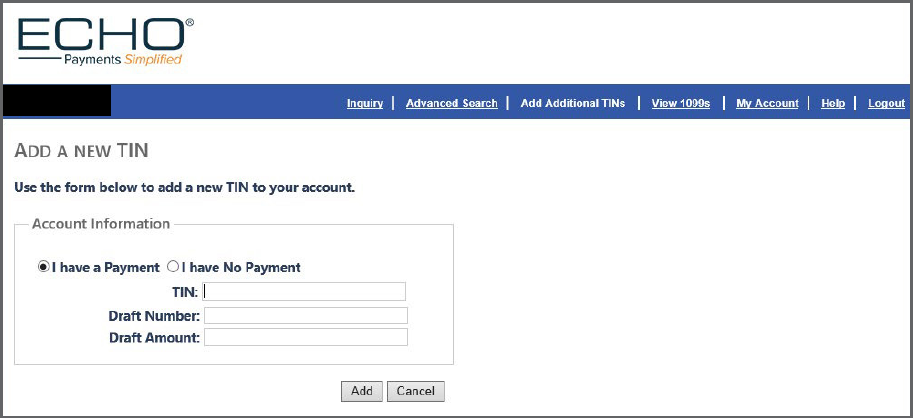
Screenshot source: ECHO Provider Payments Portal Quick Reference Guide, page 9.
ECHO login errors, password help and missing payments
If you cannot sign in or suspect an account lockout, contact ECHO provider support. The cited public sources do not specify a universal lockout duration or a separate password-reset URL. For a password change after signing in, the portal guide documents My Account. Use the current page prompts rather than guessing a reset address.
No matching payment: check that the draft number and amount belong together and to the enrolling TIN. Ask support to resolve a mismatch rather than entering a different entity’s information.
No recent ECHO payment: use the payer’s first-payment instructions. Aetna Better Health Florida, for example, directs new recipients to use the draft on their initial check. Florida’s instructions
Payment arrived but no ERA: ask the clearinghouse and ECHO to trace delivery. ECHO’s form directs missing-835 questions to its EDI team or the clearinghouse. ERA delivery instructions
Which payers use ECHO, and which guide applies?
Want help organizing payment enrollment and follow-up? Contact Bomi with the payer and the part of the process where you are stuck.
Frequently Asked Questions
What is the ECHO provider login?
Use ProviderPayments.com, linked from ECHO’s official provider page. Registered users sign in with their username and password; first-time users follow the registration link on that page.
How do I reset my ECHO provider portal password?
Contact ECHO provider support at 888-834-3511 if you cannot sign in. The cited public sources do not establish a separate reset URL or universal lockout period. The portal guide documents My Account for password changes after sign-in.
Is ECHO provider login the same as ACH enrollment?
No. Portal access lets you look up payment documents. Confirm the payer’s EFT election and any required bank verification separately.
Does ECHO charge for EFT?
The enrollment option matters. Aetna Better Health Florida documents dedicated no-fee EFT and fee-based All Payer ACH. Confirm your payer’s current terms before accepting a service.
How do I opt out of ECHO virtual cards?
Use your payer’s documented opt-out route and confirm the replacement payment method. AmeriHealth Caritas Pennsylvania’s QuickGuide lists 888-492-5579 for card opt-out and distinguishes direct-payer EFT from broader fee-based services.
Want Bomi to handle insurance billing?
Bomi helps therapy practices with benefit checks, claims, denials, balances, CAQH, attestations, and revenue management.
Book a call
About Bomi
Founded by George Ruan, Dax Earl, and Andrey Goder, Bomi helps independent therapists and group practices with insurance billing, credentialing, and payer follow-up. Bomi grew out of Dax’s experience helping his mother with her therapy practice, with a clear purpose: reduce the administrative burden of insurance while keeping practice owners in control.
Meet our founders