
CareSource Ohio: QuicRemit Fees and EFT Enrollment
By George Ruan • October 9, 2026
As of October 9, 2026. For CareSource Ohio Medicaid payments, start with the ECHO enrollment link published by CareSource. The current Ohio Medicaid claims page identifies ECHO as the payment partner and lists EFT, QuicRemit virtual cards, and paper checks. This guide is scoped to that Ohio Medicaid page.
Sections
What is a CareSource QuicRemit virtual card?
QuicRemit is the virtual-card option in CareSource’s payment choices. Running the card through your merchant processor can incur the bank and card-processing charges described by CareSource. There is no single percentage on that current page, so use your actual merchant agreement and statement to measure the cost.
If you searched for “quick remit” after receiving a payment notice, match the notice’s payer and vendor to the official CareSource page before taking action. Do not assume every similarly named payment message belongs to this account.
How to request EFT instead of virtual cards
Open CareSource’s Ohio Medicaid claims page and follow its Enroll with ECHO link. Choose EFT as the payment preference for CareSource. Current payer instructions
Have the practice TIN, CareSource Provider ID, and bank routing/account numbers ready. For an existing ECHO relationship, gather an ECHO draft number and its matching payment amount. CareSource’s enrollment FAQ
Ask ECHO to confirm the payer and tax ID covered by the election. If you are declining cards, request that change explicitly and ask what happens to each outstanding card.
Review the enrollment acknowledgment and terms. Keep the confirmation and use the first subsequent payment to check both the deposit and the remittance.
The identifier checklist comes from CareSource’s January 2020 FAQ. Use the current enrollment link above; do not rely on the old FAQ’s website path or historic payment timing. The FAQ says card opt-out can be requested through ECHO or an online payment-preference change. Read the dated FAQ.
Review payment documents after enrollment
Payment-document access is separate from the payer EFT election. ECHO’s published portal guide shows the following account screens; they do not replace the dedicated payer enrollment link or establish its fee terms. Follow the current portal prompts if the layout differs.
Sign in or choose registration
Open ProviderPayments.com. Existing users enter their own credentials and choose Log In. First-time users choose the registration link below the sign-in area.
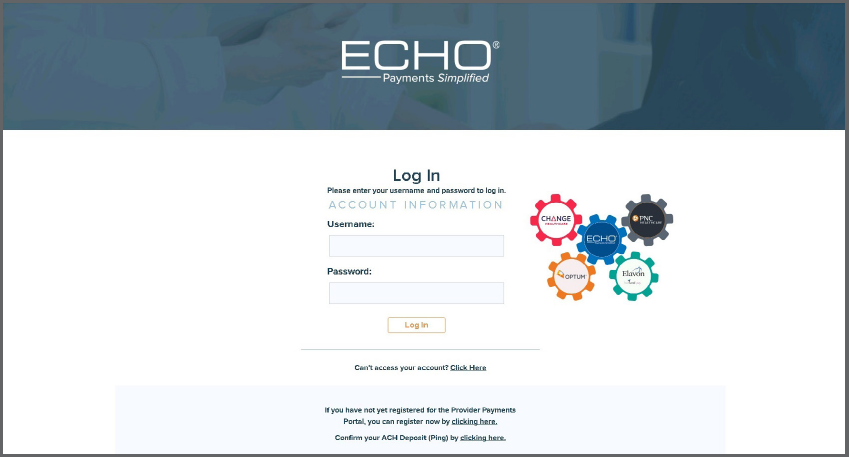
Screenshot source: ECHO Provider Payments Portal Quick Reference Guide, page 3.
Create an account if you are a first-time user
Complete Create a New Account using the on-screen instructions. Once signed in, use Inquiry to locate the payment and its EPP or 835 remittance. Check the payment reference against the bank deposit before marking the EFT setup complete.
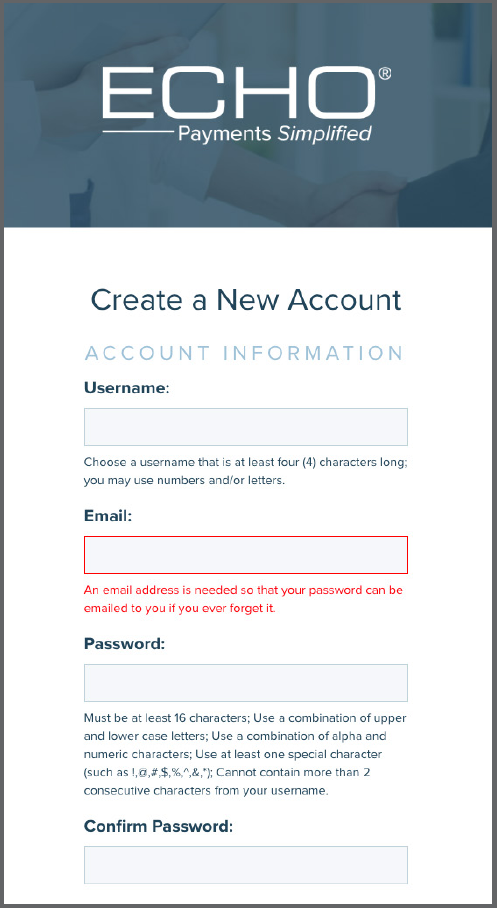
Screenshot source: ECHO Provider Payments Portal Quick Reference Guide, page 6.
Is CareSource EFT free?
CareSource’s 2020 Indiana payment training describes EFT/ERA enrollment with no fees and distinguishes an optional fee-based All Payer program. That is historical, Indiana-specific training, not a new Ohio pricing schedule. Ask ECHO to confirm today’s CareSource Ohio payer-only EFT terms before accepting an enrollment agreement.
The useful question is precise: “Please confirm the fee for CareSource Ohio Medicaid direct-payer EFT and identify any optional paid service separately.” Keep the response with the enrollment record. Do not infer pricing for every other ECHO payer from the CareSource answer.
Who should you contact if enrollment fails?
The current Ohio page lists ECHO Customer Support at 888-834-3511. Give support the enrolling billing entity and the payment reference through its verified channel. Ask whether the issue is account authentication, payer enrollment, bank validation, or delivery of remittance documents.
A login works but payments are missing: confirm the correct TIN and payer are covered. Use our ECHO portal guide to distinguish account access from enrollment.
A new virtual card arrives during the change: ask whether the election is active and whether that specific card can be replaced. Do not process and separately request a replacement without clarifying how duplicate payment is prevented.
The bank deposit differs from the remittance: compare the payment reference, gross amount and any merchant charges before deciding that the payer underpaid.
What if card fees were already taken?
Gather the original remittance and merchant settlement statement. Ask your processor to identify the charge and any available adjustment, and ask ECHO how to handle future payments. These are follow-up requests; this guide does not promise reimbursement of past processor fees. CareSource identifies those fees as bank/card-processing costs. Fee explanation.
For a practical handoff, keep a short record of the payer, TIN, payment reference, fee amount, requested change and confirmation. The practice owner and biller should be able to see what remains open without repeating the enrollment.
Related CareSource and ECHO guides
Need help tracking the payment change? Contact Bomi with your payer and enrollment question.
Frequently Asked Questions
Does CareSource Ohio use ECHO Health?
CareSource’s Ohio Medicaid claims page names ECHO as its payment partner and links its enrollment route.
What is the CareSource QuicRemit fee?
The current Ohio page attributes card fees to the bank/card-processing relationship and does not publish one universal percentage. Check your merchant statement.
How do I stop CareSource virtual cards?
Request a payment-preference change with ECHO and confirm EFT enrollment separately. For outstanding cards, ask how each payment will be handled rather than assuming the future election replaces them automatically.
Want Bomi to handle insurance billing?
Bomi helps therapy practices with benefit checks, claims, denials, balances, CAQH, attestations, and revenue management.
Book a call
About Bomi
Founded by George Ruan, Dax Earl, and Andrey Goder, Bomi helps independent therapists and group practices with insurance billing, credentialing, and payer follow-up. Bomi grew out of Dax’s experience helping his mother with her therapy practice, with a clear purpose: reduce the administrative burden of insurance while keeping practice owners in control.
Meet our founders