
AmeriHealth Caritas PA: ECHO Card Fees and EFT
By George Ruan • October 9, 2026
As of October 9, 2026. For AmeriHealth Caritas Pennsylvania, start with the payer’s ECHO enrollment link from its current billing page. The payer documents no-fee EFT for its own payments and distinguishes enrollment across all payers, which may carry a charge. Confirm the selected payer and terms on the current form.
Keep the plan name precise. This article covers AmeriHealth Caritas Pennsylvania’s published payment instructions. Do not apply it automatically to commercial AmeriHealth, Community HealthChoices, or another similarly named plan.
Sections
Why an ECHO virtual card can reduce your deposit
AmeriHealth Caritas Pennsylvania’s payment instructions describe ECHO virtual credit cards (VCCs), including merchant transaction fees based on your acquirer relationship. Your processor’s statement is the place to establish the actual charge; the payer does not specify one universal percentage.
For a practice owner, the useful comparison is the net amount received and the work needed to post it. Keep the original remittance alongside the merchant settlement instead of comparing a bank deposit with a remembered claim total.
How to opt out of AmeriHealth Caritas PA virtual cards
The payer lists 888-492-5579 for ECHO VCC opt-out. Ask to stop virtual-card payments for the correct billing entity, then ask how each unpaid card will be handled. Keep the request reference and any written confirmation.
Treat the future payment election and an outstanding payment as separate questions. Before processing a card while a replacement is being discussed, clarify which payment instrument remains valid. Do not rely on a card simply expiring to establish your preferred ongoing method.
Enroll in payer-specific EFT and ERA
Use the direct-payer route above, or follow the EFT option on the payer’s current billing page. Ask to confirm AmeriHealth Caritas Pennsylvania and the no-fee payer-only election. Official QuickGuide
Gather an ECHO draft number and corresponding payment amount. The payer says an existing ECHO account may be used to enroll and that these values validate the request. Current payment instructions
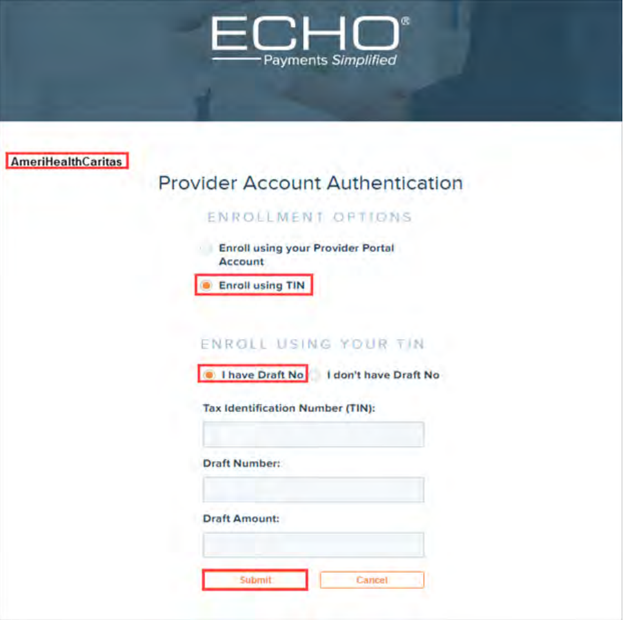
Screenshot source: AmeriHealth Caritas Pennsylvania EFT Enrollment Guide (V1.2 2020), page 7.
Follow the account-authentication and enrollment form instructions. Review the intended tax ID, bank account and remittance destination before an authorized person submits.
Complete any required bank verification. The payer’s published guide describes confirming a small ACH deposit through ProviderPayments.com. Follow the instructions you receive for your actual enrollment. Documented enrollment process
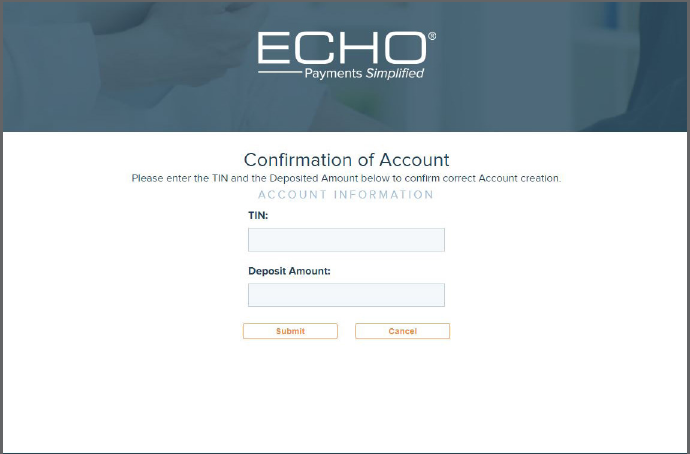
Screenshot source: ECHO Provider Payments Portal Quick Reference Guide, page 4.
Keep the confirmation, then check the first deposit and its remittance before closing the setup task.
The enrollment guide is marked 2020. It is useful for the documented flow, but old screenshots do not establish today’s processing time or a current roster of covered plans. Use the payer’s present instructions and your actual acknowledgment to resolve those questions. Guide and version.
Does direct EFT also provide electronic remittances?
The payer says EFT enrollment includes electronic remittance advices (ERAs), and payment documents are available through ECHO’s provider portal. Its instructions also describe deposits labeled PNC–ECHO. Read the payment and ERA details. A bank descriptor helps locate a payment; match its reference and amount to the ERA before posting.
If the deposit appears but the posting file does not, ask the clearinghouse to trace the expected ERA. Bring the payment reference and the intended destination to the follow-up. Keep a manual record of what was posted so a later file does not create duplicate work.
What if fees were already deducted?
First identify the service behind the deduction. For a card payment, obtain the merchant processing statement. For an EFT vendor fee, ask ECHO which program was selected and obtain the enrollment terms. The payer QuickGuide distinguishes fee-free direct-payer EFT from potentially charged all-payer enrollment.
Ask the charging party whether an adjustment is available, and keep that request separate from changing future payments. This guide does not promise refunds or automatic reissuance. For pending payments, document the outcome ECHO confirms before marking the original item paid or replaced.
Related ECHO payment guides
Need help organizing payer enrollment and payment follow-up? Contact Bomi with the plan and the issue you want to resolve.
Frequently Asked Questions
How do I opt out of AmeriHealth Caritas PA virtual cards?
The payer directs providers to ECHO at 888-492-5579. Confirm the billing entity and ask how outstanding card payments will be handled.
Is AmeriHealth Caritas Pennsylvania EFT free?
The payer’s QuickGuide documents no-fee direct-payer EFT and distinguishes all-payer enrollment, which may carry a fee. Verify the payer and terms on the current form.
Do I need to confirm a small bank deposit?
The published enrollment guide describes an ACH deposit confirmation step. Follow the current confirmation instructions for your actual enrollment; submitting the form alone may leave verification unfinished.
Planning a private practice?
Use Bomi's free Build resources to plan the business, provider identity, payer setup, and billing workflow before you see clients.
Use Build resources
About Bomi
Founded by George Ruan, Dax Earl, and Andrey Goder, Bomi helps independent therapists and group practices with insurance billing, credentialing, and payer follow-up. Bomi grew out of Dax’s experience helping his mother with her therapy practice, with a clear purpose: reduce the administrative burden of insurance while keeping practice owners in control.
Meet our founders