
PNM Login: Ohio OHID Recovery, Lockouts and MFA
By George Ruan • October 9, 2026
For Ohio PNM provider login, open the official Provider Network Management portal and sign in with your own OHID account using Log in with OH|ID.
This guide focuses on existing-account problems, with public sources checked October 9, 2026. For first-time setup, use the OHID and PNM account guide; for someone else’s billing access, use the PNM biller-access guide.
Sections
- Direct links: PNM login, OHID recovery and provider help
- TL;DR: use your own OHID, and give your biller their own
- Who needs their own OHID login?
- Before creating another account
- Add your biller with their own Provider Agent login
- Identify where the Ohio PNM login stopped
- Recover your OHID username or password
- MFA codes, a replaced phone and backup methods
- OHID works but the PNM provider record is missing
- Where to get Ohio PNM login help
- How Bomi can help
- Related provider guides
- Frequently Asked Questions
Direct links: PNM login, OHID recovery and provider help
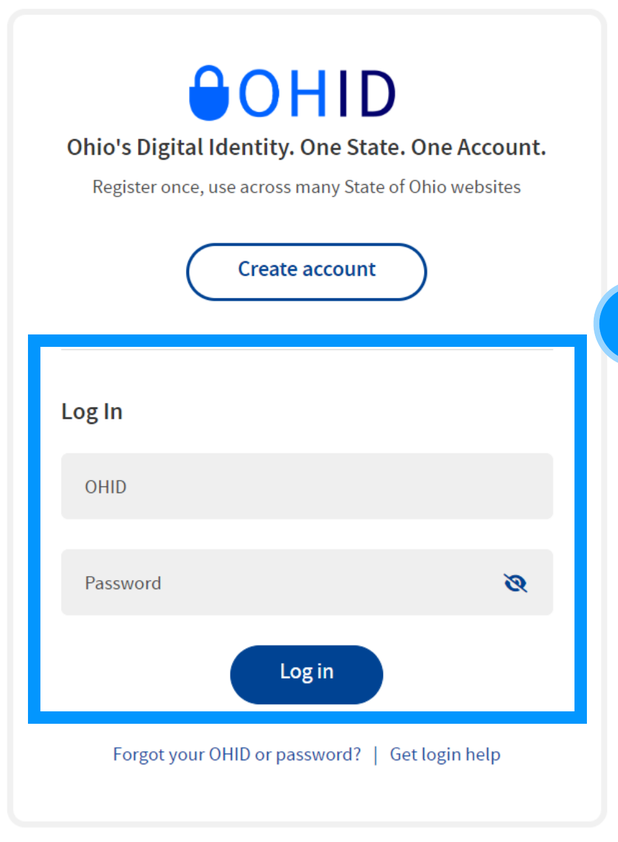
Forgot your OHID or password — use the recovery link on the login form.
ODM Integrated Helpdesk: 800-686-1516 / ihd@medicaid.ohio.gov
The PNM login page starts with the Log in with OH|ID button.

Screenshot source: PNM Login/Access Quick Reference Guide, page 1.
TL;DR: use your own OHID, and give your biller their own
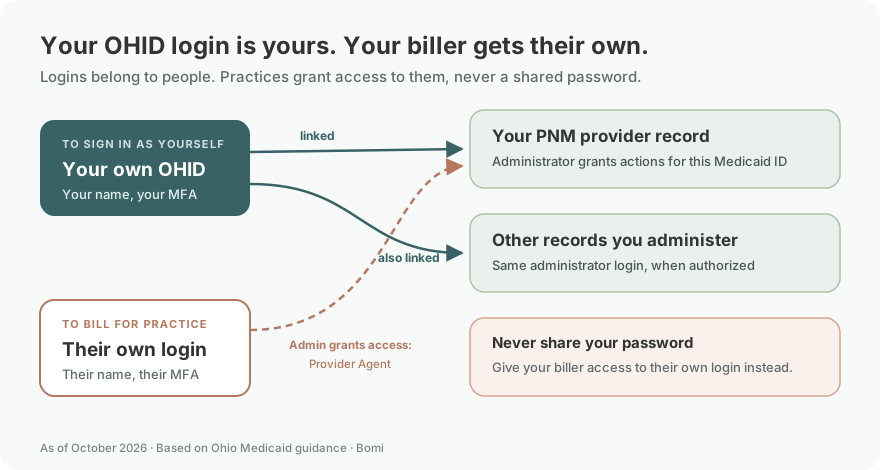
Use your own OHID account. Your biller uses their own Provider Agent login, and your Provider Administrator or Power Agent grants the actions they need for your Medicaid ID. State enrollment and health-plan participation are separate. PNM role guide and Agent Assignment and Actions guide.
Who needs their own OHID login?
Each person uses their own OHID, name and verification methods. Never share your password or MFA codes. A Provider Administrator can administer multiple NPIs/Medicaid IDs under one login; permission for a particular record still matters. OHID verification guide and PNM roles and provider records, page 6.
Before creating another account
Recover an existing account first. For first-time registration, follow the dedicated OHID and PNM account guide. This page focuses on a login that has stopped working.
Add your biller with their own Provider Agent login
Your biller uses their own OHID. The Provider Administrator or Power Agent opens Account Administration, selects the provider Medicaid ID and adds the biller using their OHID or associated email. Grant only the needed actions, such as Claim Submission or Eligibility. Current Agent Assignment and Actions QRG, pages 1–4 gives the roles and steps. For the full walkthrough, use the existing PNM biller-access guide.
Identify where the Ohio PNM login stopped
Before OHID accepts your credentials: start with username/password recovery or the displayed identity error.
At a verification challenge: check the methods registered to your own OHID account.
After returning to PNM: check the intended provider record and authorized role before changing your identity account.
The official access QRG shows OHID authentication, automatic return to PNM, acceptance of the terms, and the provider dashboard as separate steps. Use that sequence to describe the blocked step when requesting help. PNM Login/Access QRG.
Recover your OHID username or password
Open OHID and use the recovery option for a forgotten OHID or password. Use an existing account’s recovery path before creating another account. The state’s OHID help center is the identity-support starting point.
Ohio’s password-recovery guide starts from any OHID login page: select the forgotten-password option, enter your OHID username, choose an available recovery method, request and verify the PIN, then set the new password following the displayed requirements. Available methods depend on what you previously configured. Official OHID password recovery instructions.
A password reset addresses the password. If the next screen still requires a verification method you cannot access, treat that as a separate MFA problem. When reporting a lockout, record the exact error wording and where it appeared; this guide does not promise a fixed unlock time.
Screenshot source: OHID Multi-Factor Authentication 2-Step Verification Job Aid, April 2024, page 3.
MFA codes, a replaced phone and backup methods
PNM’s public Learning page links an OHID 2-Step Verification job aid. It describes SMS, email, phone-call and IBM Verify methods. If another registered method is offered and you can access it, use the option shown on the challenge; do not assume replacing the password replaces the verification device. OHID MFA job aid linked by PNM.
When you can sign in to OHID, the published setup route is Account Settings → 2-Step Verification → Configure → Add new method. The job aid asks users to set up two methods and recommends a phone-based option plus email. Follow the current on-screen prompts to verify each new method. Published verification-method setup.
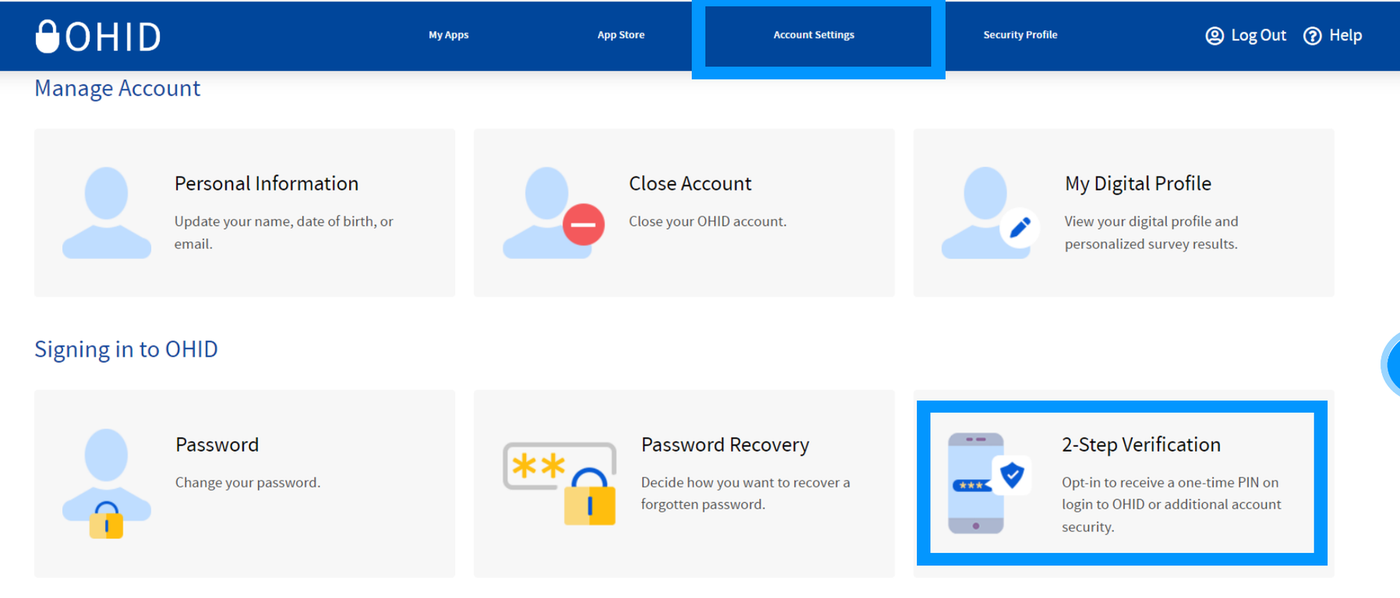
Screenshot source: OHID Multi-Factor Authentication 2-Step Verification Job Aid, April 2024, page 3.
Those settings require account access. If every registered method is unavailable, use OHID help or the provider helpdesk below for recovery support. Do not use another person’s login or approve an unexpected verification request.
OHID works but the PNM provider record is missing
Return through the official PNM login after recovery. If you reach PNM but cannot perform the intended task, review the existing administrator and agent-access guide. Record access is a different question from whether the OHID password works.
A practical support note should identify the portal, whether OHID authentication succeeded, the affected task, and the exact error text. Use the support team’s approved secure process for any requested identifiers; never include your password, verification code or patient details in an ordinary email.
Where to get Ohio PNM login help
The live PNM sign-in page directs providers who need help signing in or acquiring OHID to the ODM Integrated Helpdesk: 800-686-1516 or ihd@medicaid.ohio.gov. Use the current provider contact rather than a phone number intended for Ohio Benefits members. Current PNM login support notice.
How Bomi can help
Bomi can help organize payer follow-up, enrollment maintenance and billing work. Contact Bomi with the workflow you need help resolving.
Related provider guides
For first-time setup, use our Ohio OHID and PNM account guide. If you also work with Michigan Medicaid, see our MILogin and CHAMPS login guide.
PNM revalidation after access is restored. Verify coverage before the visit.
Frequently Asked Questions
Where is the Ohio Maximus PNM login?
Use the official Ohio PNM portal linked at the top of this guide, then Log in with OH|ID. The published access guide returns authenticated users to PNM.
Will resetting my OHID password reset MFA?
Treat password and verification-method problems separately. A new password does not by itself establish access to a lost verification device; use the offered recovery and official support options.
Who helps with Ohio PNM login problems?
The current public PNM page lists the ODM Integrated Helpdesk at 800-686-1516 or ihd@medicaid.ohio.gov for sign-in and OHID assistance.
Need help getting payer-ready?
For practices enrolled in Bomi Billing, our team handles CAQH, payer applications, attestations, roster updates, and ongoing credentialing. Credentialing requires Bomi Billing.
Credentialing with billing
About Bomi
Founded by George Ruan, Dax Earl, and Andrey Goder, Bomi helps independent therapists and group practices with insurance billing, credentialing, and payer follow-up. Bomi grew out of Dax’s experience helping his mother with her therapy practice, with a clear purpose: reduce the administrative burden of insurance while keeping practice owners in control.
Meet our founders