
Ohio PNM Login: Provider Portal and OH|ID Setup
By George Ruan • July 4, 2026
For Ohio PNM login, open the official Ohio Medicaid PNM provider portal and continue through OH|ID using your own OH|ID account. The Maximus-hosted portal requires OH|ID for all users.
Sections
- Direct links: Ohio PNM portal login and OH|ID
- TL;DR: use your own login, and give your biller their own
- Who needs their own OH|ID login
- Before you create access
- Account setup and access guide
- OH|ID and PNM Account Roles
- Account setup steps: create your OH|ID
- Step 2 — Access PNM
- What You Can Do Inside PNM
- Who Should Have Which Role: Administrator vs Agent
- Add your biller as an Agent
- Login errors and account recovery
- Action Steps for Providers
- Where Bomi Fits
- Frequently Asked Questions
- Sources
Direct links: Ohio PNM portal login and OH|ID
PNM sends you to this OH|ID sign-in page; new users choose Create account.
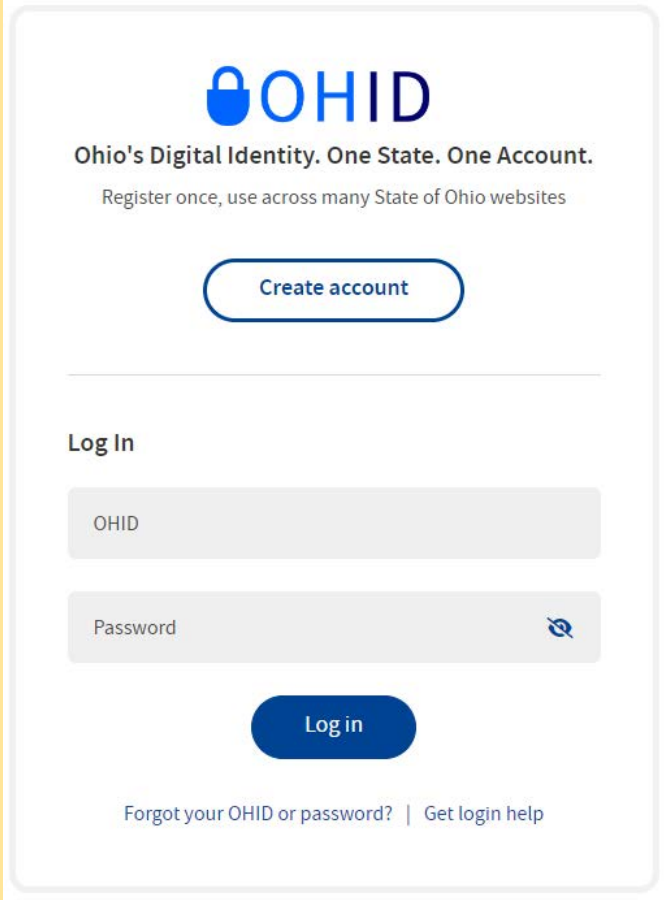
Screenshot source: PNM Initial Login Quick Reference Guide, page 1.
TL;DR: use your own login, and give your biller their own
Use your own OH|ID to sign in to PNM. Your biller uses their own OH|ID, and your Administrator or Power Agent assigns Provider Agent actions for the practice. Managed-care plan contracting is separate. Official account and access guidance.
Who needs their own OH|ID login
Your OH|ID belongs to you. Use your own name and keep any MFA or account recovery personal. The PNM FAQ permits one Administrator to manage multiple provider records under the same login, with rights assigned separately. Never share your password; have an Administrator or Power Agent assign Provider Agent actions to the biller’s own OH|ID. Official individual-user and staff-access guidance.
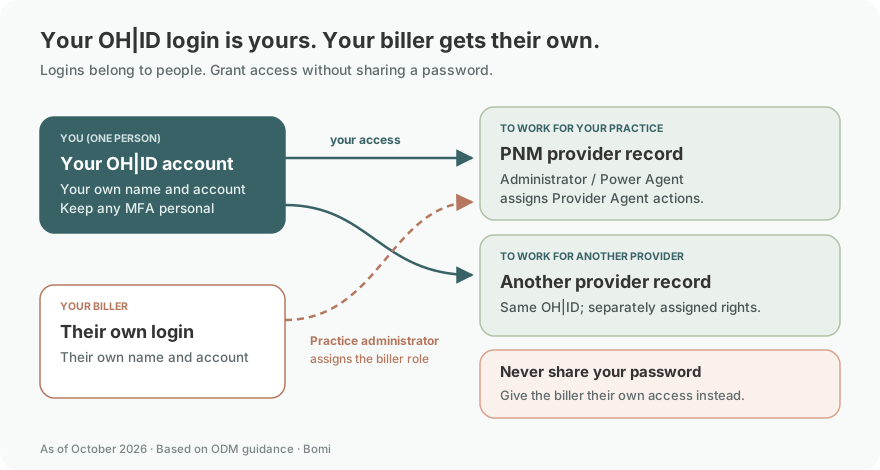
Each Administrator and Agent uses their own OH|ID. Do not share a provider’s identity account with billing staff. ODM individual-account and role guidance.
Before you create access
Check whether you already have an OH|ID and identify the provider’s NPI/Medicaid ID and existing Administrator. The Administrator assigns Agent access; creating a login alone does not grant rights to a provider record. ODM account and Administrator FAQ.
Searching for “PNM Maximus” or “OHPNM”? The official ODM PNM FAQ identifies this same Ohio PNM system and explains how to create an OH|ID and choose a provider role. For sign-in help, the PNM login page lists the ODM Integrated Help Desk at 800-686-1516 or IHD@medicaid.ohio.gov.
Login links reviewed: October 9, 2026.
Account setup and access guide
Last updated: July 4, 2026.
If you are trying to log in to Ohio Medicaid's provider portal and you keep running into two different names, OH|ID and PNM, here is the short version. OH|ID is your State of Ohio login. PNM (Provider Network Management) is the Medicaid provider portal you reach after you log in. You create an OH|ID once, then use it to open PNM for provider enrollment, maintenance, centralized credentialing and provider affiliations. Signing in does not by itself establish a managed-care contract.
Why two systems? OH|ID is Ohio's statewide digital identity used across many state services, not just Medicaid. PNM is the Medicaid-specific portal, operated for the Ohio Department of Medicaid (ODM) by Maximus at ohpnm.omes.maximus.com. PNM went live October 1, 2022 and replaced the old MITS provider enrollment system.
OH|ID and PNM Account Roles
OH|ID is the State of Ohio's digital identity and single sign-on. You create it once at ohid.ohio.gov, and it governs your login and identity verification. See OH|ID.
PNM is Ohio Medicaid's Provider Network Management portal, operated by Maximus. It is where the actual Medicaid work happens. See the PNM login.
You log in to PNM with your OH|ID. There is no separate PNM username and password; your OH|ID is the credential.
PNM went live October 1, 2022 and replaced MITS provider enrollment. The PNM FAQ confirms the migration and go-live date. Read the PNM FAQ.
Inside PNM you enroll, revalidate, complete centralized credentialing, maintain provider affiliations and add delegated billers.
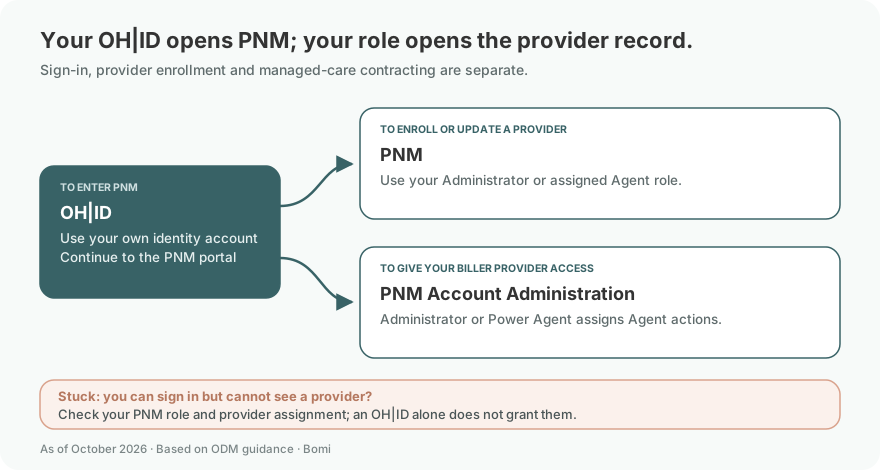
Account setup steps: create your OH|ID
OH|ID is the same login Ohioans use for many state services, so a lot of providers already have one from the BMV, Ohio Benefits, or another agency. If you do, reuse it. Do not create a second OH|ID.
Open the OH|ID sign-in screen and select Create account if you do not already have an account. Current PNM initial-login guide.
Complete the six-step account-creation process. The Email Verification step sends a PIN to the email address you supplied; check that inbox and follow the verification prompts. Creating OH|ID Account for PNM quick-reference guide.
Step 2 — Access PNM
Once your OH|ID account is created, you can reach the Medicaid portal:
Go to the PNM login page at ohpnm.omes.maximus.com and log in with your OH|ID.
The first time in, you certify that you are the individual owner and user of the OH|ID account you logged in with, then set up your provider role.
New providers start a Medicaid provider enrollment application. Existing providers land on their dashboard, where each provider (NPI/Medicaid ID) they administer appears.
For account setup and provider roles, use the official ODM PNM FAQ.
On the initial User Profile screen, select the Provider Account role appropriate to your access and choose Save. The setup guide distinguishes Provider Administrator, Provider Agent and the two DODD-specific roles shown below. Current OH|ID/PNM account-creation guide.
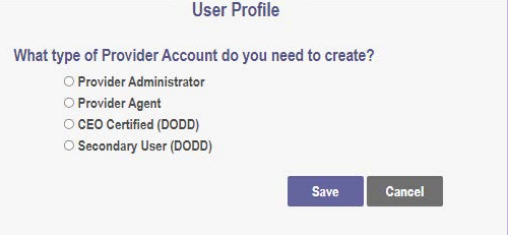
Screenshot source: Creating OH|ID Account for PNM Quick Reference Guide, page 2.
What You Can Do Inside PNM
PNM manages the provider record. Its documented enrollment and account functions include:
Enroll as a new Ohio Medicaid provider, individual or organization.
Revalidate or re-enroll (Medicaid agreements are revalidated on a set cycle).
Complete centralized credentialing. ODM credentials providers based on their provider type; providers do not need separate credentialing by each managed-care plan. See the PNM FAQ on managed-care affiliation.
Select and affiliate with managed-care plans.
Add and manage delegated administrators and agents, which is how you give a biller access.
For provider-record functions and self-service access, read the official PNM FAQ.
One important boundary: Enrollment and centralized credentialing in PNM are separate from a managed-care plan contract. Use the plan’s own current claims and authorization instructions for its members. The historical PNM FAQ describes links to other self-service systems; it should not be used as a current claims-submission manual.
And a related point providers get wrong: creating a PNM account and finishing centralized credentialing does not automatically make you in-network with a plan. Credentialing is not contracting. We break that distinction down in the Ohio Medicaid credentialing pillar guide.
Who Should Have Which Role: Administrator vs Agent
Provider Administrator and Provider Agent are the basic roles described in the current role guide. The Agent assignment guide also permits a Power Agent to assign provider-specific Agent actions.
Administrator. There is one Administrator per provider (per NPI/Medicaid ID). The Administrator manages that provider’s records and can, in turn, add agents. One person can be the Administrator for multiple providers, and each appears on their PNM dashboard.
Agent (delegate). An agent is added by the Administrator and gets specific, scoped permissions for each provider. This is the correct way to give a biller or office manager access, rather than sharing your OH|ID.
The practical rule: the practice owner or credentialed clinician usually takes the Administrator role, then adds billing staff as agents with only the permissions they need. Ohio publishes a quick-reference guide on identifying your role. See the PNM role quick-reference guide.
Add your biller as an Agent
Never share your password. Give the biller their own login and use the documented access method shown above. Official access instructions.
A Provider Administrator or Power Agent opens Account Administration, selects the provider Medicaid ID and searches, then chooses Add New Agent. In Agent Information, enter the biller’s OHID, associated email or the provider Medicaid ID as directed, and choose Add Agent. Current Agent Assignment and Actions guide v5.0.
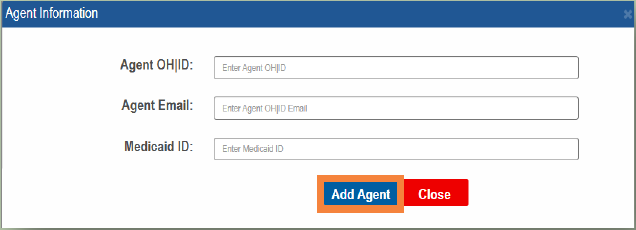
Screenshot source: PNM Agent Assignment and Actions v5.0, page 2.
Then select only the required Agent roles for that Medicaid ID, scroll down, and choose Add Agent to save the assignment. Available roles depend on the provider type; use pages 3–5 of the current guide to check each role’s actions. PNM Agent roles and actions.
Setting up a biller the right way has its own steps. See how to give your biller access to Ohio Medicaid PNM. And if you have not enrolled yet, start with how to enroll in Ohio Medicaid as a therapist.
Login errors and account recovery
Forgot your OH|ID credentials. Use the password-recovery or login-help options on the OH|ID sign-in screen. PNM initial-login guide.
Sharing logins. Do not hand your OH|ID to staff. Add them as agents in PNM instead so access is scoped and auditable.
When you are stuck. The ODM Integrated Help Desk (1-800-686-1516, IHD@medicaid.ohio.gov) handles OH|ID and PNM access problems. See PNM login support.
Action Steps for Providers
Check whether you already have an OH|ID from another Ohio service. If so, reuse it rather than creating a new one.
Create or reuse your OH|ID and complete the email-PIN verification prompts in the current account-creation guide.
Log in to PNM at ohpnm.omes.maximus.com, certify ownership of your OH|ID, and set up your provider role.
If you own or manage the practice, take the Administrator role, then add your biller as an agent with scoped permissions.
Start or confirm your Medicaid enrollment, then move on to centralized credentialing and managed-care plan affiliation.
Bookmark the PNM login, keep your account recovery information current, and note that managed-care claims still route through each plan’s own portal.
Where Bomi Fits
Bomi does not replace your OH|ID or your PNM access, and we would not want to. Those are your credentials and your system of record. What we do is help therapy practices actually use them without quietly losing revenue.
Once you are in PNM, the day-to-day gets operationally messy: eligibility checks before sessions, FFS versus managed-care claim routing, denials, EOB review, revalidation deadlines, and keeping delegated access current. Bomi helps with the credentialing and billing workflows around Ohio Medicaid, and our Ohio resources page has more state-specific detail.
Soft plug: you set up OH|ID and PNM once. Keeping the billing straight after that is the ongoing part, and that is the part Bomi is built for.
Frequently Asked Questions
Where is the Ohio PNM portal login?
Use the official Ohio Medicaid PNM provider portal linked above. All users sign in through OH|ID with their single sign-on account.
Are PNM Maximus and OHPNM the Ohio Medicaid provider portal?
The Ohio Department of Medicaid links to the PNM portal on ohpnm.omes.maximus.com. PNM means Provider Network Management; OHPNM is part of that portal address.
What if I cannot log in to Ohio PNM?
For help signing in or acquiring your OH|ID, the PNM login page directs you to the ODM Integrated Help Desk at 800-686-1516 or IHD@medicaid.ohio.gov. If you can sign in but lack provider permissions, check your assigned PNM role.
What's the difference between OH|ID and PNM?
OH|ID is Ohio's statewide digital identity and single sign-on, used across many state services. PNM (Provider Network Management) is the Ohio Medicaid provider portal, operated by Maximus, that you reach after logging in with your OH|ID. OH|ID is your login; PNM is where you do Medicaid work.
Do I need a separate OH|ID just for Medicaid?
No. OH|ID is one identity used across Ohio state services. If you already have an OH|ID from the BMV, Ohio Benefits, or another agency, reuse it. Creating multiple OH|IDs causes access confusion.
Where do I log in to the Ohio Medicaid provider portal?
At ohpnm.omes.maximus.com, the PNM login operated by Maximus. You sign in with your OH|ID credentials, not a separate PNM username and password.
Can my biller use my OH|ID to access PNM?
No, and you should not share it. PNM uses Administrator and Agent roles. The Administrator adds the biller as an agent with scoped permissions, which keeps access auditable and specific to what the biller needs.
When did PNM replace MITS?
PNM went live October 1, 2022 and replaced the old MITS provider enrollment system as the single provider portal for Ohio Medicaid.
Does creating a PNM account mean I am credentialed and in-network?
Not by itself. PNM is where you enroll and complete centralized credentialing, but credentialing is not contracting. You still have to affiliate or contract with each managed-care plan to be in that plan’s network.
Sources
Planning a private practice?
Use Bomi's free Build resources to plan the business, provider identity, payer setup, and billing workflow before you see clients.
Use Build resources
About Bomi
Founded by George Ruan, Dax Earl, and Andrey Goder, Bomi helps independent therapists and group practices with insurance billing, credentialing, and payer follow-up. Bomi grew out of Dax’s experience helping his mother with her therapy practice, with a clear purpose: reduce the administrative burden of insurance while keeping practice owners in control.
Meet our founders