
CHAMPS Login: MILogin Third Party / Business Access
By George Ruan • July 6, 2026
For CHAMPS provider login, open MILogin for Business (formerly MILogin Third Party) and sign in with your own account, then open CHAMPS. This is the provider and biller login route linked by MDHHS.
Sections
- Direct links: CHAMPS login and MILogin Third Party
- TL;DR: use your own login, and give your biller their own
- Who needs their own MILogin login
- Before you create access: know your provider/domain situation
- Account setup and access guide
- How MILogin and CHAMPS Access Fit Together
- What is MiLogin?
- What is CHAMPS?
- Account setup steps and Provider Domain Administrator
- How access roles affect billing workflows
- Common access problems
- Add your biller and document their access
- Action Steps for Providers
- Where Bomi Fits
- Frequently Asked Questions
- Sources
Direct links: CHAMPS login and MILogin Third Party
The MILogin for Business sign-in page looks like this; new users choose Create an Account.
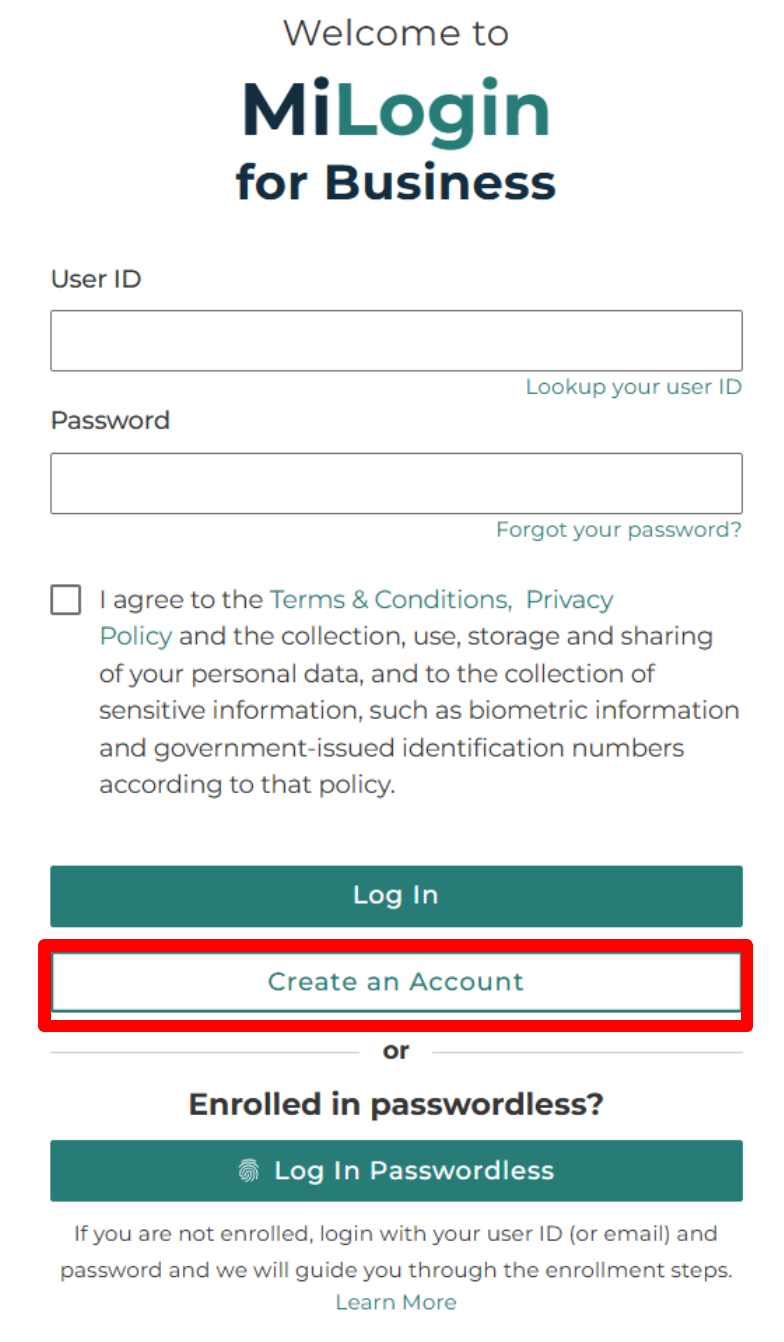
Screenshot source: MDHHS MILogin for Business Instructions, page 4.
TL;DR: use your own login, and give your biller their own
Use your own MILogin account to open CHAMPS. Your biller uses their own account, and your Provider Domain Administrator assigns their CHAMPS profiles. Medicaid health-plan participation is separate. Official account and access guidance.
Who needs their own MILogin login
MILogin belongs to one person. Use your own name and account, and keep any MFA or account recovery under your control. Never share your password: the Provider Domain Administrator assigns CHAMPS domain/profile rights to the biller’s own user account. Official individual-user and staff-access guidance.
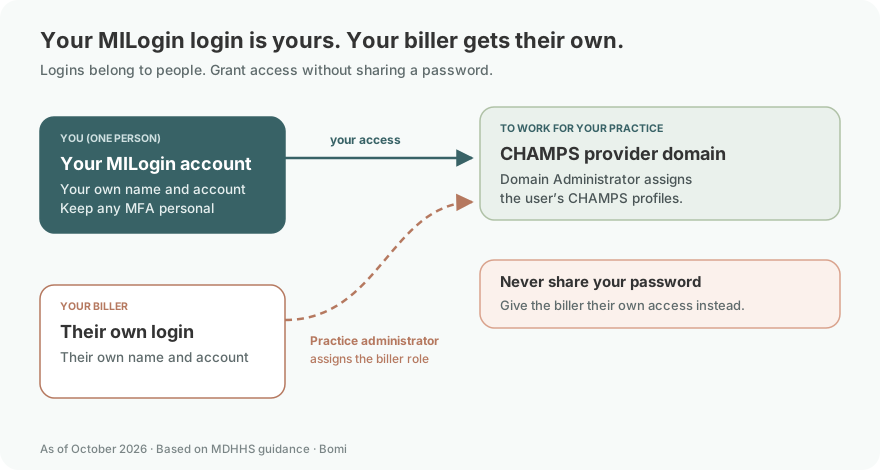
This trips up most practices, so here's the direct answer: every organizational user who needs to work in CHAMPS should have their own MiLogin user ID and password.
MDHHS is explicit that all users within a provider organization who need CHAMPS information — provider enrollment, claims, prior authorization, and so on — must obtain their own MiLogin credentials. That means:
The practice owner or enrolling provider gets a login.
Your office manager or credentialing coordinator gets a login.
Each biller who touches claims or checks eligibility gets a login.
An outside billing partner gets access provisioned to their identity (more below), not your password.
The reason isn't box-checking. Individual logins mean the audit trail reflects who did what, access can be revoked cleanly when someone leaves, and one person's lockout doesn't freeze your entire billing operation. Shared credentials break all three the moment they're used.
Before you create access: know your provider/domain situation
A little planning up front saves a lot of untangling later. Before anyone starts clicking, get clear on:
What are you enrolling? An individual/sole-proprietor provider, a rendering/servicing provider, or a group practice? Your enrollment type shapes how the CHAMPS "domain" (your provider's file) is structured.
Who will be the Provider Domain Administrator? A stable, trusted person — not someone likely to leave next quarter — because they hold the keys to everyone else's access.
Who else needs in, and to do what? List your people and the CHAMPS functions each one needs (enrollment, claims, eligibility, prior auth), to map to profiles later.
Are you working with an outside biller? Decide early how they'll be granted access, so you're not scrambling mid-claim-cycle.
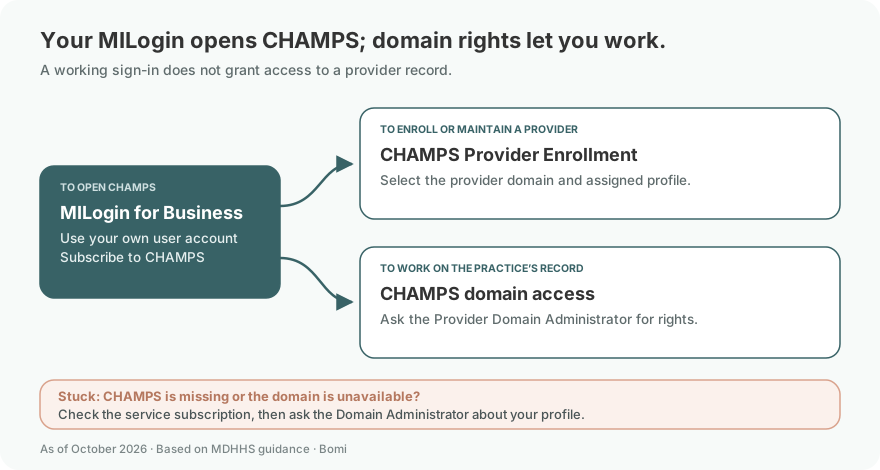
If CHAMPS is missing after you sign in, follow the MDHHS subscription instructions to request the service. Access to the provider record also depends on the rights assigned by your Provider Domain Administrator. For an existing-account problem, see what to do if you lost access to CHAMPS.
Login links reviewed: October 9, 2026.
Account setup and access guide
Last updated: July 6, 2026.
If you are trying to enroll a therapy practice in Michigan Medicaid, submit claims, check eligibility, or manage prior authorizations, everything runs through one state system: CHAMPS. But you can't open CHAMPS directly — first you need a MiLogin account. This guide explains how the two fit together, who on your team needs their own login, and why the "just share the password" shortcut causes real billing problems.
How MILogin and CHAMPS Access Fit Together
Bottom line: MiLogin is Michigan's secure login layer, and CHAMPS (the Community Health Automated Medicaid Processing System) is the Medicaid system you reach after you sign in. Providers use the MiLogin for Business service to authenticate, then request access to CHAMPS. Every person on your team who needs CHAMPS should get their own MiLogin user ID and password — Michigan expects individual accounts, not shared ones. Whoever submits your Provider Enrollment application becomes the Provider Domain Administrator and controls who else can get in and what they can do. Get that structure right at the start, and enrollment, claims, eligibility, and prior authorization all flow from the same place.
This post is for general operational education and is not legal, compliance, or billing advice. Always confirm current MDHHS, Medicaid Health Plan, PIHP, CMHSP, and Provider Manual requirements before submitting enrollment, claims, or authorizations.
What is MiLogin?
MiLogin is the State of Michigan's single sign-on system — the authentication layer in front of many state online services, including Medicaid's CHAMPS. Think of it as the key, not the room. You don't "log into CHAMPS" with a CHAMPS password; you log into MiLogin, and it passes you through to the CHAMPS applications you've been given access to.
For Medicaid providers, the relevant flavor is MiLogin for Business (formerly branded as MiLogin Third Party) — the version organizations and their staff use to connect to provider systems, as opposed to the consumer MiLogin residents use for benefits.
The practical takeaway: a MiLogin account by itself doesn't give you Medicaid data — it gives you an identity. You then attach the CHAMPS service to that identity and request the access your role requires.
What is CHAMPS?
CHAMPS stands for the Community Health Automated Medicaid Processing System. MDHHS describes it as its web-based, rules-driven, real-time Medicaid management system — Michigan's counterpart to the state Medicaid portals other states run under names like PAVE or IMPACT.
CHAMPS is organized into subsystems (you'll see them as tabs once you're in), which currently include:
Provider Enrollment — new enrollment applications, updates, revalidation, and profile maintenance.
Eligibility and Enrollment (Member) — verifying beneficiary eligibility and searching for member coverage.
Prior Authorization — submitting and tracking authorization requests.
Claims and Encounters — claim submission and follow-up.
Contracts Management — contract-related functions.
Within those areas, providers can complete a wide range of tasks online: provider enrollment and updates, claims status, direct claim entry, batch claim submission, claim adjustments and voids, payment status, prior authorization, eligibility verification, member search, and ordering/referring provider verification.
One important boundary: enrolling in CHAMPS is your state Medicaid foundation, but it does not automatically make you a participating, credentialed provider with every Michigan Medicaid Health Plan (MHP) or with the PIHP/CMHSP specialty behavioral health system. Those are separate contracting and credentialing steps — CHAMPS gets you into the state system; plan participation is its own workflow.
Account setup steps and Provider Domain Administrator
Sign in or create your MILogin for Business account
Open MILogin for Business. Existing users enter their own User ID and password; new users select Create an Account and follow the registration prompts. MDHHS MILogin instructions.
Find CHAMPS in online services
After signing in, search for CHAMPS under Discover Online Services. Select the CHAMPS result under Michigan Department of Health and Human Services and follow the service-subscription prompts. MDHHS subscription instructions.
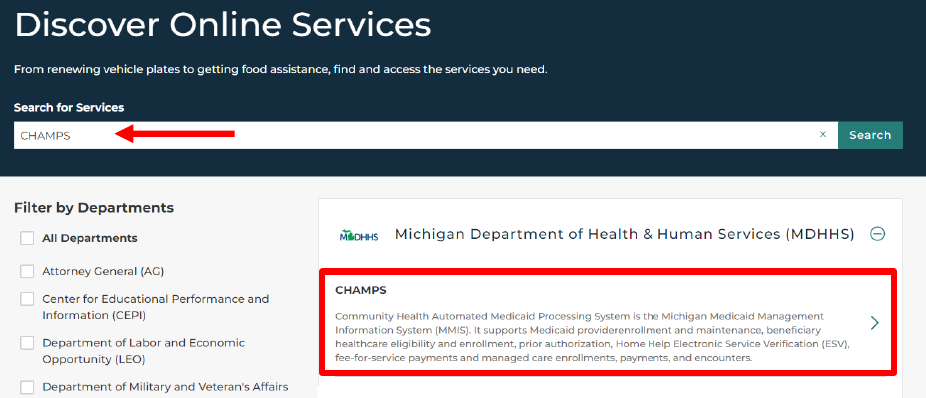
Screenshot source: MDHHS MILogin for Business Instructions, page 16.
Select the provider domain and assigned profile
Open CHAMPS from your subscribed services. Select the provider Domain and the Profile assigned to your user, then choose Go. If the needed domain or profile is unavailable, ask the Provider Domain Administrator to check your access. MDHHS CHAMPS entry instructions.
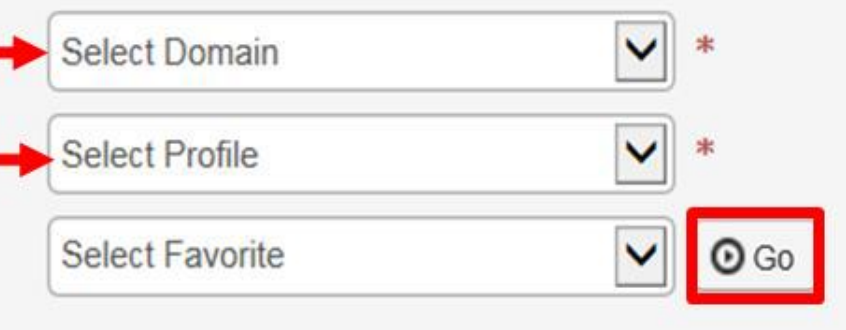
Screenshot source: MDHHS MILogin for Business Instructions, page 42.
Here's the pivot point of the whole setup: the MiLogin user who submits the Provider Enrollment application becomes that provider's Domain Administrator.
That person is responsible for assigning access rights to everyone else who needs to reach the provider's file in CHAMPS. They don't just enroll the practice — they become the gatekeeper for all subsequent access.
A few things worth knowing:
You can have more than one. An organization can establish multiple Provider Domain Administrators (a separate application is generally completed and approved for each). A single point of failure is risky.
Administrators can be changed. A Domain Administrator can be removed (end-dated) as long as at least one other active administrator remains — so you're never meant to be stuck with an untouchable account.
Plan for succession. Practices that let the enrolling user leave without transferring rights end up locked out of their own domain. Designate a primary administrator and a plan for handing off the role.
Open the administrator user list
With the Provider Domain Administrator profile selected, open Admin, then User List. The current MDHHS-linked Domain Administrator guide walks through adding a provider user and assigning their profiles. CHAMPS Domain Administrator quick reference.

Screenshot source: CHAMPS Domain Administrator Quick Reference, page 2.
In User List, choose Add to open the provider-user entry. Enter the biller’s own MILogin User ID, select the appropriate Available Profiles and move them to Selected Profiles. CHAMPS Domain Administrator instructions.
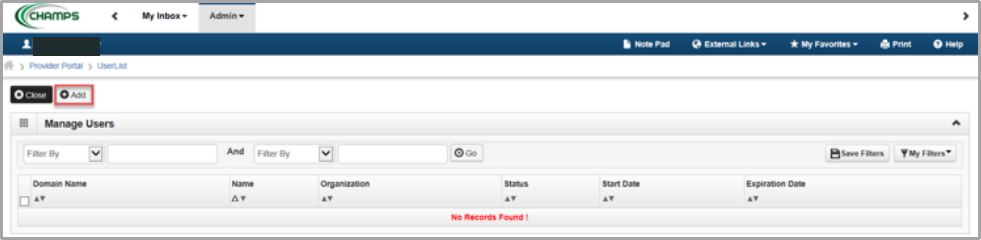
Screenshot source: CHAMPS Domain Administrator Quick Reference, page 2.
How access roles affect billing workflows
Inside CHAMPS, the Domain Administrator manages users from the Admin tab. Access is controlled by two linked concepts:
The Domain is the provider file the user is allowed to touch.
The Profile is the role — the set of access rights — the user has within that domain.
To work in a given subsystem, a user selects the appropriate domain + profile combination. That's how a biller can enter claims while a front-desk hire might only verify eligibility. The administrator assigns each person the profile that matches their job, and adjusts or removes it as roles change.
This is why individual logins matter operationally: you can grant a new biller the claims profile in minutes and revoke it the day they leave, without touching anyone else's account.
Common access problems
A handful of issues come up again and again:
"We don't know who our Domain Administrator is." Common after staff turnover. If the enrolling user left without transferring rights — or nobody's sure who holds them — MDHHS's Provider Enrollment unit can help re-establish administrator rights.
Locked out / forgotten credentials. Password and user-ID recovery happen at the MiLogin level, not inside CHAMPS, and each user recovers their own account.
New biller can't see claims. Almost always an access-profile issue: they have a MiLogin account, but no CHAMPS profile assigned yet.
Trying to solve it by sharing a login. The wrong fix — it hides who did what and creates a bigger cleanup later. Always provision the right individual access instead.
Add your biller and document their access
Never share your password. Give the biller their own login and use the documented access method shown above. Official access instructions.
If Bomi or any outside partner handles your Michigan Medicaid billing, hand off access, not passwords. Keep an internal record of:
Who your Provider Domain Administrator(s) is/are, and the backup plan if that person leaves.
Which staff and partners have CHAMPS access and under which profiles.
Your provider NPI(s) and enrollment type, so access maps to the right domain.
Your revalidation timeline. Michigan Medicaid enrollment must be revalidated periodically, and a lapse can interrupt payment — so put it on a calendar.
Action Steps for Providers
Confirm you need to enroll. Verify on MDHHS's provider-enrollment pages that your provider type must enroll in CHAMPS, and gather your NPI and identifying details.
Create a MiLogin for Business account for the person who will submit the enrollment application — a real, individual work identity. This account becomes your Domain Administrator.
Add the CHAMPS service to that MiLogin account and request access, following the current MDHHS instructions.
Submit the Provider Enrollment application in CHAMPS. The submitting user becomes the Provider Domain Administrator.
List everyone who needs access and the CHAMPS functions each one uses (enrollment, claims, eligibility, prior auth).
Have each additional user create their own MiLogin account — never reuse the administrator's login.
Assign profiles from the Admin tab, matching each user to the domain + profile that fits their role.
Provision your billing partner's access to their own identity, not by sharing credentials.
Document the setup and a succession plan, including a backup Domain Administrator.
Verify current steps before you act against the live MDHHS pages — screens and instructions change.
Where Bomi Fits
Setting up MiLogin and CHAMPS access is a one-time headache; keeping Michigan Medicaid billing clean is the ongoing one — and it's where a good partner works within your CHAMPS access rather than asking for a password.
Want help keeping Michigan Medicaid billing and credentialing workflows straight? Bomi helps therapy practices with eligibility checks, claims, denials, credentialing, payer follow-up, EOB review, and revenue operations so clinicians can spend more time with clients. Talk to Bomi about billing and credentialing.
Related reading in this series: our guide to Michigan Medicaid provider enrollment in CHAMPS walks through the steps that come after your access is set up.
This post is for general operational education and is not legal, compliance, or billing advice. Always confirm current MDHHS, Medicaid Health Plan, PIHP, CMHSP, and Provider Manual requirements before submitting enrollment, claims, or authorizations.
For another state’s provider account, see CMAP Secure Web Site login and biller access, DMAP Provider Portal login and biller access or DC Medicaid Provider Portal login and biller access. Use each portal’s own account and access roles.
For a Massachusetts practice, see MassHealth POSC login and account setup for that state’s portal and administrator workflow.
Frequently Asked Questions
Where is the CHAMPS login for providers?
Use https://milogintp.michigan.gov/ to reach MILogin for Business, sign in with your individual account, and open CHAMPS. MDHHS links to this route for Michigan Medicaid provider access.
Is MILogin Third Party login the same as MILogin for Business?
MILogin for Business is the current name for the provider-facing service formerly called MILogin Third Party. The MDHHS-linked address is https://milogintp.michigan.gov/.
How do I use MILogin for CHAMPS provider login?
Sign in to MILogin for Business and select CHAMPS. If the service is missing, use the MDHHS MILogin instructions to subscribe to CHAMPS; your Provider Domain Administrator assigns access rights to the provider record.
Do I need MiLogin to access CHAMPS?
Yes. MiLogin is the state's login layer, and CHAMPS is reached through it. Medicaid providers and their staff use the MiLogin for Business service to authenticate, then request access to the CHAMPS applications they need. There's no separate standalone CHAMPS login.
Can multiple people use the same CHAMPS login?
No — and you shouldn't. MDHHS expects every organizational user who needs CHAMPS access to obtain their own MiLogin user ID and password. Individual accounts keep the audit trail accurate, let you revoke access cleanly when someone leaves, and prevent one lockout from freezing your whole billing operation.
What is a Provider Domain Administrator?
It's the person who controls CHAMPS access for your provider organization. The MiLogin user who submits your Provider Enrollment application becomes the Provider Domain Administrator, responsible for assigning access rights to everyone else who works in the provider's file. You can have more than one, and the role can be reassigned — but there should always be at least one active administrator.
What can I do in CHAMPS?
CHAMPS supports provider enrollment and updates, revalidation, claim submission and status, adjustments and voids, payment status, prior authorization, eligibility verification, member search, and ordering/referring provider verification — organized into subsystems like Provider Enrollment, Eligibility and Enrollment, Prior Authorization, Claims and Encounters, and Contracts Management.
Can my biller get CHAMPS access?
Yes, and this is the correct pattern. Your billing partner should have their own MiLogin account, and your Provider Domain Administrator assigns them the appropriate CHAMPS access profile. That's how a partner like Bomi works your account — through provisioned access tied to their own identity, not your password.
What if the old administrator left the practice?
If the person who submitted your enrollment application left without transferring domain rights — or no one is sure who currently holds them — MDHHS's Provider Enrollment unit can help re-establish Domain Administrator access. Michigan maintains a domain-request process (an MDHHS domain-requests email address and the Provider Enrollment phone line) for this situation. Confirm the current contact details on the MDHHS CHAMPS/MiLogin pages before you reach out, then set up a succession plan so it doesn't happen again.
Sources
Need help getting payer-ready?
For practices enrolled in Bomi Billing, our team handles CAQH, payer applications, attestations, roster updates, and ongoing credentialing. Credentialing requires Bomi Billing.
Credentialing with billing
About Bomi
Founded by George Ruan, Dax Earl, and Andrey Goder, Bomi helps independent therapists and group practices with insurance billing, credentialing, and payer follow-up. Bomi grew out of Dax’s experience helping his mother with her therapy practice, with a clear purpose: reduce the administrative burden of insurance while keeping practice owners in control.
Meet our founders