
Ohio PNM Login: Provider Portal and Biller Access
By George Ruan • July 4, 2026
For Ohio PNM provider login, open the official PNM portal at Maximus and sign in with your own OH|ID account. A biller also needs the provider Administrator to grant the intended Agent permissions.
Login and access guidance reviewed October 9, 2026. The Ohio PNM FAQ distinguishes your OH|ID sign-in from provider-record roles.
Sections
- Direct links: Ohio PNM login, OH|ID and help
- TL;DR: use your own login, and give your biller their own
- Who needs their own Ohio PNM login?
- What your OH|ID login opens in PNM
- Before you create access: Medicaid ID and Administrator
- Set up the biller’s OH|ID and PNM account
- Add your biller as a PNM Provider Agent
- Ohio PNM login errors and missing permissions
- Frequently Asked Questions
- Sources
Direct links: Ohio PNM login, OH|ID and help
PNM provider login: the official Maximus destination printed in the state FAQ.
OH|ID account creation: use Create Account for your own identity; do not create one shared office login.
Forgot OH|ID / password recovery: use the current sign-in recovery controls. The FAQ describes Forgot User ID and Forgot Password.
ODM Integrated Help Desk details in the PNM FAQ: 800-686-1516 for unresolved provider-role or Administrator questions.
Provider enrollment through PNM: new enrollment is an Administrator function. An OH|ID account alone is not an enrollment approval.
The PNM login page looks like this; choose Log in with OH|ID.
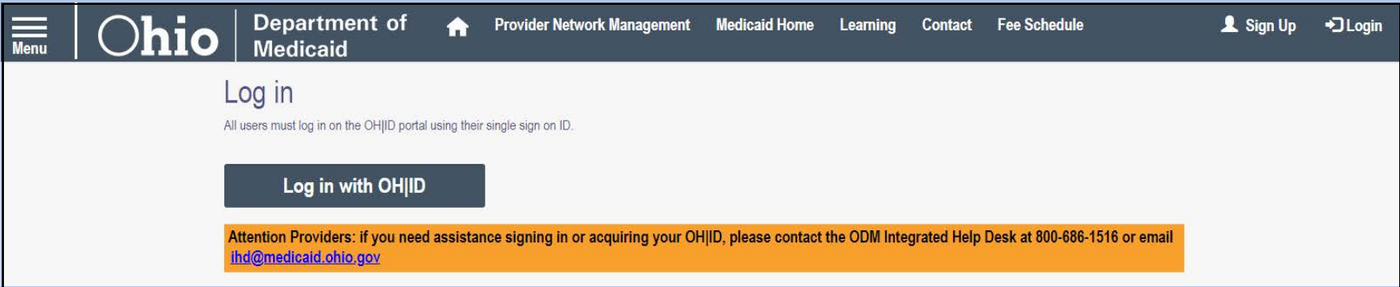
Screenshot source: PNM Login/Access Quick Reference Guide, page 1.
TL;DR: use your own login, and give your biller their own
Use your own OH|ID to sign into PNM. Your biller uses their own OH|ID and a Provider Agent role that the Provider Administrator or Power Agent links to the practice. The personal sign-in is separate from each provider’s Medicaid ID and granted actions, as shown in the current Agent Assignment guide.
Who needs their own Ohio PNM login?
Each person needs their own OH|ID, in their own name. Keep the password and your MFA methods private; the OH|ID 2-Step Verification job aid explains how to manage those methods. Never share your password with a biller: have the Provider Administrator or Power Agent assign access to the biller’s own Provider Agent account using the current PNM guide.
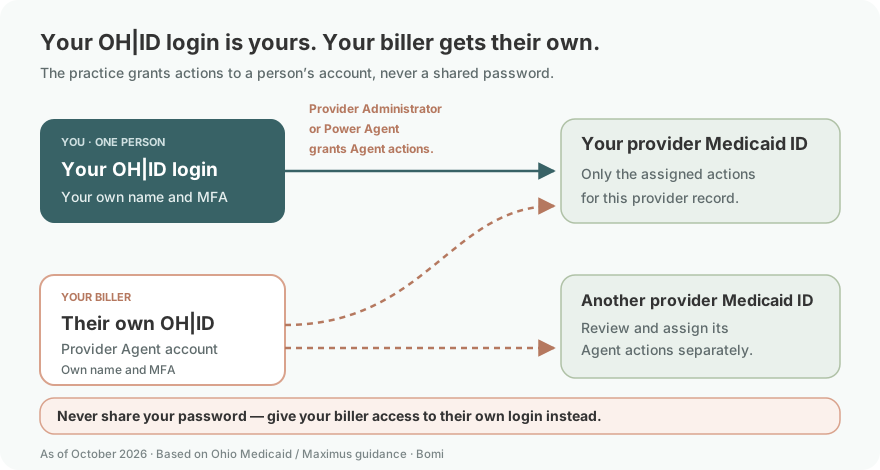
What your OH|ID login opens in PNM
OH|ID confirms who you are; PNM separately controls the provider records and actions you may use. The PNM Login/Access guide shows the OH|ID sign-in and return to PNM. The Agent Assignment guide assigns actions for specific Medicaid IDs: signing in does not give a biller eligibility, claims or enrollment permissions automatically.
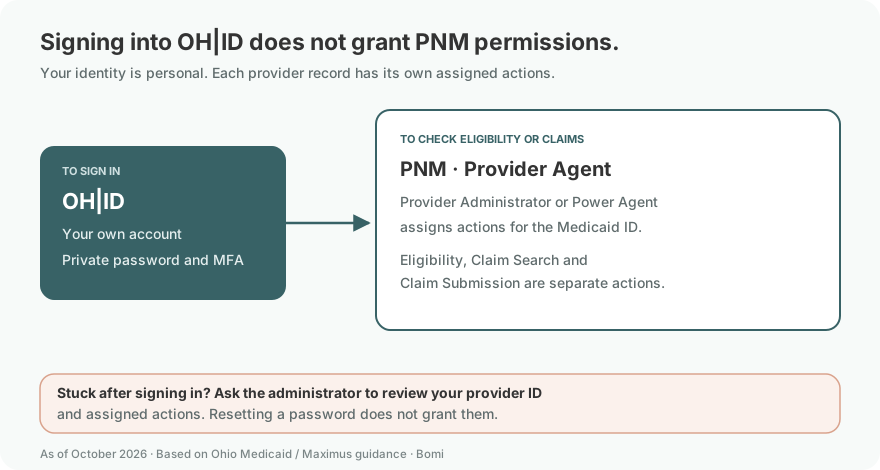
Before you create access: Medicaid ID and Administrator
Confirm which Medicaid ID the biller will work on and who is its Provider Administrator. The FAQ’s Administrator and Agent section says there is one Administrator per provider record, and Agents can be assigned after the provider has a Medicaid ID. If you do not know the Administrator or selected the wrong role, use the ODM help desk guidance in the FAQ.
Group and individual provider records need attention separately. The FAQ explains that access to a group does not automatically make someone Administrator for all affiliated individual providers. Confirm each intended record and action before treating one visible dashboard row as complete access.
Set up the biller’s OH|ID and PNM account
The biller opens the official PNM login, chooses Log in with OH|ID, and uses their own OH|ID username and password. If they need an OH|ID, the Login/Access guide shows Create account on the OH|ID screen.
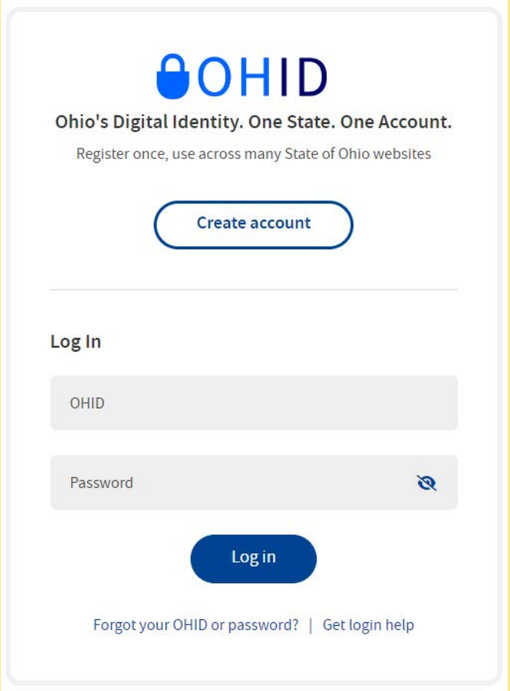
Screenshot source: PNM Login/Access Quick Reference Guide, page 1.
The guide then returns the user to PNM to review the Terms of Use and reach the dashboard. For the separate creation walkthrough, see create an OH|ID and PNM account. Give the administrator the account identifiers needed for assignment, never a password or MFA code.
Add your biller as a PNM Provider Agent
The current Agent Assignment and Actions guide lets a Provider Administrator or Power Agent assign Provider Agent actions for specific Medicaid IDs. The biller uses their own login throughout.
Choose the provider record. Open Account Administration, select the provider’s Medicaid ID, choose Search, then Add New Agent.
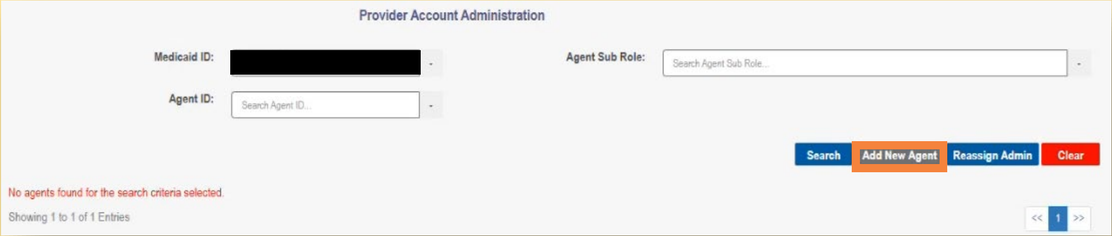
Screenshot source: Agent Assignment and Actions QRG v5.0, page 1.
Find the biller and assign actions. In Agent Information, enter the Agent OHID and/or associated email and the provider Medicaid ID, then choose Add Agent. Check only the actions needed for this provider, then scroll down and choose Add Agent to complete the assignment.
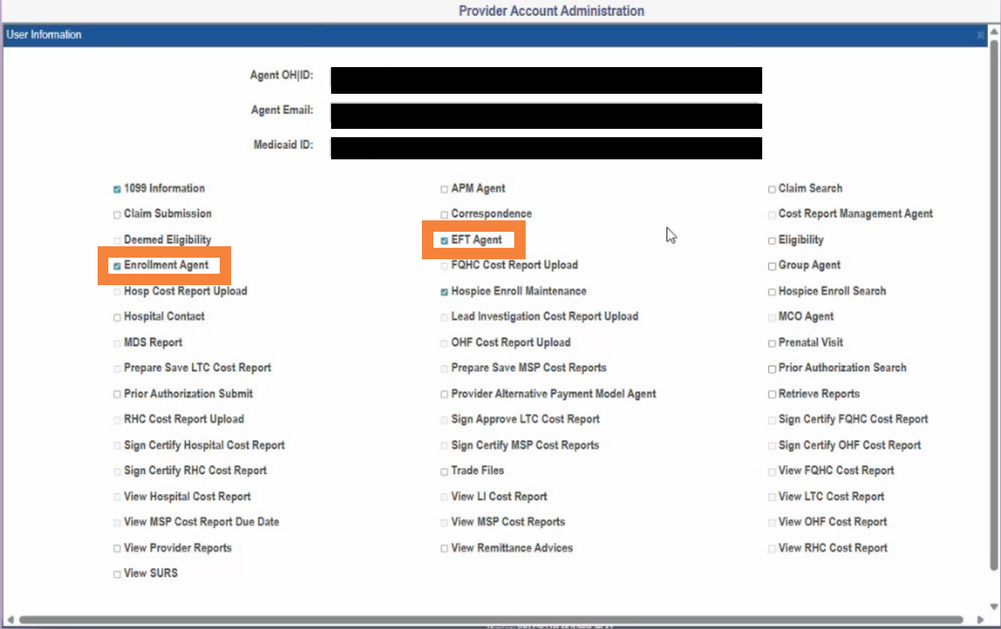
Screenshot source: Agent Assignment and Actions QRG v5.0, page 2.
The guide’s role table, pages 3–4 lists Claim Search, Claim Submission and Eligibility separately. Enrollment Agent includes provider updates, revalidations and Return to Provider responses; EFT Agent permits viewing and changing EFT details. Available actions depend on provider type. Check each intended Medicaid ID and have the biller confirm access; do not grant EFT or enrollment changes merely to allow claims work.
For claim-payer routing after access is established, see Ohio Medicaid FFS vs managed-care claims.
Ohio PNM login errors and missing permissions
Cannot sign into OH|ID: use the recovery controls on the official OH|ID login and the FAQ’s self-service guidance. Resolve the sign-in issue before changing provider assignments.
Signed in, but the provider is missing: have the Administrator review the assignment for the intended Medicaid ID using the current Agent Assignment guide.
Provider appears, but an action is missing: review that Agent’s granted actions. A visible provider record does not establish permission for every function.
Wrong role or unknown Administrator: the state FAQ directs these issues to the ODM Integrated Help Desk. Use the published contact above rather than sharing another person’s login.
Bomi can help organize provider enrollment and billing follow-up. See credentialing or talk with Bomi.
Frequently Asked Questions
Where is the Ohio PNM portal login?
Open the official PNM login linked under Direct links, then sign in with your own OH|ID. Provider-record access depends on the assigned role.
Is PNM Maximus login the same as OH|ID?
OH|ID is your individual Ohio sign-in identity. PNM is the provider portal where that identity has Provider Administrator, Power Agent or Provider Agent assignments for provider records. An OH|ID is not the provider’s Medicaid ID.
How do I reset my Ohio PNM login password?
Recover the OH|ID account used to sign in. The state FAQ describes Forgot User ID and Forgot Password controls on the OH|ID sign-in route. A successful reset does not change your PNM Agent permissions.
What is Medicaid Provider Network Management?
PNM is Ohio Medicaid’s Provider Network Management portal. It holds provider-record and role access; your personal OH|ID is the separate sign-in identity.
How do I give my biller Ohio PNM access?
A Provider Administrator or Power Agent opens Account Administration, selects the Medicaid ID, chooses Search and Add New Agent, identifies the biller’s own OH|ID account, then assigns the intended Provider Agent actions using Add Agent.
Can my biller add themselves as a PNM Agent?
The current guide assigns that work to a Provider Administrator or Power Agent, who grants Provider Agent actions for the intended Medicaid ID. An ordinary Provider Agent does not have the Account Administration button.
Sources
Ohio Provider Network Management FAQ
Official OH|ID sign-in and account recovery
Current PNM resource catalogue
Want Bomi to handle insurance billing?
Bomi helps therapy practices with benefit checks, claims, denials, balances, CAQH, attestations, and revenue management.
Book a call
About Bomi
Founded by George Ruan, Dax Earl, and Andrey Goder, Bomi helps independent therapists and group practices with insurance billing, credentialing, and payer follow-up. Bomi grew out of Dax’s experience helping his mother with her therapy practice, with a clear purpose: reduce the administrative burden of insurance while keeping practice owners in control.
Meet our founders