
Oregon MMIS Login: Medicaid Provider Portal Setup
By George Ruan • July 5, 2026
For Oregon MMIS provider login, open the Oregon Medicaid Provider Portal at or-medicaid.gov and sign in with your own MMIS provider user account (site administrator or authorized user). Use Mozilla Firefox or Microsoft Edge: OHA lists these as the only compatible browsers.
Sections
- Direct links: Oregon MMIS provider portal
- TL;DR: use your own login, and give your biller their own
- Who needs their own MMIS login
- Before You Start: OHP Enrollment and the PIN Letter
- Account setup and access guide
- What the MMIS Provider Portal Is
- What You Can Do in the Portal
- How to Set Up the Account
- Browser and Login Notes
- Password, Lockout, and PIN Help
- Add your biller or delegated user
- Action Steps for Providers
- Where Bomi Fits
- Frequently Asked Questions
- Bottom Line
- Sources
Direct links: Oregon MMIS provider portal
The MMIS login panel looks like this; existing users enter their own User Name and Password, while first-time administrators choose setup account.
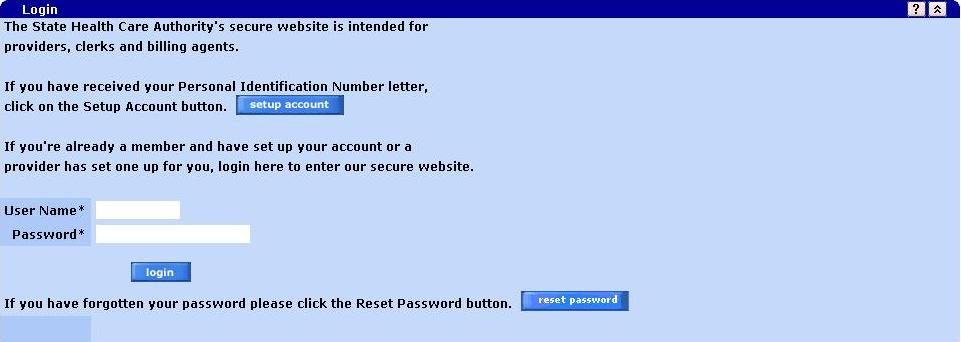
Screenshot source: MMIS Provider Portal Online Panel Help, Logon-Login / Login Layout (unpaginated).
TL;DR: use your own login, and give your biller their own
Use your own MMIS provider user account. Your site administrator gives your biller their own clerk login and assigns the roles they need. CCO-covered claims go through the member’s CCO. Official account and access guidance.
Who needs their own MMIS login
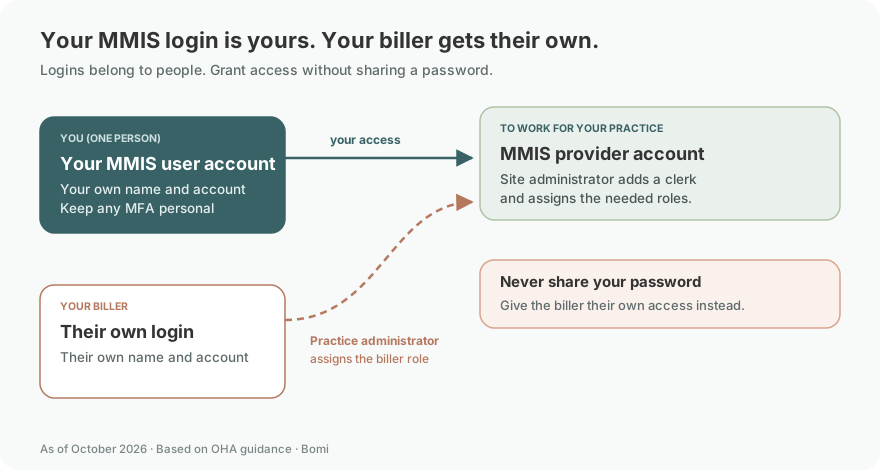
Use a provider user account in your own name and keep any MFA or account recovery personal. The site administrator creates separate clerk/user access and assigns roles for each biller. Never share your password; give your biller their own authorized-user login. Official individual-user and staff-access guidance.
Any enrolled Oregon Medicaid provider or practice that touches OHP members benefits from portal access. In a therapy practice that usually means:
The billing entity / practice. Whoever holds the OHP provider enrollment (an individual therapist or a group) needs a portal account tied to that NPI.
Front-desk and intake staff. Anyone verifying eligibility or confirming CCO enrollment before a first session.
Billers and revenue staff. Anyone checking fee-for-service claim status, submitting individual claims, or tracking prior authorizations.
Give each staff member their own user access. One person sets up the account as the site administrator and adds each staff member as their own user. We cover the delegated-access mechanics for billers in how to give your biller access to the Oregon Medicaid MMIS portal.
Before You Start: OHP Enrollment and the PIN Letter
You cannot set up a portal account until two things are true: your OHP provider enrollment is complete, and you have your PIN letter in hand.
The PIN letter is the credential OHA uses to prove that the person setting up the account is really tied to the enrolled provider record. OHA says new providers receive a PIN letter within about 5 to 6 business days of enrolling with the Oregon Health Authority. It arrives by mail, so make sure the mailing address on your enrollment is current and monitored.
If your PIN letter never shows up — or you lost it: OHA’s Provider Access team can issue a replacement. The portal page directs providers to email the Provider Access team with their name, NPI, and mailing address; a representative typically follows up within about 3 business days. Do not re-enroll or create a duplicate record because the letter is late — request a replacement PIN instead.
For a new account, OHA requires a PIN letter after provider enrollment. If you already have access, sign in above; use Password Reset if you are not yet locked out. OHA’s portal help page gives the current PIN replacement and lockout contacts.
Login links reviewed: October 9, 2026.
For CCO-covered services, follow the member’s CCO billing instructions. OHA billing guidance.
Account setup and access guide
Last updated: July 5, 2026.
If you have enrolled with the Oregon Health Plan (OHP) and now need to check member eligibility, look up a claim, or track a prior authorization, the tool you are looking for is the Oregon Medicaid MMIS Provider Portal at or-medicaid.gov. It is free, it runs 24/7, and it is the fastest way to answer the day-to-day questions that used to require a phone call. The catch: you cannot just create a login. You need a PIN letter that the Oregon Health Authority (OHA) mails to newly enrolled providers, and you need one of two specific browsers to get in.
This guide walks through what the portal does, who needs access, how the PIN letter works, and how to set up your account without getting stuck. It assumes you are already enrolled with OHP — if you are not there yet, start with our guide to enrolling as an Oregon Medicaid therapist first.
What the MMIS Provider Portal Is
The MMIS Provider Portal — MMIS stands for Medicaid Management Information System — is OHA’s official web portal for Oregon Medicaid providers, hosted at or-medicaid.gov. OHA describes it as the source for free, real-time information about OHP member eligibility, member coordinated care organization (CCO) enrollment, fee-for-service claim status, prior authorization status, and more. It is available around the clock.
It helps to be clear about what this portal is and is not. It is the state / fee-for-service (Open Card) lane tool. When a member is enrolled in a CCO, that CCO runs its own portal, its own claim submission, and its own prior authorization process — the MMIS portal will tell you which CCO a member belongs to, but you generally submit that member’s claims and authorizations to the CCO, not through this portal. For a fuller map of how Open Card and CCO lanes differ, see the Oregon Medicaid credentialing pillar guide.
What You Can Do in the Portal
Once you are in, the portal is where you can:
Verify OHP eligibility in real time. Look a member up by their Oregon Health ID, or by last name, first name, and date of birth. OHA’s eligibility page notes you can pull up to 13 months of historical eligibility (through the date of inquiry), but you cannot request eligibility for future dates.
See member CCO enrollment. Confirm whether a member is in a CCO and which one, so you route claims and authorizations to the right payer.
Check fee-for-service claim status. Review Open Card claims OHA is processing or has processed.
Submit individual claims. Enrolled providers can key in individual fee-for-service claims directly in the portal.
Submit and track prior authorizations. Submit initial PA and plan-of-care requests, and use the portal’s PA Inquiry function to check the status of an existing authorization by its prior authorization number.
Two things to keep straight. First, eligibility, coverage under the Prioritized List of Health Services, and prior-authorization requirements should be confirmed before the visit — the portal is built for exactly that. Second, prior authorization is split by lane: OHA’s prior authorization page says that for services covered by a member’s CCO you follow the CCO’s procedures, while fee-for-service PAs follow OHA’s Prior Authorization Handbook. The MMIS portal handles the fee-for-service side.
How to Set Up the Account
With your PIN letter and a completed OHP enrollment, the setup flow is straightforward:
Open the portal in Firefox or Edge. Choose Account, then Account Setup. Enter your Oregon Medicaid Provider ID and the case-sensitive PIN from your letter, then select setup account. OHA Account Setup Guide.

Screenshot source: Oregon Medicaid Provider Portal Quick Set Up Guide OHP 3160 (05/2023), page 1.
Complete the contact information, create the administrator username and password, select security questions, and accept the user agreement. The first account becomes the site administrator, who adds authorized users. OHA account setup and administrator guidance.
If your practice has multiple NPIs (for example, individual and group enrollments), each enrolled provider record has its own account and its own site administrator, so plan out who administers what before you start.
Browser and Login Notes
This trips up more people than anything else: the MMIS Provider Portal is picky about browsers. OHA states that you must use Mozilla Firefox or Microsoft Edge — those are the only compatible browsers. Google Chrome and Safari are not supported. If the portal looks broken, buttons do not respond, or a page will not load, the first thing to check is whether you are in Firefox or Edge.
A few other login habits worth adopting: bookmark or-medicaid.gov directly so staff are not searching for it each time, keep each user on their own login rather than sharing one, and remember that OHA’s Provider Services no longer gives eligibility or enrollment status over the phone — the portal (or the automated voice response line and EDI 270/271 options on OHA’s eligibility page) is the intended path.
Password, Lockout, and PIN Help
When something goes wrong, here is where to go:
Forgot your password. If you are not yet locked out, use the Password Reset button on the portal login screen and answer a security question. Follow the password requirements shown on the reset screen.
Locked out. OHA directs locked-out users to call Provider Services at 800-336-6016 (option 5), or to email the Provider Access team with your NPI/MCD ID and your username so they can help you regain access.
PIN letter lost or never arrived. Email the Provider Access team with your name, NPI, and mailing address to request a replacement; expect a follow-up within a few business days.
Need to change the site administrator. If the person who set up the account has left the practice, contact the Provider Access team to transfer the administrator role rather than creating a second account.
Always confirm the current contact numbers and email on OHA’s portal page before relying on them — OHA updates these details periodically.
Add your biller or delegated user
Never share your password. Give the biller their own login and use the documented access method shown above. Official access instructions.
The site administrator opens Account, then Clerk Maintenance to add each user. Enter the new user’s details, then select the needed Available Roles and move them into Assigned Roles before adding the clerk. Give your biller only the functions they need. OHA Account Setup Guide: adding users.

Screenshot source: Oregon Medicaid Provider Portal Quick Set Up Guide OHP 3160 (05/2023), page 1.
Once you can log in, put the portal to work as part of your routine rather than only when a problem appears:
Verify eligibility and CCO enrollment before every OHP visit, not just at intake, since coverage can change month to month.
Route claims by lane — fee-for-service claims through the MMIS portal or EDI, and CCO members’ claims through the correct CCO.
Check prior authorization requirements and status for fee-for-service services before rendering them.
Add or remove users promptly as staff join or leave, so access always matches your current team.
Our guide to verifying OHP eligibility across CCO and Open Card walks through the eligibility habit in more detail, including reading CCO enrollment correctly.
Action Steps for Providers
Finish OHP enrollment first. The portal account depends on a completed OHA enrollment.
Watch your mail for the PIN letter. Expect it within roughly 5 to 6 business days of enrolling.
Open or-medicaid.gov in Firefox or Edge. Chrome and Safari will not work correctly.
Set up the account as site administrator. Use your PIN letter details to create the first account.
Add each staff member as their own user. Do not share a single login across the practice.
Save the help paths. Note the password reset button, the 800-336-6016 (option 5) lockout line, and how to request a replacement PIN.
Build eligibility checks into your workflow. Verify OHP and CCO enrollment before each visit.
Where Bomi Fits
Bomi helps therapy practices with the operational side of Oregon Medicaid — eligibility checks, claims, denials, prior-authorization follow-up, credentialing workflows, payer follow-up, EOB review, and revenue operations — inside the EHR you already use. Getting into the MMIS Provider Portal is the first step; using it consistently, and routing each member to the right lane, is where practices actually save time and stop losing claims to the gaps between Open Card and CCO.
You can see how we approach billing operations, or start from the Oregon overview.
The honest version of the Bomi pitch: we cannot set up your OHA account for you or guarantee a claim pays — no billing partner can. What we can do is keep the eligibility, claims, and authorization steps in the right lane and in the right order, so fewer Oregon Medicaid dollars fall through the cracks.
Frequently Asked Questions
Where is the Oregon MMIS provider login?
Open https://www.or-medicaid.gov/ in Mozilla Firefox or Microsoft Edge. This is the Oregon Medicaid MMIS Provider Portal linked by OHA; it is separate from the member OHP benefits account.
How do I reset my Oregon MMIS login password?
If you are not yet locked out, use Password Reset on the login screen and answer a security question. For a locked account or reset trouble, use the current Provider Access contacts on OHA’s Oregon Medicaid Provider Portal page.
Where do I log into the Oregon Medicaid Provider Portal?
The MMIS Provider Portal is at or-medicaid.gov, available 24/7. OHA notes it only works in Mozilla Firefox or Microsoft Edge, so open it in one of those browsers rather than Chrome or Safari.
What is the PIN letter?
The PIN letter is the credential OHA mails to enrolled providers so they can prove their identity when setting up portal access. OHA says new providers receive one within about 5 to 6 business days of completing their Oregon Health Authority enrollment. If it does not arrive or you lose it, you can request a replacement from OHA’s Provider Access team.
Can I use Chrome for the Oregon Medicaid Provider Portal?
No. OHA states that Mozilla Firefox and Microsoft Edge are the only compatible browsers for the MMIS Provider Portal. If the portal is misbehaving, switching to Firefox or Edge is the first fix to try.
What can I do if I am locked out of the portal?
Contact Provider Services at 800-336-6016 or Provider Access at team.provider-access@oha.oregon.gov directly, with your NPI or Medicaid ID and username. Password Reset is only for users who are not yet locked out. Use OHA’s portal page for the current contacts.
Can my biller use my Oregon Medicaid portal login?
No — you should not share a single login. The portal uses a site-administrator model: one person sets up the account and adds each staff member, including your biller, as their own individual user.
Does an MMIS portal account make me in-network with Oregon CCOs?
No. Creating an MMIS Provider Portal account is tied to your OHP fee-for-service enrollment. It does not contract or credential you with any coordinated care organization. CCO participation is a separate process with each plan, and OHP enrollment alone does not make you in-network with every Oregon CCO.
Bottom Line
The Oregon Medicaid MMIS Provider Portal at or-medicaid.gov is the free, real-time hub for OHP eligibility, CCO enrollment, fee-for-service claim status, prior authorization, and individual claim and PA submission. To set it up, finish your OHP enrollment, wait for the PIN letter OHA mails within about 5 to 6 business days, open the site in Firefox or Edge, and create the account as your practice’s site administrator. Get that in place and the day-to-day Oregon Medicaid questions get a lot faster to answer.
For another state’s provider account, see DHS Medicaid Online login and biller access or MaineCare Health PAS Online login and biller access. Use each portal’s own account and access roles.
For a Massachusetts practice, see MassHealth POSC login and account setup for that state’s portal and administrator workflow.
Sources
Planning a private practice?
Use Bomi's free Build resources to plan the business, provider identity, payer setup, and billing workflow before you see clients.
Use Build resources
About Bomi
Founded by George Ruan, Dax Earl, and Andrey Goder, Bomi helps independent therapists and group practices with insurance billing, credentialing, and payer follow-up. Bomi grew out of Dax’s experience helping his mother with her therapy practice, with a clear purpose: reduce the administrative burden of insurance while keeping practice owners in control.
Meet our founders