
MaineCare Health PAS Online Login: Account Setup and the October Portal Change
By George Ruan • October 9, 2026
For MaineCare Health PAS Online provider login, open Health PAS sign-in and sign in with your own account.
Sections
Direct links: Health PAS login and account help
This is the Health PAS sign-in panel shown in the current public guide, before the scheduled October 12 portal change.
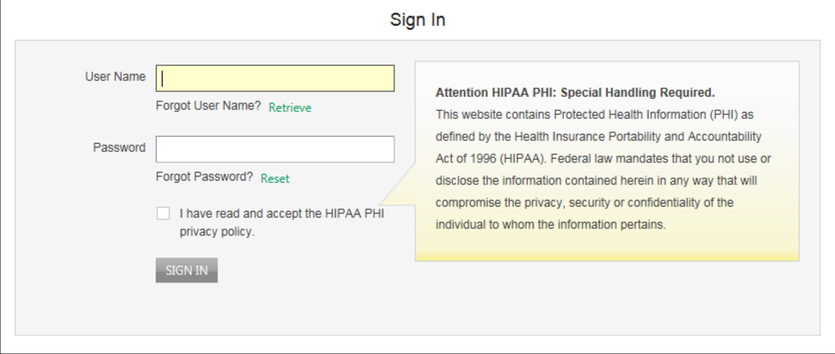
Screenshot source: MaineCare Trading Partner Guide v10.0, PDF page 19; Health PAS interface before October 12, 2026.
TL;DR: use your own login, and give your biller their own
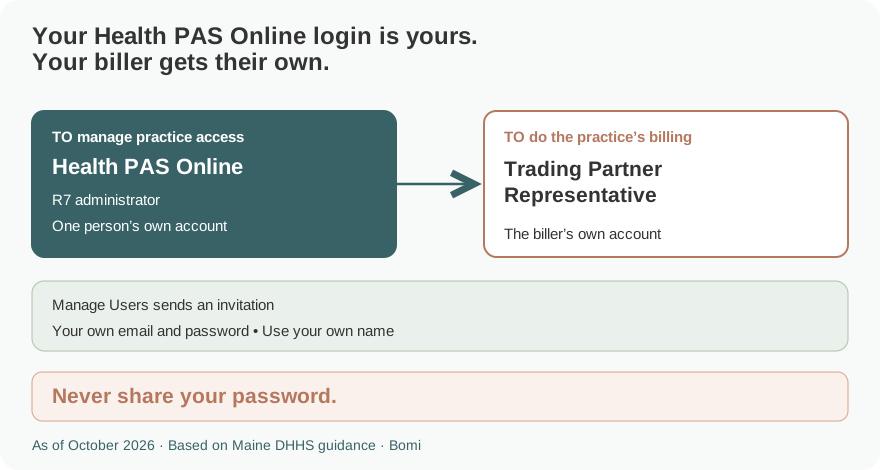
Use your own Health PAS login. Your biller gets a separate Trading Partner Representative login through an administrator’s invitation and selected roles. These Health PAS instructions describe access before the announced October 12, 2026 replacement by the MaineCare Partner Portal. Official guide.
Who needs their own Health PAS login
The existing Health PAS administrator manages the trading partner’s users; R7 is User Management. Each representative has their own username, password and email. Never share your password. The new MaineCare Partner Portal has a separate migration and invitation process: do not apply an old Health PAS screenshot to the new site. Official guide.
Before you create access
As of October 9, 2026, Maine has scheduled the new MaineCare Partner Portal to replace Health PAS Online on October 12 at 8 AM. The state says R7 trading partner administrators will migrate and will invite additional users after launch. Check the official provider resources page and the transition notice before following legacy registration steps. Official guide.
The setup and role screenshots below come from the current public Health PAS guide for providers already enrolled, version 10.0 dated January 13, 2026. They illustrate the pre-transition site. They do not show the future MaineCare Partner Portal. Official guide.
How to create your Health PAS account
Before the transition, use the provider-home registration choice for a provider already enrolled. Complete the demographic and provider information requested by the guide, then create the account’s security information. Official guide.
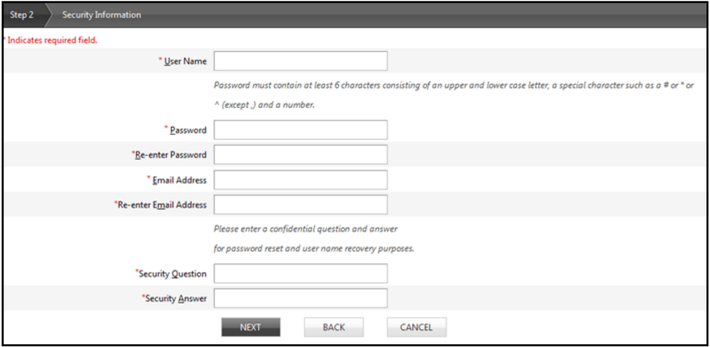
Screenshot source: MaineCare Trading Partner Guide v10.0, PDF page 13; Health PAS interface before October 12, 2026.
Choose your own username and password, provide your own email and security question/answer, and follow the remaining remittance, confirmation and agreement prompts. Use the activation email to activate the account before signing in. Official guide.
For the new portal after the scheduled launch, follow the state’s current migration instructions. The September 28 notice says additional users are managed by the migrated trading partner administrator; it does not instruct every employee to recreate a legacy Health PAS account. Official guide.
Add your biller
On the legacy Health PAS site, the administrator opens Account Maintenance > Manage Users and chooses ADD USER. Enter the biller’s first name, last name and email, select the appropriate roles and submit. The biller follows the invitation to establish their own representative account. Official guide.
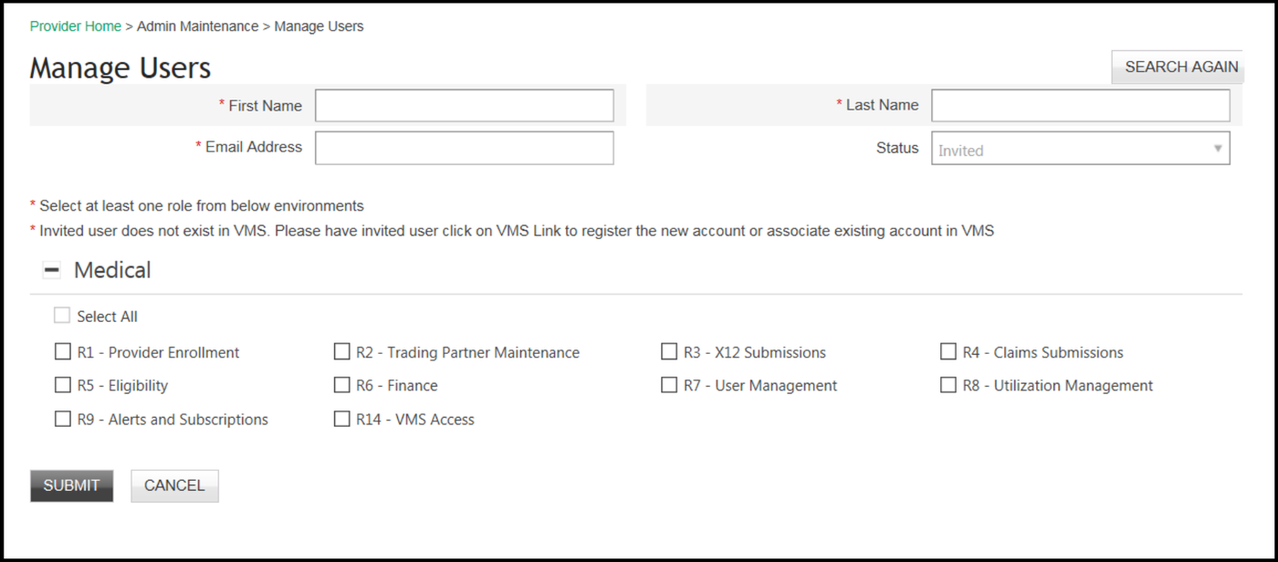
Screenshot source: MaineCare Trading Partner Guide v10.0, PDF page 34; Health PAS interface before October 12, 2026.
The role list separates R4 Claims Submissions, R5 Eligibility, R6 Finance and R7 User Management. Choose the work the biller needs; adding a biller does not require giving that person every role. The official Manage Users notice also directs administrators to manage access when staff leave. Official guide.
After the new MaineCare Partner Portal launches, the migrated administrator invites and manages additional users using the new portal. The legacy ADD USER screenshot above is not the new portal’s invitation screen. Official guide.
Login errors and account recovery
For the Health PAS sign-in shown here, Retrieve handles a forgotten username and Reset handles a forgotten password. Complete the privacy-policy acknowledgement before signing in. For transition problems or a changed login destination, use the official provider resources page and current state notices. Official guide.
Related guides
How Oregon MMIS accounts and biller access work explains a separate state’s access model. Use the guide for the state whose Medicaid program you bill.
Frequently Asked Questions
Where is the MaineCare Health PAS Online login?
Before the announced October 12, 2026 replacement, use Sign In from mainecare.maine.gov. Check Maine’s official provider resources for the current destination after the transition.
When does the MaineCare Partner Portal replace Health PAS?
The September 28, 2026 state notice schedules the replacement for October 12, 2026 at 8 AM. Recheck the official notice for any change.
How does my biller get a Health PAS login?
On legacy Health PAS, an administrator invites a Trading Partner Representative through Account Maintenance > Manage Users and assigns the needed roles.
Who invites staff to the new MaineCare Partner Portal?
The state says R7 trading partner administrators migrate to the new portal and will invite and manage additional users after launch.
Are these screenshots from the new MaineCare Partner Portal?
No. They are from the January 13, 2026 Health PAS trading partner guide and illustrate the site before its scheduled replacement.
Planning a private practice?
Use Bomi's free Build resources to plan the business, provider identity, payer setup, and billing workflow before you see clients.
Use Build resources
About Bomi
Founded by George Ruan, Dax Earl, and Andrey Goder, Bomi helps independent therapists and group practices with insurance billing, credentialing, and payer follow-up. Bomi grew out of Dax’s experience helping his mother with her therapy practice, with a clear purpose: reduce the administrative burden of insurance while keeping practice owners in control.
Meet our founders