
Florida Medicaid Secure Web Portal Login: FMMIS Access
By George Ruan • October 9, 2026
For Florida Medicaid Secure Web Portal provider login, open the official FMMIS sign-in page and sign in with your provider or agent username and password. FMMIS means Florida Medicaid Management Information System; new provider accounts need activation before this login will work.
Last updated: October 9, 2026.
Sections
- Direct links: Florida Medicaid Secure Web Portal login and help
- TL;DR: use your own login, and give your biller their own
- Who needs their own Florida Medicaid portal login?
- Before you create access: provider ID, PIN and administrator
- How to create a Florida Medicaid portal account
- Choose Account Management or Florida Web Portal
- How to add your biller as a portal agent
- Forgot your FMMIS password? Identify your account role
- The administrator left, or the PIN letter is missing
- Signed in, but claims or eligibility is missing
- Frequently Asked Questions
Direct links: Florida Medicaid Secure Web Portal login and help
Provider and agent login — returning users of the Secure Web Portal.
Create New Account — provider-ID and temporary-PIN activation.
Reset Password — username/email recovery; agents should contact their administrator.
Provider support and contact instructions — administrator recovery and missing PIN letters.
Provider Enrollment / Enrollment Wizard — apply for a Medicaid provider number before activating the provider account.
AHCA SMMC provider resources — current plans by region and plan contacts.
The Florida Medicaid login page looks like this: enter your own Username and Password, then choose Sign in.
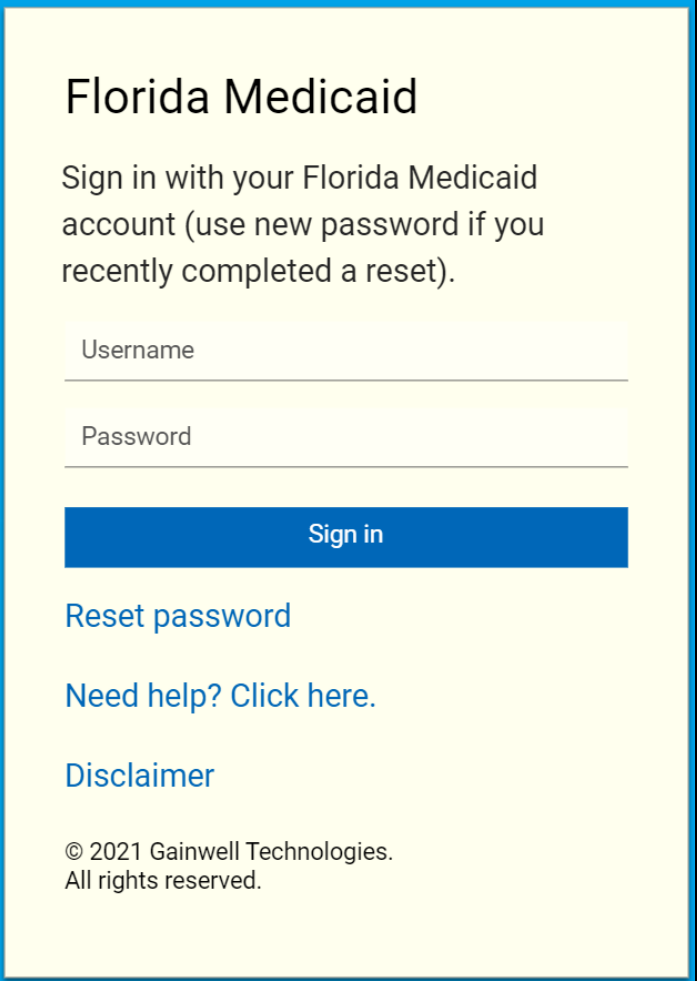
Screenshot source: Secure Web Portal Account Maintenance and Reset Password QRG (October 15, 2025), page 7.
TL;DR: use your own login, and give your biller their own
Use your own Florida Medicaid login. Your biller uses their own Agent login, and the practice administrator grants the roles they need. Applying for a Medicaid number and joining a health plan are separate.
Source: FMMIS account and agent guide; AHCA plan credentialing guidance.
Who needs their own Florida Medicaid portal login?
A login belongs to one person. Use your own name and credentials, and keep any MFA or verification under your own control. Your biller uses their own Agent account: the practice administrator uses Add Agent and assigns the necessary Florida Web Portal roles. Never share your password.
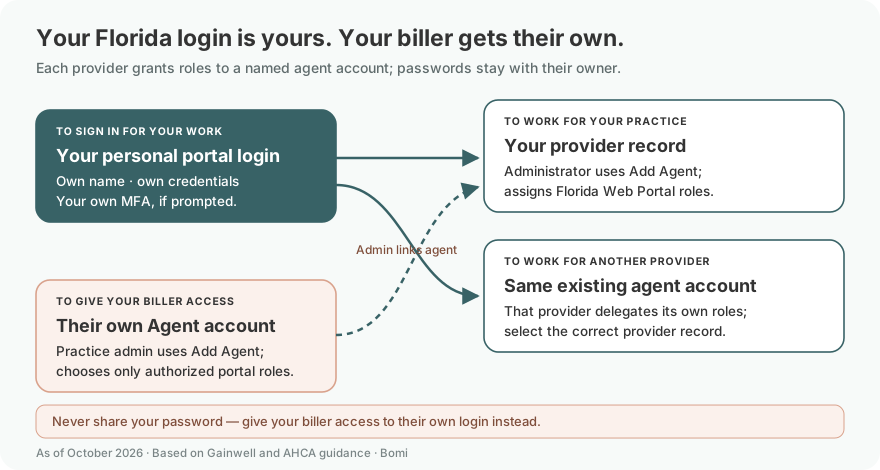
Source: FMMIS user guide, sections 3.1–3.4.1
If you work for another provider, that provider can delegate roles to your existing agent account using the guide’s existing-account process. Each provider grants its own access; confirm the correct username and provider record rather than assuming every practice is already available.
Give each staff member or outside biller an individual account. The FMMIS agent-management instructions let an administrator add an agent and authorize specific tasks. Use that delegation route so the biller can work under their own username; keep the administrator’s password with its owner.
Before you create access: provider ID, PIN and administrator
For a new provider account, have the Medicaid provider ID from the welcome letter and the temporary PIN from the separately mailed PIN letter. The official activation page asks for those two values. If the practice already has an administrator, ask them to add you as an agent instead of restarting provider-account activation. If you have not enrolled with AHCA, begin with Florida Medicaid provider enrollment.
How to create a Florida Medicaid portal account
For the provider’s initial account, the current activation instructions describe this sequence:
Open Create New Account, enter the provider ID and temporary PIN, then select Sign In.
Read the current terms, choose a username and password, and select a security question and answer.
Continue with Next, then use Sign-in to open the established account. Follow the displayed instructions if validation fails.
Use the full Florida Medicaid account-creation guide for the enrollment and PIN-letter prerequisites. Returning users can go straight to the login link at the top.
Choose Account Management or Florida Web Portal
After signing in, choose Account Management to manage agent access, or Florida Web Portal for state provider tasks allowed by your roles. DCF Provider View is a different application; it is not the claims workspace.

Screenshot source: FMMIS Secure Web Portal User Guide (v14, May 28, 2026), PDF page 14 (printed 2-3).
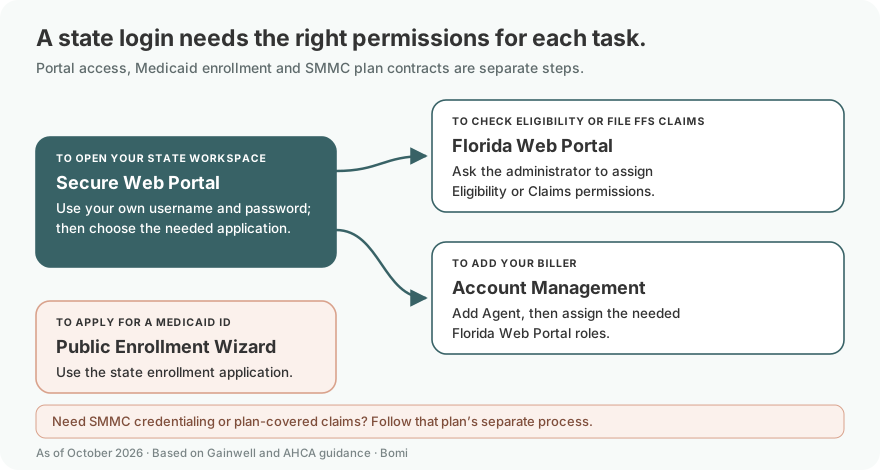
The map summarizes the FMMIS guide’s account, role and portal sections and AHCA’s plan guidance above. Available functions depend on the provider’s enrollment type and your assigned permissions.
How to add your biller as a portal agent
Have the practice administrator link the biller’s own Agent account with Add Agent, then assign the needed Florida Web Portal roles. The biller keeps their own name, credentials and any verification; never share the administrator’s password.
The administrator opens Account Management → Add Agent, searches the biller’s email, and selects the correct existing username or creates an agent. Then assign the needed Florida Web Portal roles and save. The official role instructions distinguish ordinary task permissions from Super Agent authority to add users and assign permissions. Grant the authority you intend, then follow the Florida Medicaid biller-access guide for the detailed delegation steps.
Forgot your FMMIS password? Identify your account role
Use the official password reset page for the username/email recovery route. Its instructions tell agents to contact their administrator. The account maintenance quick reference also explains how the administrator resets an agent’s password.
Before requesting a reset, confirm which username belongs to the provider account you need. For a practice with multiple staff logins, an old email address or a former biller’s username is a reason to involve the current administrator. Keep recovery messages with the account owner rather than forwarding credentials through a shared inbox.
The administrator left, or the PIN letter is missing
Follow Gainwell’s current provider support instructions when self-service recovery is unavailable. They describe the authorized letter process for administrator and PIN requests. Use the listed recovery route; the general question form is not the route for those requests. Do not send a patient record to prove a portal-access issue.
Signed in, but claims or eligibility is missing
Ask the administrator to review your assigned roles using the biller-access guide. Describe the missing task precisely: checking eligibility, reading a remittance, or submitting a claim. That is more useful than asking for every permission.
If the missing information concerns a managed-care claim, first confirm the member’s SMMC plan and the practice’s plan participation. State-portal access does not establish access to every plan’s system. For a new appointment, continue with Florida Medicaid eligibility verification.
Frequently Asked Questions
What is the Florida Medicaid provider login?
Use the official Secure Web Portal link at home.flmmis.com in the opening paragraph. New provider accounts use the provider-ID and PIN activation process first.
Is FMMIS the same as the Florida Medicaid Secure Web Portal?
FMMIS stands for Florida Medicaid Management Information System. The Secure Web Portal is its provider workspace; after sign-in, Account Management and Florida Web Portal serve different functions.
How do I reset my FMMIS password?
Use the official Reset Password link above for the username/email recovery route. Agents should contact their administrator; administrator recovery and missing PIN requests follow Gainwell’s provider-support instructions.
How do I create a Florida Medicaid provider portal account?
A newly enrolled provider uses the Medicaid provider ID and temporary PIN at Create New Account. A biller joining an existing practice should receive agent access from the administrator.
Can my biller use my administrator login?
Give the biller an individual agent account and the permissions you authorize. If an agent is locked out, ask the practice administrator for recovery help.
Does a portal login mean I am in-network with SMMC plans?
No. AHCA enrollment, state-portal access and SMMC plan contracting are separate steps.
Want Bomi to handle insurance billing?
Bomi helps therapy practices with benefit checks, claims, denials, balances, CAQH, attestations, and revenue management.
Book a call
About Bomi
Founded by George Ruan, Dax Earl, and Andrey Goder, Bomi helps independent therapists and group practices with insurance billing, credentialing, and payer follow-up. Bomi grew out of Dax’s experience helping his mother with her therapy practice, with a clear purpose: reduce the administrative burden of insurance while keeping practice owners in control.
Meet our founders