
CMAP Secure Web Site Login: Create an Account and Add Your Biller
By George Ruan • October 9, 2026
For CMAP Secure Web Site provider login, open CMAP sign-in and sign in with your own account.
Sections
Direct links: CMAP login and account help
The CMAP login panel has login for existing users, setup account for first access, and reset password for recovery.
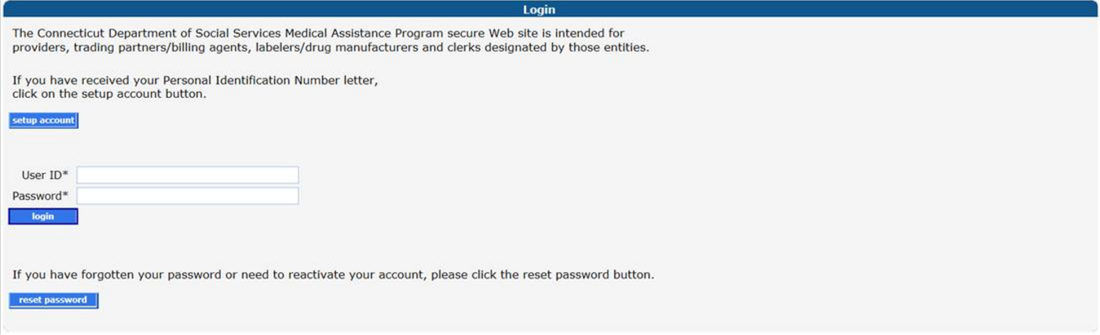
Screenshot source: CMAP Secure Web Site Enrollment and Maintenance Instructions, PDF page 1.
TL;DR: use your own login, and give your biller their own
Use your own CMAP account and complete your own MFA. Your biller uses a separate Clerk ID that the Master User adds with the needed roles. Provider enrollment is a separate application. Official guide.
Who needs their own CMAP login
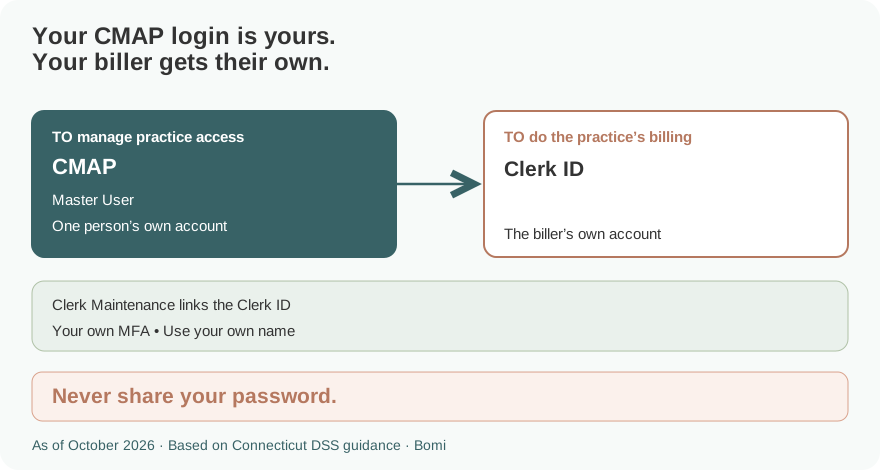
The practice’s Local Administrator, also called the Master User, manages access for the provider Web account. Each clerk signs in with their own Clerk ID and completes MFA. Never share your password. The guide also allows an existing Clerk ID to be linked to another provider Web account; that does not transfer the Master User’s password or authority. Official guide.
Before you create access
For an enrolled provider’s first secure account, locate the Initial Web User ID in the welcome letter and the Personal Identification Number in the separate PIN letter. Decide who will act as Local Administrator/Master User. These initial credentials establish the account; they are not the regular login to keep using afterward. Official guide.
If you need a Medicaid provider enrollment rather than a Web account, start with the provider enrollment page. Creating a login does not replace that application. Official guide.
How to create your CMAP account
Open Secure Site and choose setup account. Enter the Initial Web User ID and PIN exactly as provided; both are case-sensitive. Select setup account again to continue. Official guide.
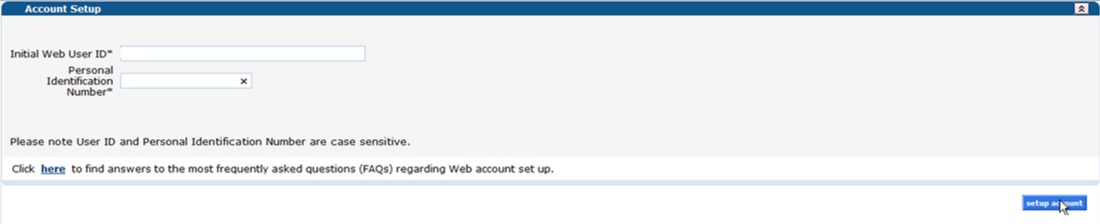
Screenshot source: CMAP Secure Web Site Enrollment and Maintenance Instructions, PDF page 6.
Create the ongoing User ID and password, complete the contact and security-question fields, review the security agreement and submit. Follow the current on-screen password requirements. The guide says not to use a personal name as the User ID; the contact information still identifies the person responsible for the account. Official guide.
Complete MFA setup when prompted. The current guide says MFA became mandatory on August 1, 2026 and offers an authenticator app or email verification. Each Master User and clerk completes their own authentication. Official guide.
Add your biller
The Master User opens Account, then Clerk Maintenance. For a new clerk, enter the clerk’s ID and contact details and establish the initial password. For someone who already has a Clerk ID, use the existing ID when adding the clerk to this provider account. Official guide.
Move only the required roles into Assigned Roles and submit. Claim Inquiry/Submission/Adjustment is a combined role; the guide says it cannot be reduced to inquiry alone. Client Eligibility Verification is a separate choice. Match access to the work the biller will perform. Official guide.

Screenshot source: CMAP Secure Web Site Enrollment and Maintenance Instructions, PDF page 9.
Give the clerk their initial credentials privately. At first login, a new clerk changes the password and supplies their own email and security answers, then completes MFA. The biller uses that Clerk ID rather than the Master User’s login. Official guide.
Login errors and account recovery
Use reset password on the Secure Site login panel and follow the User ID and security-question prompts. A clerk who cannot recover access should contact the provider account’s Master User. For a Master User problem, use the assistance directions in the current guide rather than creating a duplicate provider account. Official guide.
Related guides
How Oregon MMIS accounts and biller access work explains a separate state’s access model. Use the guide for the state whose Medicaid program you bill.
Frequently Asked Questions
Where is the Connecticut Medicaid CMAP provider login?
Use the CMAP Secure Site on ctdssmap.com. Existing users enter their own User ID and password and complete MFA.
How do I create a CMAP Secure Web Site account?
Choose setup account and use the Initial Web User ID and PIN from the enrollment letters. Then create the ongoing account and complete the security prompts.
How do I give my biller CMAP access?
The Master User adds the biller’s Clerk ID in Account > Clerk Maintenance and assigns the needed roles. The clerk uses their own login and MFA.
Can an existing CMAP Clerk ID be linked to another provider?
Yes. The guide allows the Master User to add an existing Clerk ID to another provider Web account and assign the appropriate roles.
Is CMAP MFA required?
The current secure-site guide says MFA became mandatory August 1, 2026. Each user authenticates separately.
Planning a private practice?
Use Bomi's free Build resources to plan the business, provider identity, payer setup, and billing workflow before you see clients.
Use Build resources
About Bomi
Founded by George Ruan, Dax Earl, and Andrey Goder, Bomi helps independent therapists and group practices with insurance billing, credentialing, and payer follow-up. Bomi grew out of Dax’s experience helping his mother with her therapy practice, with a clear purpose: reduce the administrative burden of insurance while keeping practice owners in control.
Meet our founders