
Zelis ePayment Center enrollment vs Zelis Payments Network: choosing no-fee EFT
By George Ruan • October 9, 2026
Source check: October 9, 2026.
For no-fee Zelis EFT enrollment, use the payer-sponsored route your payer publishes. For example, Select Health’s ePayment Center instructions describe no-cost EFT/ERA enrollment. The general Zelis enrollment form is branded ZAPP Edge; check the product and fee agreement before submitting it.
Sections
ePayment Center vs Zelis Payments Network
Electronic funds transfer (EFT) is the payment; automated clearing house (ACH) describes the bank-transfer rail; electronic remittance advice (ERA) explains what was paid. A direct deposit can still belong to a fee-bearing product. Zelis identifies ACH+ as fee-based, and describes contractual per-payment pricing for its network offering. Zelis ACH+ explanation; Zelis network enrollment terms overview.
Payer-sponsored ePayment Center: Select Health publishes a no-cost option and requires separate payer registration. Select Health enrollment
Virtual card: Select Health’s fee table marks this option as fee-bearing. Official payment comparison
ZAPP Edge/ACH+: Zelis’s current enrollment page discloses a service fee for ZAPP Edge. Zelis service-fee FAQ
Choose a confirmed payer-specific no-cost route
MVP Health Care pays through Zelis: virtual card fees and how to switch to no-fee EFT
Select Health pays through Zelis: virtual card fees and how to switch to no-fee EFT
Devoted Health and Zelis: virtual card fees and the no-fee EFT enrollment route
Banner Health Plans pays through Zelis: virtual card fees and how to switch to no-fee EFT
AvMed pays through Zelis: virtual card fees and how to switch to no-fee EFT
These guides cover documented payer routes, not every plan using Zelis. If your payer is absent, ask it for its essential EFT/ERA option. Zelis itself directs providers seeking basic EFT/ERA to the payer. Zelis guidance for essential services.
What to prepare before enrolling
Select Health’s checklist calls for the TIN or employer identification number, corporate/principal information and bank routing and account numbers. Its flow uses a registration code, account setup, an ACH agreement and bank validation. See the payer’s full enrollment steps. Enter banking information only in the verified secure workflow. Assign an authorized practice decision-maker to review the agreement.
Choose the payer and legal entity, then open the payer’s official no-cost enrollment link.
Check the agreement’s product name, fee terms and payer scope. If it says ACH+, premium service or ZAPP Edge, get clarification before accepting it as a no-cost option.
Complete the payer’s registration and bank validation. Request explicit confirmation of the payment method and effective date if replacing an existing card or network arrangement.
Set up the remittance destination separately. A deposit without usable claim detail creates a posting problem even when the payment arrives.
Inspect the next bank deposit, remittance and any vendor charge. Confirm that the payer amount and the received amount reconcile, with any difference explained.
Bank and ERA screens in the Zelis guide
After creating your payer-specific account, check the enrollment status on first sign-in. Zelis’s guide shows a pending enrollment dashboard with Continue with my enrollment. This example is set to ERA Download Only and Banking Verification is Not Applicable; it does not show an active EFT enrollment.
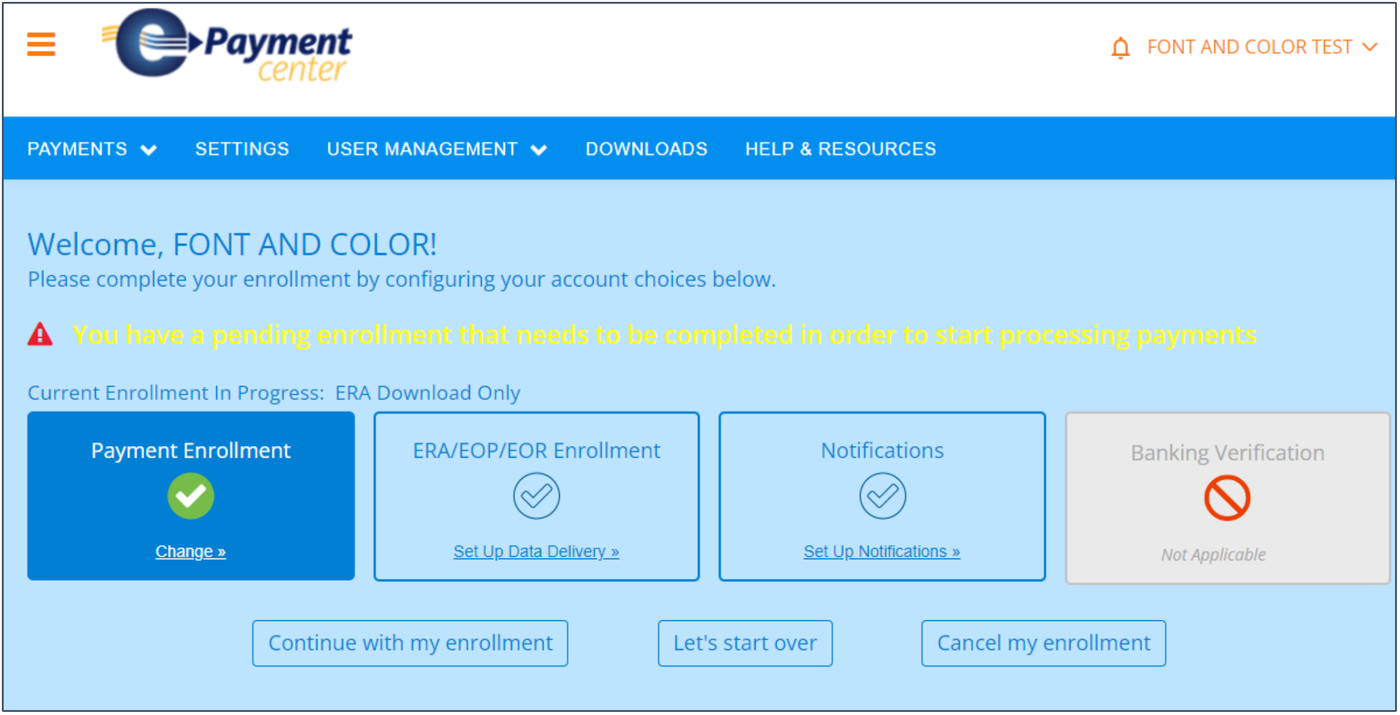
Screenshot source: Zelis ePayment Center Training Guide (v2024.07), page 5.
For the banking step, Zelis’s guide shows Bank Account Information fields for institution, account type, routing and account numbers, ownership, account holder and tax ID. Enter the authorized practice details in your verified payer portal and review the ACH agreement before submitting; this shared training example does not establish your payer’s fee terms.
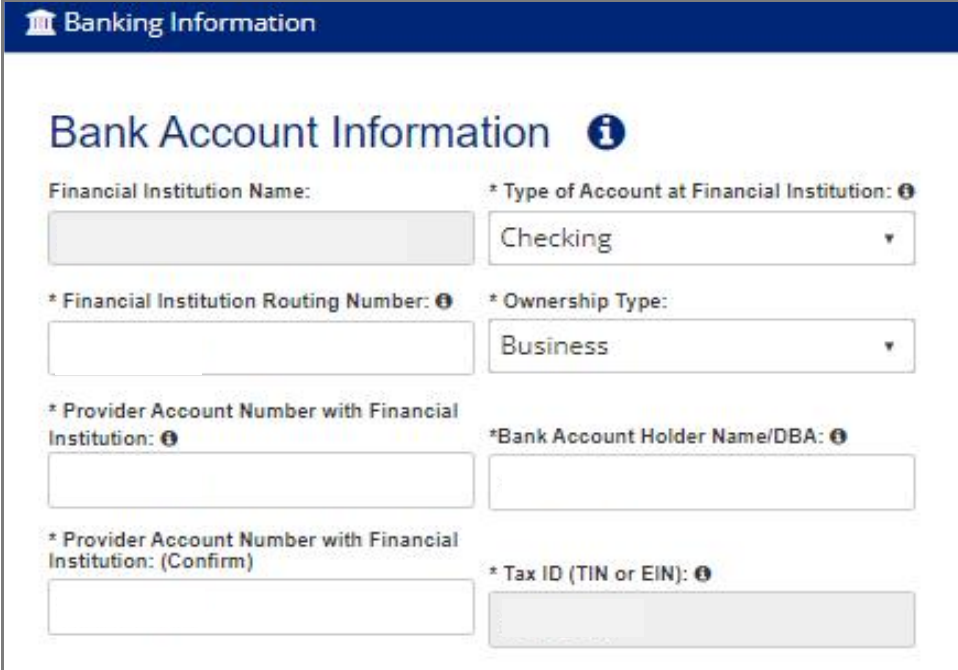
Screenshot source: Zelis ePayment Center Training Guide (v2024.07), page 19.
For the remittance step, review ERA Delivery and the contact responsible for receiving it. The guide shows Download, Clearinghouse and FTPS choices. Select the supported destination that matches your biller’s workflow, then Continue. These are Zelis training screens; payer branding and available options may vary.
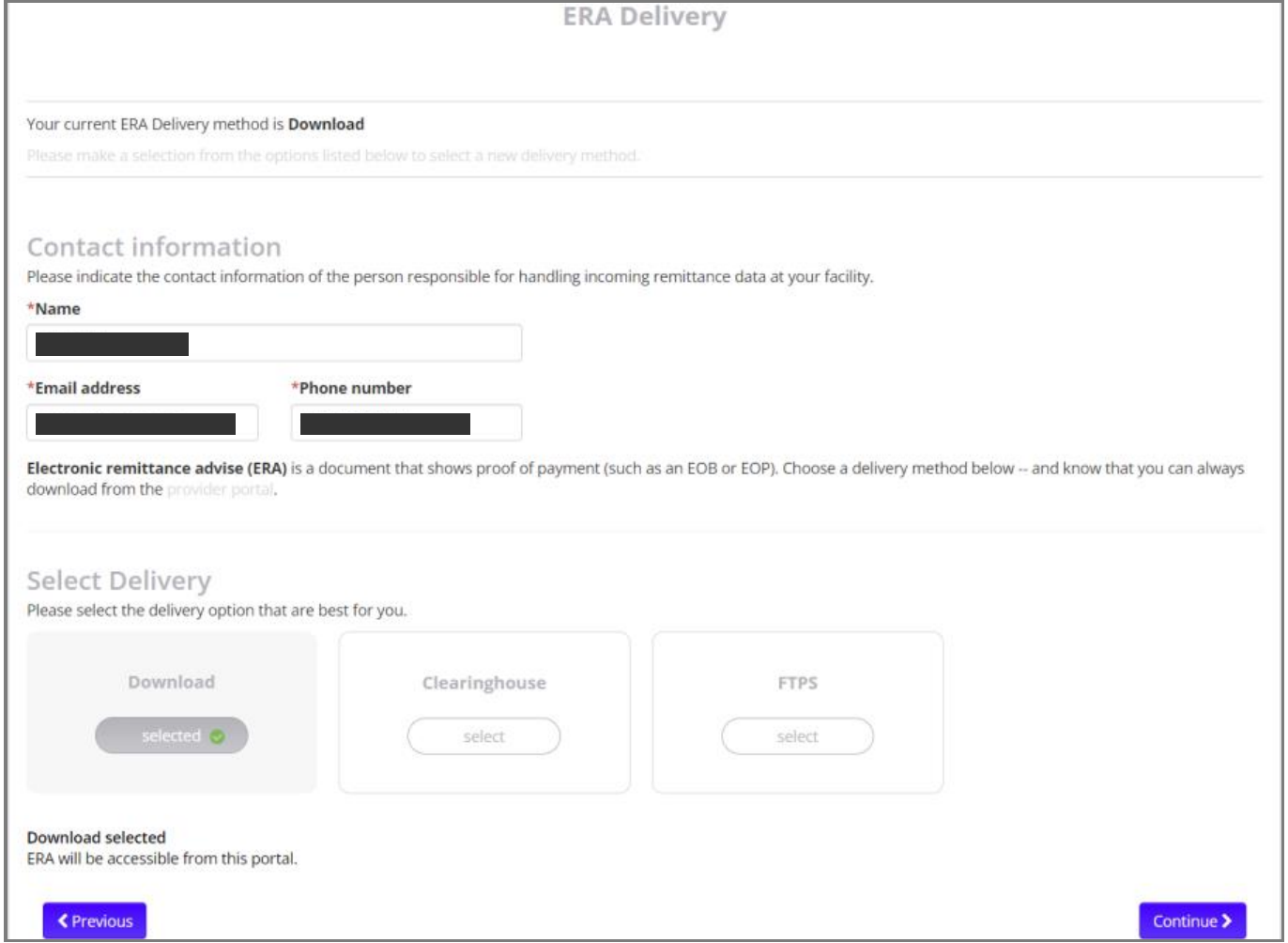
Screenshot source: Zelis ePayment Center Training Guide (v2024.07), page 19.
Already enrolled in ACH+ or receiving virtual cards?
Use a specific request: “For this payer and TIN, please explain how to replace our current payment method with the payer-sponsored no-cost standard ACH/ERA option. Confirm the fee terms, effective date and treatment of outstanding payments.” Keep the response in your enrollment record. Do not assume a new EPC login cancels an existing paid agreement.
What if fees were already taken?
Separate merchant card-processing charges from vendor service charges. Gather the processor statement, bank entry and remittance before asking who assessed the fee. Request review from the responsible party and ask whether any refund is available under your agreement. Do not budget for a refund until it is confirmed, and do not treat a payment-method change as a retroactive reversal.
For a card you have not processed, ask support how it can be replaced and how to preserve the outstanding payment while enrollment is pending. Track the replacement reference so you do not collect the same payment twice.
Find the correct Zelis ePayment Center login and support contact when access is the obstacle.
Need help coordinating payer enrollment, remittances and payment follow-up? Talk to Bomi about billing support.
Frequently Asked Questions
Is Zelis ACH always free?
No. Zelis describes ACH+ as fee-based. Some payers sponsor a no-cost standard ACH option through a separate ePayment Center.
Does one ePayment Center registration cover all payers?
Select Health says separate registration is required for each payer. Follow each payer’s published enrollment route and verify the scope of the agreement.
Will switching to EFT refund previous virtual-card fees?
A future payment-method change does not establish a refund. Ask the processor or vendor that assessed the charge to review it under the applicable agreement.
Want Bomi to handle insurance billing?
Bomi helps therapy practices with benefit checks, claims, denials, balances, CAQH, attestations, and revenue management.
Book a call
About Bomi
Founded by George Ruan, Dax Earl, and Andrey Goder, Bomi helps independent therapists and group practices with insurance billing, credentialing, and payer follow-up. Bomi grew out of Dax’s experience helping his mother with her therapy practice, with a clear purpose: reduce the administrative burden of insurance while keeping practice owners in control.
Meet our founders