
MVP Health Care pays through Zelis: virtual card fees and how to switch to no-fee EFT
By George Ruan • October 9, 2026
Source check: October 9, 2026.
MVP Health Care publishes a no-cost electronic-payment option through MVP ePayment Center. If you receive a virtual card or fee-bearing Zelis deposit, ask for the MVP-sponsored standard ACH option. MVP’s payment guide distinguishes this enrollment from its broader Zelis offering.
Sections
- What MVP’s no-cost option covers
- Virtual-card fees are different from the allowed amount
- How to enroll in MVP no-fee EFT
- Bank and ERA screens in the Zelis guide
- MVP’s registration-code instructions conflict
- Already have a Zelis account? Confirm the payment product
- If a fee has already been charged
- Confirm the next MVP payment
- Frequently Asked Questions
What MVP’s no-cost option covers
As of October 9, 2026, MVP describes its EPC as no-cost for EFT/ERA transactions and says each TIN needs its own enrollment. Its provider FAQ describes the payer-sponsored option as MVP-only, while ACH+ is a separate service. MVP payment page; MVP provider FAQ.
Virtual-card fees are different from the allowed amount
MVP’s FAQ describes merchant fees for virtual-card processing. It does not provide one rate for every practice. Read MVP’s payment-method FAQ. Compare the payer’s remittance, the card amount and your merchant statement before calling a difference a claim underpayment. Ask your processor what your actual card acceptance costs are.
How to enroll in MVP no-fee EFT
Open MVP ePayment Center from the payer’s payment page and begin registration.
Prepare the TIN, corporate/principal details and bank routing and account numbers. Follow the registration instructions shown for your organization.
Once registered, sign in, enter banking details, choose remittance delivery, review the ACH agreement and submit it.
Allow for bank pre-note verification. MVP says this can take up to six business days before ACH payments begin. MVP enrollment steps
Bank and ERA screens in the Zelis guide
For the banking step, Zelis’s guide shows Bank Account Information fields for institution, account type, routing and account numbers, ownership, account holder and tax ID. Enter the authorized practice details in your verified payer portal and review the ACH agreement before submitting; this shared training example does not establish your payer’s fee terms.
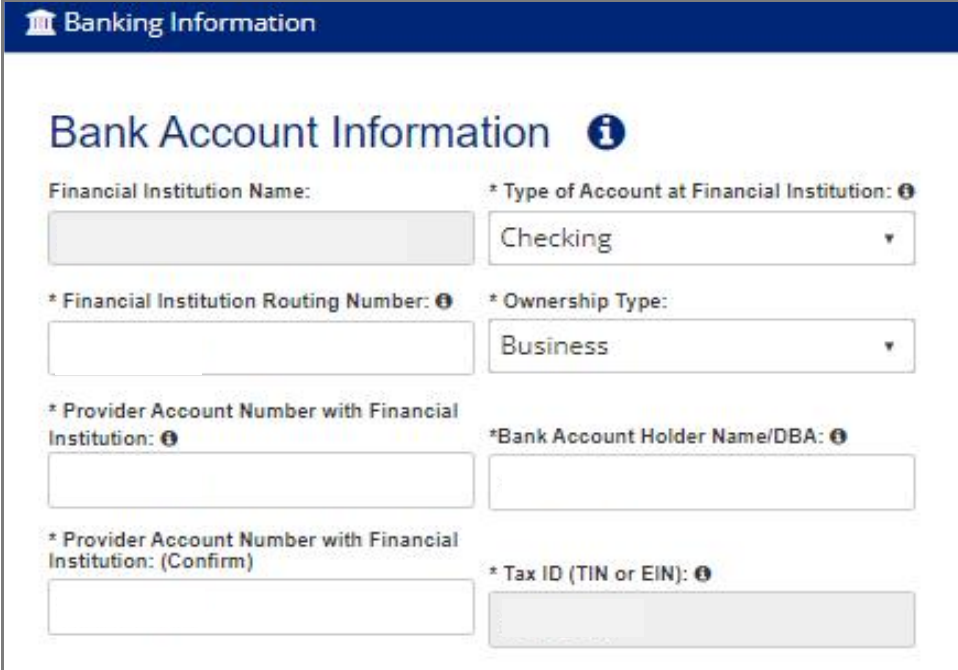
Screenshot source: Zelis ePayment Center Training Guide (v2024.07), page 19.
For the remittance step, review ERA Delivery and the contact responsible for receiving it. The guide shows Download, Clearinghouse and FTPS choices. Select the supported destination that matches your biller’s workflow, then Continue. These are Zelis training screens; payer branding and available options may vary.
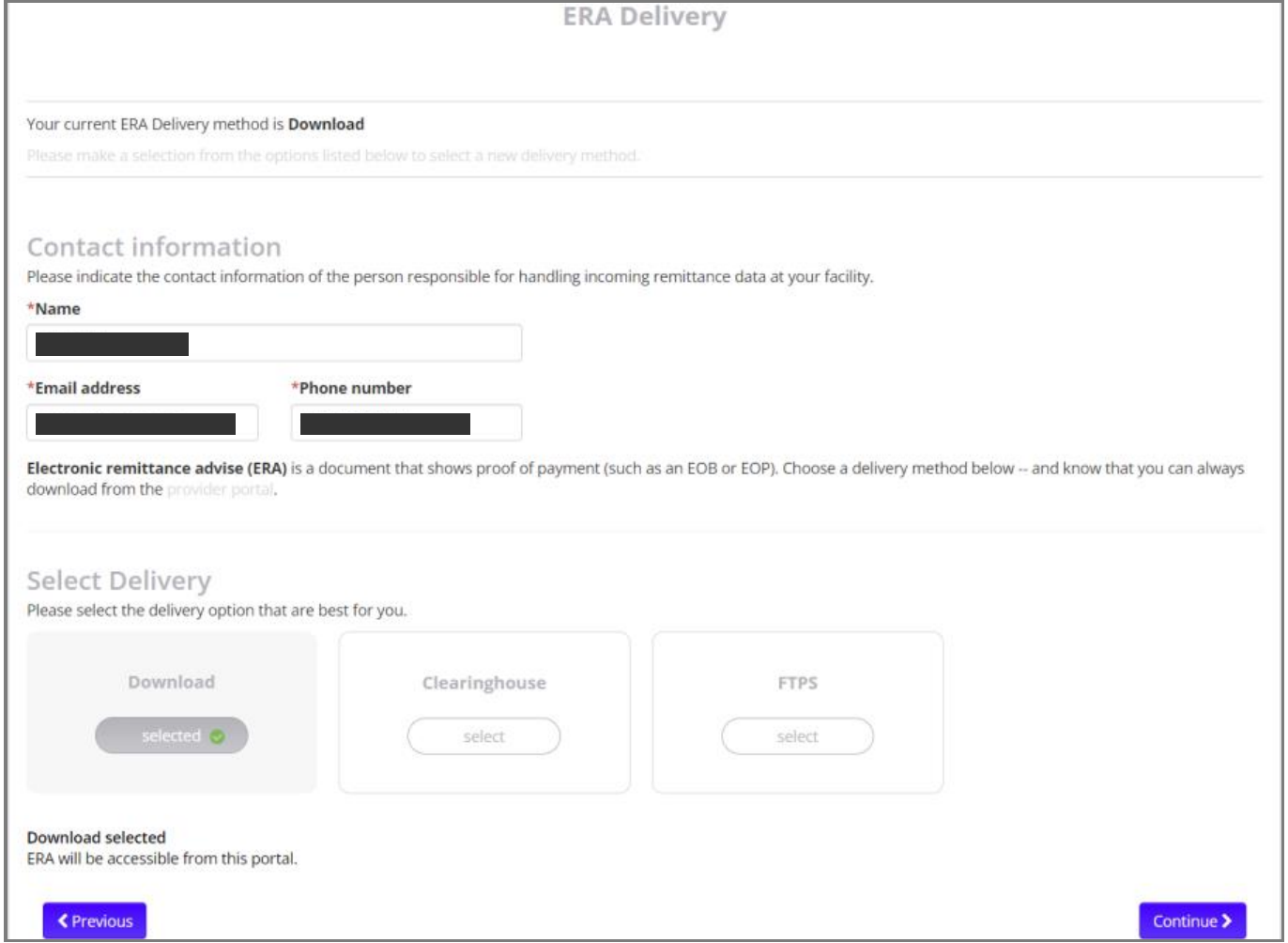
Screenshot source: Zelis ePayment Center Training Guide (v2024.07), page 19.
MVP’s registration-code instructions conflict
The payment webpage describes obtaining a registration code; the linked provider FAQ says codes are no longer needed. Compare the webpage with the official FAQ. If the current form does not match either description, call the EPC number published by MVP, 855-774-4392, and ask which flow applies. Do not invent a code or repeatedly create new registrations.
Already have a Zelis account? Confirm the payment product
MVP says existing Zelis customers can continue through their preferred Zelis payment method. MVP’s existing-customer answer. For fee removal, ask specifically whether that existing method is fee-bearing and how to move the MVP payment relationship to the sponsored EPC option. Continuing to receive deposits is a different acceptance check from eliminating fees.
If a fee has already been charged
Build a short reconciliation record: payment reference, payer amount, amount deposited, card-processing charge and any separate vendor charge. Ask the party that assessed each fee to review it; request written confirmation of any credit. Keep the next payment-method change separate from that review, and avoid promising the practice a refund.
Before running another unprocessed card, ask support about replacement and any enrollment gap. Track the original and replacement references together so the outstanding claim is neither lost nor collected twice.
Confirm the next MVP payment
Match the enrolled TIN and bank destination to the practice’s intended payment relationship.
Check the deposit against the remittance and inspect vendor or processor statements for separate fees.
Confirm the ERA reaches the biller’s posting workflow. Keep the confirmation and a support reference until one real payment reconciles.
For the portal and payment choices, use our Zelis ePayment Center login guide, ePayment Center vs Payments Network enrollment guide, and Zelis virtual-card fee overview.
Need help coordinating payer enrollment, remittances and payment follow-up? Talk to Bomi about billing support.
Frequently Asked Questions
Does MVP offer no-fee EFT through Zelis?
MVP publishes no-cost EFT/ERA enrollment through its payer-sponsored ePayment Center. Confirm that product rather than assuming an existing ACH+ arrangement is free.
Do I need a registration code for MVP ePayment Center?
MVP’s webpage and linked FAQ disagree. Follow the current portal flow and ask EPC support at 855-774-4392 if its instructions differ.
Does each MVP TIN need enrollment?
MVP’s payment page says each TIN needs its own ePayment Center enrollment.
Want Bomi to handle insurance billing?
Bomi helps therapy practices with benefit checks, claims, denials, balances, CAQH, attestations, and revenue management.
Book a call
About Bomi
Founded by George Ruan, Dax Earl, and Andrey Goder, Bomi helps independent therapists and group practices with insurance billing, credentialing, and payer follow-up. Bomi grew out of Dax’s experience helping his mother with her therapy practice, with a clear purpose: reduce the administrative burden of insurance while keeping practice owners in control.
Meet our founders