
Devoted Health and Zelis: virtual card fees and the no-fee EFT enrollment route
By George Ruan • October 9, 2026
Source check: October 9, 2026.
Devoted Health directs providers to Devoted ePayment Center registration for its no-cost electronic payments. Its official transition guide says the move from Payspan begins in September 2026. The notice describes free enrollment and payment delivery; it does not announce a default virtual-card fee.
Sections
What Devoted’s Zelis transition changes
As of October 9, 2026, Devoted says payment and remittance delivery moves to its sponsored EPC, while claim submission stays the same and historical data remains in Payspan. It also says a paid ZAPP account used for other payers does not replace separate Devoted EPC registration. Read Devoted’s transition FAQ.
If you are concerned about virtual-card fees
Check the actual product on your payment notice before changing anything. Zelis describes its broader network offering as contractually priced, with a choice of ACH or virtual card. Zelis network payment explanation. That description does not prove Devoted has enrolled your practice in a card product. Use the Devoted-sponsored route for the documented no-cost option and ask support to explain any conflicting notice.
How to enroll for Devoted no-fee EFT
Gather the TIN/EIN, corporate/principal details and bank routing and account numbers.
Use Devoted’s registration link and follow its code/email-link process to create the account.
Sign in, enter the bank information, review the ACH agreement and submit it.
Wait for bank validation. Devoted says this may take up to six business days. Devoted’s enrollment steps
Bank and ERA screens in the Zelis guide
For the banking step, Zelis’s guide shows Bank Account Information fields for institution, account type, routing and account numbers, ownership, account holder and tax ID. Enter the authorized practice details in your verified payer portal and review the ACH agreement before submitting; this shared training example does not establish your payer’s fee terms.
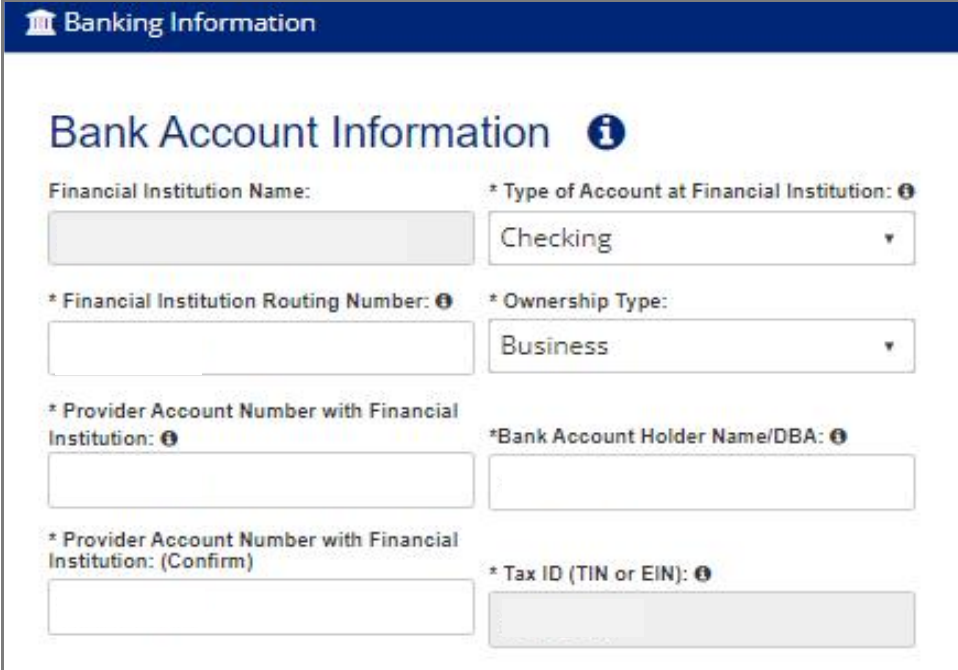
Screenshot source: Zelis ePayment Center Training Guide (v2024.07), page 19.
For the remittance step, review ERA Delivery and the contact responsible for receiving it. The guide shows Download, Clearinghouse and FTPS choices. Select the supported destination that matches your biller’s workflow, then Continue. These are Zelis training screens; payer branding and available options may vary.
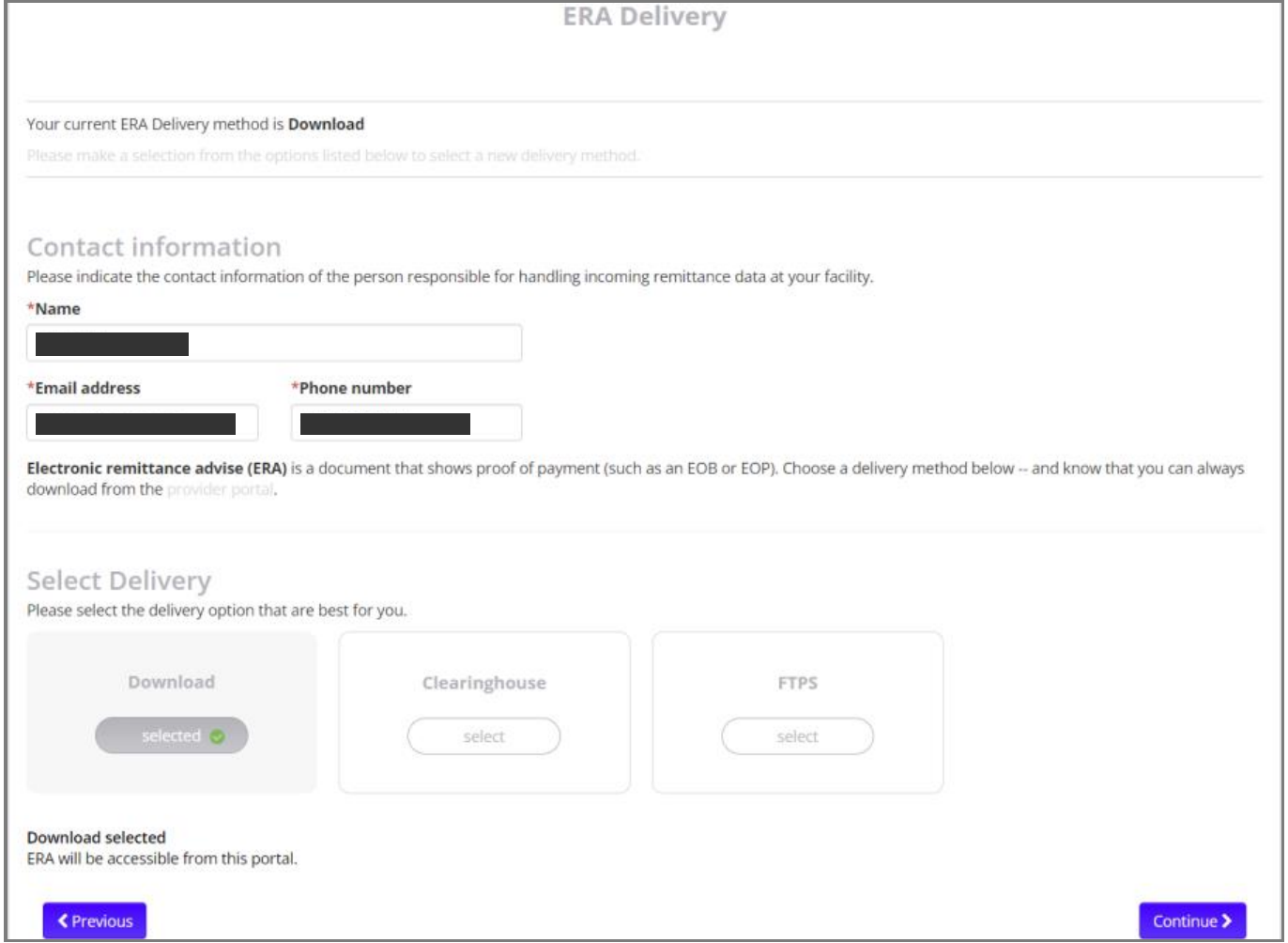
Screenshot source: Zelis ePayment Center Training Guide (v2024.07), page 19.
Already using Payspan or paid ZAPP?
Devoted instructs existing Payspan users to follow the Zelis transition communication. Providers without Payspan can enroll through EPC. Paid ZAPP users need a separate Devoted EPC registration. For help, Devoted lists 855-774-4392. Devoted’s current-user instructions.
Treat these as two checklist items: identify the existing payment arrangement, then confirm the Devoted-sponsored enrollment. Keep the portal URL, organization/TIN and confirmation together. If the instructions you receive disagree with the public guide, ask support which applies before creating another account.
What to ask if a fee has already appeared
Request an explanation tied to the payment reference: which payer issued it, which product delivered it and who assessed the charge? Compare the remittance, bank entry and processor statement. A fee on a different payer’s Zelis account is a separate payment relationship from Devoted’s EPC enrollment. Ask the responsible party to review a charge under your agreement; do not assume the transition creates refund eligibility.
For a card awaiting processing, ask support how to replace or resolve it while preserving the outstanding payment. Record any replacement reference and reconcile it before closing the item. Do not post both the original card and its replacement as separate payer payments.
Check the first payment and remittance
Confirm which TIN and bank destination were enrolled, and retain the acceptance record.
Match the first deposit to its ERA and check for any separate service charge.
Confirm the biller can find current Devoted remittances and knows where to research pre-transition history.
For the portal and payment choices, use our Zelis ePayment Center login guide, ePayment Center vs Payments Network enrollment guide, and Zelis virtual-card fee overview.
Need help coordinating payer enrollment, remittances and payment follow-up? Talk to Bomi about billing support.
Frequently Asked Questions
Is Devoted ePayment Center free?
Devoted says there is no fee for enrollment or for receiving claim payments and remittance details through its sponsored ePayment Center.
Does a paid Zelis ZAPP account cover Devoted EPC?
Devoted says providers with paid ZAPP accounts for other payers must register separately for Devoted ePayment Center.
Does the Devoted transition change claim submission?
Devoted’s guide says to continue the existing claim-submission process. The described transition concerns payment and remittance delivery.
Want Bomi to handle insurance billing?
Bomi helps therapy practices with benefit checks, claims, denials, balances, CAQH, attestations, and revenue management.
Book a call
About Bomi
Founded by George Ruan, Dax Earl, and Andrey Goder, Bomi helps independent therapists and group practices with insurance billing, credentialing, and payer follow-up. Bomi grew out of Dax’s experience helping his mother with her therapy practice, with a clear purpose: reduce the administrative burden of insurance while keeping practice owners in control.
Meet our founders