
Banner Health Plans pays through Zelis: virtual card fees and how to switch to no-fee EFT
By George Ruan • October 9, 2026
Source check: October 9, 2026.
For the no-fee route published by Banner Health Plans, use the Banner Plan Administration ePayment Center. Banner’s Zelis payment page says to choose Sign Up Now. Match the payer on your payment notice to this route before beginning.
Sections
- What Banner actually says about no-fee payments
- Why changing from a card to ACH needs a fee check
- How to request Banner’s sponsored no-fee EFT
- Bank and ERA screens in the Zelis guide
- Already enrolled with Zelis? Ask about the existing method
- What to do about fees already charged
- Verify that the new arrangement works
- Frequently Asked Questions
What Banner actually says about no-fee payments
As checked October 9, 2026, Banner says it funds a no-fee ePayment option. The same page distinguishes fee-based ACH and virtual-payment-card plans, and links the Banner Plan Administration portal. The page is dated August 30, 2024. Review Banner’s official instructions. Verify the current process with support if the portal or notice has changed. This article does not establish a payment rule for every Banner-branded entity.
Why changing from a card to ACH needs a fee check
The payment rail and the product agreement are different questions. Banner’s page identifies both free and paid electronic options. Banner’s payment choices. Ask for the sponsored no-fee option rather than simply asking for “ACH.” If a representative proposes a paid product, request its terms and the separate sponsored enrollment route before accepting it.
How to request Banner’s sponsored no-fee EFT
Read the payer name on the payment notice. Ask support whether the linked Banner Plan Administration EPC covers that exact payment relationship.
Open the official-linked Banner EPC and select Sign Up Now, as Banner directs.
If you need enrollment help, Banner publishes 855-774-4392 for ePayment Center. Verify the contact on Banner’s page
Ask what identity and bank-verification information the current enrollment needs. Have the authorized practice decision-maker review the agreement and confirm it is the no-fee sponsored product.
If replacing a virtual card or paid ACH service, request the effective date and explicit handling of outstanding payments. Save the support response and enrollment confirmation.
Bank and ERA screens in the Zelis guide
For the banking step, Zelis’s guide shows Bank Account Information fields for institution, account type, routing and account numbers, ownership, account holder and tax ID. Enter the authorized practice details in your verified payer portal and review the ACH agreement before submitting; this shared training example does not establish your payer’s fee terms.
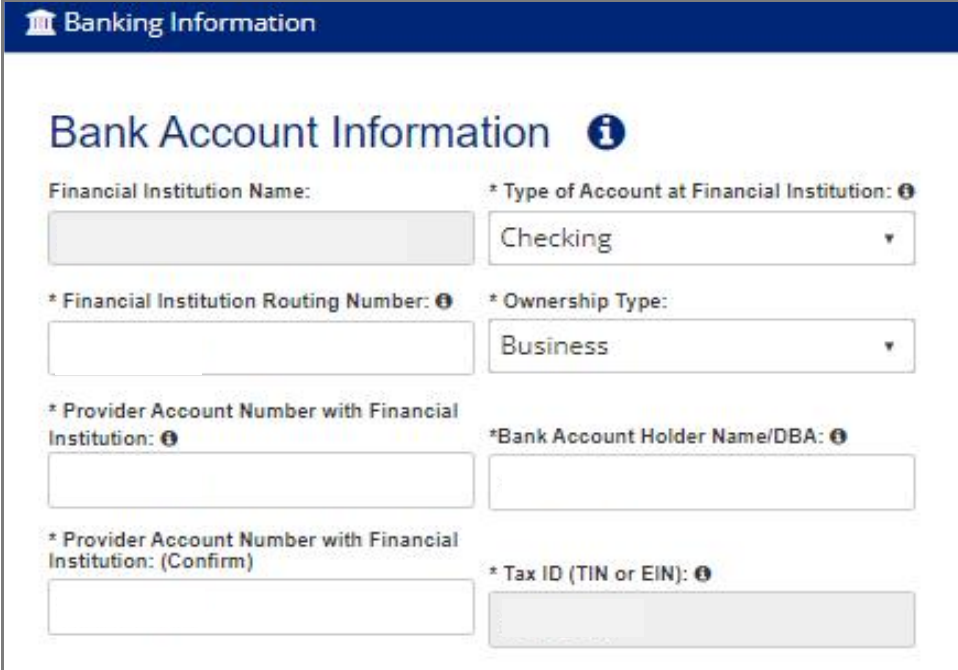
Screenshot source: Zelis ePayment Center Training Guide (v2024.07), page 19.
For the remittance step, review ERA Delivery and the contact responsible for receiving it. The guide shows Download, Clearinghouse and FTPS choices. Select the supported destination that matches your biller’s workflow, then Continue. These are Zelis training screens; payer branding and available options may vary.
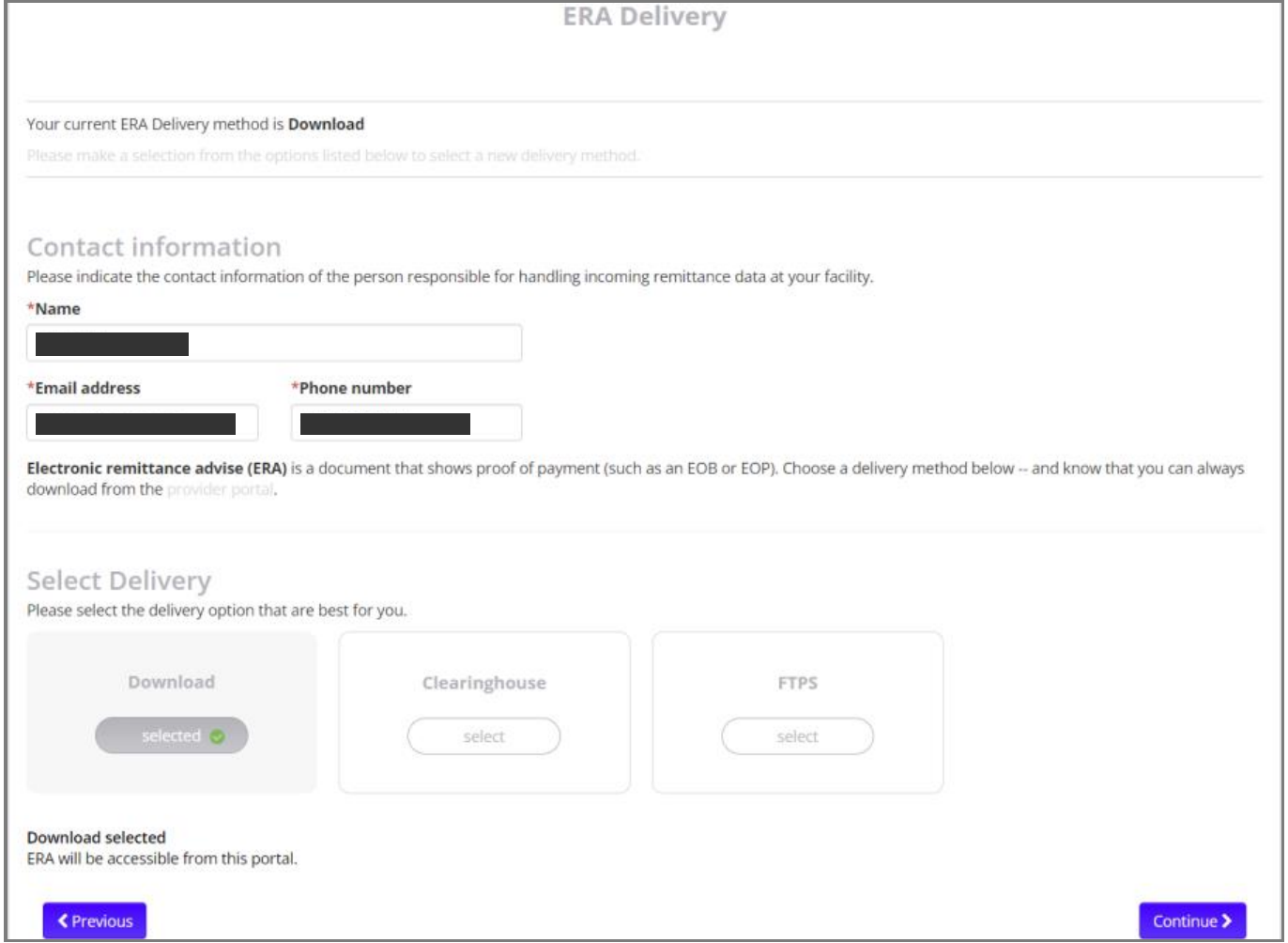
Screenshot source: Zelis ePayment Center Training Guide (v2024.07), page 19.
Already enrolled with Zelis? Ask about the existing method
Banner lists 877-828-8770 for Zelis Customer Service and 855-496-1571 for discussing fee-based plans. Banner’s support options. When calling, state the payer and ask whether your current product has provider fees. Keep a paid multi-payer service proposal separate from the specific request to use the Banner-funded option.
Suggested request: “Please confirm the no-fee EPC enrollment route for the payer on this notice and our TIN. We want to replace the current fee-bearing method. What must change, when will it take effect, and how will any issued payment be handled?” Write down the reference number and who owns the next step.
What to do about fees already charged
Separate the claim’s allowed amount from the amount paid and the charge assessed by a vendor or card processor. Compare the remittance with the deposit and processor statement, then ask the responsible party to review any disputed fee. Request the agreement provision and a written outcome; a future enrollment change does not itself promise a refund.
For a virtual card you have not run, ask about reissue and record the replacement reference before treating the payment as resolved. Keep the original and replacement linked in your reconciliation record to prevent duplicate posting.
Verify that the new arrangement works
Confirm the exact payer and enrolled legal entity; keep the no-fee terms and acceptance record.
Compare the next deposit with its remittance and check for any separate service charges.
Make sure your biller has access to the payment detail and can post it. Escalate an unexplained difference with the payment reference, not a vague “missing money” report.
For the portal and payment choices, use our Zelis ePayment Center login guide, ePayment Center vs Payments Network enrollment guide, and Zelis virtual-card fee overview.
Need help coordinating payer enrollment, remittances and payment follow-up? Talk to Bomi about billing support.
Frequently Asked Questions
Does Banner offer a no-fee Zelis option?
Banner Health Plans publishes a Banner-funded no-fee ePayment option and links the Banner Plan Administration ePayment Center. Confirm it covers the payer on your notice.
Where do I start Banner EPC enrollment?
Banner’s Zelis page directs providers to the Banner Plan Administration ePayment Center and Sign Up Now; it lists 855-774-4392 for EPC help.
Does this apply to every Banner plan?
The cited page links a specific Banner Plan Administration route. Confirm the exact payer and product rather than extrapolating to every Banner entity.
Want Bomi to handle insurance billing?
Bomi helps therapy practices with benefit checks, claims, denials, balances, CAQH, attestations, and revenue management.
Book a call
About Bomi
Founded by George Ruan, Dax Earl, and Andrey Goder, Bomi helps independent therapists and group practices with insurance billing, credentialing, and payer follow-up. Bomi grew out of Dax’s experience helping his mother with her therapy practice, with a clear purpose: reduce the administrative burden of insurance while keeping practice owners in control.
Meet our founders