
Virginia Medicaid Revalidation in PRSS: Due Dates and Steps
By George Ruan • October 9, 2026
As of October 9, 2026.
Start provider revalidation through the PRSS enrollment site or sign in through MES to check the location’s revalidation information. This renews the provider record; it is different from renewing a patient’s Medicaid benefits or an MCO contract. Use the current May 2026 enrollment guide and April 2026 portal guide.
Sections
Check Each Provider Service Location
Virginia Medicaid providers must revalidate at least every five years. The portal displays a service-location due date; delegates need the corresponding Revalidation security function to view it. Provider Portal Guide, chapter 10.
Create a practice checklist by provider and location. Include the due date, who monitors notices and who handles corrections. Do not assume that finishing one clinician’s revalidation resolves every group or location record.
Find the Due Date and Revalidation Link
In the Provider Portal, use Maintenance > Revalidation.
Select the service location when more than one is available.
When the 90-day window opens, use the link in Revalidation Information to reach Resume/Revalidate Enrollment.
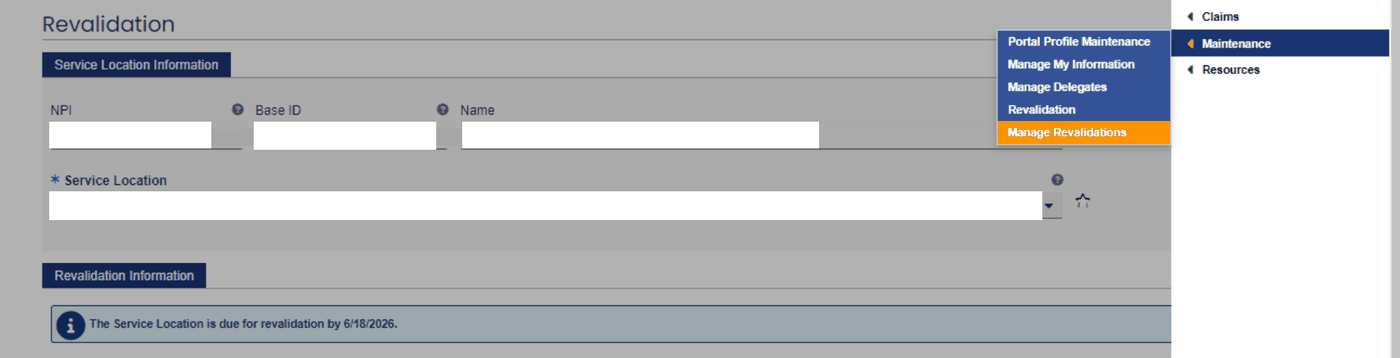
Screenshot source: Virginia Provider Portal User Guide R30.21, April 2026, printed page 132 (PDF page 143).
These menu labels come from chapter 10 of the current portal guide. If you cannot see the section, ask the PAH to check your permissions before treating it as a missing enrollment.
The Revalidation page identifies the service-location due date. The current guide’s figure below uses a historical example date; check the actual location and due date in your own record. Portal Guide, printed page 130.
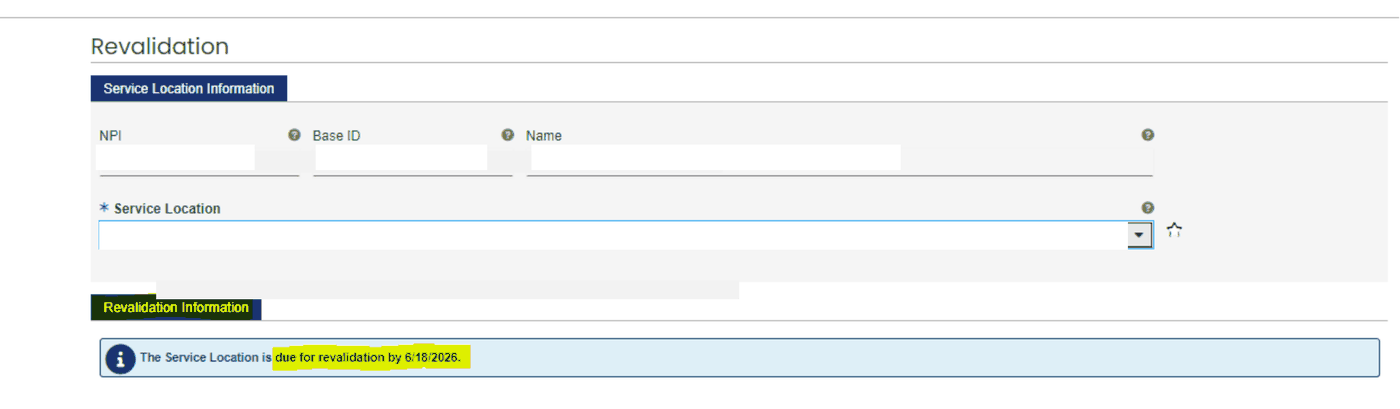
Screenshot source: Virginia Provider Portal User Guide R30.21, April 2026, printed page 130 (PDF page 141), lower Revalidation panel.
Use the Notice and Application Tracking Number
The current enrollment guide describes a notice 90 days before the due date and reminders at 60 and 30 days. Delivery uses the recorded email/mail preferences. The notice supplies an Application Tracking Number (ATN) and password for revalidation. Enrollment Guide, section XV.
Keep the application’s ATN and password separate from your everyday MES sign-in details. If notices are missing, contact PRSS support at 888-829-5373 and confirm the provider location involved. DMAS provider FAQ.
Review the Application Before Submission
Review prefilled information and complete required fields.
Supply the required attachments; original malpractice information is not prefilled.
Ask customer service about changes to read-only identifiers instead of creating a second record.
Respond promptly to correction notices and retain the submission/status information.
The May 2026 enrollment guide supplies the workflow. Match the live prompts to your provider type; do not reuse a different clinician’s documents or infer that every applicant owes a fee.
Once a revalidation application is generated, later changes in Provider Portal or by a PRSS clerk do not update that application. Make the revalidation updates in the application itself. Provider Portal Guide, chapter 10.
Track Approval Before the Deadline
The enrollment guide directs providers to obtain approval before the due date. Returned revalidations have a 30-day correction/resubmission limit, and grace provisions have exclusions. Enrollment Guide, section XV (pp. 121–123) and Appendix B (pp. 139–141).
Treat the notice deadline as the working deadline. If it is missed, ask PRSS about the current application and enrollment status before billing; do not assume a grace period preserves participation. The DMAS FAQ warns that failure to revalidate can terminate participation in both FFS and MCO programs.
A submitted application needs follow-up. Use Enrollment Status at the PRSS enrollment entry with the application credentials; review approval or correction correspondence. This status workflow is documented in the current guide’s Appendix B, page 140.
Related Virginia Medicaid Guides
Frequently Asked Questions
Is PRSS revalidation the same as patient Medicaid renewal?
No. Provider revalidation updates continued provider enrollment; patient renewal concerns the member’s benefits.
Does submitting a revalidation prove approval?
No. Track the application and respond to corrections. Use the approval notice and current provider status when confirming completion.
Can a biller view the revalidation due date?
A delegate can view the service-location revalidation page when the relevant security function is assigned. The practice should identify who monitors notices and who has authority to complete the application.
Want Bomi to handle insurance billing?
Bomi helps therapy practices with benefit checks, claims, denials, balances, CAQH, attestations, and revenue management.
Book a call
About Bomi
Founded by George Ruan, Dax Earl, and Andrey Goder, Bomi helps independent therapists and group practices with insurance billing, credentialing, and payer follow-up. Bomi grew out of Dax’s experience helping his mother with her therapy practice, with a clear purpose: reduce the administrative burden of insurance while keeping practice owners in control.
Meet our founders