
Virginia MES Login: Medicaid PRSS Provider Portal
By George Ruan • July 9, 2026
For Virginia Medicaid MES login, open the official MES login and sign in with your own MES account, then choose the Provider portal / PRSS module you are approved to use. The same login is linked from the blue LOGIN button on the MES homepage.
Sections
- Direct links: Virginia MES and PRSS
- TL;DR: use your own login, and give your biller their own
- Who needs their own MES login
- Before you create access
- Account setup and access guide
- What your MES login opens: PRSS and FFS authorization
- Why MES and MMIS credentials look different
- What does ICAM mean in MES training?
- What PRSS Does
- Account setup steps
- Add your biller or delegate
- Login errors and locked accounts
- Action Steps for Providers
- Where Bomi Fits
- Frequently Asked Questions
- Sources
Direct links: Virginia MES and PRSS
The MES sign-in page looks like this; enter your own username and password.
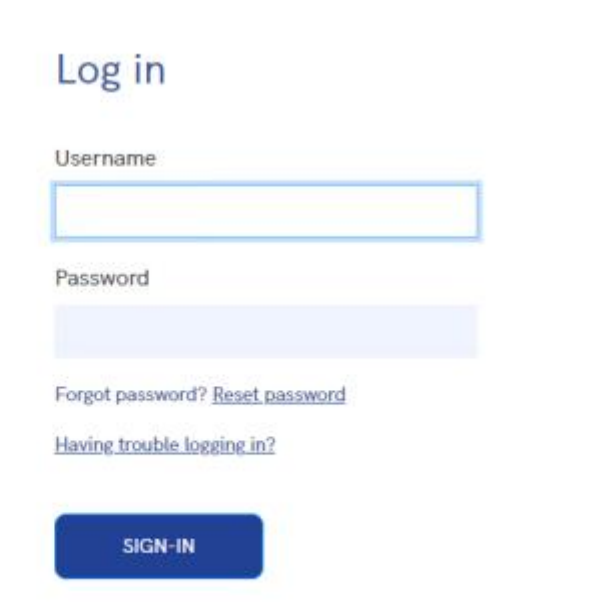
Screenshot source: Virginia Provider Portal User Guide R30.21, printed page 6 (PDF page 17).
TL;DR: use your own login, and give your biller their own
Use your own MES login. Your practice’s Primary Account Holder gives your biller their own Delegate access in PRSS. Cardinal Care plans have separate participation and claims processes. Official account and access guidance.
Who needs their own MES login
Your MES login belongs to you: use your own name and keep any MFA or account recovery personal. The Provider Portal guide permits a Delegate to be assigned to multiple providers at various service locations. Each assignment needs its own authorized functions. Never share your password; the Primary Account Holder grants the biller Delegate access under the biller’s own credentials. Official individual-user and staff-access guidance.
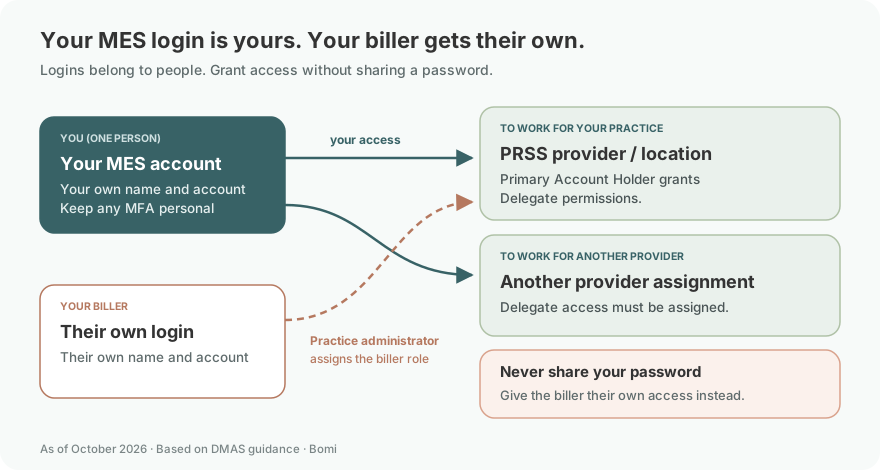
The Primary Account Holder (PAH) controls organization-level provider portal access. MES’s FAQ says that if a user does not have provider portal credentials, they should contact the PAH for the organization to grant delegate access. If the PAH does not have credentials, the PAH can submit an access request form.
This matters operationally because portal access is not just a login issue. It decides who can maintain the provider record, read remittance information, check eligibility, and work billing follow-up. For biller-specific setup, use the biller access guide.
Before you create access
Identify the organization’s Primary Account Holder and the provider account you need. A user without credentials asks the PAH for delegate access; a PAH without credentials uses the official Access Request process. MES provider access FAQ.
The MES provider FAQ says the legacy VAMMIS portal has closed. If you need credentials, contact your organization’s Primary Account Holder (PAH) for delegate access; a PAH without credentials uses the official Access Request form. Portal-account questions and locked accounts go to PRSS support at 888-829-5373.
Login links reviewed: October 9, 2026.
Confirm managed-care participation and the assigned plan’s claims route separately. DMAS Cardinal Care provider guidance.
Account setup and access guide
Last updated: July 9, 2026.
If you are looking for the Virginia Medicaid provider portal, the names can be confusing. The public gateway is MES — the Medicaid Enterprise System. Inside MES, providers reach PRSS — Provider Services Solution — for provider enrollment, provider maintenance, eligibility, claim inquiry, remittance documents, and related provider-portal work.
What your MES login opens: PRSS and FFS authorization
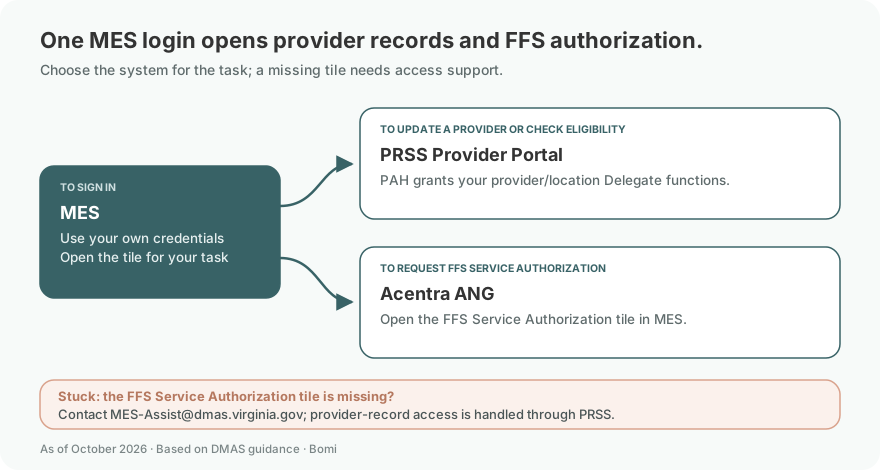
MES is Virginia Medicaid’s gateway for modern Medicaid system functions. The MES provider page points providers to the portal, training, FAQs, manuals, bulletins, EDI information, claims resources, and related support. It is the front door, not a single workflow by itself.
MES opens separate systems for different tasks. Use PRSS for your provider record and lookups. For FFS service authorization requests to Acentra, open the FFS Service Authorization tile for Atrezzo Next Generation (ANG). The July 14, 2026 DMAS bulletin requires this sign-in route from August 1, 2026; if the tile is missing or will not open, contact MES-Assist@dmas.virginia.gov. DMAS current ANG access bulletin.
Why MES and MMIS credentials look different
Approved MES users receive separate user-ID and temporary-password emails. If you are also approved for MMIS, two additional emails provide the MMIS user ID (E6Code, not your email address) and its temporary password. Use the credentials for the application whose prompt you are viewing. DMAS MES and MMIS login help For MFA, password reset and temporary locks, see MES login troubleshooting.
What does ICAM mean in MES training?
DMAS provider training lists MES-109, Approving MES Access Requests Using ICAM, for identity and access management. The reviewed provider resources do not establish a separate module named ICAP. If a request uses that name, confirm the intended application with MES support. Official MES provider training terminology.
What PRSS Does
PRSS is the provider-portal layer for enrolled providers. The Provider Portal User Guide describes the portal as a self-service tool available around the clock to inquire on claims, check member eligibility, update provider records, and perform other provider-support functions.
Provider enrollment and revalidation workflows.
Provider maintenance and demographic updates.
Eligibility, claim, payment, and remittance lookups.
Secure provider messages and document retrieval.
Account setup steps
Go to MES. Start from the official Virginia Medicaid MES site and use the portal login.
Identify the PAH. If nobody knows who controls the account, ask the administrative or finance lead first. MES says PAH information is restricted for security and control reasons.
Use delegate access. Users who need access should be set up under their own credentials and role, not through shared passwords.
Confirm the right module. Provider maintenance, claims, payment history, remittance advice, and service authorization may live under different MES modules or related systems.
Add your biller or delegate
Never share your password. Give the biller their own login and use the documented access method shown above. Official access instructions.
Have the Primary Account Holder grant the biller delegate access under their own credentials. Check the permissions for the provider functions they will use. DMAS delegate-access guidance See the Virginia biller access guide for the handoff.
To add someone who already has Provider Portal credentials, choose Add Registered Delegate. An unregistered user follows Add Unregistered Delegate and completes registration after being added. Follow the current guide for the delegate’s service locations and permissions. Provider Portal User Guide, Add Delegate.

Screenshot source: Virginia Provider Portal User Guide R30.21 (April 2026), page 122 (PDF page 133).
For active service locations, select the security functions that the delegate is authorized to use and move them into Selected Functions. At least one function must be selected for an active location; submit the permissions when complete. Provider Portal User Guide, service locations and security functions.
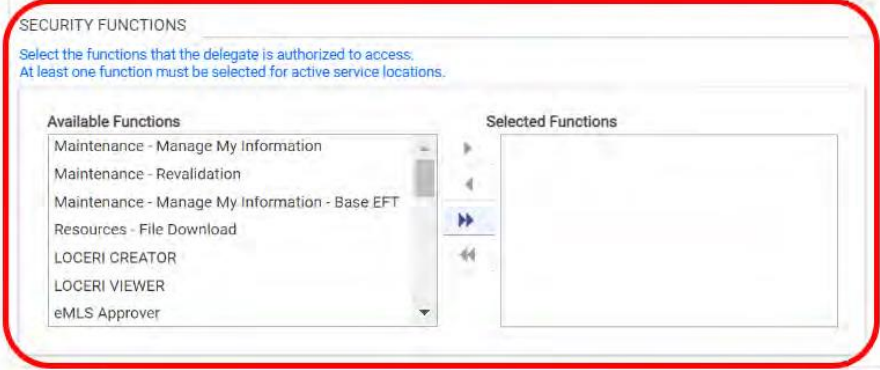
Screenshot source: Virginia Provider Portal User Guide R30.21 (April 2026), page 121 (PDF page 132).
Login errors and locked accounts
MES FAQ guidance points users without credentials back to the organization’s PAH. If the PAH is unknown, inactive, or no longer with the organization, use the official access-request and PAH update process rather than creating a workaround. The FAQ notes PAH requests may take 7 to 10 business days for review, with additional review time if corrected information is needed.
Action Steps for Providers
Document the PAH, delegate administrators, and delegates for each provider account.
Review access after staff turnover, biller changes, ownership changes, and revalidation work.
Keep a separate list of MCO portals and Acentra/Atrezzo access needs; PRSS access may not cover them.
Where Bomi Fits
Bomi helps therapy practices keep Medicaid billing and credentialing workflows organized: enrollment follow-up, portal handoffs, eligibility checks, claims, denials, EOB review, revalidation tracking, payer follow-up, and revenue operations. We still separate access correctly: your practice keeps control of provider accounts, and each user gets the access needed for their role.
Operational note: This post is general operational education, not legal, compliance, or billing advice. Confirm current DMAS, MES/PRSS, Cardinal Care MCO, Acentra/Atrezzo, provider-manual, and contract requirements before submitting enrollment, claims, or service authorizations.
Frequently Asked Questions
Where is the Virginia Medicaid MES login?
Use https://login.vamedicaid.dmas.virginia.gov/ or the blue LOGIN button at https://vamedicaid.dmas.virginia.gov/. After signing in, select the approved Provider portal / PRSS module.
Is PRSS login different from Virginia MES login?
MES is the login gateway for approved modules, including the PRSS Provider portal. New provider enrollment and application-status work use the enrollment link on the MES homepage.
What if my Virginia MES or PRSS account is locked?
The MES provider FAQ directs portal-account questions to PRSS support at 888-829-5373. If you lack credentials, ask your organization’s PAH about delegate access or the official Access Request process.
What is the Virginia Medicaid provider portal?
Providers access Virginia Medicaid portal functions through MES. PRSS is the provider-services workflow used for enrollment, maintenance, eligibility, claims, and provider-file work.
Who can give me PRSS access?
The organization’s Primary Account Holder controls delegate access. If the PAH lacks credentials or is inactive, use the official access request or PAH update process.
Can my biller use my MES login?
No. Set the biller up with appropriate delegate access instead of sharing credentials.
Sources
Planning a private practice?
Use Bomi's free Build resources to plan the business, provider identity, payer setup, and billing workflow before you see clients.
Use Build resources
About Bomi
Founded by George Ruan, Dax Earl, and Andrey Goder, Bomi helps independent therapists and group practices with insurance billing, credentialing, and payer follow-up. Bomi grew out of Dax’s experience helping his mother with her therapy practice, with a clear purpose: reduce the administrative burden of insurance while keeping practice owners in control.
Meet our founders