
SCDHHS Web Tool Login: Account Setup and Biller Access
By George Ruan • October 9, 2026
For SCDHHS Web Tool provider login, open the official South Carolina Medicaid Web Tool and sign in with your own individual user ID and password.
Last updated: October 9, 2026. The state still labels its planned ID.me sign-in change as coming soon; see SCDHHS’s provider page.
Sections
- Direct links: Web Tool login, access forms and help
- TL;DR: use your own login, and give your biller their own
- Who needs their own Web Tool login
- Request Web Tool access through the TPA
- Set your own password after access is issued
- Add a biller or another office user
- Prepare for the announced ID.me change
- If login works but the provider is missing
- Related South Carolina Medicaid guides
- Frequently Asked Questions
Direct links: Web Tool login, access forms and help
Web Tool provider login · TPA enrollment form for new or changed access · Provider access instructions · Provider Service Center: (888) 289-0709 · Separate Medicaid provider enrollment application.
The public Web Tool sign-in page has User Name and Password fields and a Log In button.

Screenshot source: Screenshot of the public SCDHHS Web Tool sign-in page, captured October 9, 2026.
TL;DR: use your own login, and give your biller their own
Use your own Web Tool ID. Your biller needs their own individual Web Tool ID, which the practice requests and links through its Trading Partner Agreement (TPA). Medicaid enrollment and MCO contracts are separate; see the state’s access instructions.
Who needs their own Web Tool login
Every user needs an individual login and password. Never share your password with your biller. The Web Tool guide, printed page 2 and July 2026 administrative manual require separate credentials. The announced ID.me process will also use your own identity account and MFA when that sign-in change launches; see the ID.me FAQ.
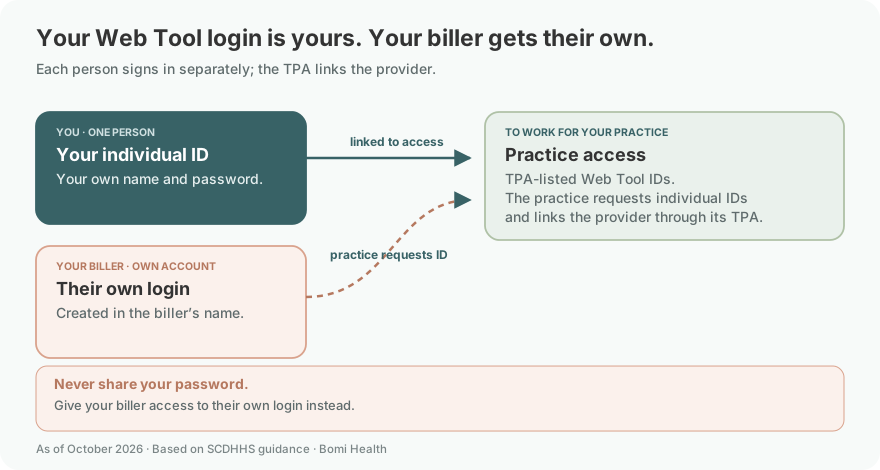
The access model follows the provider TPA instructions and Web Tool guide. It does not assume a self-service Add User role.
Request Web Tool access through the TPA
Start with the state’s agreements and forms page. The July 2026 administrative manual requires a Trading Partner Agreement, or TPA, and signed TPA enrollment form before Web Tool IDs are issued. A clinician’s Medicaid enrollment and a person’s portal access are separate setup tasks.
The currently linked forms are dated 2014. Use the provider TPA instructions with the enrollment form, checking the current index before sending it. The form has choices for a new enrollment or a change to an existing enrollment.
Enter the provider’s legal name, NPI, tax identifier and contact information in the applicable fields.
Identify the clearinghouse, billing agent or vendor if one submits your claims.
In the Web Tool section, request the number of individual IDs needed, or identify existing IDs to link. Follow the instructions’ exception for an individual billing through an existing group.
Complete the authorization and signature fields, then use the submission instructions on the official form.
Set your own password after access is issued
The currently linked April 2014 Web Tool guide, printed pages 3–4 illustrates signing in, selecting a linked provider and choosing Change PWD. Enter and verify your new password, then choose Submit. This older illustration explains the controls; follow the current portal’s displayed password rules.
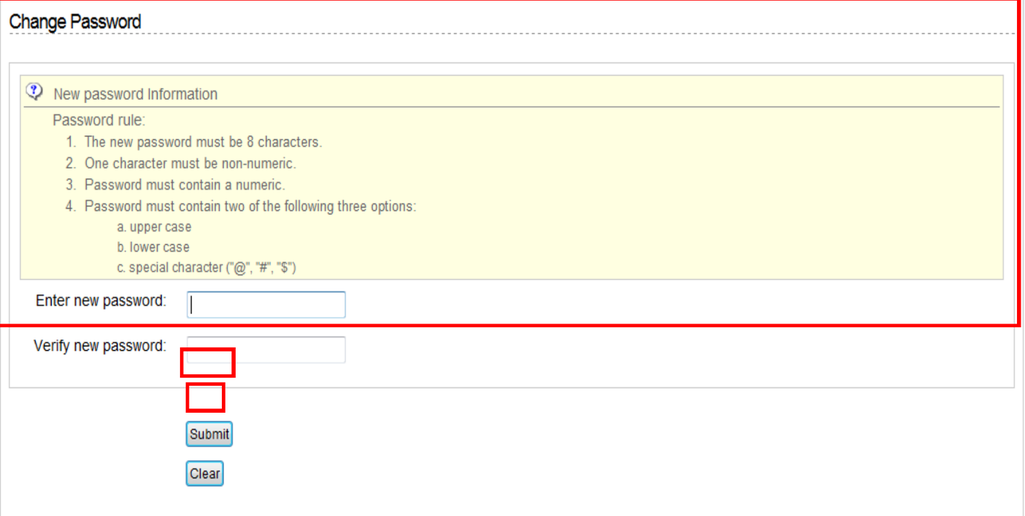
Screenshot source: Web Tool User Guide, April 2014, PDF page 8 / printed page 4.
Add a biller or another office user
Give each person their own credentials. The administrative manual requires individual login IDs and passwords. Its documented setup uses TPA enrollment and EDI support; do not assume there is a self-service administrator menu that can create another account.
For a new office user, review the number-of-IDs request on the TPA form. For an existing Web Tool ID that needs a provider NPI linked, follow the provider instructions. If the practice already has a TPA but has not used the Web Tool, the administrative manual directs it to EDI support through the Provider Service Center to register an ID.
An outside billing company’s electronic relationship also needs attention. For access to the provider’s electronic remittance advice, the administrative manual requires TPAs from both parties: the provider names the billing agent, and the agent identifies the provider and Medicaid number. The separate vendor and clearinghouse instructions explain submitter and provider linkage. A working password does not establish that transaction relationship.
Prepare for the announced ID.me change
As of October 9, 2026, the provider page describes ID.me as coming soon. The state’s ID.me FAQ says the launch date will be announced later and describes a transition period after launch. It does not establish that every provider must already use ID.me today.
Under that published preparation guidance, reuse an existing verified ID.me account if you have one. The Web Tool email must match an email on that account; add the Web Tool email to the existing account rather than creating a duplicate. Follow the FAQ’s MFA and consent prompts when the state’s sign-in flow becomes available.
If login works but the provider is missing
Check which NPI or Medicaid record was requested on the TPA. When requesting help, distinguish a password problem from a missing provider linkage or remittance relationship. Use the Provider Service Center at (888) 289-0709 for Web Tool assistance; use the ID.me FAQ’s help route for identity-account problems during that rollout.
Related South Carolina Medicaid guides
Once access is set, continue with eligibility verification or behavioral health claims and telehealth. A new clinician should first work through SC Medicaid LIP enrollment.
Frequently Asked Questions
Where is the SCDHHS Web Tool provider login?
Use portal.scmedicaid.com, linked from SCDHHS’s provider page. Provider Web Tool access is separate from the member eligibility application.
How do I add my biller or another Web Tool user?
Use the current TPA enrollment form and provider instructions to request individual IDs or link existing IDs. For electronic remittance access, check the separate provider and billing-agent TPAs.
Is ID.me already mandatory for the SC Medicaid Web Tool?
As checked October 9, 2026, the provider page still says coming soon and the FAQ says the launch date will be announced later. Follow the state’s current notice rather than assuming the member portal’s rollout date applies.
Planning a private practice?
Use Bomi's free Build resources to plan the business, provider identity, payer setup, and billing workflow before you see clients.
Use Build resources
About Bomi
Founded by George Ruan, Dax Earl, and Andrey Goder, Bomi helps independent therapists and group practices with insurance billing, credentialing, and payer follow-up. Bomi grew out of Dax’s experience helping his mother with her therapy practice, with a clear purpose: reduce the administrative burden of insurance while keeping practice owners in control.
Meet our founders