
Verify SC Medicaid Eligibility in the SCDHHS Web Tool
By George Ruan • October 9, 2026
Last updated: October 9, 2026.
Providers can check South Carolina Medicaid eligibility in the official SCDHHS Web Tool. Start from the provider page if you need the state’s login link. Check coverage for the actual service date before the therapy appointment; a Medicaid card alone does not establish current coverage, as the administrative manual explains.
Sections
Get the right provider record into your account
The state’s published Web Tool guide says users can select only provider records submitted through their office’s Trading Partner Agreement. If the practice’s record is absent, resolve Web Tool access and provider linkage before treating the problem as a member eligibility issue.
Use Eligibility and Single Query
SCDHHS’s training resources still link to the Web Tool education page. Its user guide is dated April 2014. The following navigation comes from that published guide, rather than an authenticated inspection of today’s portal; screen wording may differ.
Select the provider record you are authorized to work with. Open Eligibility, then Single Query. Enter the service date and Medicaid ID; the guide also allows service date with date of birth plus SSN, or service date with date of birth plus full name. Choose Check Eligibility.
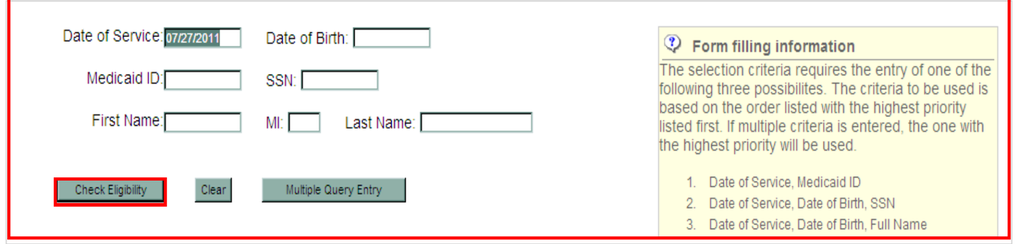
Screenshot source: Web Tool User Guide, April 2014, PDF page 72 / printed page 68.
In the selection summary, check the matching person’s Sel box and choose Display to see the detailed response. The sample identifiers below are masked.
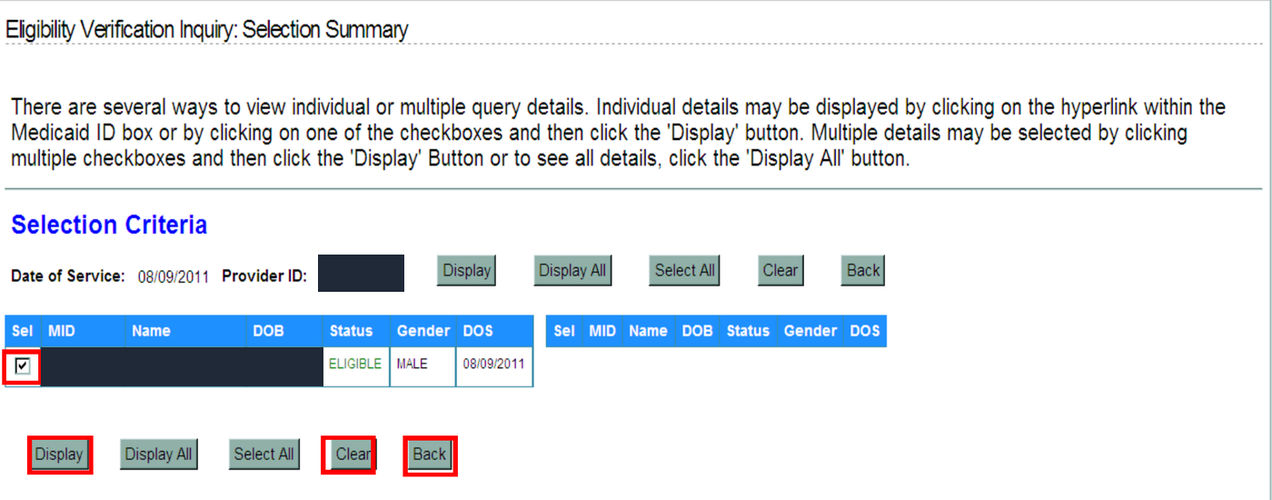
Screenshot source: Web Tool User Guide, April 2014, PDF page 73 / printed page 69.
Review the detailed benefit, program and third-party-liability information. The guide’s eligibility chapter also describes Print Response for retaining the result in the practice’s secure records. Confirm the person and service date before relying on the response.
Check more than the eligible status
The administrative manual notes that some members have limited benefits or emergency-only coverage. An eligible response therefore needs to be read alongside the benefit information for the planned service. If coverage is unclear, use the Provider Service Center to resolve the question before billing.
Separate three questions in the appointment record: whether Medicaid coverage is active for the date, which program or plan administers the service, and whether the intended service needs authorization. Our MCO versus FFS guide helps with the payer question; it does not replace the member-specific response.
If other coverage appears, investigate it before sending the claim. Record what the response actually shows instead of assuming Medicaid is always the first payer. Use the receiving payer’s current coordination-of-benefits instructions for the claim.
Confirm the MCO’s coverage information too
When a member is assigned to an MCO, use that plan’s provider resources for its eligibility and benefit checks. Absolute Total Care, for example, tells providers to verify eligibility each visit and offers its secure portal or IVR. That is a plan-specific route, not a replacement login for every Healthy Connections plan.
Keep the state coverage result and relevant plan confirmation with the date of the check. As a practice workflow, recheck when an appointment moves to another date or the member reports a plan change. Carry the confirmed receiving payer into the behavioral health claims workflow.
If the search fails or coverage is unclear
First compare the entered identifiers and service date with the information supplied for verification. The Web Tool guide describes refining the search when no subscriber is found. A failed search is a reason to check the search inputs; avoid documenting it as a confirmed loss of coverage without resolving the result.
For unresolved coverage questions, contact provider support at (888) 289-0709. Keep member details within the practice’s authorized verification and support channels. Once the result is clear, verify any authorization and participation requirements with the payer before submitting the claim.
Frequently Asked Questions
How do I verify SC Medicaid eligibility in the Web Tool?
The currently linked 2014 guide describes selecting your provider record, choosing Eligibility then Single Query, entering the service date and accepted identifiers, and displaying the detailed response.
Does a Healthy Connections Medicaid card prove current benefits?
No. The administrative manual says possession of the card does not guarantee coverage. Verify the actual service date and review benefit and program information.
What should I do if the eligibility search finds no member?
Check the identifiers and service date, then refine the search as the published guide describes. Resolve an unclear result through provider support before treating it as a confirmed coverage loss.
Want Bomi to handle insurance billing?
Bomi helps therapy practices with benefit checks, claims, denials, balances, CAQH, attestations, and revenue management.
Book a call
About Bomi
Founded by George Ruan, Dax Earl, and Andrey Goder, Bomi helps independent therapists and group practices with insurance billing, credentialing, and payer follow-up. Bomi grew out of Dax’s experience helping his mother with her therapy practice, with a clear purpose: reduce the administrative burden of insurance while keeping practice owners in control.
Meet our founders