
ePACES Login: eMedNY Access and Biller Setup
By George Ruan • October 9, 2026
For ePACES provider login, open the official ePACES login and sign in with your individual ePACES username and password. As of October 9, 2026, first-time activation and Medicaid provider enrollment use separate routes; an ePACES account does not enroll a therapist in Medicaid.
Sections
- Direct links: ePACES login and eMedNY enrollment
- TL;DR: use your own login, and give your biller their own
- Who needs their own ePACES login?
- Before you create access: provider, ETIN and administrator
- ePACES account setup: activate using the eMedNY token
- Add your biller: assign provider and function access
- ePACES login errors: missing providers and locked accounts
- First task after login
- Frequently Asked Questions
- Sources
Direct links: ePACES login and eMedNY enrollment
ePACES provider login — eligibility and fee-for-service transactions after activation.
First-time ePACES activation — the token-based setup route described in the enrollment overview.
ePACES password and unlock instructions — ask your administrator to use Change Password or Unlock User; this is the help guide, not a separate reset portal.
eMedNY support: 800-343-9000 — token/enrollment help through the official FAQ’s support path.
Provider Services Portal (PSP) — Medicaid provider enrollment and provider-file maintenance, using HCS or NY.gov business access.
The ePACES login page asks for your username, password, robot check and agreement to Medicaid confidentiality rules.
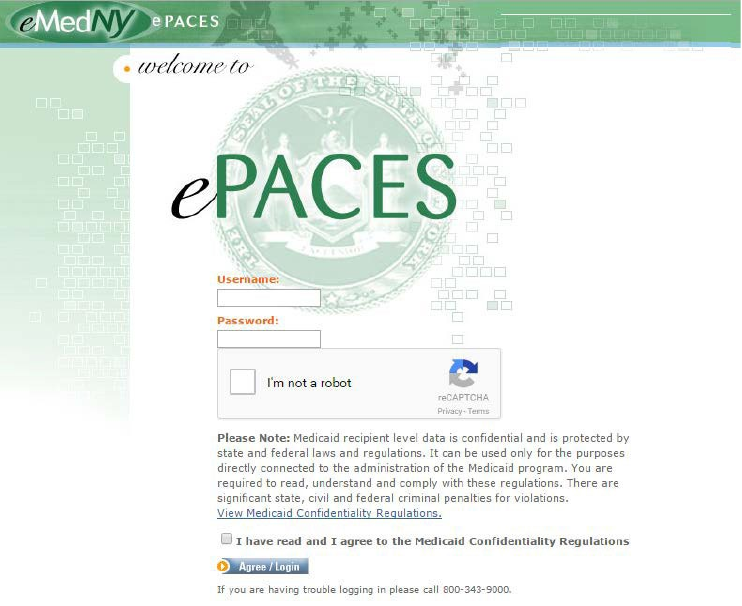
Screenshot source: ePACES Help, PDF page 11 (printed page 5); current public edition includes August 2026 changes.
TL;DR: use your own login, and give your biller their own
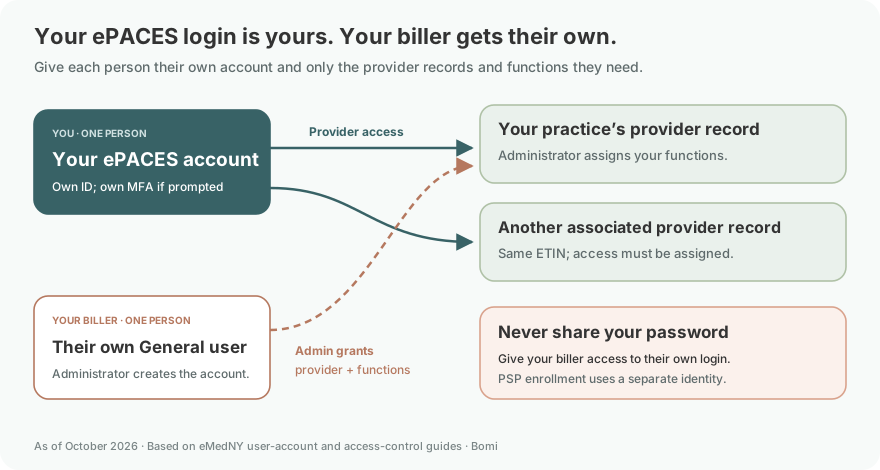
Use your own ePACES username and password. Your administrator can create a separate General user for your biller and choose which providers and tasks they can access. Medicaid enrollment in PSP and joining a managed-care plan are separate from ePACES access. See eMedNY’s user-account guide.
Who needs their own ePACES login?
Each clinician, staff member or outside biller using ePACES needs an individual user ID and password. The ePACES access-control guidance requires unique user credentials and limits access to authorized provider records and functions. Have the administrator create the appropriate user rather than share a practice password.
Never share your password. If a verification prompt appears, complete it yourself; the cited ePACES guides describe individual credentials and a robot check, not a particular MFA method. PSP separately requires MFA for its HCS or NY.gov business identity. ePACES login guidance; PSP access requirements.
Before you create access: provider, ETIN and administrator
The ePACES enrollment overview calls for the provider's NPI or Medicaid ID, an email address, an active certified submitter ETIN, and the submitter's contact information. Decide who will be the primary administrator and who will transmit claims. The submitter may be the provider or an outside billing service.
Check enrollment type first. The guide says OPRA providers, physician assistants, and managed-care-only groups, businesses and institutions should not be enrolled in ePACES. It also limits group enrollment to specified uses such as eligibility or an eXchange remittance username. Do not assume a nonbilling enrollment supports claim submission. Start with the therapist enrollment guide if the provider record is not active.
ePACES account setup: activate using the eMedNY token
Follow the current enrollment guide rather than trying to create a production username directly on the login page:
Request enrollment assistance and a token through the eMedNY call center at 800-343-9000, as directed in the ePACES FAQ. Have the enrolled provider identifiers available.
Monitor the designated email address. The guide instructs you to reply to the welcome email with only the token in the subject, removing reply or forward prefixes, and wait for acknowledgment.
Open the enrollment activation page. First-time activation uses the NPI or MMIS ID and token; returning enrollment users use their enrollment credentials.
Complete provider verification, privacy acknowledgments and the email sequence. Designate the submitter's ETIN using the guide's Find TSN and Add TSN steps, then have the submitter complete activation.
After setup, use the production ePACES login. The designated submitter becomes the primary administrator and can create individual user accounts.
An activation email is one step in the sequence. Keep the remaining acknowledgments moving; the FAQ does not promise a universal activation turnaround.
Add your biller: assign provider and function access
The user-account guide describes Primary Administrator, Administrator, Supervisor and General roles. Administrators manage users; a Supervisor has access to functions other than user administration. General users receive function permissions assigned by the administrator.
Use Add/Edit Users to add each person and assign the required provider and functions. Our ETIN and biller-access guide explains why a certified transmitter relationship and a user's permissions both matter. Avoid solving an access problem by sharing the administrator's credentials.
For a biller who needs selected functions, have the Primary Administrator or an authorized Administrator create their own General user. General is the documented role for assigning specific functions; it is our recommendation for limited access, not a special role reserved for outside billers. Use the user-account guide for these steps:
Open Add/Edit Users, select Add New User and enter the biller’s own name and email address. Choose Next.
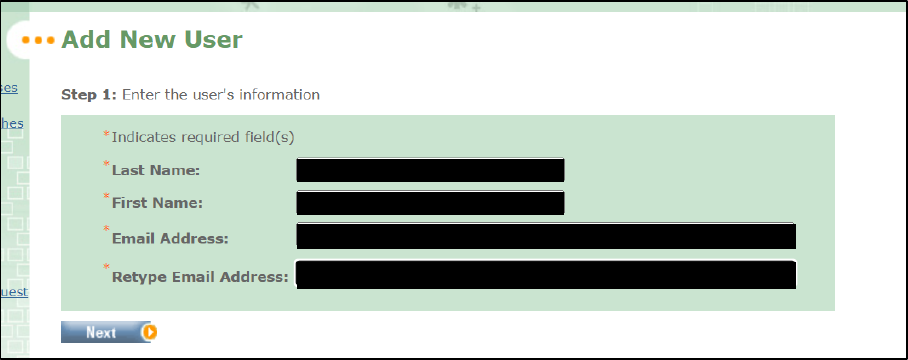
Screenshot source: ePACES Setting Up User Accounts v2 (December 4, 2024), PDF page 3.
Assign the intended provider records and choose General User. Use Add/Edit Access Privileges to grant only the functions the biller needs, then Submit.
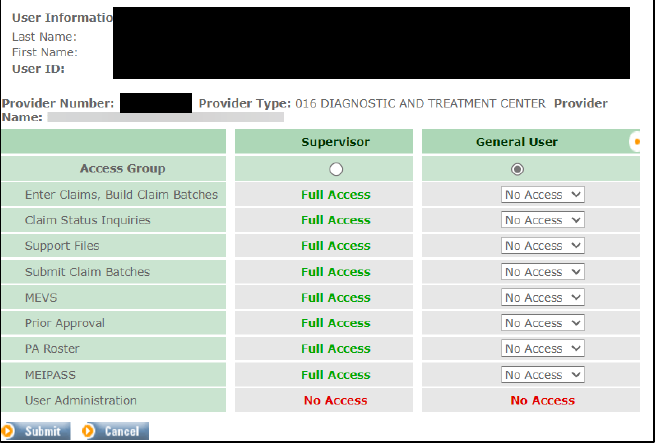
Screenshot source: ePACES Setting Up User Accounts v2 (December 4, 2024), PDF page 5.
Have the biller sign in using their own assigned credentials and confirm the correct provider appears. Never give them the administrator’s password.
ePACES login errors: missing providers and locked accounts
A successful login with an empty provider list is an access problem to investigate. The guide directs the primary administrator to Update Provider List within Add/Edit Users, then update the user's provider permissions. Select the correct provider before running an inquiry.
For an existing user's lockout or password problem, have the administrator use the guide's Unlocking User or Change Password functions. For a stalled token or enrollment sequence, return to the eMedNY support path. Keep enrollment identifiers in the appropriate support channel rather than ordinary shared notes.
First task after login
Run an ePACES eligibility inquiry and read its response for the intended date of service. Eligibility access, claim-submission access and participation in a managed-care network each need their own confirmation.
Frequently Asked Questions
Is eMedNY PSP the same as ePACES?
No. ePACES supports eligibility and fee-for-service transactions. PSP handles state provider enrollment and file maintenance, using HCS or NY.gov business access with multifactor authentication.
How do I reset or unlock my ePACES account?
Ask your ePACES administrator to use Change Password or Unlock User, following the user-account guide. For a stalled activation or enrollment sequence, contact eMedNY at 800-343-9000 through the official support path.
What is the eMedNY ePACES provider login?
The production login is epaces.emedny.org. First-time token activation is at www.emedny.org/enroll; Medicaid provider enrollment is handled through PSP.
Do I need an ETIN for ePACES?
The enrollment overview requires an active certified submitter ETIN. The submitter may be the provider or a billing service, subject to the enrollment type and certification requirements.
Can my biller use my ePACES username?
Create a separate user with the required provider and function permissions. The primary administrator manages user access; sharing credentials skips those controls.
Sources
Planning a private practice?
Use Bomi's free Build resources to plan the business, provider identity, payer setup, and billing workflow before you see clients.
Use Build resources
About Bomi
Founded by George Ruan, Dax Earl, and Andrey Goder, Bomi helps independent therapists and group practices with insurance billing, credentialing, and payer follow-up. Bomi grew out of Dax’s experience helping his mother with her therapy practice, with a clear purpose: reduce the administrative burden of insurance while keeping practice owners in control.
Meet our founders