
Verify NY Medicaid Eligibility in ePACES: MEVS Guide
By George Ruan • October 9, 2026
Sign in at the official ePACES login to run New York Medicaid eligibility inquiries through the Medicaid Eligibility Verification System (MEVS). Submitting a request is only the first step: read the response for the correct patient, provider and date of service before deciding where a behavioral health claim belongs. Steps checked October 9, 2026 against public eMedNY guides.
Sections
Before you send an eligibility request
Choose the correct provider in ePACES. The eligibility-request guide describes inquiries under an individual provider or group. If the intended provider is missing, ask the administrator to review the provider list and your permissions; see account setup and missing-provider troubleshooting.
Have the member's Client Identification Number (CIN) or the demographic information required for a demographic search, plus the actual service date. Use information already held through your normal intake process. Keep identifiers and responses in the practice's approved records rather than copying them into general team messages.
Submit the ePACES MEVS inquiry
Follow the official request guide:
Open Eligibility and choose Request for the selected provider.
Enter either the Client ID/CIN or the required demographic search information. The guide warns against populating both search routes in the same request.
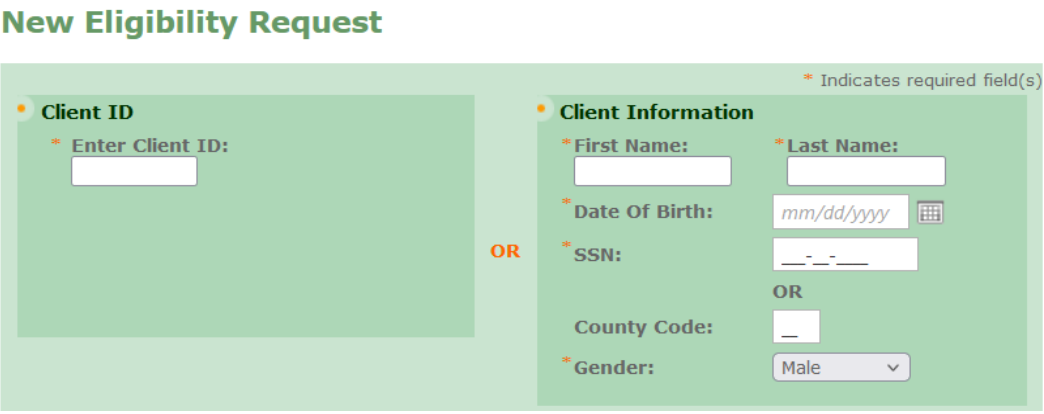
Screenshot source: ePACES MEVS Eligibility Request v2/revision 1 (November 14, 2024), PDF page 1.
Set the date of service deliberately. The field defaults to today; an inquiry for a different visit needs that visit's date.
Review the service-type selection. The default 30 inquiry returns general health-plan coverage; selecting specific service types narrows what the response returns.
Submit the request, then open Eligibility Responses and read the resulting response. A request acknowledgment is not the coverage determination.
We recommend retaining the response or reference information with the service date in your normal eligibility workflow. A check for today's date should not be filed as proof of coverage on a different date.
Read more than the eligible/not-eligible field
The ePACES response guide describes several sections that can change the billing decision:
Medicaid coverage and covered or noncovered services for the inquiry date and selected service types.
Restricted-recipient information and exceptions, including information associated with HARP or Health Homes.
Managed-care enrollment details, including the plan and contact information.
Medicare and other third-party insurance information that may require a separate coverage check.
Read the whole relevant response. A service-filtered result may omit information outside the chosen filter. If a response appears incomplete, compare the request's service types and date with what you intended to verify before assuming coverage is absent.
The manual’s example shows the Covered Services section. Its sample services and copay amounts illustrate the screen layout; they do not establish this patient’s current benefits or copay.
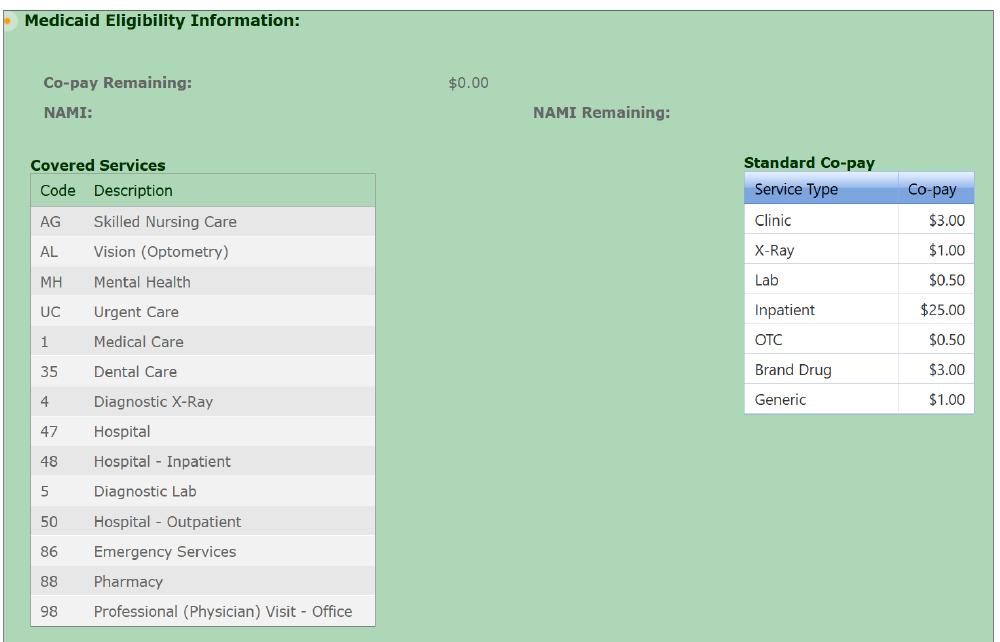
Screenshot source: ePACES MEVS Eligibility Response v2 (November 21, 2024), PDF page 4.
Decide whether the service goes to a plan or FFS
An active Medicaid response does not establish that your practice is in-network or that a particular treatment is authorized. Use the response to identify coverage, then confirm the intended service's benefit and authorization requirements with the responsible payer. The guide specifically directs providers to verify third-party coverage with the other insurer for the actual service.
For a managed-care member, record the plan and confirm the behavioral health billing route. Do not assume that a general Medicaid eligibility result turns the visit into an eMedNY FFS claim. Our MMC/HARP credentialing guide separates the provider's network status from the member's coverage.
Recheck when the visit or coverage changes
If intake and the session occur on different dates, run the inquiry for the session date. The request guide permits future-date inquiries only within the current month; a future check still needs follow-up when the service occurs. We recommend rechecking when a member reports an insurance change or a later claim conflicts with the saved response.
Before billing, compare that eligibility evidence with the claim's payer and provider details. For a remote session, also confirm the applicable telehealth requirements. Eligibility supplies part of the billing decision; keep the coverage, network and authorization findings together.
Frequently Asked Questions
Is an ePACES eligibility request the same as the response?
No. Submit the request, then open Eligibility Responses and review the result for the correct provider, member, date and service-type scope.
Should I enter both the CIN and demographic search information?
The eMedNY request guide directs users to choose the Client ID route or the demographic route rather than filling both in the same request.
Does active Medicaid eligibility guarantee payment?
No. Confirm the service’s responsible payer, benefits, provider participation and applicable authorization requirements. Review managed-care and other-insurance information in the response.
Sources
Want Bomi to handle insurance billing?
Bomi helps therapy practices with benefit checks, claims, denials, balances, CAQH, attestations, and revenue management.
Book a call
About Bomi
Founded by George Ruan, Dax Earl, and Andrey Goder, Bomi helps independent therapists and group practices with insurance billing, credentialing, and payer follow-up. Bomi grew out of Dax’s experience helping his mother with her therapy practice, with a clear purpose: reduce the administrative burden of insurance while keeping practice owners in control.
Meet our founders