
NY Medicaid Enrollment: LCSW, LMHC, LMFT, Psychologist
By George Ruan • October 9, 2026
Start with eMedNY's official enrollment page for your profession: LCSW, LMHC, LMFT or clinical psychologist. As of October 9, 2026, the Provider Services Portal (PSP) is the current application route. An old printable application or an ePACES username does not replace that enrollment process.
Sections
Choose FFS billing or nonbilling enrollment
Each profession's page separates fee-for-service billing enrollment, nonbilling OPRA/managed-care enrollment, and a change from nonbilling to billing. Choose the option that matches the work you will perform. A nonbilling record does not authorize you to submit fee-for-service claims.
The LCSW page says LMSWs cannot enroll independently. The LCSW/LMHC/LMFT policy manual also excludes limited-permit practitioners from independent enrollment. If supervised billing is the issue, review our New York limited-permit guide before selecting an independent-provider pathway.
Find the right eMedNY enrollment forms
Open the requirements page for the profession and option you selected. For FFS billing, use the LCSW requirements, LMHC requirements, LMFT requirements or clinical psychologist requirements. These current pages direct applicants to download required forms from PSP at Step Requirements, complete them and upload them.
Build the packet from that live checklist. It includes professional license/registration information and applicable supporting documents such as group affiliation, ETIN certification or EFT paperwork. Which additional forms apply depends on the application and billing arrangement. Do not reuse another profession's checklist or assume a solo-practice packet covers a group affiliation.
The individual FFS requirements pages say an application fee is not required for these provider types. That does not establish a rule for every organizational enrollment. Follow the requirements for the actual applicant.
Set up your PSP identity and generate the application
The PSP instructions accept either an HCS account or an NY.gov business account and require multifactor authentication. Use the official access links from that page; the NY.gov route calls for a business account.
Review the profession and enrollment-option requirements before opening a new application.
Sign in to PSP, select your profile, and choose New Enrollment from the Provider dropdown.
Enter the requested identifying information and select Generate Application. Save the Application ID for tracking.
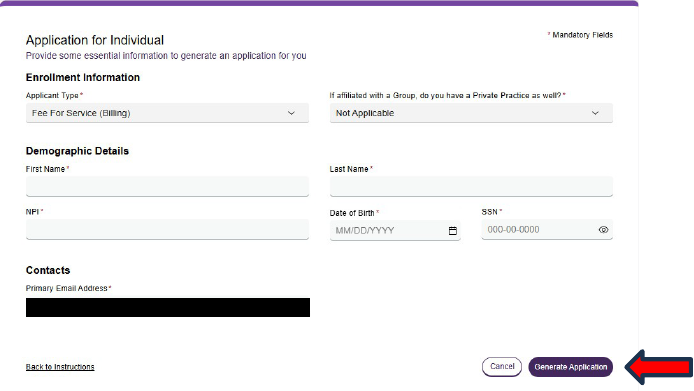
Screenshot source: Provider Services Portal Milestone 1 v3 (February 2, 2026), PDF page 2.
Complete the provider type, billing status, affiliations and other required fields. Upload the profession-specific documents requested at Step Requirements.
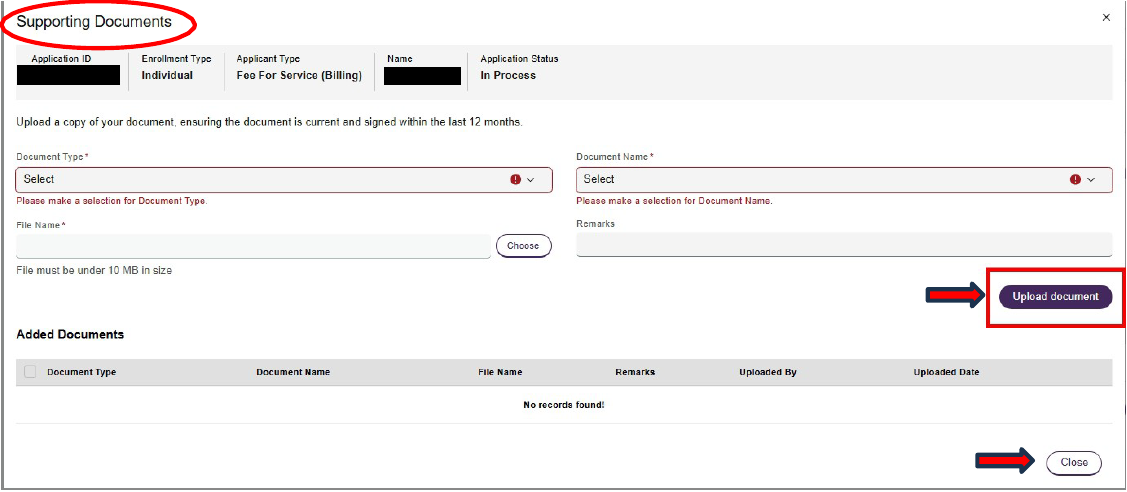
Screenshot source: Provider Services Portal Milestone 1 v3 (February 2, 2026), PDF page 6.
Review the packet, submit through the authorized provider identity, and track requests for corrections in PSP.
The current Milestone 1 guide illustrates Generate Application and Supporting Documents. These are individual-provider examples; use your actual profession and enrollment option rather than copying the sample selections.
A biller can prepare; the provider must submit
The submission instructions require an individual provider to log in through their own HCS or NY.gov business account, review the application and click Submit. For an organization, the submitting owner or duly authorized representative must be disclosed on the enrollment file or application. Preparation by credentialing staff does not replace that submission requirement.
Keep the email address monitored. PSP distinguishes an application in review from an active enrollment and issues a written determination with an effective date when approved. Record that date before treating the provider as enrolled. We recommend tracking each individual and group application separately rather than assuming one approval activates every affiliation.
After approval, confirm the next lane
State enrollment, access to ePACES and a managed-care contract each need their own confirmation. See the PSP enrollment instructions and state requirements for managed-care network providers.
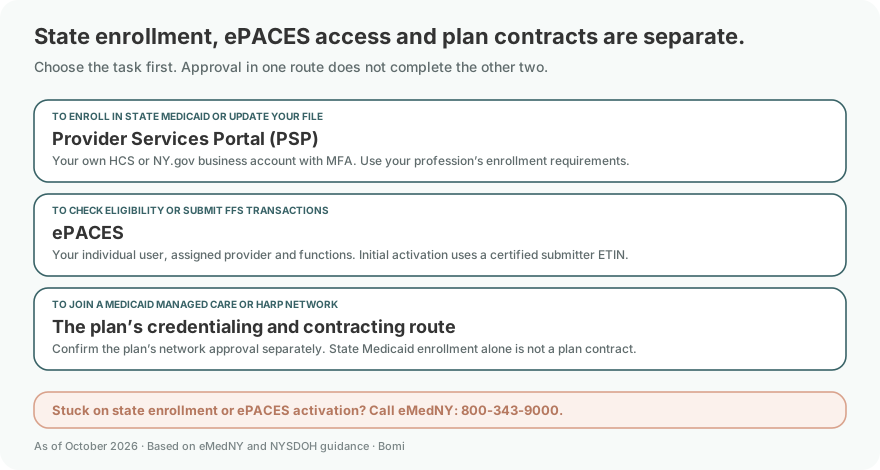
If you will bill FFS electronically, complete the applicable ETIN certification and ePACES setup. The legacy Provider Enrollment Maintenance Portal now limits its functions to specified transactions; use PSP's current routing for new enrollment and general provider-file work.
If you will join a Medicaid Managed Care or HARP network, state enrollment is one requirement. Follow the separate plan credentialing and contracting workflow and confirm the product, location and effective date with the plan before scheduling on an in-network assumption.
Frequently Asked Questions
Which eMedNY forms should an LMHC or LMFT use?
Start from the profession’s enrollment page and choose the billing or nonbilling option. The current requirements pages direct applicants to download forms in PSP at Step Requirements and upload the completed documents.
Can an LMSW enroll independently in New York Medicaid?
The eMedNY LCSW enrollment page says LMSWs are not eligible for independent enrollment. Supervised arrangements require their own policy review.
Does my biller submit my individual PSP application?
The provider must review and submit using their own HCS or NY.gov business account. Credentialing staff may prepare the application, but cannot replace that provider submission step.
Sources
Need help getting payer-ready?
For practices enrolled in Bomi Billing, our team handles CAQH, payer applications, attestations, roster updates, and ongoing credentialing. Credentialing requires Bomi Billing.
Credentialing with billing
About Bomi
Founded by George Ruan, Dax Earl, and Andrey Goder, Bomi helps independent therapists and group practices with insurance billing, credentialing, and payer follow-up. Bomi grew out of Dax’s experience helping his mother with her therapy practice, with a clear purpose: reduce the administrative burden of insurance while keeping practice owners in control.
Meet our founders