
eMOMED Login: Account Setup and Biller Access
By George Ruan • October 9, 2026
For eMOMED provider login, open the official eMOMED sign-in page and sign in with your own individual user account. This guide covers Missouri Medicaid account setup and adding your biller, checked October 9, 2026.
Sections
- Direct links: eMOMED login, registration and help
- TL;DR: use your own login, and give your biller their own
- Who needs their own eMOMED login
- Before you create eMOMED access
- eMOMED account setup and MFA
- Add your biller as a separate user
- Confirm access with a first provider task
- Missing NPI, forgotten password or MFA trouble
- Portal access is separate from enrollment and contracts
- Related Missouri guides
- Frequently Asked Questions
Direct links: eMOMED login, registration and help
eMOMED login, Register Now and password/MFA reset — use the links on the public sign-in page.
Provider administrator and Provider Employee registration guide
The eMOMED sign-in page has User ID and Password fields; first-time users choose Register Now, and existing users can reset their password or MFA methods.
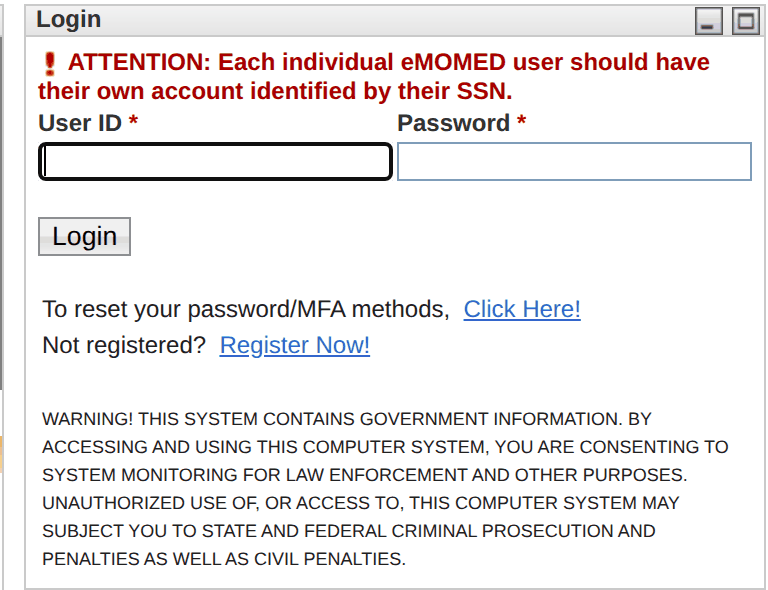
Screenshot source: Screenshot of the public eMOMED sign-in page, captured October 9, 2026.
TL;DR: use your own login, and give your biller their own
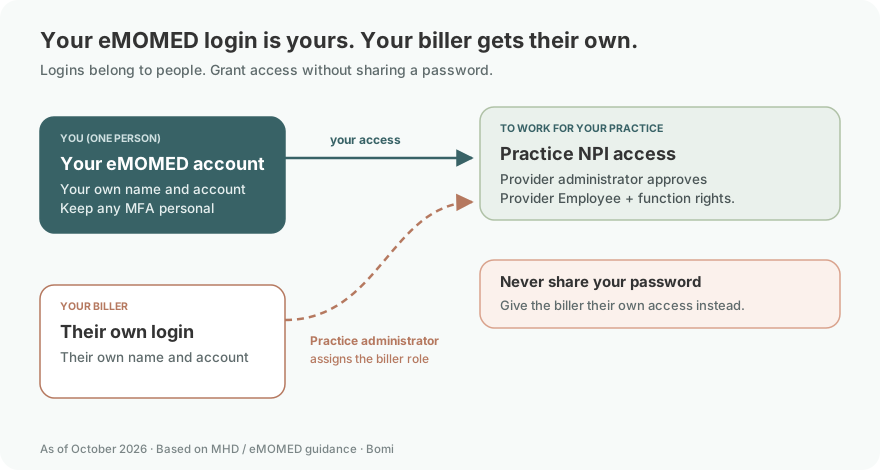
Use your own eMOMED account and your own MFA. Your biller registers their own Provider Employee account; the practice administrator approves access to the practice NPI and assigns the permissions they need. Clinician enrollment and managed care contracts are separate. Registration roles; NPI-access FAQ, pages 5–6.
Who needs their own eMOMED login
Every person using eMOMED, including the owner and biller, needs their own account. Keep your MFA methods and password to yourself; the public sign-in notice requires individual accounts and MFA. Access to the practice is granted through NPI permissions, so never share your password to give the biller access. eMOMED account and MFA notices; NPI-access FAQ.
Before you create eMOMED access
Have the provider NPI ready and identify the practice administrator who can approve your request. A registered user account still needs permission for the provider record. eMOMED NPI-access FAQ, pages 5–6.
eMOMED account setup and MFA
The public login page offers “Not registered? Register Now!” and says every individual user needs their own account. It also states that MFA has been mandatory since August 16, 2026. Available enrollment methods are SMS, email and an authenticator app. eMOMED public login.
Open eMOMED and choose Register Now. Complete your own registration rather than using the practice owner’s identity.
Keep your assigned user ID and use the portal’s MFA enrollment prompt before trying to open protected services.
Match the account’s role and NPI access to the work you will perform: administering access differs from working as a provider employee or biller.
MHD documents user registration in its provider FAQ and the portal publishes a registration training announcement for provider administrators and employees. These are public instructions; this guide does not claim to have inspected a signed-in account.
Add your biller as a separate user
Have the biller register their own Provider Employee account, keep their own MFA, and arrange NPI access through the provider administrator. Never share your password. The portal’s NPI-access FAQ, pages 5–6 documents this ePassport workflow:
The biller signs in to their own account, opens ePassport and selects Initiate Access Request.
Enter the provider NPI, choose Add, check the NPI list and submit the request.
The administrator opens ePassport → Manage Access Requests, selects the user and NPI, moves the NPI into the Accept column, then submits and finishes.
The provider administrator reviews NPI Access Management and assigns the functional access needed for the biller’s work.
The FAQ assigns NPI-access approval to the administrator or designated sub-administrator. A pending request is different from an account-registration problem. Ask the practice administrator to review the correct NPI and user before repeating registration.
This older FAQ is cited only for its NPI permission instructions. Its legacy Internet Explorer guidance is not current browser advice. If menu labels differ, use the portal’s current help and technical support rather than guessing.
Confirm access with a first provider task
After the administrator approves the correct NPI and functional permissions, open Participant Eligibility to check that you can reach the practice’s eligibility workflow. The state’s public guide illustrates this menu; its other listed functions may need different permissions. MO HealthNet Eligibility and Spend Down Guide, Checking Eligibility.
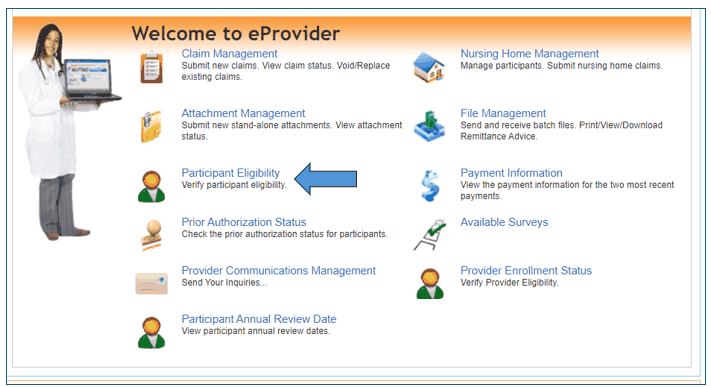
Screenshot source: MO HealthNet Eligibility and Spend Down Guide, Checking Eligibility (unpaginated online lesson).
Missing NPI, forgotten password or MFA trouble
Use the password/MFA reset link on the public login page for sign-in recovery. An account that signs in but cannot access the practice NPI needs a permission review. eMOMED public login.
MHD lists the Provider Technical Help Desk at 573-635-3559, option 1, for eMOMED assistance. Explain whether registration, MFA or provider access is failing; do not give another person your password or MFA code. MHD General Provider and Claim FAQs.
Portal access is separate from enrollment and contracts
For a new clinician, follow the MO HealthNet enrollment guide. For plan participation, follow managed care versus FFS credentialing. Missouri moved enrollment responsibility from MMAC to MHD on September 16, 2026, while keeping existing procedures during the transition. MHD enrollment update.
Related Missouri guides
Verify MO HealthNet Eligibility in eMOMED
MO HealthNet Behavioral Health Claims and Telehealth
For the broader practice setup, see the Missouri practice guide.
Frequently Asked Questions
Where is the eMOMED provider login?
Use https://www.emomed.com/ for the official MO HealthNet provider portal. Avoid long session-specific bookmarks.
Does eMOMED require MFA?
Yes. The public login notice says MFA has been required since August 16, 2026, with SMS, email and authenticator-app options.
How do I add my biller to eMOMED?
Have the biller register their own Provider Employee account and request access to the correct NPI. The provider administrator or designated sub-administrator approves NPI access through ePassport; the administrator assigns functional permissions.
Does my eMOMED login make me in network?
A user account supplies portal access. State provider enrollment and each managed care plan’s credentialing and contract are separate processes.
Planning a private practice?
Use Bomi's free Build resources to plan the business, provider identity, payer setup, and billing workflow before you see clients.
Use Build resources
About Bomi
Founded by George Ruan, Dax Earl, and Andrey Goder, Bomi helps independent therapists and group practices with insurance billing, credentialing, and payer follow-up. Bomi grew out of Dax’s experience helping his mother with her therapy practice, with a clear purpose: reduce the administrative burden of insurance while keeping practice owners in control.
Meet our founders