
MN–ITS Login: LoginMN Account Setup and MPSE
By George Ruan • October 9, 2026
For MN–ITS provider login, open the official LoginMN sign-in page and sign in with your individual work-email account, choose the MN–ITS application, then select the appropriate NPI or UMPI. Minnesota Provider Screening and Enrollment (MPSE) opens from the MN–ITS navigation. New users need the appropriate invitation or new-enroller registration route described below.
Sections
- Direct links: MN–ITS login, registration and MPSE
- TL;DR: use your own login, and give your biller their own
- Who needs their own MN–ITS login?
- Before you create access: enrollment and your administrator
- Set up access for an already enrolled provider
- Not enrolled yet? Start the MPSE new-enroller route
- Add your biller as an MN–ITS User
- MN–ITS transactions and MPSE enrollment need separate permissions
- Troubleshoot missing access before making another account
- How Bomi can help
- Related Minnesota guides
- Frequently Asked Questions
Direct links: MN–ITS login, registration and MPSE
MPSE registration for first-time enrollers and missing-login help
User access and administrator support: MHCP Provider Resource Center, 651-431-2700 or 800-366-5411, option 2, for primary-administrator reassignment.
The shared LoginMN sign-in form looks like this. Existing users enter their own email and password; new MN–ITS users follow their DHS invitation rather than registering from the public sign-in page.
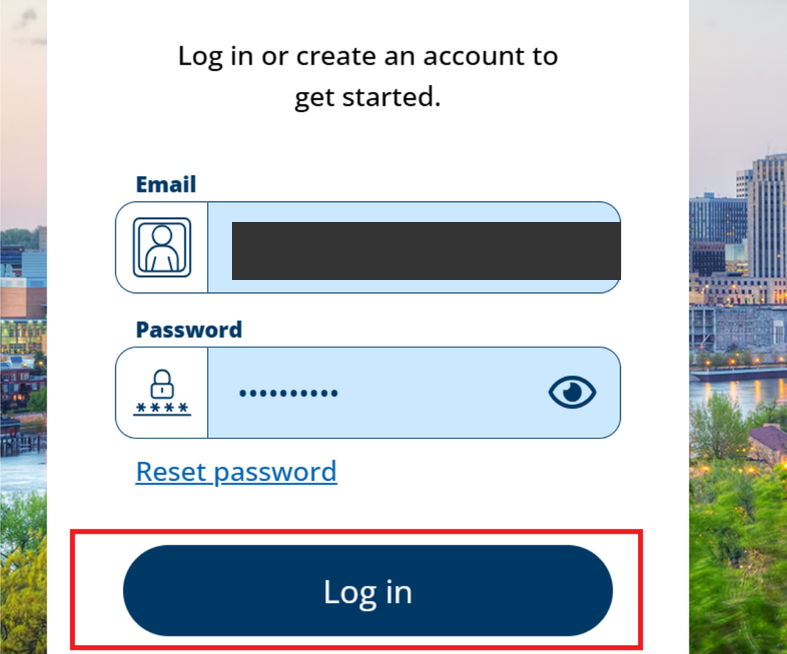
Screenshot source: MMB: Accessing the Capital Budget System for Local Governments (May 2025), PDF page 13, printed page 11 — shared LoginMN sign-in form only.
TL;DR: use your own login, and give your biller their own
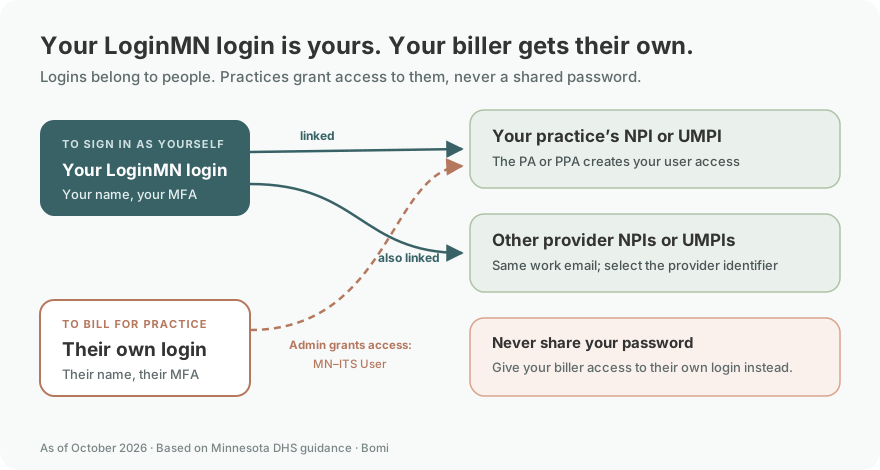
Use your own work-email LoginMN account. Your biller gets their own MN–ITS User access, which your primary or secondary administrator grants. MPSE enrollment roles and health-plan participation are separate from being able to sign in. DHS user access.
Who needs their own MN–ITS login?
Each provider, staff member and biller uses their own name, individual work email and MFA. Never share your password. Your same work-email LoginMN account can be linked to multiple NPIs or UMPIs; select the provider you need after sign-in. The primary administrator (PA) or secondary administrator (PPA) grants each record’s functions and MPSE roles. DHS user-access guidance.
Before you create access: enrollment and your administrator
For an enrolled provider, identify the primary administrator and the correct NPI or UMPI before requesting access. Use the invitation for that provider record. A first-time MHCP enroller instead starts with the dedicated MPSE registration route below. DHS enrollment and registration guidance and MPSE access routes.
Set up access for an already enrolled provider
Follow the LoginMN invitation sent to the primary administrator identified for the enrolled provider, or the invitation created after an administrator adds a user. DHS warns against creating an account directly from the public LoginMN page for this purpose. Use an individual work email, not a shared office login. Current MN–ITS access guidance.
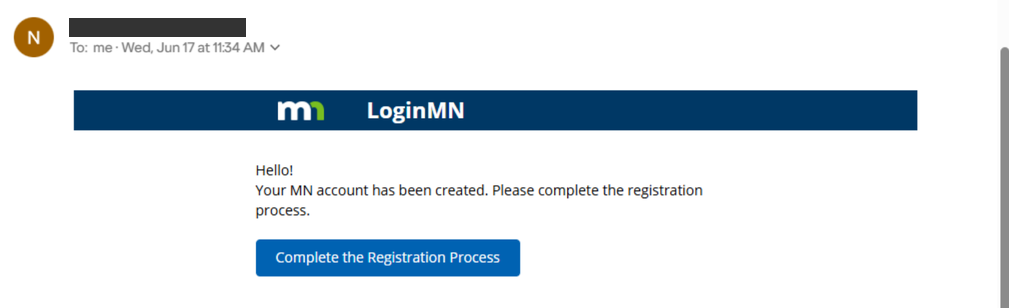
Screenshot source: DHS: LoginMN Registration Steps to Access MN–ITS, page 1.
Verify your own work email
Open your LoginMN invitation and enter the work email that received it. Request and enter the emailed verification code, then choose Confirm Code. DHS registration guide.
Set your password and your own MFA
Create and confirm your password. Choose your MFA method and follow the prompts with your own phone or authenticator. DHS recommends Phone if unsure and warns against using a phone with an automatic answering service. DHS LoginMN instructions.
Open DHS MN–ITS and select the provider
After verification, select the DHS MN–ITS application or the relevant NPI/UMPI. A primary administrator registering for the first time also reviews contact information and electronically agrees to the EDI Trading Partner Addendum. Ordinary users and PPAs do not perform that PA-only step. DHS registration guide.
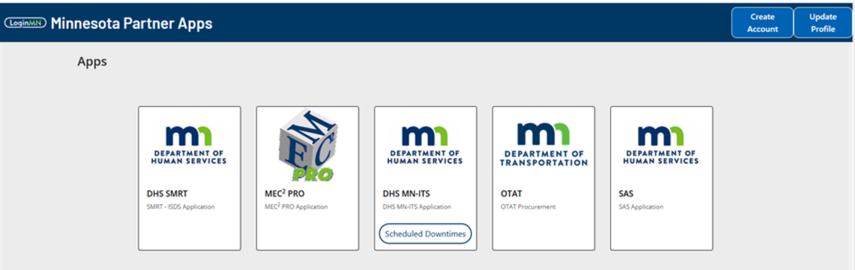
Screenshot source: DHS: LoginMN Registration Steps to Access MN–ITS, page 7.
Not enrolled yet? Start the MPSE new-enroller route
The MPSE Registration and Access manual links a dedicated LoginMN Registration for Minnesota Provider Screening and Enrollment page. Enter and confirm your email, enter your first and last name, complete the verification challenge, and submit. Finish the LoginMN email instructions, open MN–ITS, and follow its MPSE link to begin enrollment. This is a different starting route from an enrolled provider’s invitation. Official MPSE new-enroller registration instructions.
Continue with individual or group MHCP enrollment rather than stopping after account creation.
Add your biller as an MN–ITS User
The primary administrator or secondary administrator creates the user in User Administration, enters that person’s work email and name, selects MN–ITS User for ordinary biller access (or MN–ITS Secondary Admin (PPA) when that administrator role is appropriate) and Active status, assigns only needed functions, applications and MPSE roles, then saves. The biller signs in with their own name, work email and MFA; never give them your password. The user receives a LoginMN registration email. Email is the username and cannot simply be edited later. DHS user-access instructions.
For Bomi-specific access and enrollment-role choices, use the existing MN–ITS and MPSE delegation guide.
MN–ITS transactions and MPSE enrollment need separate permissions
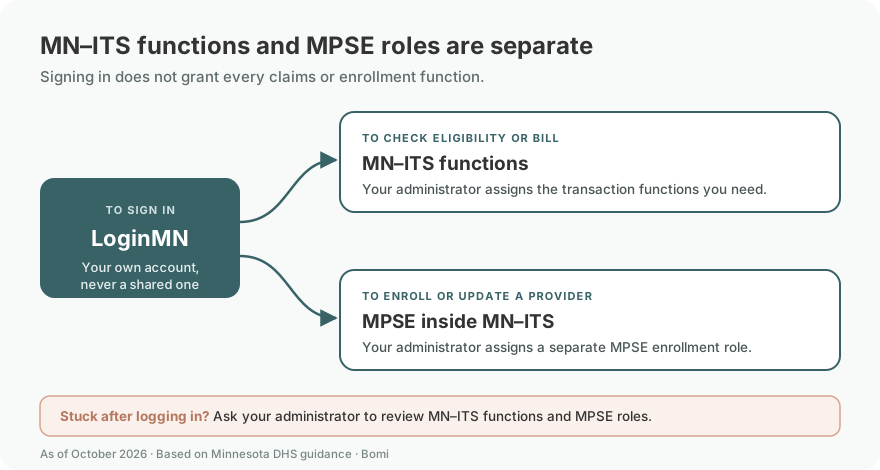
MN–ITS functions control work such as eligibility, claims and mailbox access. MPSE opens from MN–ITS, but enrollment actions depend on your assigned MPSE role. Ask the administrator for the access your task needs. MN–ITS access and MPSE roles.
Troubleshoot missing access before making another account
If the MPSE link or an expected function is unavailable, ask the administrator to review permissions. If the administrator needs reassignment, use the MHCP Provider Resource Center contact in the current access instructions. MN–ITS administration help.
For an MPSE identifier-already-in-use error, follow the specific portfolio-retrieval guidance instead of repeatedly creating profiles. That recovery process is for the errors described by DHS, not a substitute for ordinary access management. Retrieve Portfolio.
How Bomi can help
Bomi can help organize enrollment, payer follow-up and billing work. If you want help with your Minnesota workflow, contact Bomi and identify the task that is blocked.
Related Minnesota guides
Verify eligibility after access is working. Check FFS versus managed-care participation.
Frequently Asked Questions
Is LoginMN the same as MN–ITS or MPSE?
LoginMN authenticates your individual account. MN–ITS provides authorized transaction functions and the link to MPSE, which manages enrollment records.
How do I recover my MN–ITS username or password?
Use the missing-login instructions in the DHS MPSE Registration and Access manual, which directs existing providers who do not know their credentials to the MHCP Provider Resource Center. Missing application permissions require administrator review.
Does my biller need their own MN–ITS login?
Yes. The primary or secondary administrator creates a user with the biller’s individual work email and assigns the required functions and MPSE roles. The biller completes the LoginMN invitation.
What is the MN–ITS provider login?
Start at LoginMN, then choose DHS MN–ITS and the relevant provider identifier. MPSE is a link inside MN–ITS.
Can I create a LoginMN account from the sign-in page?
For enrolled-provider MN–ITS access, follow the administrator or enrollment invitation. Providers enrolling for the first time should use the dedicated MPSE registration link in the current DHS manual.
Does MN–ITS access mean my MHCP enrollment is approved?
No. Account access, enrollment approval and health-plan participation are separate. Use MPSE to track the applicable enrollment request.
Planning a private practice?
Use Bomi's free Build resources to plan the business, provider identity, payer setup, and billing workflow before you see clients.
Use Build resources
About Bomi
Founded by George Ruan, Dax Earl, and Andrey Goder, Bomi helps independent therapists and group practices with insurance billing, credentialing, and payer follow-up. Bomi grew out of Dax’s experience helping his mother with her therapy practice, with a clear purpose: reduce the administrative burden of insurance while keeping practice owners in control.
Meet our founders