
Verify MHCP Eligibility in MN–ITS Before a Session
By George Ruan • October 9, 2026
Updated October 9, 2026.
To verify Minnesota Health Care Programs (MHCP) eligibility, sign in through LoginMN, open MN–ITS, and choose Eligibility Request (270). Review the returned 271 response for the service date you actually need. A card or a previous visit’s result does not establish today’s payer route.
As of October 9, 2026, the current MN–ITS eligibility manual links DHS’s interactive verification guide. MHCP requires eligibility checks before services and claim submission. MN–ITS eligibility overview.
Sections
- Sign in with your personal LoginMN account
- Run a MN–ITS eligibility request for the right date
- Can MN–ITS verify a future appointment?
- Read the 271 response before choosing a claim destination
- Save the result and investigate mismatches
- Access problem or eligibility problem?
- How Bomi can help
- Related Minnesota guides
- Frequently Asked Questions
Sign in with your personal LoginMN account
Use your own work email, password and MFA. New MN–ITS users complete the DHS invitation first. DHS MN–ITS access guidance.
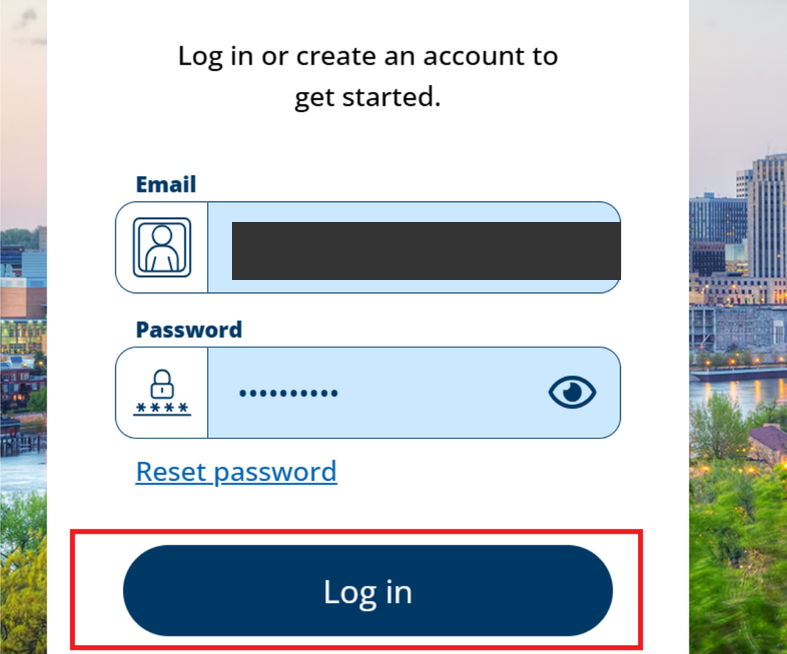
Screenshot source: MMB: Accessing the Capital Budget System for Local Governments (May 2025), PDF page 13, printed page 11 — shared LoginMN sign-in form only.
Choose DHS MN–ITS from Minnesota Partner Apps, select the intended NPI or UMPI when prompted, and open Eligibility Request (270). DHS LoginMN registration guide and eligibility manual.
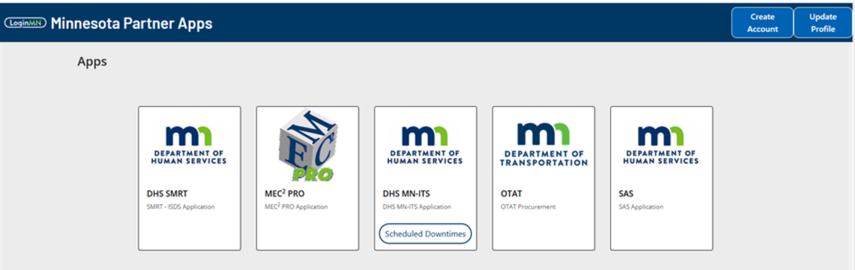
Screenshot source: DHS: LoginMN Registration Steps to Access MN–ITS, page 7.
Run a MN–ITS eligibility request for the right date
Confirm the NPI or UMPI populated from your selected account. Consolidated providers follow the guide’s additional address and taxonomy instructions.
Check the Date of Service From field: it defaults to today. Replace it with the intended date in MM/DD/YYYY format when needed.
Enter a supported combination of at least two subscriber information fields. Use Eligibility Help to see valid combinations.
Review Service Type Code: the default is 30, Health Benefit Plan Coverage. Select the available code that fits the inquiry.
Submit the request and print or save the 271 response securely with the eligibility record.
The DHS interactive eligibility guide provides these fields and steps.
Can MN–ITS verify a future appointment?
The guide allows checks back through the previous 12 months, but not for a future date. The response applies to the date in the From field, not an entire date range. If the appointment is later, plan to recheck on the service date; do not label today’s response as confirmation of future coverage. Date limits in the eligibility guide.
Read the 271 response before choosing a claim destination
Review the program coverage, any prepaid health-plan information and other insurance. If a managed-care plan is listed, follow that plan’s applicable service rules. Review other coverage and coordination-of-benefits requirements before assuming MHCP is primary. MHCP eligibility and billing rules.
For the current plan-name changes and participation distinction, see FFS versus managed-care credentialing.
Save the result and investigate mismatches
Keep the checked service date and response with the billing record using your normal secure workflow.
If the subscriber does not match, compare the entered identifiers and use Eligibility Help before repeating the same search.
If coverage, plan assignment or other insurance differs from your records, resolve the discrepancy before choosing the claim route.
For a past-date claim, rerun the inquiry for that historical service date rather than relying on today’s result.
Eligibility can be updated later and does not guarantee payment. Covered-service rules, provider status, authorization and claim requirements still matter. MHCP billing overview.
Access problem or eligibility problem?
If you cannot open the transaction at all, first check MN–ITS login and user permissions. If the transaction runs but the result is unexpected, investigate the member/date/coverage information. Those are different problems.
How Bomi can help
Bomi can help organize enrollment, payer follow-up and billing work. If you want help with your Minnesota workflow, contact Bomi and identify the task that is blocked.
Related Minnesota guides
Mental-health claims and telehealth. Give Bomi individual access without sharing a password.
Frequently Asked Questions
Where do I verify MHCP eligibility?
In MN–ITS, select Eligibility Request (270) and review the returned 271 response. Sign in through LoginMN.
Can I check future MHCP eligibility in MN–ITS?
The current interactive guide does not allow future-date checks. It permits checks for up to the previous 12 months, and the response covers the From date.
Does an eligible 271 response guarantee payment?
No. Verify the service, provider participation, authorization, other insurance and claim requirements as well.
Want Bomi to handle insurance billing?
Bomi helps therapy practices with benefit checks, claims, denials, balances, CAQH, attestations, and revenue management.
Book a call
About Bomi
Founded by George Ruan, Dax Earl, and Andrey Goder, Bomi helps independent therapists and group practices with insurance billing, credentialing, and payer follow-up. Bomi grew out of Dax’s experience helping his mother with her therapy practice, with a clear purpose: reduce the administrative burden of insurance while keeping practice owners in control.
Meet our founders