
CHAMPS Enrollment Status: Track a Michigan Medicaid Application
By George Ruan • October 9, 2026
Last updated: October 9, 2026.
Sections
- Sign in through the official MILogin entry
- Choose Track Application in the Provider menu
- Enter the Application ID and complete verification
- Distinguish saved work from submission
- Use the instructions for your enrollment category
- Use Manage Provider Information for an approved record
- Keep group and rendering enrollment in sequence
- Related Michigan Medicaid guides
- Frequently Asked Questions
Sign in through the official MILogin entry
Open the official MILogin for Business link below, then CHAMPS. This guide covers application tracking, checked October 9, 2026. If the portal account or provider domain is missing, use the access-recovery guide below before starting a second application.
Official MILogin for Business login
Choose Track Application in the Provider menu
MDHHS’s CHAMPS 101 guide says Track Application can resume an incomplete application or track a submitted one. CHAMPS assigns the Application ID after Step 1, Basic Information. Retain that reference when it is created; possessing an ID alone does not establish final submission or approval.
MDHHS: CHAMPS 101 Provider tab

Screenshot source: CHAMPS Group Track Application (undated, current resource), PDF/slide page 6.
Enter the Application ID and complete verification
The group Track Application guide shows Provider → Track Application, entering the Application ID, then Next. Complete the required verification fields shown for your application. Our recommendation is to use the original application reference and authorized access rather than trying unrelated provider numbers or creating another application to see its status.
MDHHS: Group Track Application instructions
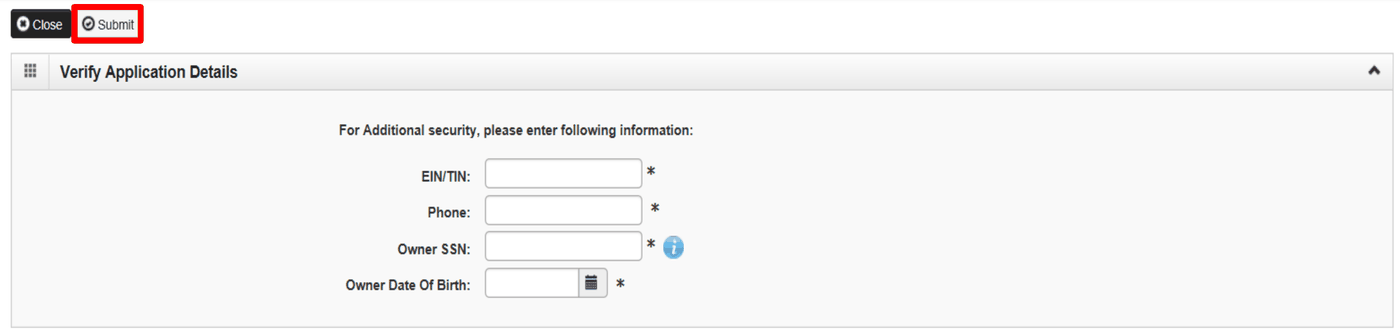
Screenshot source: CHAMPS Group Track Application (undated, current resource), PDF/slide page 7.
Distinguish saved work from submission
The group guide ends with Submit and a confirmation that the application has been submitted and is under review by the state. Our recommended status record distinguishes work still needing submission, a submission confirmation, and an enrollment decision. Save the exact portal wording rather than translating every screen into “approved.”
MDHHS: Group Track Application instructions
Use the instructions for your enrollment category
MDHHS publishes category-specific enrollment guidance. A group application is not the same record as each clinician’s individual or rendering enrollment. Our suggested tracking sheet keeps the applicant, billing arrangement, application reference, current status, outstanding request, and next action together, with separate rows for separate enrollment records.
MDHHS: Medicaid provider enrollment
Use Manage Provider Information for an approved record
MDHHS’s Provider-tab overview distinguishes Track Application from Manage Provider Information for an approved provider record. Use the latter for record maintenance and revalidation. If you have forgotten the Application ID, the overview directs you to Provider Enrollment support rather than asking you to invent a new reference.
MDHHS: CHAMPS 101 Provider tab
Keep group and rendering enrollment in sequence
MDHHS’s group page says the group must be approved before rendering providers can be linked to it. Our recommendation is to check the group decision before treating a clinician-linking problem as a login failure. Keep state approval and any separate health-plan participation decision in different fields.
MDHHS: Group enrollment and maintenance guides
Related Michigan Medicaid guides
Frequently Asked Questions
When does CHAMPS assign the Application ID?
The Provider-tab overview says it is assigned after Step 1, Basic Information.
Does an Application ID mean my enrollment is approved?
No. Track the submission confirmation and the state’s enrollment decision separately.
Where do I update an approved provider record?
Use Manage Provider Information for maintenance and revalidation, following the instructions for that enrollment category.
Want Bomi to handle insurance billing?
Bomi helps therapy practices with benefit checks, claims, denials, balances, CAQH, attestations, and revenue management.
Book a call
About Bomi
Founded by George Ruan, Dax Earl, and Andrey Goder, Bomi helps independent therapists and group practices with insurance billing, credentialing, and payer follow-up. Bomi grew out of Dax’s experience helping his mother with her therapy practice, with a clear purpose: reduce the administrative burden of insurance while keeping practice owners in control.
Meet our founders