
CHAMPS Login: Find Michigan Medicaid Payment RAs
By George Ruan • October 9, 2026
For CHAMPS provider login, open MiLogin for Business and sign in with your own account to find Michigan Medicaid payment RAs.
Last checked: October 9, 2026.
Sections
- Direct links: CHAMPS login, registration and recovery
- TL;DR: use your own login, and give your biller their own
- Who needs their own CHAMPS login
- Before you create access
- Account setup steps: find CHAMPS in MiLogin
- MiLogin signs you in; CHAMPS needs a domain and profile
- Add your biller with their own MiLogin user ID
- CHAMPS login errors, password recovery and lockouts
- Go to My Inbox and Archived Documents
- Select the Medicaid Payments Paper RA document
- Match the remittance to the payment reference
- Use the 835 setup for electronic remittances
- Separate biller access from billing-agent authorization
- Check which payer issued the payment
- Related Michigan Medicaid guides
- Frequently Asked Questions
Direct links: CHAMPS login, registration and recovery
The MiLogin for Business login page looks like this: existing users choose Log In; first-time users choose Create an Account.
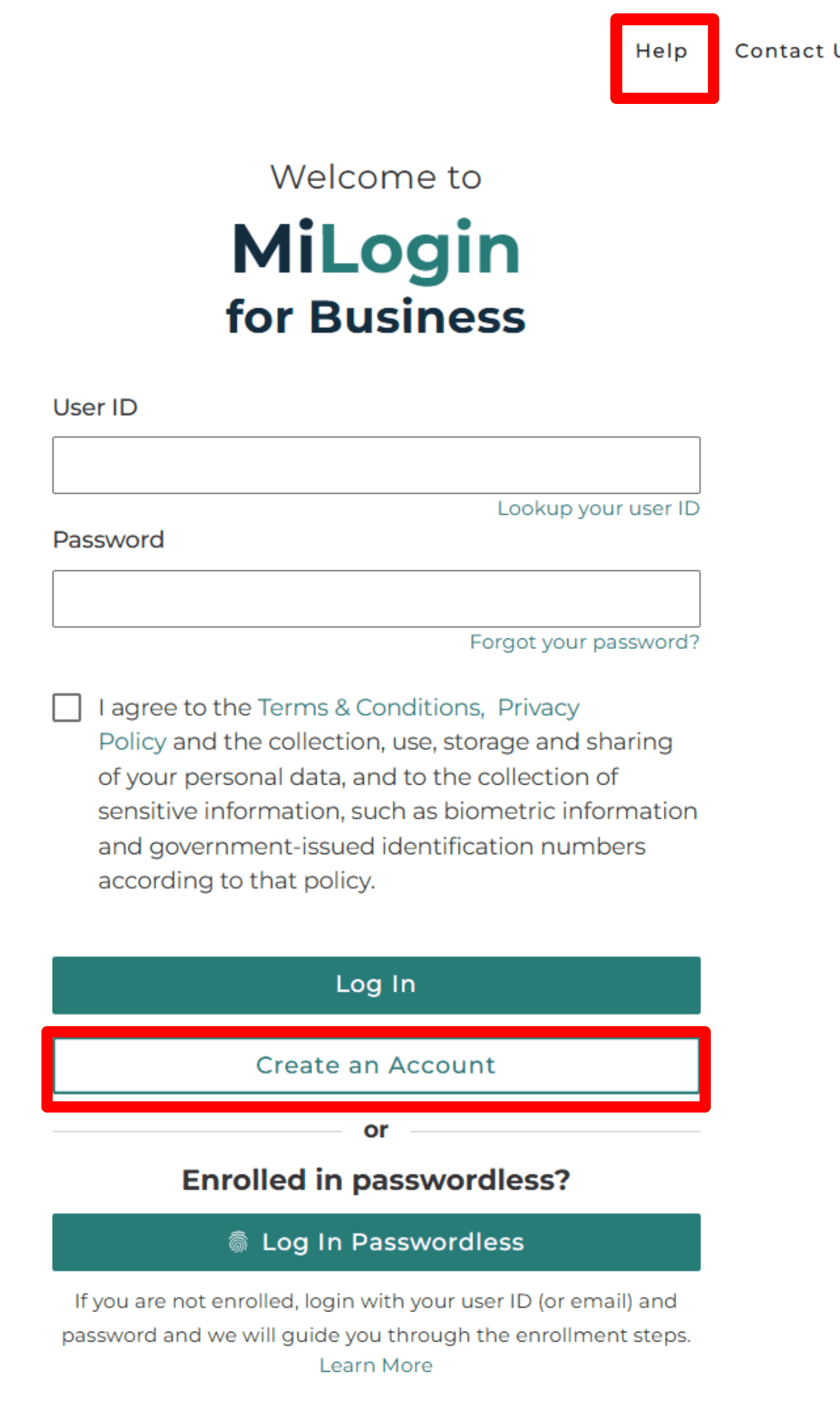
Screenshot source: MiLogin for Business Instructions (2026), PDF/slide page 4.
TL;DR: use your own login, and give your biller their own
Use your own MiLogin for Business account. Your biller creates their own account, and your practice’s Domain Administrator assigns their CHAMPS profile. Joining a health plan and authorizing an 835 receiver are separate tasks.
MDHHS: assign CHAMPS users and profiles
Who needs their own CHAMPS login
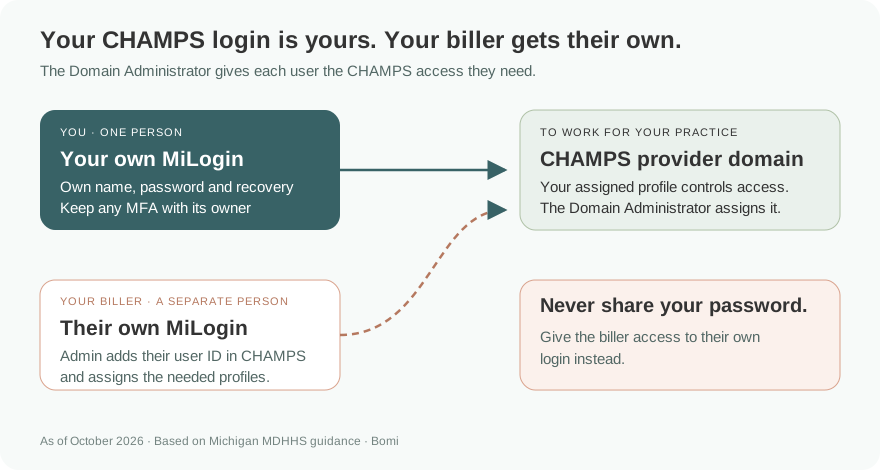
Each person who uses CHAMPS needs their own MiLogin user ID and password. Register with your own name. Our security recommendation is to keep any MFA, recovery methods and security answers under that person’s control. Never share your password; grant the biller access to their own account.
MDHHS: personal MiLogin registration and CHAMPS access
Before you create access
Confirm whether you already have a MiLogin for Business account and which enrolled provider domain you need. The state’s guide separates a new provider enrollment from adding users to an existing provider. Recover your existing account before creating a duplicate.
MDHHS: new providers and new users
Account setup steps: find CHAMPS in MiLogin
Choose Create an Account and complete the email, personal-name, phone, user ID and password steps in the state guide. Find Services, search CHAMPS, accept the terms and choose Provider/Other. Once the service is available, open CHAMPS and Launch service.
MDHHS: MiLogin registration and CHAMPS subscription
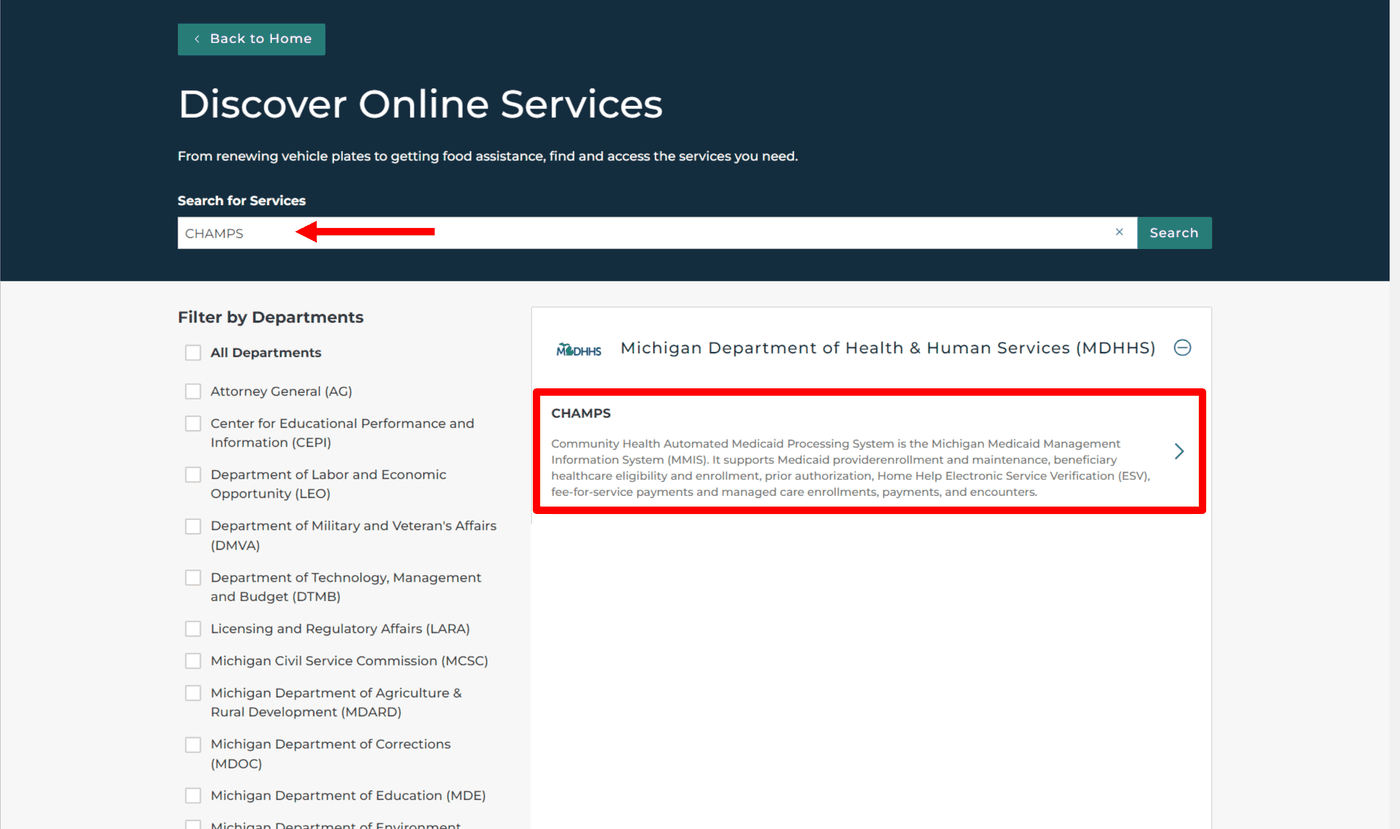
Screenshot source: MiLogin for Business Instructions (2026), PDF/slide page 16.
MiLogin signs you in; CHAMPS needs a domain and profile
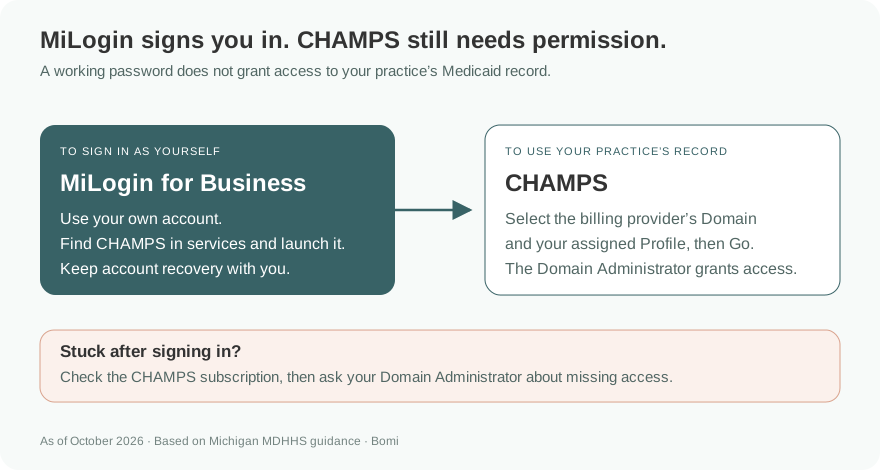
A successful MiLogin sign-in does not establish your provider permissions. CHAMPS asks you to select the billing NPI’s Domain and your assigned Profile, then Go. For an existing provider, a Domain Administrator grants user access and profiles; available profiles depend on the enrolled specialty.
MDHHS: CHAMPS domain and profile selection
MDHHS: provider user permissions
Add your biller with their own MiLogin user ID
The biller first creates their own MiLogin account. In CHAMPS, the practice’s Domain Administrator selects the billing NPI and Domain Administrator profile, then opens Admin → User List → Add. Enter the biller’s own MiLogin User ID, select the profiles needed for their work, move them to Selected Profiles and choose OK. Keep password, recovery and any MFA with the biller; never give them the practice representative’s credentials.
MDHHS: add a user and assign profiles
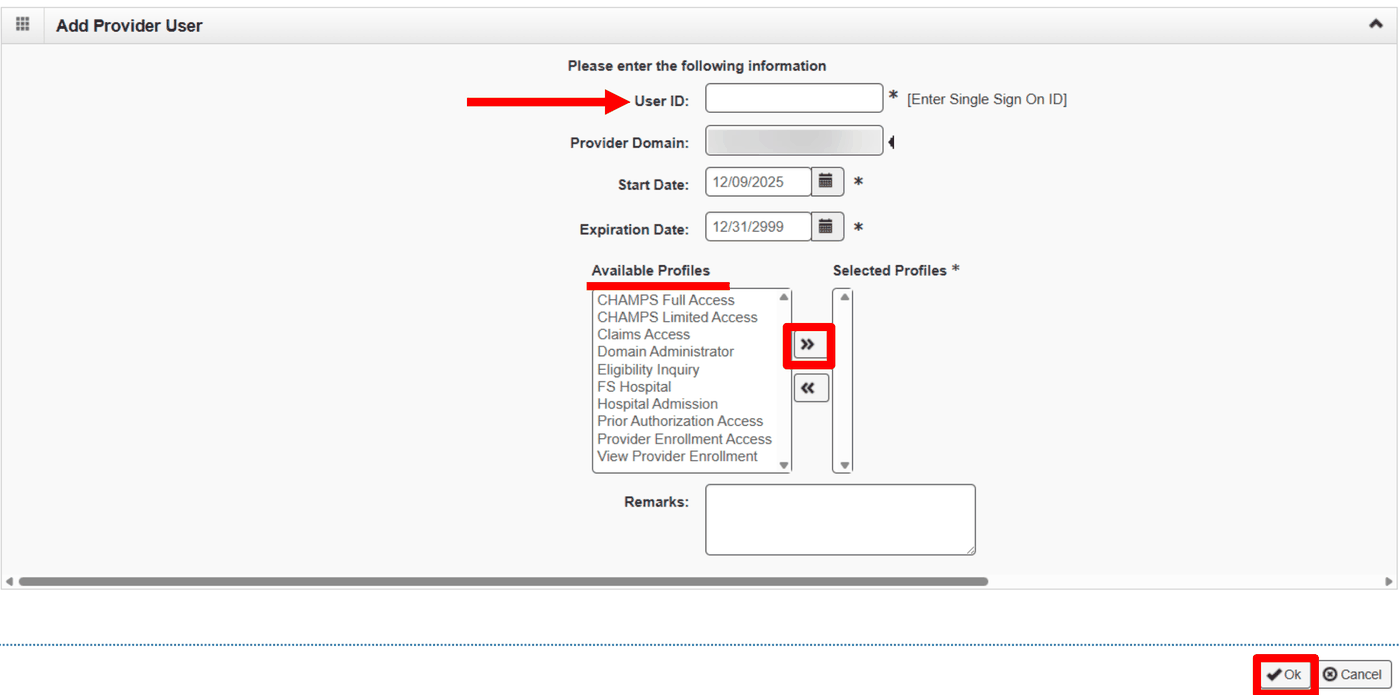
Screenshot source: CHAMPS Domain Administrator Functions (2025), PDF/slide page 9.
CHAMPS login errors, password recovery and lockouts
Use Lookup your user ID or Forgot your password on MiLogin for Business. The current state guide says a temporary lock clears after 30 minutes; use Contact Us to seek help sooner. For a disabled account without a reactivation prompt, use Contact Us. MDHHS lists DTMB’s Client Service Center at 800-968-2644 for MiLogin technical assistance.
MDHHS: MiLogin technical assistance
If MiLogin works but CHAMPS, a provider domain or a profile is missing, follow the subscription instructions and ask your Domain Administrator to check user access. If the administrator has left, the state’s Domain Administrator guide identifies MDHHS-5405 and DCH-1401 and directs requests to MDHHS-DomainRequests@michigan.gov.
MDHHS: Domain Administrator replacement and access updates
Go to My Inbox and Archived Documents
MDHHS identifies My Inbox as the CHAMPS location for Archived Documents, including paper remittance advices. The payment document is an RA: a remittance advice explaining the processing of claims and related payment information. Start here when looking for the state’s paper payment report.
MDHHS: CHAMPS My Inbox functions
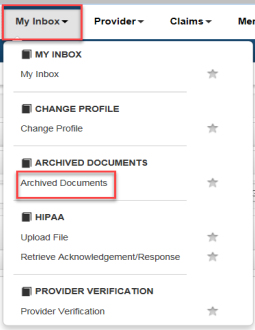
Screenshot source: Retrieving Medicaid Remittance Advice (February 13, 2018), PDF/slide page 1.
Select the Medicaid Payments Paper RA document
The state’s retrieval guide directs users to Archived Documents, select Document Type “Medicaid Payments Paper RA,” then Go. Open the blue Paper RA hyperlink for the paid date you need. The RA opens in a new window. If nothing opens, our suggested first check is whether your browser blocked that window.
MDHHS: Retrieving Medicaid Remittance Advice

Screenshot source: Retrieving Medicaid Remittance Advice (February 13, 2018), PDF/slide page 2.
Match the remittance to the payment reference
The guide’s RA example identifies an RA number and date, claim totals, and warrant/EFT number and date. It also shows claim-level detail. Our recommended reconciliation record pairs the relevant RA reference with the actual bank transaction, then separates paid, denied, and adjusted items for follow-up.
MDHHS: Retrieving Medicaid Remittance Advice
Use the 835 setup for electronic remittances
For automated ERA delivery, MDHHS provides 835 companion guides and instructions to change the receiver through a CHAMPS provider modification. Opening a paper RA is a different task from configuring that receiver. Ask your billing team which format its posting workflow uses before requesting a change.
MDHHS: HIPAA companion guides and 835 receiver updates
Separate biller access from billing-agent authorization
The state has distinct instructions for associating an enrolled billing agent and authorizing 835 access. Our recommendation is to document portal user permissions, billing-agent association, and the intended ERA recipient separately. Check the applicable instructions before changing any of them.
MDHHS: Billing agent association and 835 authorization
Check which payer issued the payment
MDHHS maintains a separate Medicaid health-plan directory, and plans publish their own billing resources. Our recommended first question for a missing payment is which payer processed the claim. Use that payer’s remittance instructions instead of assuming every Michigan Medicaid payment appears in the state’s paper RA archive.
MDHHS: Medicaid health plans and service-area resources
Related Michigan Medicaid guides
Frequently Asked Questions
Where are payment RAs in CHAMPS?
Open My Inbox → Archived Documents, choose Medicaid Payments Paper RA, then Go and open the paid-date link.
Is a paper RA the same as an 835 receiver setup?
No. Use MDHHS’s separate 835 receiver and billing-agent instructions for electronic remittance delivery.
Should I search the state archive for every health-plan payment?
First identify the payer that processed the claim and follow its remittance instructions.
Want Bomi to handle insurance billing?
Bomi helps therapy practices with benefit checks, claims, denials, balances, CAQH, attestations, and revenue management.
Book a call
About Bomi
Founded by George Ruan, Dax Earl, and Andrey Goder, Bomi helps independent therapists and group practices with insurance billing, credentialing, and payer follow-up. Bomi grew out of Dax’s experience helping his mother with her therapy practice, with a clear purpose: reduce the administrative burden of insurance while keeping practice owners in control.
Meet our founders