
MPRIME Login: Maryland Access Guidance and Legacy ePREP
By Dax Earl • October 9, 2026
For MPRIME provider login guidance, open the official Maryland Medicaid MPRIME page. As of October 9, 2026, MDH has not published a direct provider login link; access guidance is through its MPRIME page and Resource and Training Center.
Sections
- Direct links: MPRIME guidance, legacy ePREP and help
- TL;DR: use your own login, and give your biller their own
- Who needs their own MPRIME login
- MPRIME vs ePREP: which account do you need?
- Before you create access
- Account setup steps
- Add your biller/delegate
- A working login does not replace EVS or Carelon access
- Login errors & lockouts
- Frequently Asked Questions
Direct links: MPRIME guidance, legacy ePREP and help
Transition help: mdh.mprimegolive@maryland.gov. Official contact guidance
TL;DR: use your own login, and give your biller their own
Use your own account and keep credentials private. Your biller should have their own login, but MDH’s reviewed public resources do not yet name the MPRIME delegate role or approval steps. EVS eligibility and Carelon transactions use separate access routes. Official access guidance.
Who needs their own MPRIME login
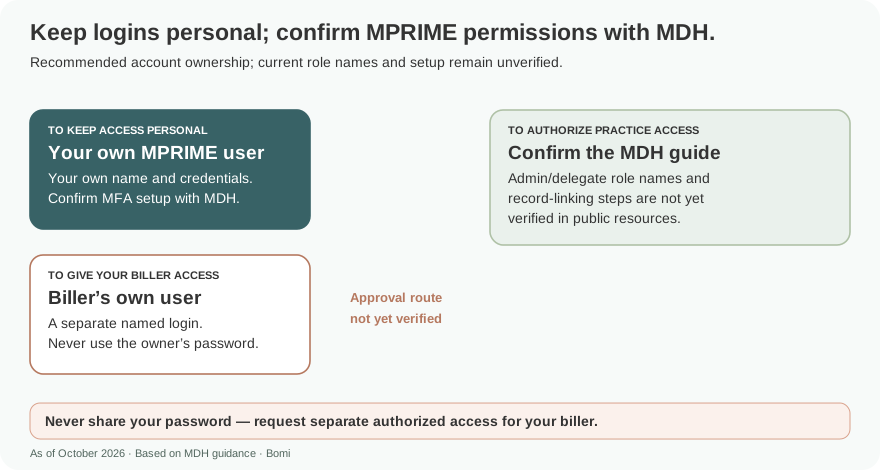
Recommended access practice: owners and billers should use their own authorized accounts and keep credentials private. MDH’s public MPRIME pages do not yet establish delegate roles or permission transfer, so confirm the current instructions before assigning access. Official MPRIME resources.
Recommended access practice: use your own name and keep your login and MFA with you. Have the biller use a separate named account; never share your password. MDH’s reviewed public pages do not establish the current MFA setup, administrator/delegate role names or provider-record linking, so confirm those instructions before granting access. Official access guidance.
MPRIME vs ePREP: which account do you need?
ePREP is the Electronic Provider Revalidation and Enrollment Portal. MPRIME takes over enrollment functions, including new applications, updates and changes of ownership. A saved ePREP login is therefore not evidence that an enrollment update can still be submitted there. Read PT 94-26.
For an existing ePREP profile, the official legacy sign-in address is below. This is an ePREP destination, not a verified MPRIME login. Check MDH’s current transition guidance before using it for an enrollment task. Open the official ePREP login.
MDH has announced a transition from ePREP to MPRIME. If you are new to Maryland Medicaid, confirm the current account and enrollment instructions on MDH’s official transition page before following an older ePREP signup tutorial. Check MDH’s MPRIME transition guidance.
Before you create access
Recommended preparation: make a short access inventory before attempting the new account setup. The goal is to know which person needs access to which enrollment record, so a successful login does not get mistaken for completed provider enrollment.
Name the practice owner responsible for enrollment and a backup contact who can follow up on access problems.
Collect the existing Medicaid provider numbers, NPIs and legal business names in your secure practice records. Do not send credentials or patient information in an ordinary support email.
List each individual and group enrollment record that the owner and biller need to manage.
Use the state’s current account guide when available. Verify access to each intended record before submitting an application or changing enrollment information.
Account setup steps
Use the Getting Started resources on MDH’s Resource and Training Center. The live public page reviewed for this guide does not expose a direct login, account buttons or complete setup sequence. Confirm the official guide when available; this article cannot safely supply speculative clicks. MDH account setup resources.
Add your biller/delegate
The biller should use their own login. Ask MDH for the current practice-administrator approval route and exact biller/delegate role name before assigning access; those details are not yet verified in the published resources reviewed here. Never share the owner’s password or MFA codes. Official user guidance.
Ask the current MPRIME guide how an authorized biller obtains their own access and how the owner approves it. The public material reviewed here does not establish delegate role names, account-association screens or automatic transfer of ePREP user permissions. Avoid using an old ePREP role name as a MPRIME instruction.
Recommended handoff: have the owner and biller confirm the provider records needed, the actions the biller should perform, and who retains approval responsibility. Record the access result and any support ticket. Keep the account setup task open until the intended records are accessible.
A working login does not replace EVS or Carelon access
For eligibility, Maryland directs providers to its separate Eligibility Verification System (EVS). See Maryland’s EVS page.
For Public Behavioral Health System work, Carelon’s Digital Front Door uses Availity Essentials and ProviderConnect for service transactions. Do not treat MPRIME as the portal for every billing task. See the Carelon Digital Front Door.
Login errors & lockouts
Use mdh.mprimegolive@maryland.gov for MPRIME transition questions. Include a concise description of the blocked task and consult the published resources before emailing. Read Maryland’s transition contact instructions.
No MPRIME password-reset or lockout sequence is verified in the reviewed public resources. Use the published transition contact for a blocked access task, and do not assume ePREP recovery repairs MPRIME access. MDH MPRIME access guidance.
Find MPRIME training sessions and account setup resources
Check the therapist enrollment workflow before applying
Frequently Asked Questions
What is the MPRIME provider login?
As of October 9, 2026, MDH has not published a direct provider login link on its reviewed public MPRIME pages. Start with MDH’s official MPRIME page and Resource and Training Center for current access guidance.
How do I reset my MPRIME password?
The reviewed public MDH material does not establish a reset sequence. Use the current official MPRIME guidance and transition contact rather than assuming legacy ePREP recovery applies.
Is MPRIME replacing ePREP?
Yes. Maryland’s official transition guidance schedules the replacement for October 2026. Check the state’s MPRIME page for current access instructions.
Can I create a new ePREP account?
MDH has announced a transition from ePREP to MPRIME. This guide has not confirmed current ePREP signup availability from a live official page. Confirm the current account route on MDH’s MPRIME transition page linked above.
Will my ePREP password work in MPRIME?
This guide has not verified credential transfer. Use Maryland’s current MPRIME account instructions rather than assuming an ePREP password or permissions will carry over.
Want Bomi to handle insurance billing?
Bomi helps therapy practices with benefit checks, claims, denials, balances, CAQH, attestations, and revenue management.
Book a call
About Bomi
Founded by George Ruan, Dax Earl, and Andrey Goder, Bomi helps independent therapists and group practices with insurance billing, credentialing, and payer follow-up. Bomi grew out of Dax’s experience helping his mother with her therapy practice, with a clear purpose: reduce the administrative burden of insurance while keeping practice owners in control.
Meet our founders