
EVS Login: Maryland eMedicaid Provider and Biller Access
By Dax Earl • October 9, 2026
For EVS provider login, open the official Maryland eMedicaid portal and sign in with your own eMedicaid User ID and password, following its published MFA instructions. Last updated: October 9, 2026.
Sections
- Direct links: EVS login, eMedicaid registration and help
- TL;DR: use your own login, and give your biller their own
- Who needs their own eMedicaid login
- Before you create access
- Account setup steps
- Add your biller/delegate
- Login errors & lockouts
- How to verify Maryland Medicaid eligibility in EVS
- Use the service date, not a future appointment date
- What to check after eligibility
- Frequently Asked Questions
Direct links: EVS login, eMedicaid registration and help
Phone EVS eligibility inquiries: 1-866-710-1447. Official EVS phone guidance
The eMedicaid sign-in box asks for your User ID and password; it also has Forgot Your Password. First-time registration is a separate option on the portal home page.
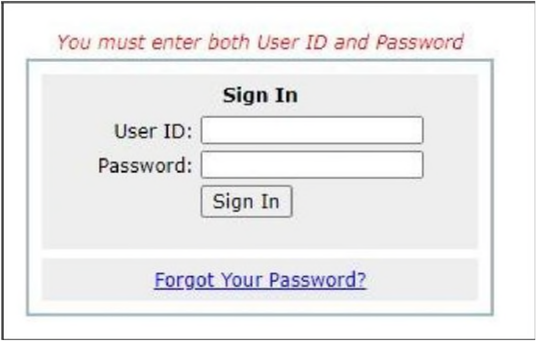
Screenshot source: eMedicaid MFA Guide (February 2024 rollout), PDF page 1.
TL;DR: use your own login, and give your biller their own
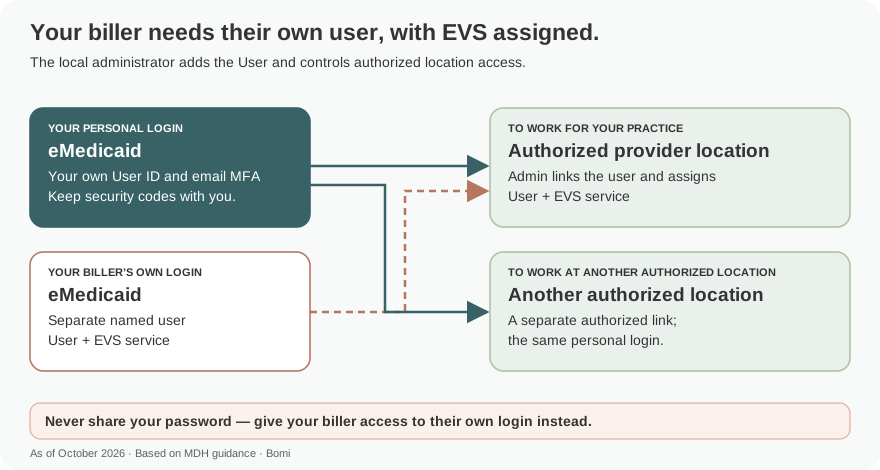
Use your own eMedicaid User ID and email MFA. Your biller gets their own User account; the local administrator adds it and assigns the EVS service for the locations they may use. Enrollment through MPRIME and Carelon transactions use separate access routes. Official access guidance.
Who needs their own eMedicaid login
The administrator creates or authorizes user access; an administrator who needs to perform EVS transactions also needs a user account. Recommended handoff: give the biller their own authorized user and keep passwords private. EVS user requirements.
Use your own named User ID, password and email MFA; your biller needs a separate User account. EVS Help explicitly supports multiple authorized locations, with the user selecting the intended location. Never share your password — give your biller access to their own login instead. Official access guidance.
Before you create access
Confirm that the provider is enrolled and has a Medicaid provider number, then identify the local administrator. Keep the user’s email current for recovery and the published email-MFA process. eMedicaid registration instructions; MFA help.
Account setup steps
The public portal directs providers who already have a Medicaid provider number to register under Step 2. Its current links include Creating and Managing eMedicaid Accounts and EVS Help. Follow those instructions for transaction access rather than assuming an enrollment-portal account also opens EVS. Open the eMedicaid registration and help links.
The account guide says the provider must be enrolled to create a login. Its enrollment references still say ePREP, so use Maryland’s current transition instructions for the enrollment step. Read Creating and Managing eMedicaid Accounts.
Find MPRIME and ePREP enrollment access
After entering your own credentials, use the one-time passcode emailed to you, then select Verify OTP. Use Resend OTP if needed, and keep the code private. Official email MFA steps.
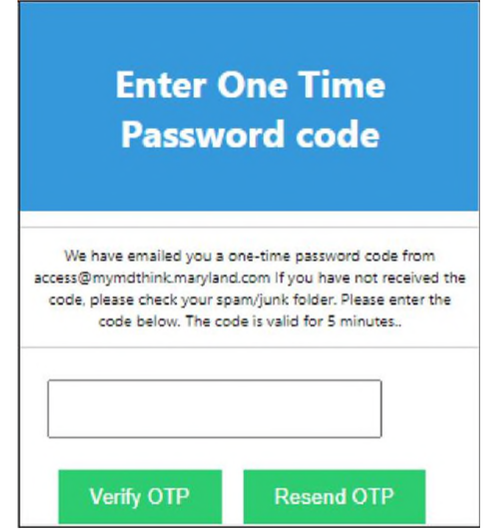
Screenshot source: eMedicaid MFA Guide (February 2024 rollout), PDF page 2.
Add your biller/delegate
The practice’s local eMedicaid administrator adds the biller as a User and assigns the EVS service for the authorized locations. The biller signs in with their own User ID and email MFA. Use the User account and EVS service assignment for the biller’s eligibility work. Official user guidance.
Sign in as the local administrator and select Administrator Services at the bottom of the portal. Creating and Managing eMedicaid Accounts, Diagram C.

Screenshot source: Creating and Managing eMedicaid Accounts (current portal-linked version), Diagram C, PDF page 3.
The linked account guide tells the administrator to use Administrator Services, then Add a New User. EVS Help adds a separate requirement: the local administrator must assign the EVS service to the authorized user. Creating the user alone is not the complete eligibility-access setup. See the administrator account instructions and EVS service-assignment instructions.
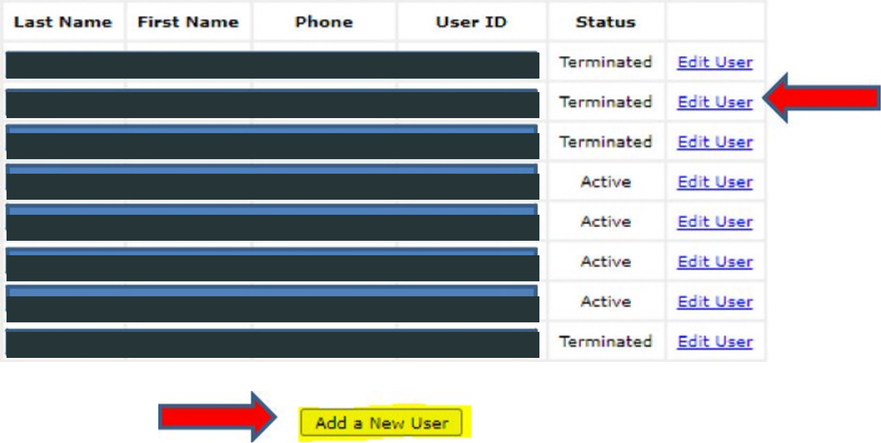
Screenshot source: Creating and Managing eMedicaid Accounts (current portal-linked version), Diagram D, PDF page 3.
If Recipient Eligibility Verification is missing, contact the local eMedicaid administrator. The EVS help page also says an administrator who needs to use EVS must register themselves as a user. Read the EVS access requirements.
Recommended handoff: have the biller sign in with their authorized account and confirm that the intended location and Recipient Eligibility Verification link are available. Keep account creation and EVS assignment as separate checklist items until both work.
Login errors & lockouts
Use Forgot Your Password on the official portal. Recovery requires the User ID, name and email to match the account record. If the profile has no email, the reset page directs you to the local administrator. Official password reset.
For a locked user account, ask the administrator; for an administrator lockout, follow the official help page’s contact instructions. The password-rule notice also describes temporary failed-login locks and reset-based unlocking. Administrator and user help; Published password/lockout notice.
How to verify Maryland Medicaid eligibility in EVS
The official EVS help page gives this inquiry sequence. Complete it only in the authorized portal and keep patient information in your approved practice systems. See the official inquiry instructions.
Select Recipient Eligibility Verification.
Choose a location if you are authorized at multiple locations; a single authorized location is preselected.
Enter the recipient’s last name as shown on the Medical Assistance card.
Enter the Maryland Medical Assistance number OR Social Security number, not both.
For a past service, enter the historical date. If left blank, EVS uses the current date.
Use the service date, not a future appointment date
Maryland directs authorized providers to verify eligibility before rendering a service. EVS cannot check future eligibility and can check past services up to one year ago. MDH EVS guidance.
Recommended workflow: an advance scheduling check and a service-date check answer different questions. If a future appointment is outside EVS’s supported date range, leave a task to check at the appropriate time. For an older claim, use the actual service date so today’s status does not get substituted for the historical inquiry.
Maryland also provides phone EVS at 1-866-710-1447. You need an NPI or provider number to access it. Use that official route when appropriate rather than guessing at eligibility from a card alone. See phone EVS instructions.
What to check after eligibility
Recommended next step: document the inquiry date, service date and result in your approved workflow. Then check the applicable service, enrollment and authorization requirements. An eligibility response should not be treated as evidence that every other claim condition is satisfied.
Determine whether the service belongs to Carelon PBHS or HealthChoice
Review claims and telehealth requirements
Frequently Asked Questions
How do I reset my Maryland EVS password?
Use Forgot Your Password on the Maryland eMedicaid login page. Enter the matching account identity and email. If no email is on file, contact the local administrator.
Where is the Maryland Medicaid EVS login?
EVS is accessed through the Maryland eMedicaid portal by authorized users. Use the official login and the Recipient Eligibility Verification service.
Why is the EVS link missing for my biller?
Official EVS Help says the local administrator must assign the EVS service to an authorized user. Contact the administrator if Recipient Eligibility Verification is missing.
Can Maryland EVS verify next month’s eligibility?
No. Maryland says EVS does not check future dates. It can check past eligibility for services up to one year ago.
Can an eMedicaid administrator use EVS automatically?
The official EVS help page says an administrator must also register as a user to access EVS.
Want Bomi to handle insurance billing?
Bomi helps therapy practices with benefit checks, claims, denials, balances, CAQH, attestations, and revenue management.
Book a call
About Bomi
Founded by George Ruan, Dax Earl, and Andrey Goder, Bomi helps independent therapists and group practices with insurance billing, credentialing, and payer follow-up. Bomi grew out of Dax’s experience helping his mother with her therapy practice, with a clear purpose: reduce the administrative burden of insurance while keeping practice owners in control.
Meet our founders