
KMAP Login: Provider Portal and Delegate Access
By George Ruan • October 9, 2026
For KMAP provider login, open KMAP provider login and sign in with your provider administrator or authorized Provider Delegate account.
Last checked: October 9, 2026.
Sections
- Direct links: KMAP login, registration and enrollment
- TL;DR: use your own login, and give your biller their own
- Who needs their own KMAP login
- Before you create access
- Account setup steps
- Add your biller as a Provider Delegate
- KMAP login errors and lockouts
- Keep enrollment-resume credentials separate
- KanCare plan participation is separate
- Related provider guides
- Frequently Asked Questions
Direct links: KMAP login, registration and enrollment
Provider login / new Provider or Delegate registration — use the provider route.
Forgot username or password: start at the official login — use the recovery options shown for your account.
KMAP provider help — provider customer service: 800-933-6593.
The KMAP Login/Register page looks like this. Existing users choose Login; first-time providers and delegates register under Provider/Drug Labeler.
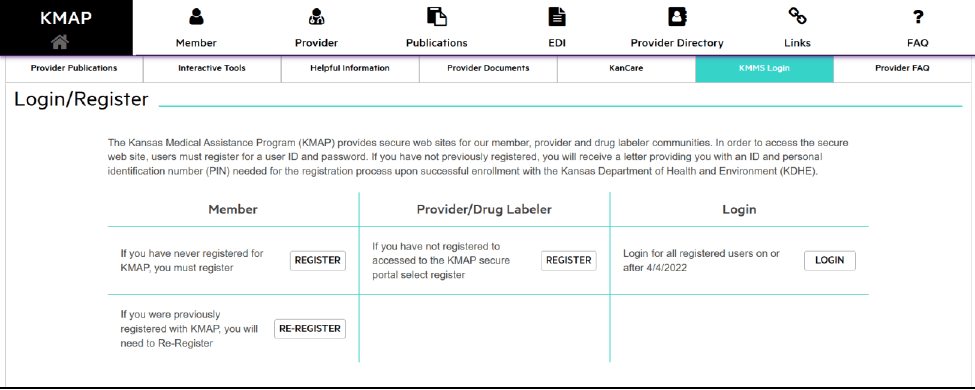
Screenshot source: KMAP Provider Portal Reference Guide v6.1 (June 4, 2026), PDF page 22 (printed page 15).
TL;DR: use your own login, and give your biller their own
Sign in with your own KMAP account: the provider administrator, or an authorized Provider Delegate. Your biller registers their own Provider Delegate login, and your administrator chooses which service locations and functions they can use. Enrollment and KanCare plan participation are separate; resuming an enrollment application uses its tracking number and password. KMAP Provider Enrollment Wizard
Who needs their own KMAP login
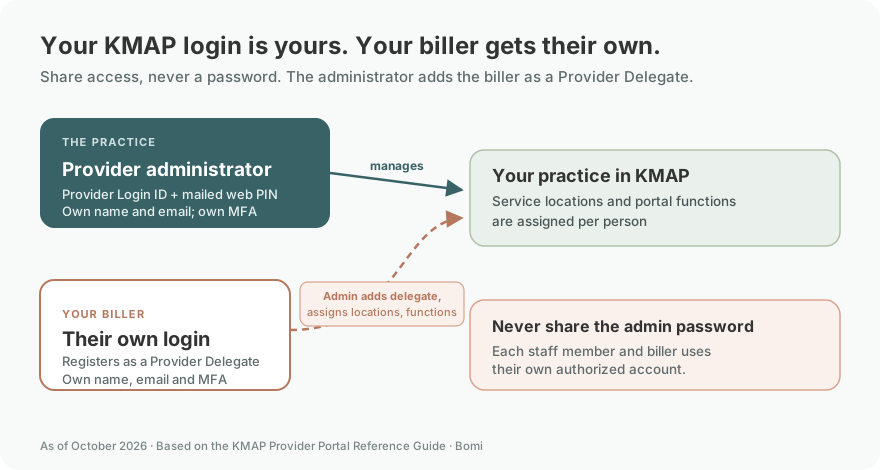
The portal guide distinguishes Provider (Administrator) from Provider Delegate. Each person registers with their own name and email and completes their own security profile for password recovery and multi-factor authentication (MFA). Administrators assign delegate functions and locations. Never share your password: each staff member and biller uses their own authorized account. KMAP Provider Portal Reference Guide
Before you create access
Locate the provider welcome letter and separate web PIN letter. The guide uses the first 10 digits of the 14-digit KMAP Provider ID as Provider Login ID, with the web PIN. This is different from an application’s enrollment tracking number. KMAP Provider Portal Reference Guide
Account setup steps
Open Login/Register and Register under Provider/Drug Labeler. Choose Provider for the organization administrator or the appropriate delegate role for a biller, then complete the registration and security prompts. Our recommendation is to keep recovery contact information current and under the account owner’s control. KMAP provider login
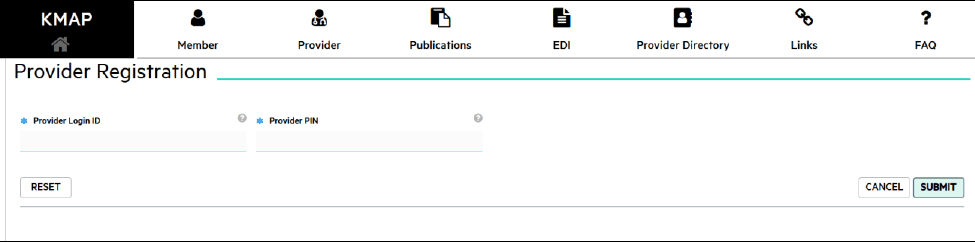
Screenshot source: KMAP Provider Portal Reference Guide v6.1 (June 4, 2026), PDF page 23 (printed page 16).
Add your biller as a Provider Delegate
The biller registers their own Provider Delegate account, using their own name, email and MFA security profile. They give the administrator their relationship code, username and email. The administrator opens Maintenance, then Manage My Delegates, selects Add Registered Delegate, and uses the delegate’s last name and relationship code to link their account. The administrator assigns access for the intended service locations and functions. Never share the administrator password. Use the detailed biller-access guide below for the existing-delegate workflow. A working login alone does not establish access to every practice record. KMAP Provider Portal Reference Guide
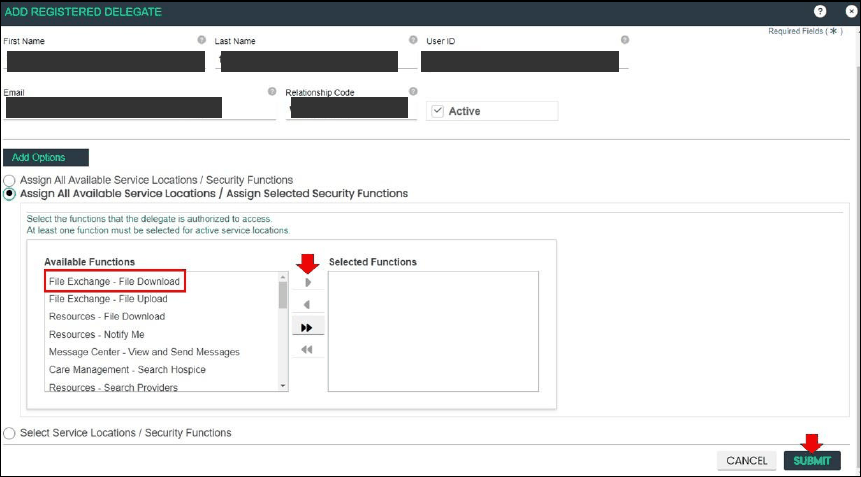
Screenshot source: KMAP Provider Portal Reference Guide v6.1 (June 4, 2026), PDF page 137 (printed page 130).
KMAP login errors and lockouts
Use the recovery options on the official login page for a username or password problem. If a PIN is missing, contact KMAP provider assistance rather than guessing or submitting a duplicate enrollment. If login succeeds but a task or location is missing, ask the administrator to review assigned access. KMAP provider assistance
Keep enrollment-resume credentials separate
Resume Enrollment is for an application already started in the wizard. Keep its tracking number and password with that application. Creating a secure portal user does not complete an unfinished enrollment or establish plan network participation. Resume KMAP enrollment
KanCare plan participation is separate
Administrator/delegate portal access does not establish KanCare plan participation. KDHE maintains the current KanCare overview; use the relevant plan’s own participation and billing instructions for its workflow. KDHE KanCare overview
Related provider guides
Frequently Asked Questions
What is the KMAP provider login?
Use the official KMAP Login/Register page linked in sentence one and the provider account route.
Is “kmaps login” the KMAP provider portal?
For Kansas Medicaid provider access, the system is KMAP. Use the official provider login rather than an enrollment-resume screen.
What is the KMAP provider portal login for a biller?
A biller uses their own Provider Delegate account and the locations/functions assigned by the provider administrator.
How do I reset my KMAP password?
Start with the recovery options on the official login page; use the cited provider-assistance channel if you cannot complete recovery.
Want Bomi to handle insurance billing?
Bomi helps therapy practices with benefit checks, claims, denials, balances, CAQH, attestations, and revenue management.
Book a call
About Bomi
Founded by George Ruan, Dax Earl, and Andrey Goder, Bomi helps independent therapists and group practices with insurance billing, credentialing, and payer follow-up. Bomi grew out of Dax’s experience helping his mother with her therapy practice, with a clear purpose: reduce the administrative burden of insurance while keeping practice owners in control.
Meet our founders