
How to Enroll in KanCare as a Therapist Through KMAP
By George Ruan • October 9, 2026
Last updated: October 9, 2026.
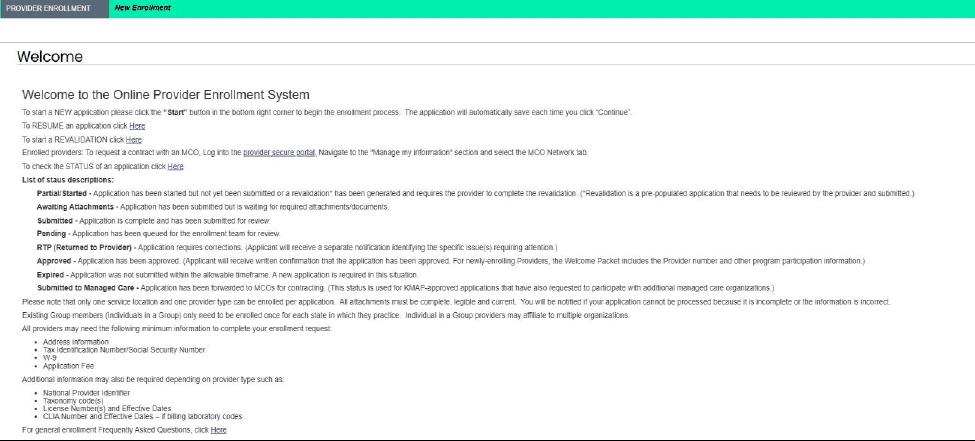
To enroll in KanCare as a therapist, start with the KMAP Provider Enrollment Wizard. Its pre-checklist uses enrollment type, provider type, specialty, tax ID type, and program selections to identify the documents for your application. Choose the category that actually matches your license and services. KMAP Provider Enrollment Wizard
Sections
- Prepare the right KMAP enrollment checklist
- Complete and save the application
- Read KMAP enrollment statuses correctly
- Choose KanCare MCO participation deliberately
- Check individual, group, and location details
- After approval: portal access and billing readiness
- Related Kansas Medicaid guides
- Need help with KanCare billing or enrollment?
- Frequently Asked Questions
Prepare the right KMAP enrollment checklist
The wizard asks for address and tax identification information, with additional items such as NPI, taxonomy, and license details depending on provider type. Use its generated checklist rather than a universal therapist document list. The public instructions limit each application to one service location and one provider type. KMAP Provider Enrollment Wizard

Screenshot source: KMAP Provider Portal Reference Guide v6.1 (June 4, 2026), PDF page 12 (printed page 5).
Screenshot source: KMAP Provider Portal Reference Guide v6.1 (June 4, 2026), PDF page 12 (printed page 5).
Complete and save the application
The wizard assigns a tracking number and lets an applicant resume with that number and a password. We recommend assigning one person to monitor the application email and keeping a private record of submissions and correction requests. Resume KMAP enrollment
Generate the pre-checklist for the intended provider type and specialty.
Gather current, legible documents and match the legal name and tax information to the relevant tax records.
Register the application and save the tracking number securely.
Complete the sections and requested attachments, then submit and monitor the application status.
Read KMAP enrollment statuses correctly
The wizard distinguishes a started application, missing attachments, a submitted or pending application, and Returned to Provider (RTP). RTP means corrections are required; read the separate notice and address its specific request. Approved means state approval, while Submitted to Managed Care means a KMAP-approved application was forwarded for MCO contracting. KMAP Provider Enrollment Wizard
Choose KanCare MCO participation deliberately
Healthy Blue’s enrollment instructions say selecting an MCO in the wizard initiates a contracting and credentialing request. Keep that follow-up separate from state approval. If you already have enrollment, the wizard directs additional MCO requests through the secure portal’s MCO Network tab. Healthy Blue: join our network
Check individual, group, and location details
For a group practice, make a worksheet of the clinicians, billing entity, and service locations you intend to use. Ask KMAP and the selected plan which enrollment records and relationships your arrangement requires. A login for one record should not be treated as proof that another clinician or location is enrolled. KMAP Provider Portal Reference Guide
After approval: portal access and billing readiness
Use the provider welcome information to arrange secure portal access. Then confirm plan participation and the member’s assigned payer before billing. Our recommendation is to hand off a documented record of state approval, plan follow-up, portal responsibility, and unresolved items to the biller. Healthy Blue Kansas provider manual, June 2026
Related Kansas Medicaid guides
Need help with KanCare billing or enrollment?
Bomi helps therapy practices with credentialing and billing. Bring your state enrollment status, plan correspondence, and unresolved questions so the next steps can be assigned clearly.
Frequently Asked Questions
Can I resume a KMAP provider enrollment application?
Yes. The official Resume Enrollment page asks for the assigned tracking number and password. Keep those separate from secure portal credentials.
What does Submitted to Managed Care mean?
KMAP defines it as a state-approved application forwarded to MCOs for contracting. It is not itself confirmation of an effective plan contract.
Planning a private practice?
Use Bomi's free Build resources to plan the business, provider identity, payer setup, and billing workflow before you see clients.
Use Build resources
About Bomi
Founded by George Ruan, Dax Earl, and Andrey Goder, Bomi helps independent therapists and group practices with insurance billing, credentialing, and payer follow-up. Bomi grew out of Dax’s experience helping his mother with her therapy practice, with a clear purpose: reduce the administrative burden of insurance while keeping practice owners in control.
Meet our founders