
IMPACT Login: ILogin, Provider Enrollment and Biller Access
By George Ruan • October 9, 2026
For IMPACT provider login, open the official Illinois IMPACT entry and sign in with your ILogin account after registration or legacy-account conversion. As of October 9, 2026, this is the state’s published entry for provider enrollment access.
Sections
- Direct links: IMPACT login, account setup and help
- TL;DR: use your own login, and give your biller their own
- Who needs their own IMPACT login
- Before you create access
- Create or convert the IMPACT account
- Add your biller: Domain Administrator permissions
- Billing Agent is a separate association
- Login errors: missing enrollment or account trouble
- Does IMPACT access include MEDI eligibility?
- Frequently Asked Questions
Direct links: IMPACT login, account setup and help
Password recovery and account activation help — (877) 782-5565; IMPACT.Help@illinois.gov.
The ILogin sign-in screen shown in the Illinois guide asks existing users for their own email or username; new users choose Sign up.
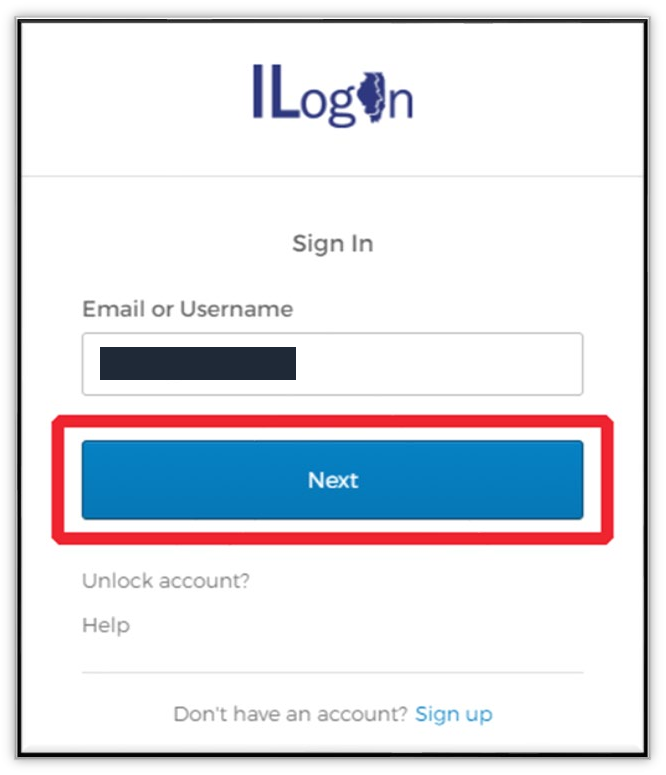
Screenshot source: Illinois DoIT Create a New ILogin Account, PDF page 5 (printed page 2).
TL;DR: use your own login, and give your biller their own
Use your own ILogin account to sign into IMPACT. Your biller uses their own account; the Domain Administrator grants Provider Enrollment Access or View Provider Enrollment for your enrollment. MEDI eligibility and managed care plan billing are separate. HFS access guidance
Who needs their own IMPACT login
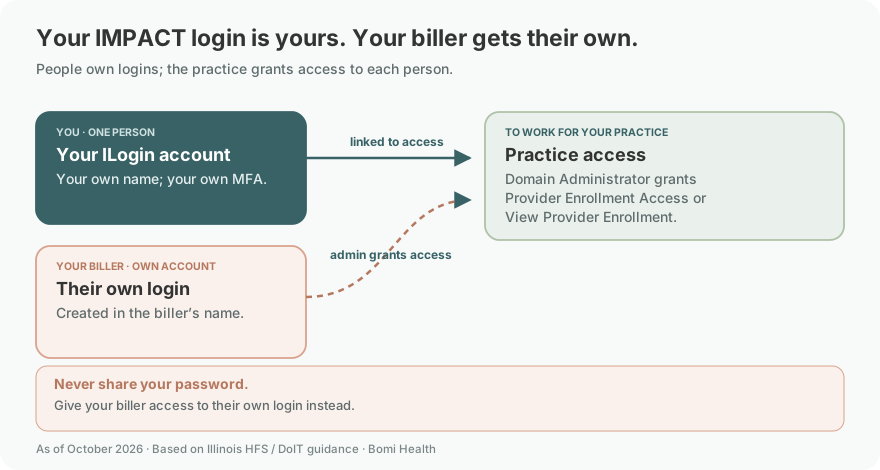
Your IMPACT account belongs to you as a person, not to the practice. Use your own name and keep your own MFA under your control. HFS account ownership rules and ILogin MFA guidance explain the identity and sign-in requirements. Never share your password; your biller needs their own login.
The administrator adds the biller’s own sign-on identifier under the HFS access-rights instructions. Each person should use their own account; do not hand over a clinician’s password to provide enrollment access.
Before you create access
Before creating another account, check whether you are a new or legacy IMPACT user and which existing enrollment needs access. Confirm who administers that enrollment and ask for the rights needed for the work. A new account does not repair a missing grant on an existing record.
Create or convert the IMPACT account
New user: use the registration option and complete the ILogin email activation.
Return through the application tile and complete the required identity proofing.
Legacy user: use the conversion option with the existing credentials. After registration or conversion, use the login option.
Those are the routes on the public IMPACT entry page, not instructions to create a second account every time access fails. Public IMPACT account options
Add your biller: Domain Administrator permissions
The biller creates their own ILogin account. The practice’s Domain Administrator grants Provider Enrollment Access or View Provider Enrollment to that person for the relevant enrollment; Domain Administrator itself is a broader profile. Keep MFA with the person who owns the login. HFS user-access profiles
HFS distinguishes administration of enrollment access from permission to edit the enrollment and permission to view it. The account that submits an approved application becomes its domain administrator. HFS administrator guide
The examples below come from HFS’s still-published administrator guide, whose sample screens show older dates. Use the current IMPACT login above; these images illustrate enrollment access, not ILogin registration.
Select the relevant enrollment and administrator profile, open Manage Users and choose Add.
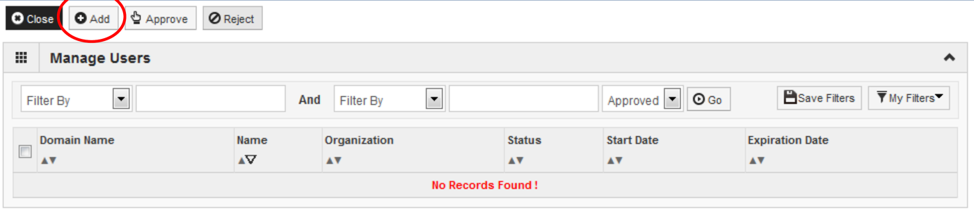
Screenshot source: HFS Provider Domain Administrator: Granting/Changing/Removing Access Rights, page 7.
Enter the biller’s own sign-on identifier, choose the appropriate access profile and enter its dates.
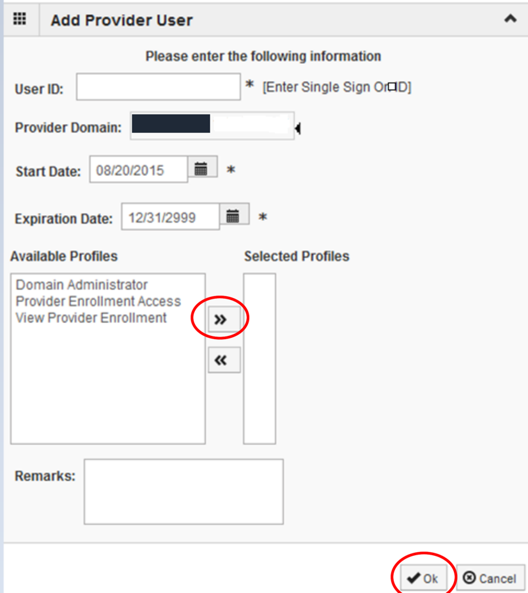
Screenshot source: HFS Provider Domain Administrator: Granting/Changing/Removing Access Rights, page 8.
Save the grant and have the biller check access from their own account.
The HFS guide names Domain Administrator, Provider Enrollment Access and View Provider Enrollment. Choose the narrowest profile that supports the work; do not grant user administration merely for a read-only review. Access profiles and assignment instructions
Billing Agent is a separate association
HFS also publishes a Billing Agent enrollment guide. This is a different concept from assigning a person an enrollment-access profile. Billing Agent enrollment guide
The group enrollment guide includes claims-submission mode and an agent association. When the billing-agent mode is selected, the corresponding association becomes required. Search for the intended agent and verify the returned name. Group claims-mode and agent-association instructions
Ask your billing partner which task is needed: maintaining enrollment, receiving a billing-agent association, or getting eligibility access. Put that request in writing so you can confirm the right setup was completed.
Login errors: missing enrollment or account trouble
Check the enrollment selected and the access assigned to that user. HFS’s administrator guide also explains changing and removing rights. Review access when a billing relationship ends. Change or remove enrollment access
For account activation and enrollment questions, use the current HFS training and help page rather than guessing a new role or sending your password to a biller. Official IMPACT help and training
Does IMPACT access include MEDI eligibility?
MEDI has its own registration and authorization requirements for Internet Electronic Claims access. Include that as a separate setup task if your biller needs eligibility transactions. MEDI application access requirements
Individual and group enrollment · MEDI login and eligibility · MCO participation
For account activation or sign-in help, HFS’s training page lists (877) 782-5565 and IMPACT.Help@illinois.gov. Use that official support route if you cannot recover access from the sign-in flow.
Frequently Asked Questions
What is the IMPACT provider login?
Use impact.illinois.gov and choose Login after registering or converting your legacy account. The current sign-in uses ILogin.
Is ILogin the same as IMPACT?
ILogin provides the personal sign-in. IMPACT is the provider enrollment system, with separate enrollment-specific access profiles.
How do I reset my IMPACT login or get account help?
Start at the official IMPACT login entry. For account activation or sign-in assistance, use HFS’s current help and training page or contact (877) 782-5565 / IMPACT.Help@illinois.gov. Do not create a duplicate account to fix an enrollment permission.
How do I give my biller IMPACT access?
Have the biller use their own sign-on identifier and grant the appropriate enrollment access through the Domain Administrator workflow. A Billing Agent association is a separate task.
Need help getting payer-ready?
For practices enrolled in Bomi Billing, our team handles CAQH, payer applications, attestations, roster updates, and ongoing credentialing. Credentialing requires Bomi Billing.
Credentialing with billing
About Bomi
Founded by George Ruan, Dax Earl, and Andrey Goder, Bomi helps independent therapists and group practices with insurance billing, credentialing, and payer follow-up. Bomi grew out of Dax’s experience helping his mother with her therapy practice, with a clear purpose: reduce the administrative burden of insurance while keeping practice owners in control.
Meet our founders