
MEDI Login: myHFS, Digital ID and Medicaid Eligibility
By George Ruan • October 9, 2026
For MEDI provider login, open the official MEDI / myHFS sign-in and use your State of Illinois Digital ID. MEDI authorization controls access to IEC eligibility and electronic transactions; IMPACT provider enrollment is a separate system. Public instructions checked October 9, 2026.
Sections
- Direct links: MEDI login, Digital ID setup and help
- TL;DR: use your own login, and give your biller their own
- Who needs their own MEDI login
- Before you create access
- Set up Digital ID, myHFS and MEDI authorization
- Add your biller or employee authorization
- Run the eligibility inquiry in IEC
- Active Medicaid does not settle the MCO billing question
- Login errors: Digital ID recovery or missing authorization
- Keep the next step clear
- Frequently Asked Questions
Direct links: MEDI login, Digital ID setup and help
The older HFS manual example shows the myHFS sign-in form; enter your own Digital ID or use the current registration and recovery links above.
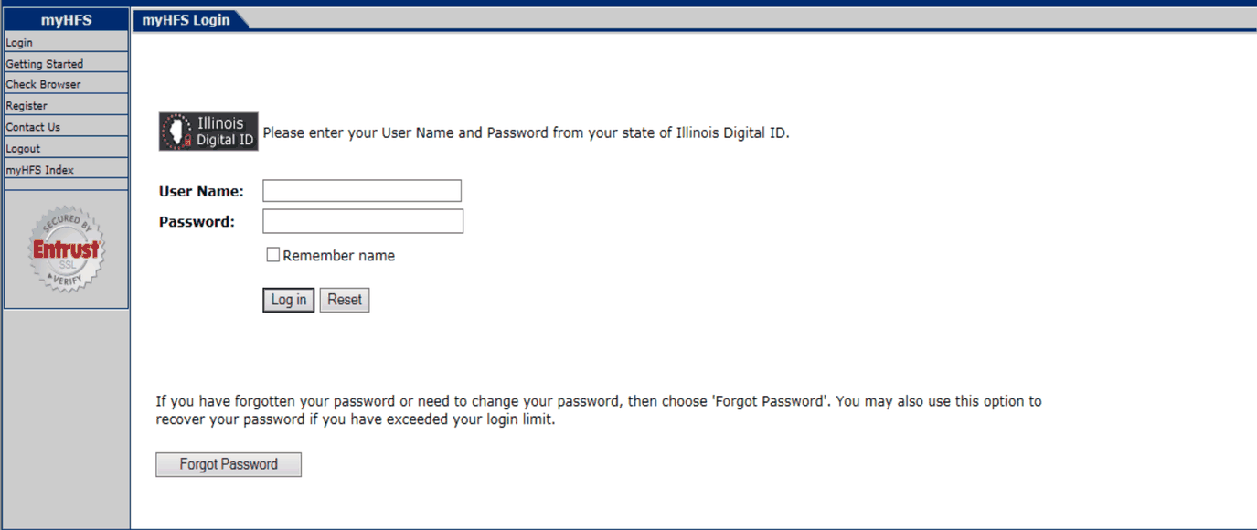
Screenshot source: HFS Long Term Care MEDI Registration Tools and Guidelines, older sample UI, page 6.
TL;DR: use your own login, and give your biller their own
Use your own Digital ID to sign into myHFS. Your biller uses their own Digital ID with Employee access or Other Business authorization granted through the appropriate administrator. IMPACT enrollment and managed care plan billing are separate. HFS access guidance
Who needs their own MEDI login
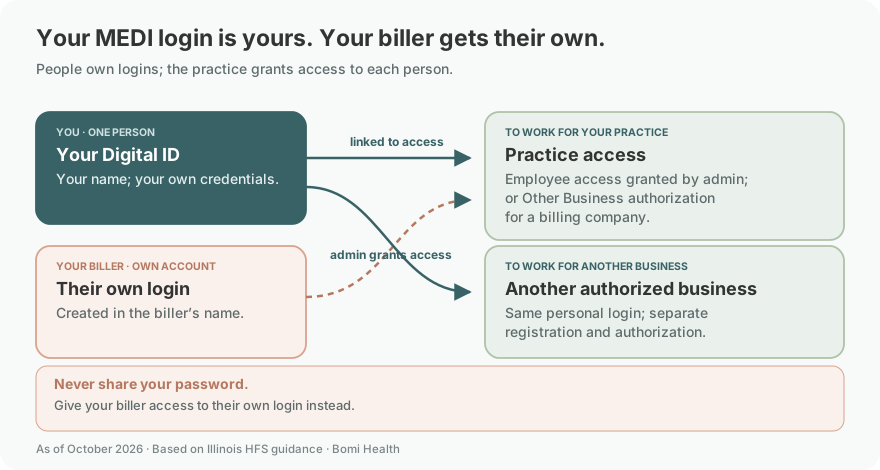
Your Digital ID belongs to you, in your own name. Keep your credentials and any MFA prompts under your own control; never share your password. The MEDI manual permits different relationships with multiple businesses under the personal identity, but each relationship needs its own registration and authorization. MEDI personal identity and registration rules
Each staff member or biller should use their own Digital ID and the appropriate MEDI authorization. The MEDI manual separates business and employee access. Avoid sharing a clinician’s credentials to get eligibility work done.
Before you create access
Before registering, check whether you already have a Digital ID and identify the business or employee relationship that needs access. HFS Getting Started distinguishes providers, payees, other businesses and employees. Use the applicable relationship rather than treating an IMPACT role as MEDI approval.
Set up Digital ID, myHFS and MEDI authorization
HFS’s published LTC registration deck contains older sample UI. The crops here illustrate common Digital ID, MEDI registration and business-authorization controls only; use the current links above and the current MEDI manual for your relationship. LTC-specific instructions and old browser requirements are not part of this guide.
Create the state Digital ID if you do not already have one, then return to myHFS and sign in with it.
Complete the initial myHFS contact registration, then choose the MEDI business or employee registration category that fits your work.
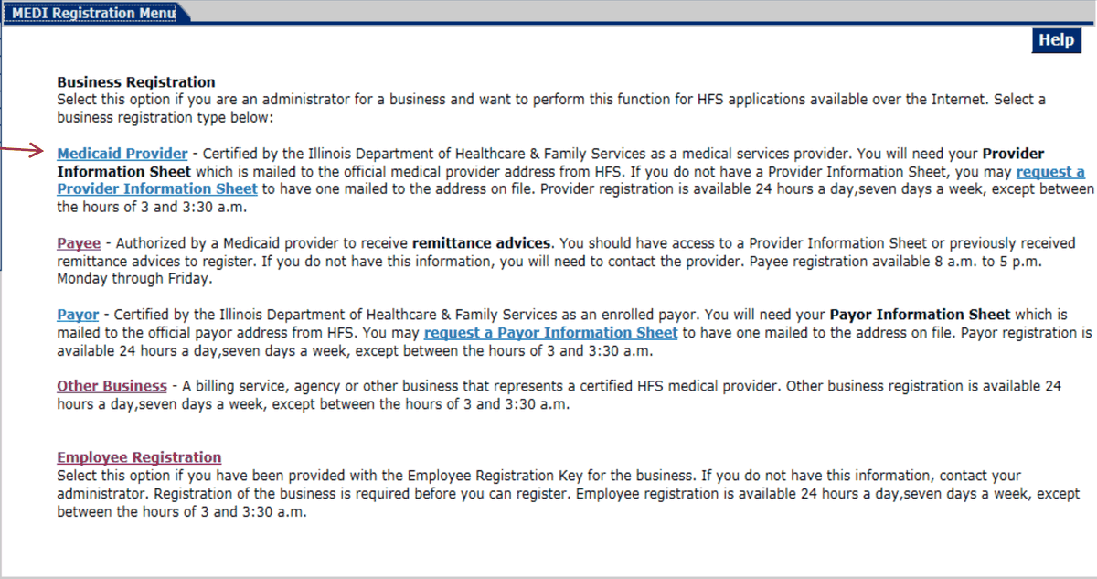
Screenshot source: HFS Long Term Care MEDI Registration Tools and Guidelines, older sample UI, page 10.
HFS describes these as separate steps. Its Getting Started page identifies providers, payees, other businesses and employees as registration categories; authorized users then access the Internet Electronic Claims (IEC) application for eligibility and transactions. MEDI Getting Started
Add your biller or employee authorization
Your biller uses their own Digital ID. For an employee, the business administrator accepts the employee registration and grants application access. For an outside billing company registered as Other Business, the provider grants business authorization; the billing company’s administrator then delegates access to its own registered employees. Never share a password to replace these grants. MEDI employee and business authorization
For a billing company or staff member, follow the authorization path for that relationship. The MEDI manual explains business authorization and employee access levels; an IMPACT enrollment permission is not a substitute. MEDI authorization manual
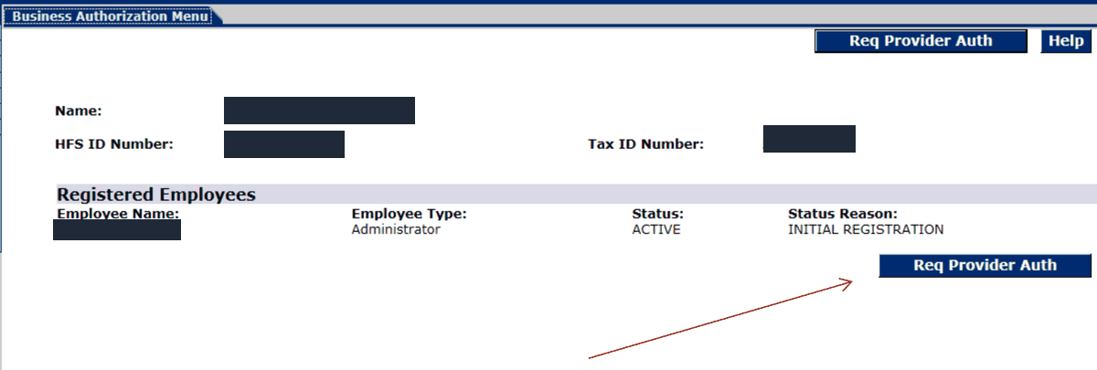
Screenshot source: HFS Long Term Care MEDI Registration Tools and Guidelines, older sample UI, page 24.
Run the eligibility inquiry in IEC
HFS’s MEDI FAQ identifies a single-recipient 270 eligibility inquiry with an immediate response through direct data entry. Use the authorized IEC eligibility function rather than creating a claim simply to test coverage. MEDI transaction FAQ
Select the patient and the service date you need to verify using the eligibility inquiry fields.
Review the returned coverage and plan information for that date.
Record the date checked and the plan routing in your secure billing record; resolve an unclear result before relying on it for billing.
HFS tells providers to verify eligibility on the date of service and says MEDI identifies the enrolled managed care plan. The checklist is a practical way to apply that guidance; it is not a reproduction of every live screen. HFS date-of-service eligibility guidance
Active Medicaid does not settle the MCO billing question
HFS directs billing questions to the member’s plan and distinguishes IMPACT credentialing from plan contracts. After identifying the plan, check your participation and the applicable billing requirements with that plan. HealthChoice provider FAQ
A useful practice checklist asks: Which plan applies to this visit? Which billing entity and clinician will submit it? Is the required plan participation in place? Does the service need a separate authorization check? Keep eligibility evidence and those operational answers together.
Login errors: Digital ID recovery or missing authorization
The login page offers Digital ID password recovery and account management. If sign-in fails, start there. If you can sign in but cannot reach eligibility transactions, review MEDI authorization instead of assuming the patient has lost coverage. MEDI login and recovery
HFS’s MEDI home page links registration help and publishes maintenance information. Check that page when a previously working service is unavailable; avoid retrying unrelated enrollment changes to repair an access problem. MEDI help and system notices
Keep the next step clear
IMPACT access vs MEDI access · MCO contracts and claim routing · Telehealth billing checks
For recovery and access help, start with HFS MEDI home and its Digital ID account-management and help links. Use those published routes for account recovery and authorization help.
Frequently Asked Questions
What is the MEDI provider login?
Use medi.hfs.illinois.gov, the official myHFS sign-in, with your State of Illinois Digital ID.
Is myHFS the same as MEDI?
myHFS is the account home. MEDI registration and authorization determine access to IEC, where authorized users perform eligibility inquiries and electronic transactions.
How do I reset my MEDI password?
Use Digital ID recovery or account management linked from the MEDI login and HFS MEDI home page. If sign-in works but IEC is unavailable, review MEDI authorization instead.
Does my IMPACT login give me MEDI access?
No. MEDI has its own Digital ID, registration and authorization path. Complete the appropriate business or employee access setup.
Can I check Illinois Medicaid eligibility in MEDI?
Authorized users can reach IEC eligibility inquiries through MEDI. Check the member’s coverage and plan for the actual date of service.
Want Bomi to handle insurance billing?
Bomi helps therapy practices with benefit checks, claims, denials, balances, CAQH, attestations, and revenue management.
Book a call
About Bomi
Founded by George Ruan, Dax Earl, and Andrey Goder, Bomi helps independent therapists and group practices with insurance billing, credentialing, and payer follow-up. Bomi grew out of Dax’s experience helping his mother with her therapy practice, with a clear purpose: reduce the administrative burden of insurance while keeping practice owners in control.
Meet our founders