
Create a Florida Medicaid Secure Web Portal Account
By George Ruan • October 9, 2026
Last updated: October 9, 2026.
The official Florida Medicaid provider activation form is Create New Account. It asks for your Medicaid provider ID and temporary PIN. This is the provider Secure Web Portal account, separate from a member account or an SMMC plan’s provider portal.
These steps were checked October 9, 2026 against Gainwell’s current Secure Web Portal user guide. If the practice already has an administrator, ask that person for your own agent login before trying to activate another practice account.
Sections
Do you have an approved Medicaid provider record?
Gainwell’s enrollment page says approved providers receive a nine-digit Medicaid provider number. The application comes first. If you are still choosing Full or Limited enrollment, start with Florida Medicaid enrollment for therapists rather than treating portal activation as an enrollment application.
Use the Medicaid provider ID and PIN letter
The activation instructions describe separate welcome and PIN letters. On the activation form, enter the provider ID and temporary PIN, continue through the agreement, and set the account credentials and security question. Return to the official provider login after setup.
Before activating, decide who will maintain the practice’s account over time. Use an email the authorized administrator can actually monitor. Save the provider ID in the practice’s administrative records and keep the PIN and credentials out of shared onboarding spreadsheets.
On Create New Account, enter the Provider ID and temporary PIN from the practice’s letters, then Sign In. This activation screen is different from the returning-user login.
After reviewing and accepting the current terms, complete your account details, username, password and security Question/Answer, then select Next. The guide’s sample provider name and ID are covered below.
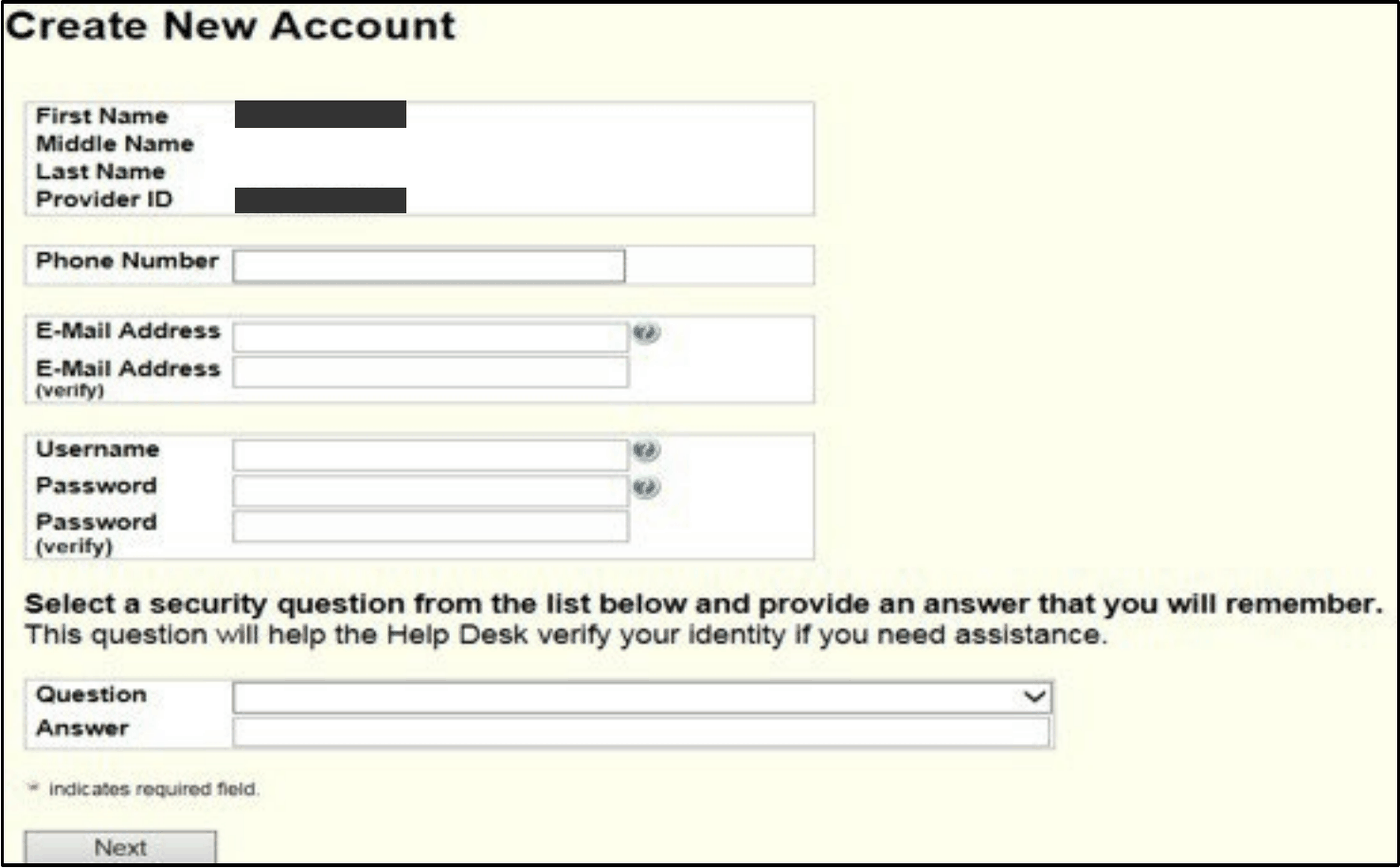
Screenshot source: FMMIS Secure Web Portal User Guide (v14, May 28, 2026), PDF page 13 (printed 2-2).
After creating the account, use My Information to review the security Question and Answer. Gainwell’s current account-maintenance guide shows the question menu below: choose a question, enter your own answer and use Save. Keep the answer with the account owner so it is available for recovery.

Screenshot source: Secure Web Portal Account Maintenance and Reset Password QRG (October 15, 2025), page 2.
What if the PIN has not arrived?
Gainwell’s support page says the PIN letter is mailed within ten business days after the provider file is activated. That clock starts with activation, rather than the day you first submit an application. Check whether you are waiting for enrollment approval or for a letter tied to an activated record.
If the letter is missing or an old administrator controls access, follow the current support instructions for the authorized request. Keep your application tracking details and the provider number ready for the appropriate support team. Do not submit a duplicate enrollment solely to solve a login problem.
Add staff after the administrator can sign in
Give each biller or staff member a separate account through the agent-access process. Choose permissions for the work they perform. Gainwell’s account maintenance guide is also useful when an agent later needs password help.
Finish by checking that the account opens the intended provider record, then try the task it was created for. For intake, that is usually service-date eligibility verification; for a new practice, it may be documenting AHCA enrollment and SMMC plan effective dates separately.
Frequently Asked Questions
Do I need a Medicaid provider ID to create the account?
The official activation form asks for a Medicaid provider ID and temporary PIN. An enrollment application is separate from activating the portal account.
Should every employee activate a new provider account?
Staff joining an existing practice should ask its administrator for individual agent access.
When does the PIN-letter mailing period start?
Gainwell says the PIN letter is mailed within ten business days after the provider file is activated, rather than after initial application submission.
Want Bomi to handle insurance billing?
Bomi helps therapy practices with benefit checks, claims, denials, balances, CAQH, attestations, and revenue management.
Book a call
About Bomi
Founded by George Ruan, Dax Earl, and Andrey Goder, Bomi helps independent therapists and group practices with insurance billing, credentialing, and payer follow-up. Bomi grew out of Dax’s experience helping his mother with her therapy practice, with a clear purpose: reduce the administrative burden of insurance while keeping practice owners in control.
Meet our founders