
Give Your Biller Access to the Florida Medicaid Web Portal
By George Ruan • October 9, 2026
Last updated: October 9, 2026.
To add your biller to Florida Medicaid, the practice administrator starts in the Secure Web Portal. Use a named agent account and assigned permissions. Sharing the owner’s login makes it harder to remove access or tell which person needs a password reset.
As of October 9, 2026, the steps below follow section 3 of Gainwell’s May 2026 user guide. If the practice has not activated its account, complete provider ID and PIN setup first.
Sections
Add the biller as an agent
In Account Management, choose Add Agent, enter the biller’s email and Search. The guide shows the search screen below. When results appear, select the intended username; if there is no match, use Add New Agent.
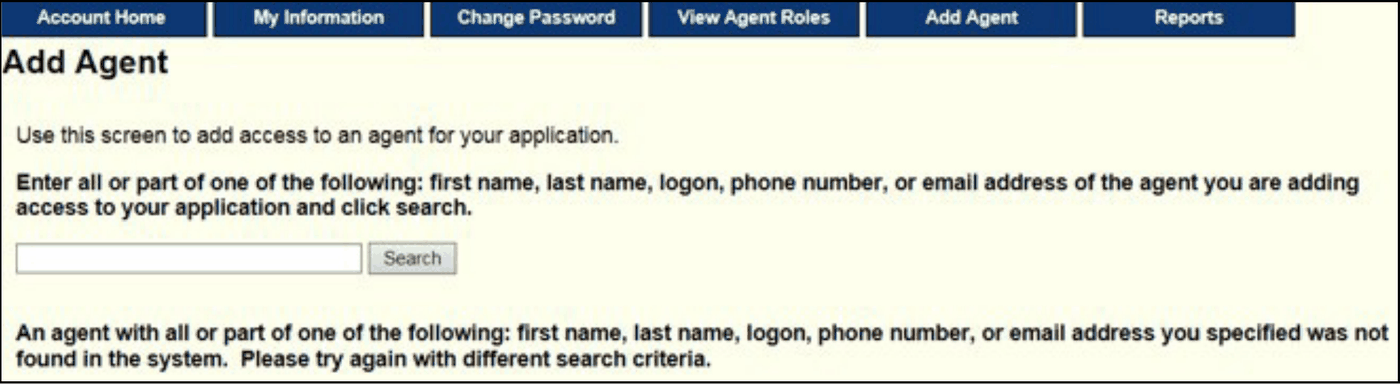
Screenshot source: FMMIS Secure Web Portal User Guide (v14, May 28, 2026), PDF page 22 (printed 3-1).
Confirm the username with the biller before selecting an existing match. An email search can return more than one account. Then have the biller check access under their own login and confirm the correct provider is available. Never ask the biller to send you their password as proof.
Choose billing permissions without handing over bank control
The role descriptions distinguish claims, eligibility, reports, file exchange and other permissions. EFT Designation can change banking information; Super Agent can administer other users. As a practical access policy, grant the tasks you authorize and review those two powerful permissions separately.
For example, an eligibility-only staff member should not receive bank-maintenance authority simply to check coverage. Ask a biller whether they need claim submission, claim inquiry, remittance reports, or electronic file exchange, and document the answer before choosing permissions. Available roles can vary with the enrollment record.
On Manage Agent Roles, select Florida Web Portal, check the authorized permissions and Save Changes. The guide’s figure below shows the system selector with Account Management selected and Super Agent checked: that is administrator authority, not a recommendation for ordinary biller access. Choose Florida Web Portal for the biller’s specific business permissions. Available permissions vary by enrollment type; the current guide says PES and Download 997 are no longer supported.
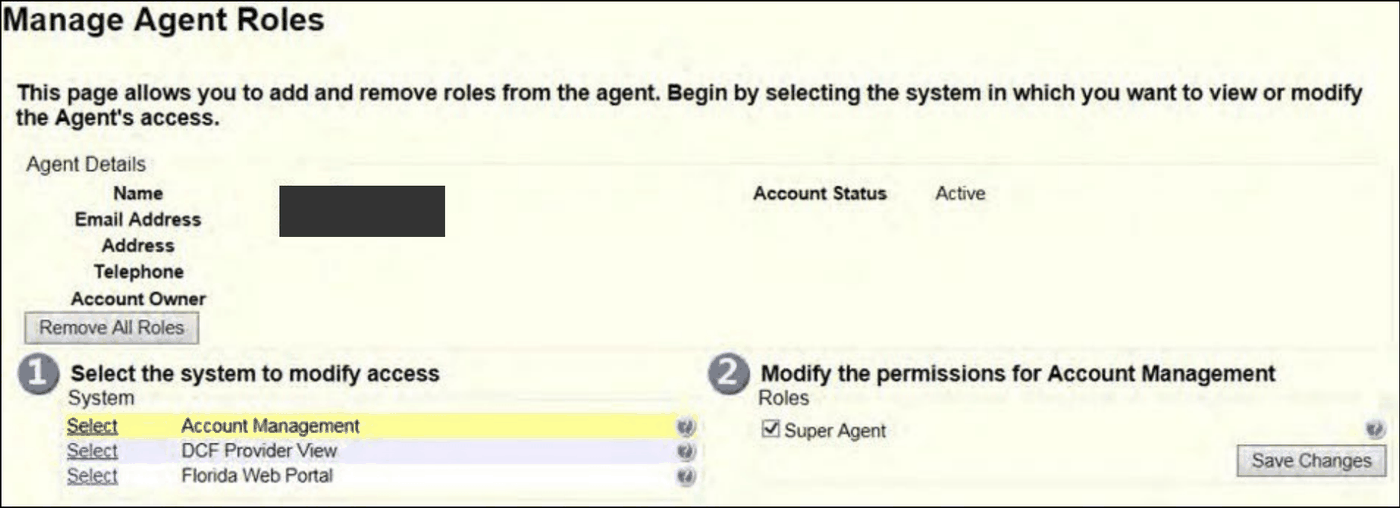
Screenshot source: FMMIS Secure Web Portal User Guide (v14, May 28, 2026), PDF page 24 (printed 3-3).
Agent access and Trading Partner enrollment are different
Section 2.11 of the February 2026 AHCA enrollment policy requires billing agents, clearinghouses and eligibility contractors to enroll as Trading Partners and link to the provider group. Adding an individual portal agent does not complete that organizational enrollment. The portal guide also covers the separate EDI agreement workflow.
Before the first claim file, ask the billing company to confirm its Trading Partner relationship and transmission setup. Before an SMMC claim, also confirm the plan’s separate contracting and portal requirements. A successful state-portal login is not a test of either connection.
Recover or remove the biller’s access
The account maintenance reference explains administrator password-reset help for agents. For an access change, review the agent’s roles and remove permissions that are no longer authorized using the portal guide’s role-management steps. Do not reset the practice administrator’s password just because one agent is locked out.
As a handoff check, ask the biller to demonstrate the intended task without sharing patient details in email: locating the eligibility screen, seeing the correct provider, or finding the claims menu. Continue with eligibility checks and claim routing once access is established.
Frequently Asked Questions
Does adding an agent complete billing-company enrollment?
No. Individual portal permissions and the organizational Trading Partner enrollment/linkage are separate.
Should a biller receive EFT Designation access?
Review it separately: that role can change banking information. Grant only the authority the practice intends to delegate.
Who helps an agent reset a password?
The practice administrator can use the agent-reset process described in Gainwell’s account maintenance guide.
Want Bomi to handle insurance billing?
Bomi helps therapy practices with benefit checks, claims, denials, balances, CAQH, attestations, and revenue management.
Book a call
About Bomi
Founded by George Ruan, Dax Earl, and Andrey Goder, Bomi helps independent therapists and group practices with insurance billing, credentialing, and payer follow-up. Bomi grew out of Dax’s experience helping his mother with her therapy practice, with a clear purpose: reduce the administrative burden of insurance while keeping practice owners in control.
Meet our founders