
Verify Health First Colorado Eligibility in the Portal
By George Ruan • October 9, 2026
Updated October 9, 2026.
To verify Health First Colorado eligibility before a therapy visit, start at the official Provider Web Portal and use the eligibility workflow for the intended service date. A member’s card is a starting identifier; the current state record is the place to check coverage and RAE/MCO enrollment.
Sources were checked October 9, 2026. RMHP’s 2026 manual tells providers to verify eligibility and enrollment through Colorado interChange and retain the verification evidence. State eligibility verification guidance.
Sections
- Confirm the provider and service-location context
- Run the service-date eligibility check
- Review other insurance and the behavioral health administrator
- Save evidence and resolve discrepancies
- Eligibility is one part of claims readiness
- How Bomi can help
- Related Colorado Medicaid guides
- Frequently Asked Questions
Confirm the provider and service-location context
HCPF’s January 2026 training starts by confirming the provider’s NPI and Health First Colorado location ID. This is especially relevant when the same practice has multiple locations. A successful login does not tell you that the intended record is selected. HCPF member eligibility training.
For a delegate, use the appropriate provider context described in portal login and biller setup. For an unfamiliar location identifier, see the provider-ID lookup guide.
Run the service-date eligibility check
Open the portal’s Eligibility area and the member eligibility verification workflow.
Identify the member using the accepted information in the current request form. Check the member identity before using a similarly named result.
Use the date of the intended service, then review the returned coverage rather than relying on an earlier visit’s result.
Read the benefit and managed-care information, including the assigned RAE or MCO, before choosing a payer.
Follow the official Verify Member Eligibility and Co-Pay quick guide for the current form. The Colorado Access FAQ specifically directs providers to check the state portal on the date of service. This guide does not prescribe an unverified historical or future inquiry window.
The current July 2026 DentaQuest manual reproduces the state portal’s Eligibility Verification navigation shown below. Historical sample dates illustrate the layout only; use the response for your actual member and service date.

Screenshot source: DentaQuest Colorado Health First Medicaid Office Reference Manual, July 1, 2026, page 21 — retained state-portal Eligibility Verification navigation example.
Review other insurance and the behavioral health administrator
HCPF’s eligibility training includes Other Insurance Detail Information and carrier details. Review that information as part of coordination-of-benefits work; a Medicaid response should not cause the practice to overlook other reported coverage. Other insurance in the HCPF training.
After reviewing the coverage response, return to Eligibility Verification and open Other Insurance Detail Information to read carrier and policy details. Treat this as a review; the illustrated Save and Reset controls are not needed merely to read the result. State-portal UI reproduced in the current manual, page 21.
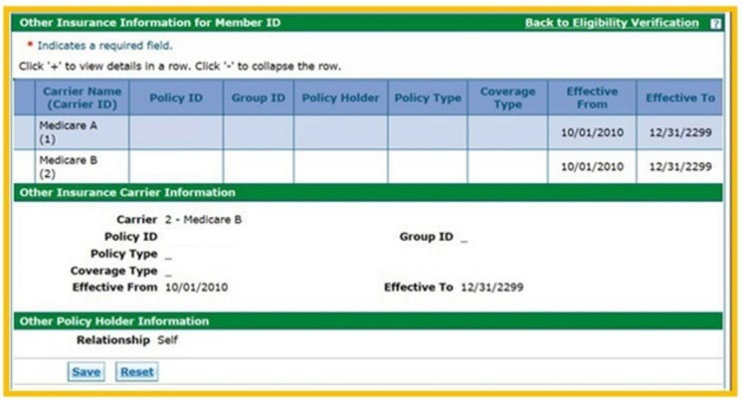
Screenshot source: DentaQuest Colorado Health First Medicaid Office Reference Manual, July 1, 2026, page 21 — retained state-portal UI example.
For behavioral health, use the four-RAE and FFS guide to interpret the assigned entity. In particular, Region 2’s NHP assignment and RMHP behavioral health administration are related but different names.
Save evidence and resolve discrepancies
Retain the eligibility verification documentation. RMHP identifies it as support for an appeal when a claim is denied for eligibility or enrollment. Save it in the practice’s approved secure record workflow. RMHP eligibility documentation guidance.
Record which member and date were checked, the check date, and the coverage response.
If the card and current result differ, resolve the current assignment with the appropriate payer before choosing a claim destination.
If you are reviewing a denial, check the original service date rather than substituting today’s eligibility.
Keep patient identifiers out of ordinary email, public support forms and internal-link sharing.
Those are practical recordkeeping steps for a biller. Use current official plan instructions when escalating a discrepancy; do not change a claim’s facts to fit a desired payer.
Eligibility is one part of claims readiness
An eligibility response does not establish your clinician’s enrollment, affiliation, network contract, service coverage or authorization. Review those separately using the therapist enrollment guide and claims and telehealth checklist.
For a CCHA-specific second check, its 2026 manual directs providers to Availity Essentials, Patient Registration, then Eligibility & Benefits. That instruction is limited to CCHA members; it does not replace the statewide portal route for every RAE. CCHA eligibility, page 46.
How Bomi can help
Bomi can help organize enrollment, payer follow-up and billing work. For help with a Colorado provider workflow, contact Bomi and describe the blocked task.
Related Colorado Medicaid guides
Portal and delegate access. Denied claims and patient liability.
Frequently Asked Questions
Where should a Colorado therapist verify Medicaid eligibility?
Use the state Provider Web Portal/interChange eligibility workflow for the service date. Official plan manuals direct providers there to verify state coverage and RAE/MCO enrollment.
Does a Health First Colorado card prove the member’s current RAE assignment?
Check the current state eligibility response. Do not rely only on a card or an assignment saved from an earlier visit.
Does an eligible response guarantee payment for a therapy claim?
No. Verify service coverage, enrollment and affiliation, plan participation, authorization and correct claim routing separately.
Want Bomi to handle insurance billing?
Bomi helps therapy practices with benefit checks, claims, denials, balances, CAQH, attestations, and revenue management.
Book a call
About Bomi
Founded by George Ruan, Dax Earl, and Andrey Goder, Bomi helps independent therapists and group practices with insurance billing, credentialing, and payer follow-up. Bomi grew out of Dax’s experience helping his mother with her therapy practice, with a clear purpose: reduce the administrative burden of insurance while keeping practice owners in control.
Meet our founders