
Colorado Provider Web Portal Login: Account Setup and Delegate Access
By George Ruan • October 9, 2026
For Colorado Medicaid provider login, open the official Provider Web Portal and sign in with your own provider administrator or authorized Delegate account.
Last checked October 9, 2026. Account and delegate steps follow HCPF’s published guides.
Sections
- Direct links: Colorado portal login, registration and enrollment
- TL;DR: use your own login, and give your biller their own
- Who needs their own Colorado portal login
- Before you create access
- Create the provider account after enrollment approval
- Add your biller as a Delegate
- Batch-file enrollment is separate from Delegate access
- Colorado portal login errors and lockouts
- Related Colorado Medicaid guides
- How Bomi can help
- Frequently Asked Questions
Direct links: Colorado portal login, registration and enrollment
Forgot User ID or Forgot Password — use the recovery controls on the official login page.
Provider Services Call Center — 833-468-0362 for portal or enrollment assistance; password recovery is self-service.
Start provider enrollment — use this before provider registration if enrollment is not approved.
The public Provider Web Portal sign-in form looks like this.
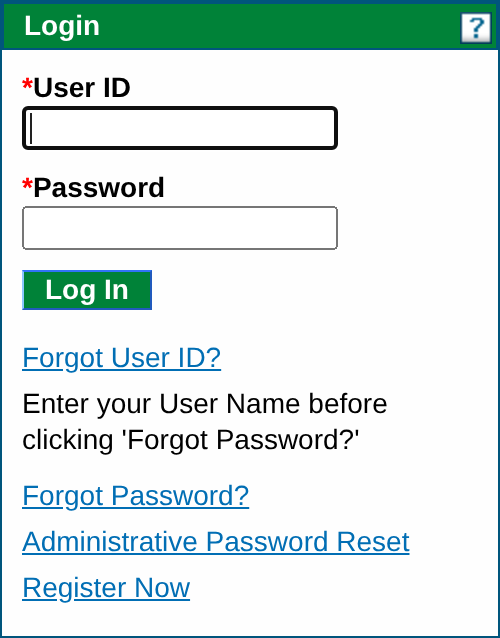
Screenshot source: Screenshot of the public Colorado Provider Web Portal sign-in page, captured October 9, 2026.
TL;DR: use your own login, and give your biller their own
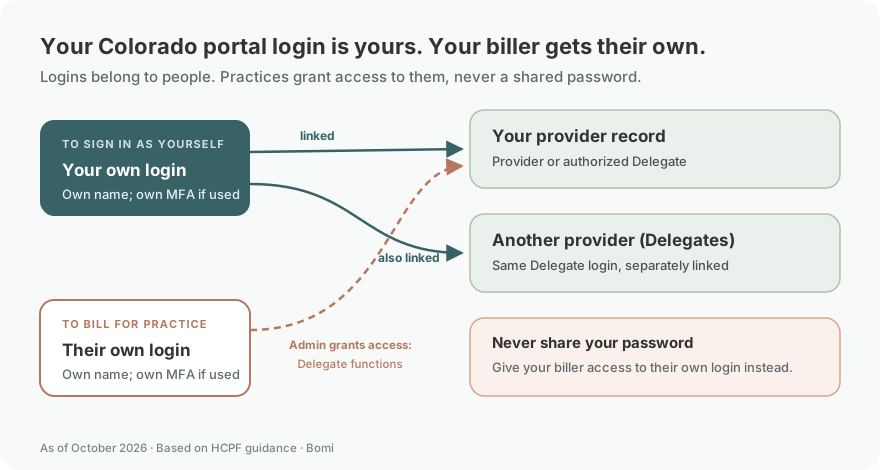
Use your own account. Your biller registers their own Delegate login, and the provider’s administrator grants the functions they need. Provider enrollment, RAE network participation and batch-file enrollment are separate. HCPF registration and roles.
Who needs their own Colorado portal login
Each biller or staff delegate uses their own Delegate account and one delegate code per person. Administrators link that person to a provider record and choose the functions they can use. Never share your password; give your biller access to their own login instead. HCPF delegate guide.
An authorized delegate working for multiple providers can use Switch Providers. This does not mean one provider administrator account covers every provider type: the registration guide requires separate accounts for separately enrolled provider types. Switch Providers help and provider registration rules.
Our recommendation is to use your own name and recovery contact information, and keep any MFA you use under your own control. HCPF’s published registration guide describes challenge questions and email verification. HCPF account setup guide.
Before you create access
The live registration selector requires an approved provider enrollment before Provider registration. Have the Health First Colorado Provider ID and ZIP code for the intended provider record ready. If enrollment is still pending, start with the enrollment application rather than another portal account. Official registration selector.
Create the provider account after enrollment approval
Choose Register Now from the portal home page and the registration role that matches the approved record.
For Provider registration, enter the Health First Colorado Provider ID and ZIP code. HCPF recommends the Provider ID rather than NPI when the NPI spans multiple locations or provider types.
Choose a user ID and an identifying display name. Answer the challenge questions and complete the user agreement.
Follow the verification email, then check that the account is associated with the intended enrolled record. A successful login alone does not confirm the Provider ID is correct.
Follow HCPF’s published registration guide. Use the existing provider-ID and effective-date guide to keep identifiers and dates separate.
Add your biller as a Delegate
First ask whether the biller already has a delegate code, including one created by another provider. HCPF’s guide says each person should have only one code. The biller signs in with their own Delegate login; the provider administrator grants functions for this provider record. HCPF delegate setup and linking.
Link a biller who already has a delegate code
In Manage Accounts, choose Link Registered Delegate/Office Staff. Enter the existing code and last name, select the needed functions, then submit and confirm. Use the existing code rather than making another identity for the same person. Linking an existing delegate.
Create a code for a new delegate
If the person has no code, use Add New Delegate/Office Staff in Manage Accounts. Enter the required identity fields, choose functions, then submit and confirm. Give the generated code to the biller so they can register their own Delegate account using matching information. Adding a new delegate.
Choose functions from the Delegate Access Definitions guide for the work the biller actually needs. As a practical recommendation, identify eligibility, claims or other tasks before granting access, and keep recovery details and any MFA with the person who owns the login.
Batch-file enrollment is separate from Delegate access
As of October 9, 2026, the live portal notice directs providers and trading partners using EDI batch transactions to the new Trading Partner Enrollment and Testing Site and gives an October 30, 2026 enrollment deadline. Follow that current notice for the batch-file route; a delegate code does not complete trading-partner enrollment. Current Provider Portal News notice.
Older registration and delegation guides show a Billing Agent or Link Registered Trading Partner ID for X12 Reports route. Treat those as older published instructions and confirm the current batch-file requirements with your billing service; they are not a reason to share the administrator’s password. Older published registration guide and delegation guide.
Colorado portal login errors and lockouts
If login succeeds but the provider or function is missing, check the delegate’s Switch Providers selection and ask the administrator to review the linked record and functions. Gainwell login help and HCPF delegate permissions.
The live login notice says a temporary lock after repeated wrong passwords normally clears after approximately 15 minutes. It also describes an automatic logout after 15 minutes of inactivity; return to the official login and sign in again. Current portal lockout and timeout notices.
For a delegate password problem, use Forgot Password on the login page. HCPF’s June 9, 2025 updated notice says administrators do not reset delegate passwords and the call center cannot reset either role’s password. Follow the role-specific self-service route. Updated password guidance.
For an inactive account, review status with the administrator. The July 2025 reminder describes inactivation after 60 days without login for new delegate/trading-partner accounts and 90 days for existing accounts; it excludes administrators. Published account inactivity reminder.
Related Colorado Medicaid guides
How Bomi can help
Bomi can help organize enrollment, payer follow-up and billing work. Contact Bomi and describe the Colorado workflow you need help with.
Frequently Asked Questions
Where is the Colorado Medicaid provider login?
Use the official Colorado Provider Web Portal. Sign in with your own provider administrator or authorized Delegate account; choose Register Now only when creating access for the appropriate approved record.
Why is my Colorado Provider Web Portal account locked?
The live portal notice says repeated wrong passwords may cause a temporary lock that automatically clears after approximately 15 minutes. Use the official recovery controls for a forgotten user ID or password.
Is Colorado Medicaid portal registration the same as provider enrollment?
No. The public registration selector requires approved enrollment for provider registration. Start with Provider Enrollment if the enrollment application is not approved.
How do I give a biller with an existing delegate code Colorado portal access?
No. HCPF’s published guide says one delegate code per person. Link an already registered delegate using their existing code.
Can a Colorado Medicaid administrator reset a delegate password?
HCPF’s updated June 2025 notice directs delegates to Forgot Password and says administrators are not responsible for resetting delegate passwords. Use the current role-specific recovery instructions.
Planning a private practice?
Use Bomi's free Build resources to plan the business, provider identity, payer setup, and billing workflow before you see clients.
Use Build resources
About Bomi
Founded by George Ruan, Dax Earl, and Andrey Goder, Bomi helps independent therapists and group practices with insurance billing, credentialing, and payer follow-up. Bomi grew out of Dax’s experience helping his mother with her therapy practice, with a clear purpose: reduce the administrative burden of insurance while keeping practice owners in control.
Meet our founders