
Verify Wisconsin Medicaid Eligibility in ForwardHealth EVS
By George Ruan • October 9, 2026
Last updated: October 9, 2026.
Sections
- Use Enrollment Verification before the therapy visit
- Search the actual date of service
- Read more than the benefit-plan result
- Respect the inquiry’s date limits
- Troubleshoot “No rows found” before drawing a conclusion
- Retain the inquiry evidence securely
- Related Wisconsin Medicaid guides
- Frequently Asked Questions
Use Enrollment Verification before the therapy visit
EVS provides current program, managed care, and other coverage information. Use the official ForwardHealth Portal for the inquiry. Our workflow recommendation is to save the result with the intended service date and resolve coverage questions before billing.
ForwardHealth Online Handbook: Enrollment Verification
Search the actual date of service
The February 2025 guide directs signed-in provider users to Enrollment. Enter Member ID, or an allowed identity combination, and the From/To dates of service; select Search. Verify the returned identity.
Enrollment Verification User Guide, February 2025
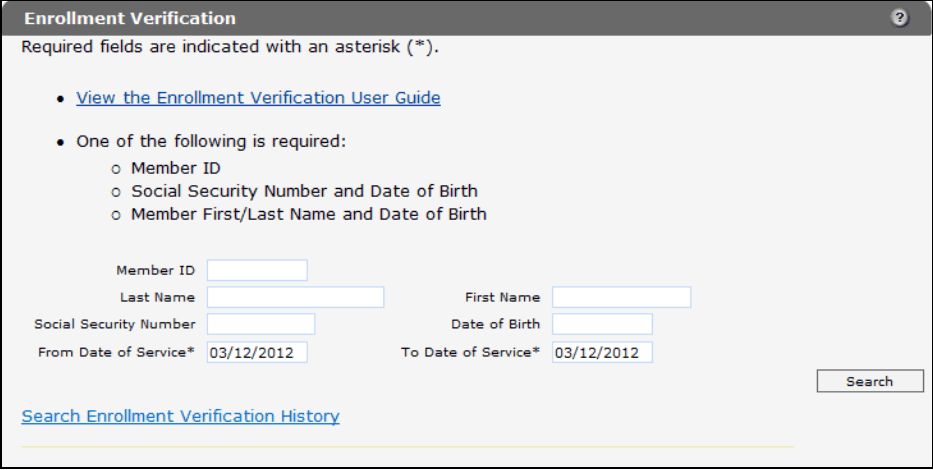
Screenshot source: ForwardHealth Portal Enrollment Verification User Guide (February 17, 2025), PDF page 6 (printed page 4).
Read more than the benefit-plan result
Check the benefit plan, managed care enrollment, Medicare, and other commercial coverage panels. Review the complete response for the service date rather than stopping at the first positive result.
Enrollment Verification User Guide, February 2025
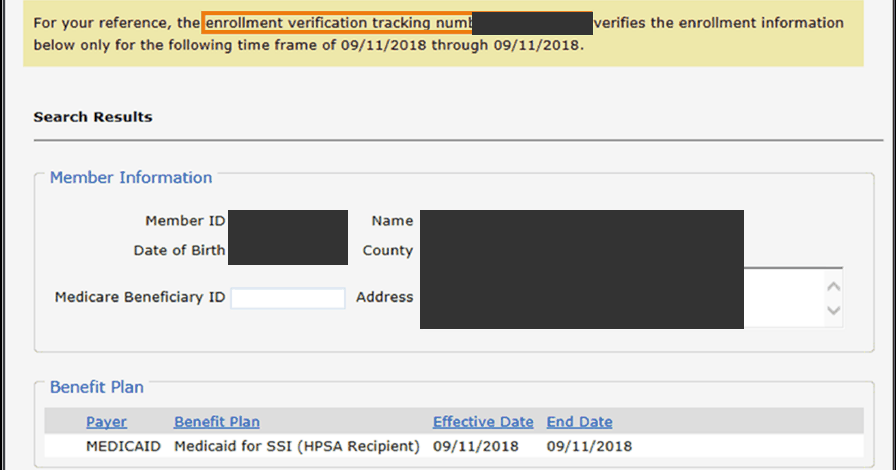
Screenshot source: ForwardHealth Portal Enrollment Verification User Guide (February 17, 2025), PDF page 9 (printed page 7).
Respect the inquiry’s date limits
The guide limits a single query to one year. Before the 20th, future inquiries extend through the current month; on or after the 20th, through the next month. Recheck future coverage when services occur.
Enrollment Verification User Guide, February 2025
Troubleshoot “No rows found” before drawing a conclusion
The guide notes that an incorrect financial-payer context can return no results. Check that the account is authorized for Medicaid/BadgerCare Plus, then verify member identifiers and dates. Do not turn a failed search into a patient billing decision.
Enrollment Verification User Guide, February 2025
Retain the inquiry evidence securely
Save the tracking number and original response securely. The guide warns that history results are less comprehensive than the initial inquiry; history is limited to the service location that made it. Use the inquiry as evidence of the check, not a guarantee of payment.
Enrollment Verification User Guide, February 2025
Related Wisconsin Medicaid guides
Frequently Asked Questions
Does a ForwardHealth card prove active eligibility today?
Check current service-date EVS information. A card or an old result does not replace that inquiry.
Can I check a future appointment?
Within the guide’s date limits, yes. Recheck future enrollment when the service actually occurs.
Why can’t another location find our inquiry history?
The guide limits history to the service location that made the original inquiry. Confirm that you are using the correct account context.
Want Bomi to handle insurance billing?
Bomi helps therapy practices with benefit checks, claims, denials, balances, CAQH, attestations, and revenue management.
Book a call
About Bomi
Founded by George Ruan, Dax Earl, and Andrey Goder, Bomi helps independent therapists and group practices with insurance billing, credentialing, and payer follow-up. Bomi grew out of Dax’s experience helping his mother with her therapy practice, with a clear purpose: reduce the administrative burden of insurance while keeping practice owners in control.
Meet our founders