
ForwardHealth Login: Provider Portal and Administrator Setup
By George Ruan • October 9, 2026
For ForwardHealth provider login, open ForwardHealth provider login and select Login to sign in with your administrator or clerk username and password.
Last checked: October 9, 2026.
Sections
- Direct links: ForwardHealth login, account setup and help
- TL;DR: use your own login, and give your biller their own
- Who needs their own ForwardHealth login
- Before you create access
- Account setup steps
- Add your biller as a clerk
- ForwardHealth login errors and lockouts
- Check coverage before choosing a billing route
- ForwardHealth claims and HMO billing
- Where are professional claim instructions?
- Related provider guides
- Frequently Asked Questions
Direct links: ForwardHealth login, account setup and help
New account: Providers → Request Portal Access — follow the PIN request instructions in the account guide.
Password reset and account unlock instructions — chapters 3.3 and 3.4.
Portal Help Desk: 866-908-1363 — the guide’s help channel for portal access.
The ForwardHealth Sign In page looks like this: enter your username and select Next, or choose Logging in for the first time? to set up the administrator account.
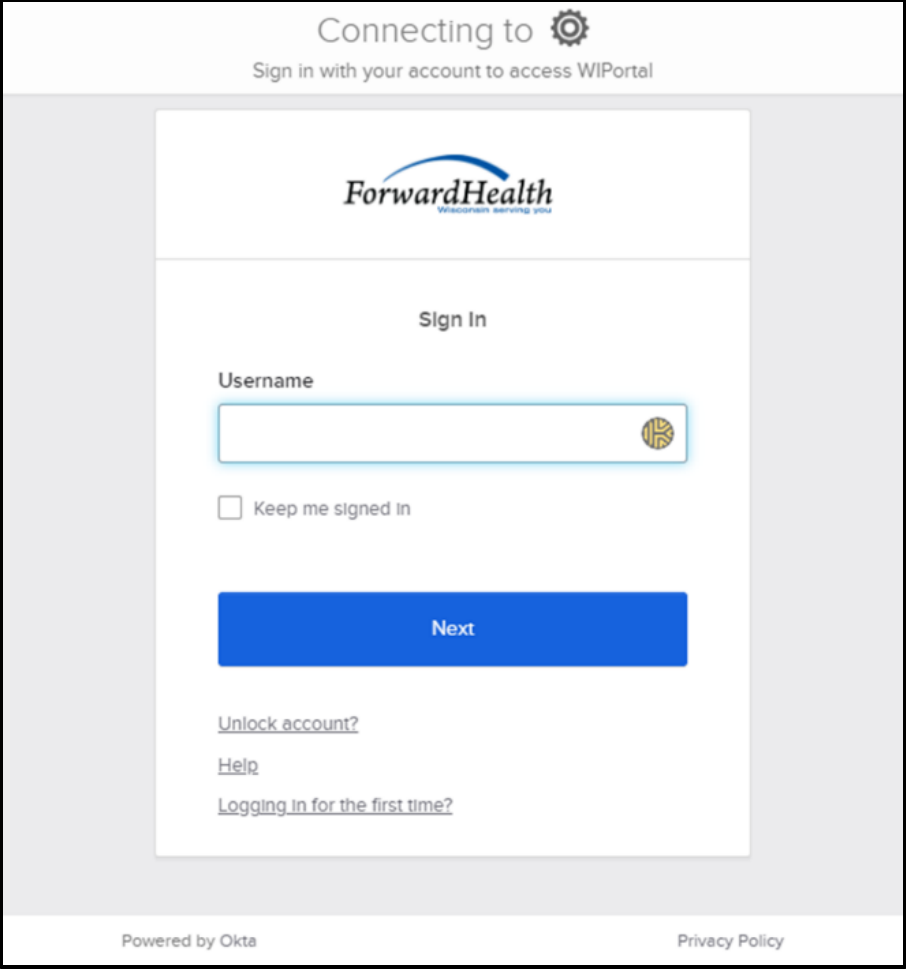
Screenshot source: ForwardHealth Provider Portal Account User Guide (July 15, 2024), PDF page 14 (printed page 11).
TL;DR: use your own login, and give your biller their own
Use your own ForwardHealth login. Your administrator creates or links your biller’s own clerk account and chooses the roles it can use. Medicaid enrollment and joining a BadgerCare Plus HMO network are separate. ForwardHealth account guide
Who needs their own ForwardHealth login
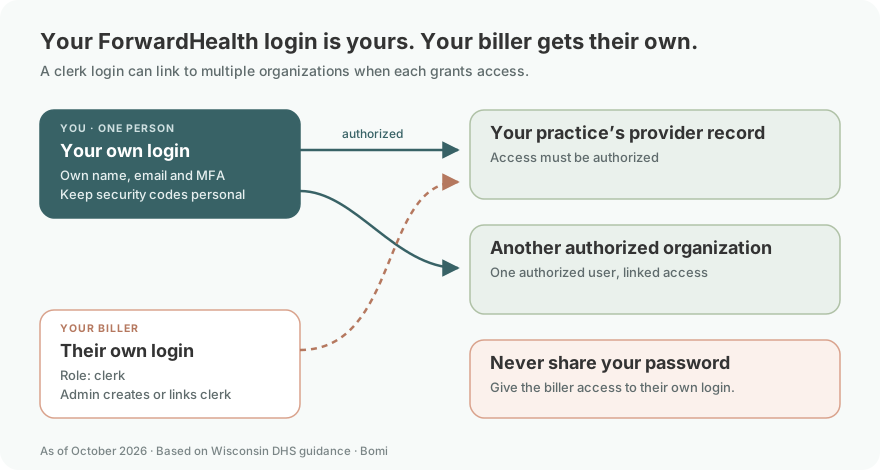
The administrator establishes the provider account and assigns clerk access. Each person uses their own name, contact details and security methods, including their own MFA. The guide allows multiple service locations under one administrator and a clerk account linked to multiple organizations; use Switch Organization for authorized records. Never share your password: give your biller their own clerk login. ForwardHealth account guide: personal accounts, clerks and linked organizations
Before you create access
Confirm the correct provider enrollment and whether the practice already has an administrator or requested PIN. Each service location/provider file has one administrator; multiple locations may attach to that administrator. ForwardHealth account guide
Account setup steps
Under Providers, choose Request Portal Access, search the NPI, select the appropriate enrollment, enter the requested SSN or TIN, and submit. A successful request produces a mailed PIN letter. At Login, select Logging in for the first time? Use the complete Login ID and single-use PIN to establish a username and password. ForwardHealth account guide
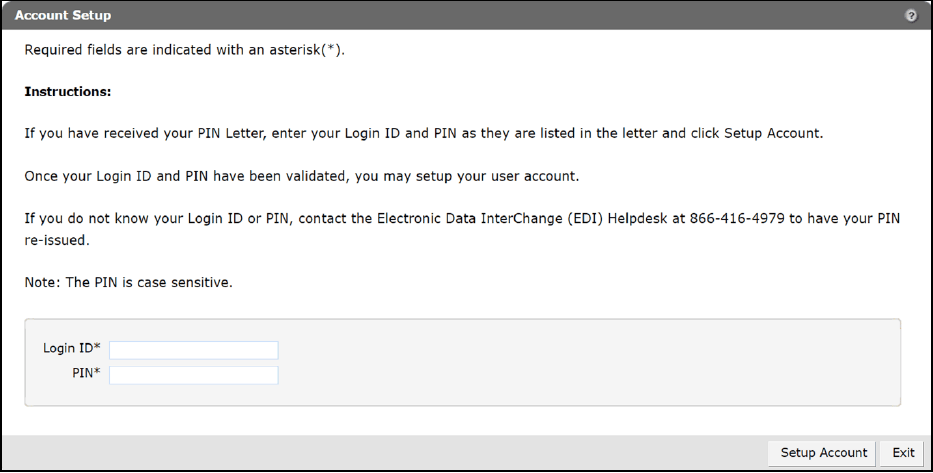
Screenshot source: ForwardHealth Provider Portal Account User Guide (July 15, 2024), PDF page 15 (printed page 12).
Add your biller as a clerk
Open Account, then Clerk Maintenance and Add Clerk. Enter the biller’s own name and contact details, username and initial password, or Search for an existing clerk to link it. Assign only the roles their work requires, then submit. The biller changes the initial password on first login and controls their own MFA and recovery methods. Never share the administrator password. The administrator must also provide backup contact details different from their own. ForwardHealth account guide
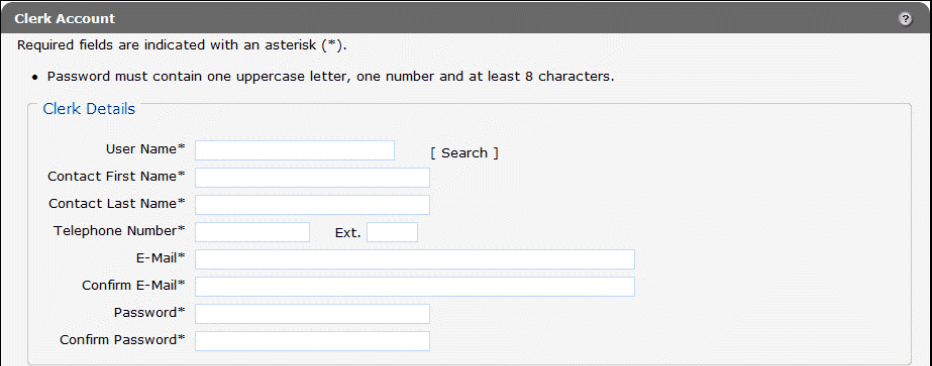
Screenshot source: ForwardHealth Provider Portal Account User Guide (July 15, 2024), PDF page 54 (printed page 51).
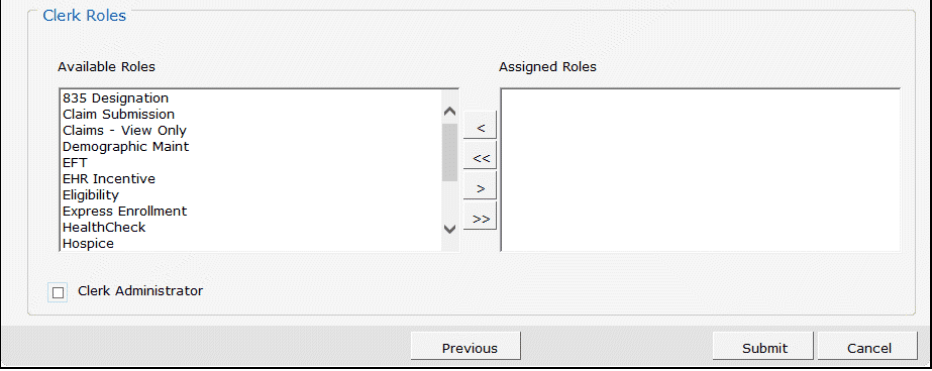
Screenshot source: ForwardHealth Provider Portal Account User Guide (July 15, 2024), PDF page 54 (printed page 51).
ForwardHealth login errors and lockouts
For an existing username, follow the account guide’s reset or unlock instructions. A PIN request can fail because the SSN/TIN is incorrect, no provider agreement is on file, or a PIN was already requested. Check internally for an existing PIN before requesting another. ForwardHealth account guide
Check coverage before choosing a billing route
EVS is the enrollment verification workflow. Verify coverage for the service date before choosing a billing route; eligibility alone does not promise payment. ForwardHealth enrollment verification guide
ForwardHealth claims and HMO billing
The professional claims guide describes ForwardHealth claim submission. For HMO network participation, contact the plan’s provider relations team and follow that plan’s billing instructions. These are separate from setting up a portal user. ForwardHealth HMO network enrollment
Where are professional claim instructions?
Use the professional claims guide for the portal’s claims workflow and the related mental health claims article below for our coverage of that topic. ForwardHealth professional claims guide
Related provider guides
Frequently Asked Questions
What is the ForwardHealth provider login?
Open the official ForwardHealth Portal linked in sentence one, select Login, and use your administrator or clerk credentials.
How do I reset my ForwardHealth password?
Use the reset instructions in chapter 3.3 of the official account guide. Chapter 3.4 covers unlocking an account; the guide also lists Portal Help Desk support.
Is a PIN my ForwardHealth login password?
No. The PIN establishes the account once; subsequent sign-ins use the username and password you create.
Can my biller use the ForwardHealth provider portal?
Yes, through individual clerk access and the roles assigned by the administrator; see the linked clerk-access guide.
Does ForwardHealth login enroll me in a BadgerCare Plus HMO?
No. State enrollment, portal access, and HMO network participation are separate tasks.
Planning a private practice?
Use Bomi's free Build resources to plan the business, provider identity, payer setup, and billing workflow before you see clients.
Use Build resources
About Bomi
Founded by George Ruan, Dax Earl, and Andrey Goder, Bomi helps independent therapists and group practices with insurance billing, credentialing, and payer follow-up. Bomi grew out of Dax’s experience helping his mother with her therapy practice, with a clear purpose: reduce the administrative burden of insurance while keeping practice owners in control.
Meet our founders